Hiring Tools

Thank you! Your submission has been received!
Oops! Something went wrong while submitting the form.

Candidate Experience best practices to elevate your Recruitment Process in 2025

Defining candidate experience for the modern talent landscape

Candidate Experience (CX) is a collection of perceptions and emotions a job seeker develops regarding an organization throughout its hiring lifecycle. This journey begins long before the application, starting with the initial job search and exposure to employer brand, and extending through the screening methods, interview stages, final decision-making, and concluding with the onboarding process, regardless of whether the candidate is hired.

A robust CX is not merely a courtesy; it acts as a critical determinant of an organization’s ability to attract, select, and retain high-quality talent in a competitive environment.1

While the term Candidate Experience shares its acronym with Customer Experience (CX), their relationship within a business context is nuanced. Both focus on delivering positive interactions, yet Candidate Experience operates within a two-way evaluative process where the stakes are inherently higher. Candidates are rigorously vetting the company culture and operational professionalism just as intensely as the company is assessing their fit. 

The recruitment process itself is a deeply personal and high-stakes brand touchpoint for the applicant. A critical strategic realization for talent leaders is that a poor candidate experience can translate directly into lost customer loyalty and potential revenue. The manner in which a company manages its hiring pipeline becomes a public barometer of how it values its people, setting the foundation for the subsequent employee experience, which in turn, drives the eventual customer experience.

This competitive pressure is coupled with a pronounced shift in candidate expectations regarding speed and communication. Candidate patience is diminishing rapidly, giving rise to what is termed the "ghosting epidemic." 

This low tolerance for ambiguity necessitates that recruiters prioritize transparency and consistency across all stages of the pipeline.

Simultaneously, the industry is accelerating its pivot toward skills-based hiring. Traditional credentials are declining in perceived value; only 41% of job seekers today believe a college degree is "very important" in the job market. This fundamental change increases the demand for objective, relevant, and transparent assessments that validate a candidate’s practical abilities over academic qualifications, making the fairness and relevance of the evaluation stage a critical component of the overall candidate experience.

Why do you need to invest in candidate experience?

Investing in candidate experience yields measurable returns that extend far beyond simply filling a vacancy. The positive or negative nature of the hiring journey directly influences brand perception, future talent attraction, and financial performance.

Reputation management and business impact

A negative candidate experience has immediate and long-lasting reputational consequences. When candidates feel poorly treated, they act as active detractors within their professional networks and on public review sites. This digital word-of-mouth can inflict severe damage on an organization's employer brand, deterring future high-quality applicants. 

Talent attraction and pipeline health

The quality of the candidate experience determines an organization's long-term talent pipeline health. Providing constructive feedback and maintaining respectful communication makes talent four times more likely to consider applying to the company for future roles. This passive replenishment of the talent pipeline is highly cost-effective, leveraging past recruitment efforts. In contrast, 80% of job seekers report that they would not reapply to a company that failed to notify them of their application status.

Offer acceptance and quality of hire

Candidate experience heavily influences the final decision-making phase. Between 80% and 90% of candidates state that a positive or negative experience can change their minds about accepting a role or working for a company. 

The interview stage is particularly vulnerable: negative interactions during interviews cause 36% of candidates to decline offers, highlighting that talent acquisition teams must focus relentlessly on interview fairness and professionalism. 

Quantifying the strategic returns of positive candidate experience

Candidate experience best practices you should implement

1. Clear, transparent, and skills-focused job descriptions

The job description is the foundational document of the candidate journey, serving as the first formal point of communication. Organizations must make job descriptions highly specific, behavioral, and skills-focused. 

  • For roles in technical fields, this specificity is paramount. Instead of using generic phrases such as "develop software," the description should define specific technical expectations, such as "design and implement RESTful APIs in Python".
  • Furthermore, defining how success is measured (e.g., "deliver error-free releases at least 90% of the time") helps candidates accurately assess their ability to meet the role's demands.
  • By highlighting transferable skills and emphasizing demonstrable competence—such as problem-solving or coding proficiency—over strict adherence to degrees or certifications, recruiters align with the modern focus on skills-based hiring.

This approach also recognizes that only 41% of job seekers consider a college degree "very important" in today's market.

Similarly, transparency must extend to compensation. 

  • Nearly half (47%) of job seekers prioritize knowing salary details before they apply. Explicitly listing the salary range upfront demonstrates respect for the candidate’s time and serves as an effective initial filter, ensuring that applications received are from candidates whose expectations are already aligned with the opportunity.

2. Simplified, mobile-optimized application process

Application friction is a primary driver of candidate drop-off. Lengthy or impersonal application processes are frustrating and a significant barrier for high-quality candidates.

Organizations must recognize that the application conversion rate benchmark is low; for e-commerce, average conversion rates are often under 2%, suggesting that recruitment processes, which demand more personal effort, must be exceptionally streamlined to succeed. The mandate for a simplified process begins with a mobile-first approach. 

  • Over 61% of job seekers utilize mobile devices to apply for jobs. The application flow must adhere to modern mobile UX principles, prioritizing simplicity, clarity, and accessibility. This involves avoiding overly complex, clunky portals and ensuring forms are responsive and easy to navigate on small screens.
  • Recruiters should implement technology that minimizes manual data entry. Features such as automatic resume parsing, LinkedIn integration for auto-filling fields, and the critical "save progress" functionality prevent highly qualified applicants from abandoning an application halfway through.

3. Establishing hyper-personalized, timely Communication

The lack of timely and clear communication is consistently cited as the number one complaint from candidates, often leading to resentment and public criticism. With candidates assuming they have been ghosted after just one week of silence, rapid responsiveness is non-negotiable.

  • Automated tools are essential for achieving the required speed and consistency. Recruiters should utilize automated emails, texts, and chatbots to provide instant confirmation of application receipt, next steps, and status updates.
  • The use of conversational AI and LLM-powered virtual assistants can handle high-volume FAQs and initial pre-screening, a practice that has been shown to result in up to a 3x improvement in application completion rates and a 25% rise in candidate satisfaction scores. These automated touchpoints ensure that candidates never feel neglected.

However, automation must serve as a foundation for, not a replacement of, personalized engagement. To foster true connection, outreach must be hyper-personalized. This means moving beyond simply inserting a candidate's name. A practical strategy for enhancing this personalization is to ask candidates early in the process how they prefer to be contacted—via email, text, or phone—allowing the recruiter to tailor the interaction channel itself.

4. Use objective technology for seamless interviews and screening (The skills-first approach)

A foundational principle of excellent candidate experience in 2025 is the reliance on objective, skills-based evaluation methods that candidates perceive as transparent and fair.

Technical skills assessments, such as structured coding challenges or domain-specific simulations, are highly effective. By objectively evaluating candidates based on their actual skills, organizations can select individuals who are truly capable of doing the job, resulting in a reduction in bad hires and improved talent accuracy.

Furthermore, the format of the assessment profoundly affects the experience. Studies indicate that 62% of candidates experience significant anxiety during live technical interviews. In contrast, using take-home coding tests or simulated work environment challenges reduces this performance-limiting stress. This format allows candidates to demonstrate real-world problem-solving skills, conduct necessary research, and explore complex problems in an environment that more closely mirrors actual working conditions. 

5. Provide real-time, constructive feedback 

Providing timely, specific feedback is the most correlated factor with positive Candidate Net Promoter Scores (NPS), particularly among rejected candidates. Talent is four times more likely to consider applying again to a company that offers constructive feedback, demonstrating the long-term value of this practice.

To ensure feedback is effective, recruiters should adhere to a rigorous protocol:

  1. Timeliness: Feedback must be delivered as soon as possible after the interview or assessment, ideally within 24–48 hours, while the information is fresh in the candidate’s mind.
  2. Structure and objectivity: Feedback should be balanced, including both positive reinforcement of strengths and constructive identification of areas for improvement. It must remain professional, tied directly to the skills and requirements of the role, and avoid personal opinions.
  3. Actionability: The constructive elements must be actionable, offering clear, practical suggestions for improvement that the candidate can apply in future opportunities, transforming the rejection into a valuable learning interaction.

Delivering a generic, auto-generated rejection email is viewed as disrespectful and can immediately damage trust.

6. Create an inclusive, bias-free recruitment process

Ensuring fairness and inclusivity is a fundamental best practice, not only for ethical reasons but also for mitigating legal and reputational risk. This practice must now extend to the governance of automated tools used in screening. AI systems, particularly those powered by Large Language Models (LLMs), learn from historical data that often reflects and reinforces societal biases, creating risks of discrimination in hiring decisions.

Recruiters must adopt several strategies to mitigate both human and algorithmic bias:

  • Structured interviews: 72% of employers are now using structured interviews to standardize the evaluation process. By using a standard set of questions and clear scoring rubrics, organizations ensure that all candidates are assessed against the same objective criteria, significantly reducing the impact of unconscious bias.
  • Technological anonymization: Dedicated video interviewing and assessment software should be used to monitor for and reduce bias. Advanced platforms can anonymize applications and even transcribe speech to text during screening, allowing hiring managers to focus purely on skills, experience, and talent. Recruiters must prioritize accessible, intuitive platforms and ensure candidates are reassured that technical difficulties will not count against them.
  • Inclusive design: Job roles should be designed to be flexible by default, a practice that demonstrably increases applications from diverse groups, such as women. Job descriptions must avoid coded language and irrelevant requirements, ensuring that the roles are accessible to marginalized groups.

Critically, true inclusivity in 2025 demands rigorous AI governance. The "black box" nature of many AI algorithms, which obscures how decisions are reached, presents an ethical challenge. 

Key Metrics to Track:

  1. Candidate Satisfaction Scores (CSAT/NPS): This is the most direct gauge of sentiment and willingness to refer. Industry benchmarks show that the staffing industry Candidate NPS rose significantly to 30 in 2024. 
  2. Drop-Off Rates (by stage): Tracking where candidates abandon the process pinpoints friction. High drop-off rates often signal a too-lengthy application or assessment process, or a lapse in communication.
  3. Time-to-Hire (TTH) and Time-to-Contact: These operational metrics reflect efficiency and responsiveness. The average TTH is approximately 42 days, and given candidates' impatience (assuming ghosting after one week), reducing this cycle time is critical to maintaining positive sentiment.
  4. Offer Acceptance Rate: This metric serves as a final quality check on the entire candidate journey, indicating whether the experience was compelling enough to secure the top talent.

Conclusions and future outlook

The strategic management of Candidate Experience (CX) has become a primary driver of talent acquisition success in the competitive 2025 landscape. The central mandate for recruiters is the shift from transactional processes to relationship-based nurturing, grounded in fairness, transparency, and speed.

Moving forward, sustained CX excellence hinges on three strategic priorities:

  1. Prioritizing objectivity and fairness: The demand for fairness necessitates the widespread adoption of structured hiring methods and skills-based assessment technologies. By moving away from subjective evaluation towards objective measures of competence, organizations not only enhance the candidate experience but also mitigate the high risks associated with unconscious human bias and algorithmic bias in AI systems.
  2. Mastering communication velocity: Given the candidate's low threshold for perceived ghosting (one week of silence), rapid communication is mandatory. This requires leveraging LLM-powered automation for instant updates while using personalized data to maintain a high-touch, human connection.
  3. Establishing robust AI governance: HR leaders must ensure ethical oversight as agentic AI integrates deeper into recruitment. This means demanding transparency (XAI) and institutionalizing regular bias audits to ensure technology serves as an ally in reducing bias, rather than a system that reinforces historical inequalities.

Organizations focused on attracting elite technical talent must rely on objective assessment to fulfill the modern candidate's demand for a fair, skills-based evaluation.

FAQs: Candidate Experience Best Practices

How to make candidate experience better?

To improve the candidate experience, organizations must strategically focus on three fundamental areas: enhance speed by reducing Time-to-Hire and Time-to-Contact metrics; mandate transparency by publishing clear, skills-focused job descriptions and communicating next steps consistently; and ensure objectivity by implementing structured interviews and objective skills assessments.

What is the best candidate experience?

The best candidate experience is characterized by genuine respect for the candidate's time and effort, personalized communication that acknowledges their unique background, and a clear, objective evaluation process. This experience makes the candidate feel valued and ensures they are assessed based purely on the demonstrable skills relevant to the job, regardless of whether they are hired.

How to measure candidate experience?

Candidate experience is effectively measured by tracking a combination of operational efficiency metrics, such as Time-to-Hire, Drop-off Rates at each stage, and Offer Acceptance Rates, alongside subjective sentiment scores. The most critical sentiment metric is the Candidate Net Promoter Score (NPS) and Candidate Satisfaction (CSAT), which should be collected via short, stage-specific surveys sent immediately after key interactions to capture timely and accurate feedback.

7 key Recruiting Metrics every Talent Acquisition team should track: A strategic guide

Why recruitment metrics are important

Recruitment metrics are measurable data points that provide a clear, quantitative view into the efficiency and effectiveness of the hiring process. These metrics act as a "GPS for your hiring process," providing direction and real-time feedback that helps teams stay on course toward their goals. By moving beyond gut feelings and subjective impressions, organizations can leverage these metrics to diagnose problems, identify opportunities, and validate the impact of their talent acquisition efforts on the broader business.

As companies navigate persistent talent shortages and a highly dynamic market for top professionals, the traditional approach to hiring is no longer sufficient. 

Success now hinges on a strategic, data-driven framework that enables proactive decision-making and continuous process improvement. This evolution signifies a fundamental shift in the role of talent acquisition, transforming it from a mere administrative function into a critical pillar of business strategy. According to recent data, 87% of recruiting professionals agree that talent acquisition has become a more strategic function over the past year, underscoring this change.

The importance of tracking recruitment metrics cannot be overstated. They enable organizations to make more informed hiring decisions, pinpoint and resolve bottlenecks in the recruitment funnel, and optimize costs. Most critically, metrics provide a direct line of sight into the quality of new hires, which is arguably the most significant factor in long-term organizational success. 

A study from LinkedIn's business resources highlights that poor hiring decisions can lead to higher turnover, increased training costs, and missed opportunities, demonstrating how metrics directly impact a company’s performance, productivity, and profitability. Therefore, understanding and leveraging recruiting metrics is no longer optional; it is the definitive roadmap for building a resilient and high-performing talent acquisition function.

Part I: The core pillars of recruiting metrics

For any talent acquisition team to operate effectively, a foundational understanding of key metrics is essential. These metrics can be broadly categorized into three pillars: efficiency and velocity, financial and ROI, and outcome and quality. Each provides a unique perspective on the health of the hiring process and contributes to a comprehensive, data-driven strategy.

1. Efficiency and velocity metrics

These metrics focus on the speed and fluidity of the hiring process, providing a measure of how quickly a team can move from an open role to a new employee.

Time-to-Fill

Time-to-Fill is a macro-level metric that measures the total duration from when a job requisition is approved to the day a candidate accepts the job offer. This metric provides a broad view of the entire recruitment process's efficiency.

Time−to−Fill = Date of Offer Acceptance − Date of Requisition Approval 

  • A shorter Time-to-Fill is a strong indicator of an efficient hiring process. 
  • A lengthy Time-to-Fill suggests significant delays, which can result in lost productivity and revenue from prolonged vacancies. 

Time-to-Hire

While often used interchangeably with Time-to-Fill, Time-to-Hire is a more granular and focused metric. It tracks the duration from the moment a specific candidate first applies for a job to when they accept a formal offer.

Time−to−Hire = Date of Offer Acceptance − Date of Candidate Application 

  • This metric directly measures the internal recruiting team's efficiency and how quickly they can move an identified, qualified candidate through the funnel. 
  • Tracking both Time-to-Fill and Time-to-Hire provides a powerful diagnostic tool.
  • A prolonged Time-to-Hire indicates delays in the candidate's journey, such as slow resume screening, long interview scheduling, or a protracted decision-making process. 

Interview-to-Hire Ratio

The Interview-to-Hire Ratio is a crucial metric for evaluating the effectiveness of a team's pre-screening and candidate qualification processes. It is calculated by dividing the total number of candidates interviewed by the number of hires made from that pool.

Interview−to−Hire Ratio = Total Interviews ÷ Total Hires 

  • A low ratio indicates that the team's initial screening is highly effective at identifying well-suited candidates, reducing the time and resources spent on interviewing unqualified individuals.
  •  A high ratio, on the other hand, can signal a need to improve the initial stages of the funnel, whether through refining job descriptions, using better sourcing channels, or implementing more rigorous pre-screening assessments.

2. Financial and ROI metrics

Recruitment is a significant investment, and financial metrics are essential for demonstrating its return on investment (ROI).

Cost-per-Hire

Cost-per-Hire is a fundamental financial metric that measures the total expenses incurred to fill a single position.

Cost−per−Hire=Total Recruiting Costs÷Number of Hires 

  • The average Cost-per-Hire in the United States is approximately $4,129, though this can vary significantly based on the role, industry, and seniority level.
  • A comprehensive calculation includes both internal and external costs. Internal costs encompass recruiter salaries, employee referral bonuses, and the labor costs associated with interviews and onboarding. External costs include advertising fees on job boards, agency commissions, technology subscriptions, and travel or relocation expenses for candidates.

Tracking this metric is vital for budgeting, resource allocation, and identifying opportunities to optimize recruitment spending without compromising the quality of hires.

3. Outcome and quality metrics

These metrics move beyond efficiency and cost to assess the actual value and long-term success of the hiring process.

Quality of Hire (QoH)

Quality of Hire is widely regarded as the most important recruiting metric, as it evaluates the long-term performance and contribution of new employees. Unlike other metrics, QoH is a composite index, not a single data point.

It is calculated by combining several post-hire indicators into a single score. A comprehensive Quality of Hire index often includes:

  • Performance score: Based on formal performance reviews, typically conducted at 3, 6, or 12-month intervals.
  • Hiring manager satisfaction: Gauged through surveys that ask managers to rate the new hire's performance, cultural fit, and overall contribution.
  • New hire retention rate: The percentage of new hires who remain with the company for a specific period, such as one year.
  • Time to productivity: The duration it takes for a new hire to become fully effective in their role.

The formula for the Quality of Hire Index is:

Quality of Hire Index = (Performance Score+Manager Satisfaction+New Hire Retention Rate+Time to Productivity)÷4 

A high Quality of Hire is directly linked to business success, leading to increased team productivity and innovation. Conversely, a low QoH can result in wasted training costs, high turnover, and reduced employee morale.

Offer acceptance rate

The offer acceptance rate is a clear indicator of the competitiveness and appeal of an organization's job offers. It measures the percentage of job offers extended that are ultimately accepted by candidates. 

Offer Acceptance Rate=(Offers Accepted÷Total Offers Made)×100 

  • A low Offer Acceptance Rate suggests that the company's offers—whether due to salary, benefits, company culture, or the overall candidate experience—are not competitive enough to secure top talent.
  • Benchmarks suggest that an offer acceptance rate above 90% is considered excellent, indicating a highly effective and appealing recruitment process.

New hire retention rate

This metric, a key component of the Quality of Hire index, focuses on the stability of a company's new workforce. It is calculated as the percentage of new employees who are still employed after a set period, typically their first year.

New Hire Retention Rate = (Number of New Hires at End of Period÷Number of New Hires at Start of Period)×100 

  • A high new hire retention rate signifies that the hiring and onboarding processes are effective at finding individuals who are a good long-term fit for the role and the company culture.
  • A high rate of first-year attrition, in contrast, is a red flag that points to potential issues with the hiring process, the accuracy of job descriptions, or the new hire onboarding experience.

Essential recruiting metrics, formulas, and impact

Best practices for tracking and optimizing your metrics

Collecting data is only the first step; the real value lies in using it to inform strategy and drive continuous improvement. A modern, expert-level talent acquisition team relies on technology to automate data collection, integrate systems for a holistic view, and leverage advanced tools to enhance the quality of hire.

1. Automate data collection

Manual data collection, often performed through spreadsheets, is a significant drag on efficiency and is highly susceptible to human error. Automation is not a luxury but a necessity for accurate and timely reporting, especially in high-volume environments. AI and machine learning tools are transforming this process by automating tedious tasks like resume screening, interview scheduling, and candidate communication. This frees up recruiters to focus on high-value, human-centric activities such as candidate engagement and strategic planning. AI-driven platforms can process large volumes of applications, identify top matches based on skills, and handle routine inquiries with chatbots, ensuring candidates are kept informed and engaged without constant manual intervention from the recruitment team.

2. Leverage your ATS for deeper insights

An Applicant Tracking System (ATS) is the foundational technology for a metrics-driven recruitment team. It serves as a centralized data hub, automating the tracking of candidate movement through the funnel and providing real-time analytics. The true power of an ATS is realized through its ability to integrate seamlessly with other tools. By connecting to job boards, HRIS systems, and assessment platforms, an ATS creates a unified data pipeline. This eliminates data silos and provides a comprehensive view of the entire hiring process, from initial application to final onboarding. A robust ATS provides dashboards that allow for a quick, visual understanding of key metrics, enabling swift and data-informed decision-making.

3. Enhance quality of hire with skill-based assessments

The rise of skill-based hiring represents a significant evolution in recruitment, prioritizing a candidate's abilities over traditional credentials. This approach directly addresses the challenge of improving Quality of Hire by providing an objective, data-driven evaluation of a candidate's potential.

HackerEarth provides a suite of AI-powered skill-based assessments that directly impact key recruiting metrics. By moving beyond traditional resume screening, these platforms offer a clear, objective view of a candidate's technical abilities through coding tests, hackathons, and project-based questions. This approach helps companies hire top performers who might not have a conventional background, thereby enhancing Quality of Hire.26 The objective nature of these assessments also helps to reduce unconscious bias, creating a more equitable evaluation ground for every candidate.

Furthermore, HackerEarth's solution significantly impacts efficiency metrics. Automating the technical screening process allows recruiters to quickly filter out unqualified candidates, reducing the time spent on manual resume reviews and unnecessary interviews. This directly contributes to a shorter Time-to-Hire and a lower Cost-per-Hire by streamlining the labor-intensive early stages of the recruitment funnel.

How skill-based assessments impact your metrics

Strategic analysis: from data to decision-making

Collecting metrics is the baseline; the true hallmark of an expert-level talent acquisition function is the ability to use that data to drive a strategic, proactive approach. Metrics are not static numbers to be reported on but dynamic tools for continuous improvement.

A fundamental best practice is to engage in continuous analysis and benchmarking. This means regularly reviewing metrics to identify emerging trends and predict future needs. A talent acquisition team should compare its performance against both internal and external benchmarks. For example, while the average Time-to-Fill is 42 days, a company might find that its internal benchmark for a specific role is 60 days. This internal comparison immediately signals a need for process optimization in that area.

Moreover, a sophisticated team understands the importance of building a comprehensive recruitment metrics dashboard. This dashboard provides real-time visibility into key performance indicators, enabling leaders to identify bottlenecks, reallocate resources, and make swift, data-driven decisions. By tracking and analyzing metrics, a team can move beyond a reactive stance, anticipating talent needs and building a talent pipeline before a position even becomes vacant.

Conclusion

The modern talent acquisition function requires a strategic, data-driven approach to navigate a competitive and complex landscape. By systematically tracking and analyzing key recruiting metrics, organizations can gain the necessary clarity and control to build a more efficient, cost-effective, and successful hiring process.

This report has detailed the core pillars of recruiting metrics, from the foundational measures of Time-to-Fill and Cost-per-Hire to the critical outcome-based metric of Quality of Hire. It has also explored the specialized metrics required for high-volume and DEI hiring, demonstrating how a tailored approach to data can solve complex, modern challenges. The central message is one of interconnectedness: no single metric tells the whole story. Instead, true success is achieved by understanding the entire recruitment funnel, identifying the cause-and-effect relationships between its stages, and leveraging data to create a feedback loop of continuous improvement.

For any organization seeking to transform its recruitment function, the path forward is clear: embrace technology and data as a strategic imperative. HackerEarth offers an essential tool for this transformation. Simplifying the process of tracking and improving key recruiting metrics through automated, skill-based technical assessments saves valuable time and costs while enhancing the quality of hire. With the correct data and the right technology, any talent acquisition team can build a more efficient, effective, and equitable hiring process, ensuring it not only meets the business's current needs but also fuels its long-term growth.

Top 10 HR Assessment Tools to use in 2025

Hiring the right person shouldn't feel like a gamble, especially when the role can impact your entire team. You spend hours reviewing resumes, setting up interviews, and hoping instincts don’t lead you in the wrong direction. That approach worked once, but it won’t keep up with today’s complex hiring needs.

The good news is HR assessment tools do a lot of the heavy lifting for you. These smart solutions help you make faster, better hiring calls by focusing on actual skills and potential. Whether you manage a lean team or run a growing company, these 10 HR assessment tools can make a huge difference in hiring right the first time.

What Are HR Assessment Tools and Why Do You Need Them?

HR assessment tools are digital platforms or software used by hiring teams to evaluate job candidates based on a mix of skills, traits, and behavioral indicators. These tools help companies go beyond resumes and interviews by offering a structured, unbiased way to assess whether someone fits the role. 

The best talent assessment tools for HR often include technical tests, personality quizzes, cognitive ability checks, and more, depending on what the role demands. They also make it easier to compare candidates on equal footing and remove unconscious bias from hiring decisions.

Many teams rely on these tools because they help them move faster without losing sight of quality. Here’s how they help:

  • Hire quicker without sacrificing precision
  • Find better matches for both role and team fit
  • Improve long-term performance and retention
  • Support fair and structured decision-making
  • Reduce the pressure on HR during high-volume hiring rounds

Let’s now look at some of the key features that these tools have to offer for your unique needs.

📌Related read: How Talent Assessment Tests Improve Hiring Accuracy and Reduce Employee Turnover

Key Features to Look for in HR Assessment Tools

Ideally, you’ll want HR assessment tools that actually do more than look good on a slide because your hiring success depends on features that combine power with ease of use and scale. 

Hence, keep an eye out for these features:

AI‑powered assessments

In 2025, 72% of HR professionals report using AI weekly across tasks like resume screening and assessments illustrating sharp demand for tools that think. 

Such tools reduce manual work and bias because they let you compare candidates more fairly while saving time across high volume hiring cycles.

Integration with ATS

You lose efficiency when assessment results live in one place and resumes or interview notes live in another. A recent survey showed that 86% of recruiters experienced reduced time‑to‑hire after integrating assessment features with their ATS. 

This gives you faster decision making, clearer visibility into candidate progress, and fewer manual hand‑offs among systems.

Candidate experience

The best tools treat candidates like customers giving feedback at every step. In fact, one benchmark in 2025 found tools that offer AI‑powered communication and feedback features improve candidate engagement by nearly 78% than those without those features. 

Smooth application flows, transparency, and speed keep candidates positive even if they do not get an offer.

Customization and scalability

Finally, you need tools that adapt as your hiring needs change across roles and scale up smoothly. Data from a recent survey shows that businesses using HR software with AI features report a 57% improvement in recruitment outcomes compared to 44% in firms without those features. 

As a result, you can tailor assessments for different roles, grow without breaking workflows, and support more complex hiring requirements.

Quick Overview Table: HR Assessment Tools

Take a look at how these tools stack up on use case, features, pros and cons, and real user ratings:

Tool Best For Key Features Pros Cons G2 Rating
HackerEarth Organizations needing a unified platform for technical, soft skills, HR, and skills-based assessments Coding challenges, proctoring, project assessment, AI-driven reports Strong ecosystem, lots of question types, good analytics Limited customization, no low-cost, stripped-down plans 4.5
Mercer Mettl Broad assessments across roles Psychometric tests, custom tests, proctoring, analytics Well-established, trusted for many roles Pricing may be steep for small firms 4.4
Criteria Corp General hiring, volume roles Cognitive, personality, aptitude tests Clean setup, strong customization Lacks deep technical assessments 4.5
HireVue Video and interview assessments Video interviews, coding, AI scoring Good for combining video with tests AI scoring sometimes controversial 4.1
Vervoe Skills-first hiring Automated grading, skill tests, scenario tasks Excellent for nontechnical & scalable roles Some roles may need extra customization 4.6
Xobin Indian/growth markets Assessments, LMS, role templates Affordable, localized focus Fewer global case studies 4.7
Pymetrics Soft skills & potential Neuroscience games, behavioral insights Unique approach, good for culture fit Less suitable for deep technical roles 3.5
TestGorilla Startups/SMBs Wide test library, coding + aptitude Cost-effective, easy to use Some advanced features behind paywall 4.5
iMocha Tech and comprehensive hiring Skills tests, code simulators, role templates Strong technical test support Less brand recognition among nontech firms 4.4
Woven Fast early stage/assessments Smart matching, assessments, workflow tools Good for building pipeline early Smaller user base, less mature analytics 4.7

Top 10 HR Assessment Tools in 2025

We’ve already explored a high-level comparison of key features, strengths, and limitations in the table above. To get a clearer picture of how each platform truly works in practice, let’s dive deeper into the 10 best assessment tools for human resource teams:

1. HackerEarth: Best for AI-Powered Coding and Technical Assessments

HackerEarth hiring assessments landing page showing features
HackerEarth platform with 36,000+ coding questions, advanced proctoring, and role-based assessments 

If you're hiring for tech-heavy roles and want to move fast without sacrificing quality, HackerEarth is built exactly for that. Its AI-powered platform helps recruiters assess, screen, and hire developers with real coding skills, not just great-looking resumes. What makes it stand out is how it combines automated evaluation, smart proctoring, and live coding features into one cohesive workflow. It gives recruiters everything they need to run efficient, cheat-proof, and accurate technical assessments at scale.

HackerEarth's question library is massive, with 36,000+ coding and skill-based questions that span 1,000+ skills and 100+ roles. This means you can tailor each test to the job you’re hiring for, even niche AI and data roles. You can also create custom questions that mirror real projects your team handles. For hiring managers, it offers data-backed decision support, with deep insights on code quality, logical flow, memory efficiency, and even cyclomatic complexity.

With features like AI-powered invigilation, facial recognition, and tab-switch alerts, assessments stay fair. Their proctoring tech includes SmartBrowser and advanced image processing, so candidates can’t game the system, whether they’re switching tabs or trying impersonation tactics. This ensures every result reflects a candidate’s real capability.

HackerEarth also supports live interview formats, with its FaceCode tool and AI Interview Agent, which replaces over 5 hours of engineer time with structured, human-like conversations run by AI. These interviews assess depth, consistency, and problem-solving under pressure. It even scores candidates and flags strengths and weaknesses.

For hiring pipelines that are struggling with speed, HackerEarth’s AI agents can cut hiring time by up to 75%, identifying top candidates faster with tools like the AI Screening Agent and AI Practice Agent. The platform’s design ensures a developer-friendly experience, with support for 40+ programming languages, and integrations with tools like Jupyter Notebooks for technical evaluations.

Its client base includes top-tier tech teams from companies like Microsoft, PayPal, Google, and Barclays, so it’s not just for startups; HackerEarth works well for both large enterprise hiring and fast-moving tech teams.

Key features

  • End‑to‑end assessment at scale: Manage everything from coding assessments to sourcing and evaluation in one platform 
  • Hackathons: Organize coding competitions that engage a global talent pool, providing real‑world scenarios to test candidate capabilities
  • Advanced proctoring: Ensure fairness with SmartBrowser, image processing, and tab‑switch detection
  • Automated candidate evaluation: Automatically assess technical submissions and provide detailed reports on performance
  • ATS integration: Seamlessly integrate with applicant tracking systems to streamline recruitment workflows
  • 36,000+ questions across 1,000+ skills: Evaluate candidates with a vast library covering emerging AI and niche tech skills
  • Project‑based assessments: Simulate real-world challenges with custom datasets and test cases

Pros

  • Provide rich question library and role templates
  • Deliver strong proctoring for test integrity
  • Offer data‑driven reports with candidate benchmarking

Cons

  • No low-cost, stripped-down plans

Pricing

  • Growth Plan: $99/month 
  • Scale Plan: $399/month 
  • Enterprise: Custom pricing with volume discounts and advanced support

📌Suggested read: The 12 Most Effective Employee Selection Methods for Tech Teams

2. Mercer Mettl: Best for Holistic Pre‑Employment Assessments

Mettl featuring its online assessments and skill evaluation tools
Mettl offers comprehensive online assessments for hiring

Mercer Mettl delivers a powerful suite of pre-employment assessment tools designed to evaluate both core traits and job-specific skills. Their platform uses AI-assisted proctoring, advanced psychometric science, and domain-level testing to help companies make accurate hiring decisions. 

It offers everything from personality and behavioral tests to cognitive, communication, and technical assessments, all on a secure, scalable online platform. With robust remote proctoring, 95% cheating detection, and integrations with leading ATSs, Mettl stands out as a comprehensive hiring solution.

Key features

  • AI-driven proctoring: Detect cheating with 95% accuracy using AI, webcam monitoring, and browser lockdown
  • Custom assessments: Tailor test content across roles using behavioral, cognitive, and technical modules
  • ATS integrations: Conduct and access assessments directly from Greenhouse and other leading ATSs

Pros

  • Offer diverse test types across functions
  • Run scalable assessments with minimal effort
  • Deliver real-time results on a single dashboard

Cons

  • Some users find the interface or dashboards less modern or less intuitive

Pricing

  • Custom pricing

3. Criteria Corp: Best for Psychometric and Aptitude Testing

Criteria's comprehensive HR assessment tool dashboard with test categories
Assess cognitive, personality, and emotional intelligence

Criteria Corp offers a science-backed assessment platform designed to measure cognitive ability, personality traits, emotional intelligence, and job skills. Their tools help recruiters uncover true potential and behavioral fit using a mix of traditional psychometrics and game-based assessments. 

With adaptive technology, mobile support, and proctoring add-ons, it creates a smooth candidate experience while delivering rich insights across multiple hiring dimensions. It’s ideal for businesses that want to look beyond resumes.

Key features

  • Game-based assessments: Engage candidates through short games while measuring key cognitive traits
  • Adaptive testing: Adjust question difficulty based on candidate performance for accurate predictions
  • Mobile-ready interface: Reach more applicants with fully mobile-optimized assessment experiences

Pros

  • Offer fun, engaging candidate experience
  • Deliver results fast with adaptive tools
  • Cover a wide range of test types

Cons

  • Lacks deep technical assessments

Pricing

  • Available in Professional, Professional+ & Talent Success Suite: Custom pricing

4. HireVue: Best for Realistic Job Previews

HireVue's homepage showing their AI-powered hiring platform for HRs
Make the right hire with data

HireVue’s Virtual Job Tryout® helps companies hire smarter by giving candidates a first-hand look at the job through immersive tasks. It combines predictive analytics with real-world scenarios to help hiring teams spot top performers quickly. 

From sales to customer support, this tool enables data-driven hiring that reduces early attrition and improves long-term success. The platform is fully mobile-friendly, making it accessible and flexible for candidates on the go.

Key features

  • Virtual Job Tryout®: Let candidates experience real job tasks before joining
  • Predictive performance data: Use science-backed insights to forecast job success
  • Self-selection filters: Help candidates decide fit, reducing unwanted turnover

Pros

  • Deliver immersive, hands-on job previews
  • Identify top performers with predictive insights
  • Improve retention with better role fit

Cons

  • Users frequently face scheduling issues with HireVue

Pricing

  • Custom pricing

5. Vervoe: Best for HR Skill Assessments

Vervoe's homepage showcases their CV-free candidate screening platform
Screen candidates without a CV

Vervoe is an AI-powered HR assessment tool that helps hiring teams focus on real-world skills. By simulating job tasks through interactive assessments, it enables recruiters to make decisions based on performance, not resumes. 

Its machine learning algorithm automatically grades and ranks candidates, minimizing bias and human error. With customizable templates, seamless ATS integrations, and detailed candidate engagement metrics, Vervoe delivers a highly efficient and candidate-friendly hiring experience, especially ideal for small to mid-sized teams.

Key features

  • AI-Powered Scoring: Automatically score assessments using machine learning algorithms
  • Real-World Simulations: Test candidates with interactive, job-specific tasks and scenarios
  • Seamless Integrations: Integrate smoothly with ATS platforms like Greenhouse and Lever

Pros

  • Customize tests to match real job tasks
  • Automate grading with AI scoring
  • Deliver a highly engaging candidate experience

Cons

  • Limited question library (around 110+ questions by default)

Pricing

  • Free (7 days)
  • Pay As You Go: $300 (10 candidates)
  • Custom: Contact for pricing

*Pay As You Go is charged as a one-time payment

6. Xobin: Best for Scalable Skill Evaluations

Xobin homepage and chat pop-up
Assess skills with Xobin's software for HR

Xobin is an all-in-one HR assessment platform tailored for hiring teams across industries. With over 3,400 pre-built tests and a question bank of 180,000+ items, it enables employers to assess both technical and soft skills with precision. 

The platform’s AI-based proctoring, video transcriptions, and auto-scoring eliminate manual effort, reduce cheating, and streamline hiring decisions. It’s especially suited for mid to large-scale recruitment, offering a customizable and structured evaluation process.

Key features

  • AI-Based Proctoring: Detect cheating through no-tab activity, face tracking, and alerts
  • Automated Scoring: Automatically evaluate answers across coding, aptitude, and psychometrics
  • 360° Reports: Generate detailed and customizable candidate reports with performance insights

Pros

  • Access 180,000+ questions for diverse roles
  • Detect cheating with powerful AI proctoring
  • Customize tests for any industry or function

Cons

  • Fewer ATS integrations than other enterprise-grade tools

Pricing

  • 14-day free trial
  • Complete Assessment Suite: Starting from $699/year

7. Pymetrics: Best for Soft Skill Screening for HR

Log in to Pymetrics with username or email
Access your Pymetrics account 

Pymetrics (now part of Harver) is a neuroscience-backed HR assessment platform that uses gamified behavioral evaluations to measure soft skills and cognitive traits. It's designed to help organizations, especially in campus and early career hiring, identify high-potential talent based on attributes like learning agility, effort, and emotional intelligence. 

With mobile-first experiences, AI chatbots, and personalized development reports, Pymetrics offers a bias-reducing, data-driven alternative to traditional resume screening, making hiring more predictive, fair, and engaging.

Key features

  • Gamified Assessments: Evaluate candidates with neuroscience-based games measuring core traits
  • Bias-Free Hiring: Use behavioral data to reduce unconscious bias in recruitment
  • AI Chatbot Engagement: Capture and engage candidates with interactive chatbot experiences

Pros

  • Engage Gen Z with gamified mobile assessments
  • Identify potential beyond traditional resumes
  • Reduce unconscious bias in hiring decisions

Cons

  • Results are sometimes perceived as less reliable for experienced professionals

Pricing

  • Custom pricing

8. TestGorilla: Best for Research-Backed Assessment

TestGorilla homepage featuring AI-powered talent sourcing and assessments
Get hundreds of validated tests, AI scoring, and a global talent pool

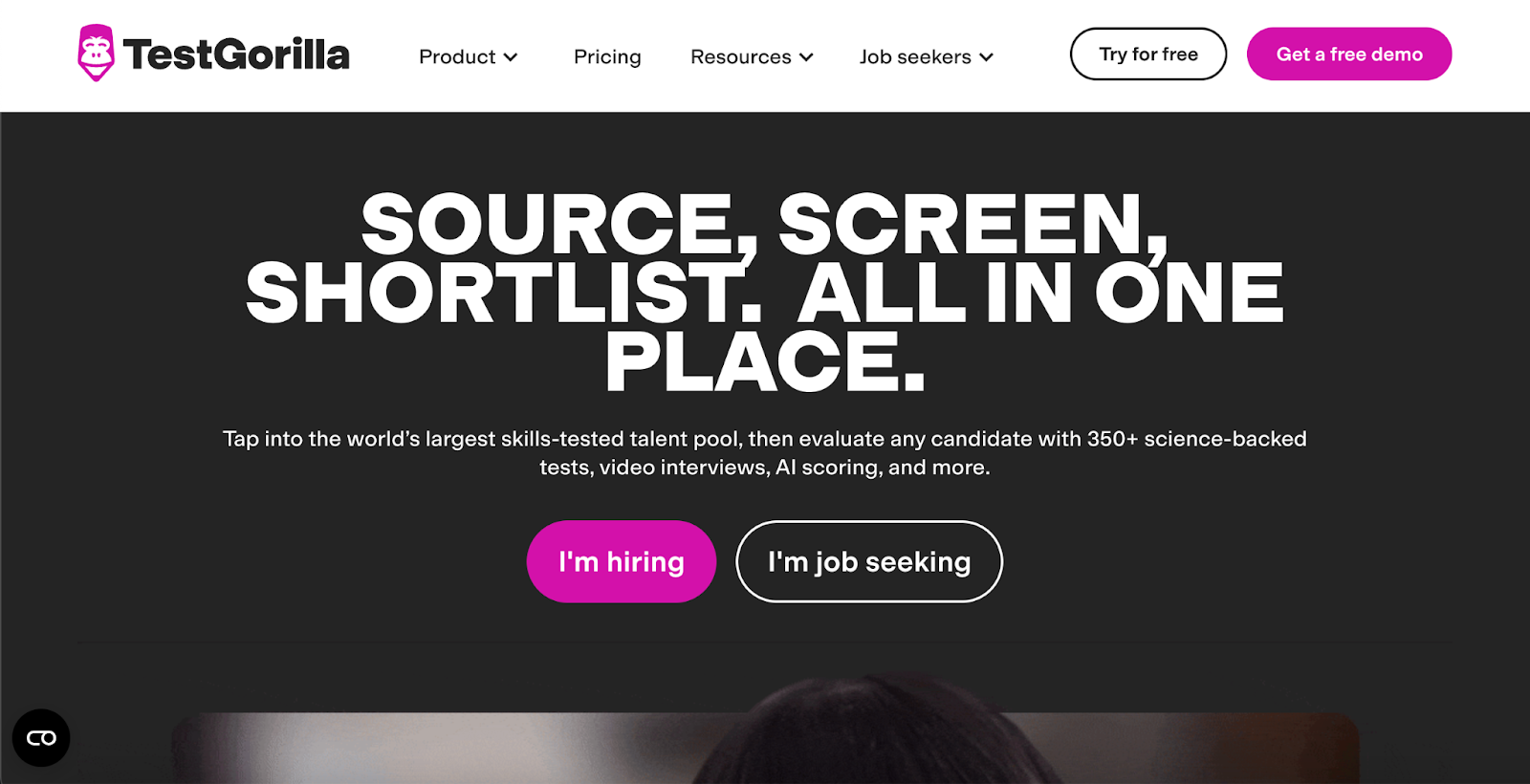
TestGorilla is an all-in-one, skills-based hiring platform that replaces subjective CV reviews with objective, data-backed assessments. It uses AI-powered scoring, auto-grading, and percentile rankings to help HR teams instantly identify top candidates. 

With over 350+ validated tests, customizable questions, AI video interviews, and real-time behavior monitoring, TestGorilla simplifies every stage of candidate screening, making hiring faster, fairer, and more predictive for companies of all sizes.

Key features

  • Smart Assessment Builder: Let AI recommend fair, skills-based tests for any job
  • AI Video Interviews: Automatically score candidate videos for soft skill insights
  • Behavioral Monitoring: Monitor test-taking behavior to ensure candidate integrity

Pros

  • Choose from 350+ science-backed tests
  • Automate screening with AI video scoring
  • Compare candidates with percentile-based insights

Cons

  • Lower-tier plans have assessment limitations compared to competitors

Pricing

  • Free
  • Core: $142/month (billed annually)
  • Plus: Contact for pricing

📌Related read: How Talent Assessment Tests Improve Hiring Accuracy and Reduce Employee Turnover

9. iMocha: Best for a Library of Pre-Built Assessments

 iMocha homepage showcasing an AI-powered skills intelligence platform
iMocha offers 10,000+ skill assessments, AI inference, and skills-based hiring solutions

iMocha is a robust, AI-powered HR assessment platform designed to support skills-based hiring at scale. With 2,500+ ready-to-use skill tests covering tech and non-tech roles, it empowers HR teams to screen talent quickly and effectively. 

The platform offers AI-enabled test creation, skills gap analysis, and real-time benchmarking, helping companies move towards a skills-first hiring approach. It also supports internal mobility, DEI goals, and workforce upskilling through detailed, data-driven insights.

Key features

  • Extensive Test Library: Choose from 2,500+ pre-built assessments for various roles
  • Skills Gap Analysis: Identify and address gaps with AI-powered insights
  • Role-Based Benchmarking: Compare candidate performance with industry standards

Pros

  • Access the world’s largest test library
  • Gain real-time skills intelligence insights
  • Customize tests easily for any job role

Cons

  • Excess features for orgs who only need a simple HR assessment

Pricing

  • 14-day free trial
  • Basic: Contact for pricing
  • Pro: Contact for pricing
  • Enterprise: Contact for pricing

10. Woven

Woven's Human-Powered Technical Assessment platform for engineers
Get a detailed analysis from actual engineers on real-world scenarios

Woven is a human-powered technical assessment platform tailored for experienced software engineers. It replaces generic code quizzes with short, real-world scenarios like code reviews, system debugging, and architecture design. 

Each test is double-blindly scored by certified engineers, ensuring accuracy and fairness. Woven uses async proctoring and AI-cheat detection to verify candidate authenticity and deliver same-day results. The platform is highly customizable to fit tech stack, role, and seniority, making it ideal for hiring top-tier engineering talent.

Key features

  • Real-World Scenarios: Simulate job tasks like debugging and code review assessments
  • Human Scoring: Get unbiased results from double-blind certified engineer reviews
  • AI Cheat Detection: Detect ChatGPT or copied code with behavioral and content analysis

Pros

  • Ensure high-quality, human-verified candidate scoring
  • Detect AI-generated or plagiarized submissions
  • Achieve fast results with 6-hour turnaround

Cons

  • Involves a learning curve for new users

Pricing

  • Starter: $249 + $4,000 per successful hire
  • Premium: $499 + $4,000 per successful hire
  • Annual: $1200 per successful hire

How to Choose the Right HR Assessment Tool for Your Organization?

To make the most informed decision, consider these key factors while choosing the best online HR assessment tool:

  • Aligning the tool with your hiring goals: Start by defining what success looks like in your hiring process, whether that’s faster screening, better cultural fit, or improved candidate quality. Then, evaluate tools based on how well their features (e.g., skill simulations, behavioral assessments, or AI scoring) map to those goals. A tool built for technical roles won’t serve well for assessing leadership or customer service aptitude.
  • Cost-effectiveness and ROI: Consider how much time, effort, and cost the tool saves your team, from reduced manual screening to fewer bad hires. Compare pricing models (subscription, pay-per-use, etc.) and weigh them against tangible outcomes like lower turnover or faster time-to-hire.
  • Integration and scalability: The tool should integrate seamlessly with your existing ATS, CRM, and HRIS platforms. This ensures smoother workflows and centralizes candidate data. Also check whether it can scale across teams, departments, and global hiring needs as your company grows.

How to Choose the Right HR Assessment Tool for Your Organization with HackerEarth

Ultimately, choosing the right HR assessment tool depends on your hiring goals, feature requirements, and budget flexibility. To simplify your decision-making:

  • Shortlist a few platforms from this guide that closely align with your recruitment needs.
  • Schedule demos, run pilot assessments, and evaluate usability with current openings or internal teams.

Among the options, HackerEarth stands out with its powerful suite of all-in-one HR-focused assessments, AI-powered evaluation, and robust proctoring capabilities. Whether you're hiring for technical, non-technical, or leadership roles, HackerEarth allows you to create role-specific tests, reduce manual screening, and make data-driven hiring decisions.

For instance, Apisero, a global IT consulting firm, used HackerEarth to streamline internal developer hiring. They reduced engineering involvement by 70% and shortened screening time by 60%, while ensuring only the best-fit candidates moved forward.

Book a demo today to discover how HackerEarth can transform your hiring process.

FAQs

How to do an HR assessment?

Start by defining job requirements, select relevant tests (skills, personality, cognitive), administer assessments fairly, analyze results, and use insights to make informed hiring decisions that match your company’s needs.

What assessment tools do HR professionals use?

HR pros use tools like HackerEarth, TestGorilla, Pymetrics, and Xobin to evaluate skills, personality, cognitive ability, and cultural fit for more accurate and efficient hiring.

What is the most common skills screening tool used by employers to select the best candidates?

Many employers use all-in-one coding and skills assessment platforms like HackerEarth to objectively evaluate candidates’ technical and job-related abilities before hiring.

Top 9 Online Test Cheating Prevention Software in 2025 | HackerEarth

Did you know the proctoring industry is expected to grow from $836.43 million in 2023 to $1.99 billion by 2029? 

That’s a massive jump, and it’s happening because hiring managers are finding it harder than ever to prevent cheating during virtual tests. Candidates try everything from switching tabs and using outside help to tampering with results, which makes manual monitoring nearly impossible.

This is where online test cheating prevention software comes in. It tracks suspicious behavior, records activity, and maintains a fair assessment. The best platforms offer tools like video proctoring, browser lockdown, and audio flags to detect dishonest attempts quickly.

To help you choose wisely, we’ve shortlisted the top 9 online test cheating prevention software picks that hiring teams can rely on. Let’s break down what each one offers.

Key Features to Look for in Cheating Prevention Software

Choosing online test cheating prevention software isn’t just about blocking tabs. The right one safeguards your tests without disrupting the hiring process for either the team or the candidate.

Advanced security measures

The best online test cheating prevention software comes packed with features that go beyond surface-level monitoring. Real-time AI tracking tools can detect voice changes and flag unfamiliar faces on screen, helping hiring teams spot dishonest behavior in the moment.

Top tools also include anti-tab-switching, browser lockdown, and blocking attempts to access external devices for help. With real-time data encryption and detailed audit logs, all activities are recorded in a manner that fosters trust and facilitates the tracing of any questionable actions.

Detection of common cheating tactics

Cheating doesn’t always look obvious, which is why your online test cheating prevention software needs to spot the more minor signs too. These include sudden screen changes, tab switching, and even the connection of secondary devices.

The best tools include plagiarism detection features in technical tests, especially when you're hiring developers or engineers at scale. 

📌Also read: The Mobile Dev Hiring Landscape Just Changed

Seamless integration with existing platforms

If your online test administration software cheating prevention tool doesn’t work with your existing hiring setup, it just adds to your team’s workload. The right one should seamlessly integrate with your ATS, LMS, or HR platform without requiring a technical overhaul.

Candidate-friendly user experience

Using online test cheating prevention software shouldn’t feel like a trap for candidates. The best tools make it easy for both admins and candidates to navigate the process without glitches or confusion.

This is especially important when you're trying to create a positive virtual onboarding experience later, because the candidate’s test experience shapes their impression early on.

Real-time proctoring vs. automated monitoring

Both real-time proctoring and AI monitoring come with substantial benefits, depending on the type of role you’re hiring for. Live proctoring gives you full control with human review during the test, but it requires more people and scheduling.

Automated monitoring, on the other hand, uses machine learning to track actions like unusual eye movement or background noises. It scales better and works well for volume hiring, especially when using online test cheating prevention software for multiple test batches.

Quick Overview Table: Top Online Test Cheating Prevention Software

These tools aim to deter or detect malpractice during online exams. Let’s see how they stack up:

Tool Best For Key Features Pros Cons G2 Rating
HackerEarth All-in-one online test cheating prevention, coding and skills assessment Secure browser, proctoring (AI and human), monitoring, anomaly detection Integrated with assessment & coding workflows Limited deep customization, no low-cost, stripped-down plans 4.5
ProctorU High-stakes exams needing live human oversight Live proctoring, identity verification, environment scan, session audit Well-known, strong for high stakes Long wait setup, technical issues, intrusive software reports 3.3
Proctorio Fully automated browser-based proctoring Browser lockdown, video/audio analytics, integrity flags, identity checks Scalable, less human overhead, strong analytics Privacy/false-positive concerns, browser extension required 4.2
Talview Recruitment & assessment and proctoring Multi-device proctoring; live, recorded and automated modes; chat support Strong user satisfaction, customizable workflows Cost, dependency on connectivity, possible feature gaps vs pure proctoring tools 4.4
Mercer Mettl Educational & corporate assessments needing mixed AI and human proctoring Secure browser, AI-scoring flags, human review, identity checks, LMS integration High detection accuracy, scalable exam hosting Some reviewers rate video recording or lockdown less robust than Proctorio 4.4
HireVue Hiring & assessment workflows, interview, and proctoring Automated flagging, video interview and proctoring, and candidate behavior analysis Suitable for end-to-end hiring and proctoring in one ecosystem Proctoring is an adjunct; specialized tools might outperform in pure invigilation 4.1
Examity University/certification/high-stakes exams Live and automated proctoring, identity checks, audit logs, and reporting Trusted by higher-ed, multiple proctor modes Potential latency, cost, browser/device compatibility N/A
Questionmark Secure assessments for regulated industries Lockdown mode, item randomization, access control, and audit logs Strong in compliance/regulated contexts Proctoring features may need integration; not purely built for high-security proctoring 2.8
Woven Secure assessment & online testing platforms Browser lockdown, audio/video monitoring, identity checks, cheating flags Strong specialized focus Involves a learning curve for new users 4.7

The Top 9 Cheating Prevention Tools for Online Tests in 2025

With numerous platforms claiming to provide the most secure online testing experience, it can be difficult to determine which proctoring solution actually delivers. 

To help you make an informed choice, we’ve broken down the top 9 tools, highlighting their key features, strengths, and ideal use cases so that you can compare with confidence.

1. HackerEarth

HackerEarth's secure online test proctoring tool
HackerEarth ensures fair tests with AI-powered proctoring tools

When it comes to secure, scalable, and reliable assessments, HackerEarth offers everything you need in one place. It combines AI-first testing tools with deep anti-cheating capabilities, making it a strong choice for recruiters seeking to run trustworthy coding assessments with online test cheating prevention software.

Its testing library offers over 36,000 questions across 1,000+ skills, covering everything from full-stack development and DevOps to machine learning and data analytics. Recruiters can create hiring challenges and project-based tasks that go beyond textbook questions. To prevent dishonest attempts, HackerEarth uses Smart Browser technology, AI-powered snapshots, audio monitoring, and code plagiarism checks. These features are especially useful in high-pressure assessments where candidates use technology to cheat in online technical assessments and attempt to bypass detection tools.

A major reason teams trust HackerEarth is its focus on real-time proctoring and accuracy. It supports ID verification using e-KYC tools, detects forbidden tools like ChatGPT or InterviewCoder, and tracks behavior with constant visual and audio monitoring. This makes it reliable for everything from lateral hiring to campus placements and large-scale assessments.

Its FaceCode feature takes live technical interviews to the next level. This tool supports collaborative coding with built-in video chat, real-time summaries, and proctoring. Recruiters can also activate the AI FaceCode Agent, which works alongside senior engineers during live interviews. The agent helps by spotting anomalies, tracking performance patterns, and offering real-time support, giving your engineers more time to focus on deeper evaluation.

Another powerful feature is SonarQube-based scoring, which reviews code not just for correctness, but also for readability, security, and maintainability. You also get 15+ ATS integrations, unlimited concurrent assessments, and customizable lockdown controls, which is everything you’d want in online test administration software for cheating prevention.

For hiring teams trying to build a recruitment pipeline that filters in real talent without cutting corners, HackerEarth checks every box.

Key features

  • Hackathons: Run global coding challenges that simulate real-world scenarios to identify top tech talent
  • AI-powered proctoring: Monitor candidates through live video, audio, and behavior scoring
  • Smart Browser: Block copy-paste, restrict apps, and lock screen activity
  • Adaptive question sets: Randomize questions or add follow-up logic tasks to validate real problem-solving ability

Ideal use cases

  • Technical recruitment, skill assessments, online coding challenges

Pros

  • Catch code plagiarism across a massive code database
  • Verify IDs through DigiLocker and trusted sources
  • Randomize questions to prevent answer-sharing

Cons

  • No low-cost, stripped-down plans

Pricing

  • Growth Plan: $99/month per user (10 credits)
  • Scale Plan: $399/month (25 credits)
  • Enterprise: Custom pricing with volume discounts and advanced support

📌Suggested read: The 12 Most Effective Employee Selection Methods for Tech Teams

2. ProctorU

ProctorU platform for secure online exam monitoring
ProctorU prevents cheating with live remote proctoring tools

ProctorU, now part of Meazure Learning, offers flexible and secure online test cheating prevention software designed for both remote and in-person testing. It supports multiple test environments, including remote proctoring, on-site test centers, hybrid delivery, and even event-based setups for large groups. 

The platform runs on the ProctorU system paired with the Guardian Browser, which blocks unwanted apps, prevents tab switching, and flags suspicious behavior in real time. It also boasts the world’s largest network of certified remote proctors, making it ideal for companies that require a combination of live oversight and automation.

Key features

  • Remote Proctoring: Deliver secure tests via live monitoring through the Guardian Browser
  • Hybrid Flexibility: Combine remote and in-person testing with global test center access
  • Event-Based Setup: Run assessments at conferences or off-site locations with minimal equipment

Ideal use cases

  • Online exams, professional certifications, and higher education

Pros

  • Choose between multiple delivery formats
  • Use certified proctors for added trust
  • Scale across countries and test types

Cons

  • Some users report occasional tech disruptions

Pricing

  • Custom pricing

3. Proctorio

Proctorio website screenshot with logo and mission statement
Online test cheating prevention software

Proctorio offers a flexible and scalable online test cheating prevention software platform, combining automated AI-driven proctoring with optional live human oversight. It replicates the in-person exam environment through recording, lockdown, and verification settings to secure digital test delivery. 

The platform uses proprietary WebSweep technology to monitor content leaks, detect plagiarism with originality verification tools, and verify test-taker identity via real-time ID and face comparison. It also holds compliance certifications, including VPAT 301 and WCAG 2.1 AA for accessibility. End-to-end encryption safeguards exam data, backed by 24/7 expert support.

Key features

  • Automated Proctoring: Enable recording and lockdown settings to replicate in-person exam conditions
  • Identity Verification: Verify test-taker IDs with real-time image comparison for authenticity
  • Content Protection: Monitor and alert on unauthorized posting of exam questions

Ideal use cases

  • Technical recruitment, certification exams, skill assessments, online coding challenges, and academic testing

Pros

  • Scale exams globally without scheduling restrictions
  • Integrate seamlessly with LMS and assessment platforms
  • Provide robust accessibility and privacy compliance

Cons

  • Some users encounter occasional privacy concerns

Pricing

  • Custom pricing

4. Talview 

Talview website with "Agentic AI" headline and two people
Talview AI Proctoring and Interviewing Software

Talview features the world’s first Agentic AI for proctoring and interviewing, powered by advanced AI and large language models (LLMs). Its remote proctoring uses a secondary camera for comprehensive candidate monitoring, delivering real-time analysis of video, audio, and screen activity. 

The platform’s patented AI, Alvy, detects 8x more infractions than traditional AI and evolves with new cheating tactics, ensuring security without stress. The platform supports flexible deployment modes, including Automated, Live, and Record & Review proctoring. 

Key features

  • AI Proctoring: Monitor video, audio, and screen with AI to flag suspicious activity
  • Identity Verification: Authenticate candidates using facial recognition and multi-camera monitoring
  • Scalable Deployment: Scale effortlessly from small to massive exam sessions worldwide

Ideal use cases

  • Skill assessments, online coding challenges, certification and compliance exams, campus hiring and bulk recruitment

Pros

  • Detect 8x more cheating infractions than standard AI
  • Support 24/7 proctoring with human-AI collaboration
  • Integrate easily with leading LMS platforms

Cons

  • Users reported feature gaps compared to specialized proctoring tools

Pricing

  • Custom pricing

5. Mercer Mettl 

Mercer Mettl website with text and a proctoring eye graphic
Enhance exam integrity with Mercer Mettl's online proctoring

Mercer Mettl offers a robust online proctoring solution that enhances exam integrity through advanced AI and human-assisted monitoring. Some of its key features include three-point candidate authentication via email, OTP, and official ID verification before exams, combined with secure browser lockdown and continuous facial verification during tests. 

Its dual-camera proctoring utilizes mobile devices for a comprehensive monitoring view, while AI-driven alerts detect suspicious behavior in real time. 

Key features

  • Candidate Authentication: Verify identities using email, OTP, and official ID before exams
  • AI Monitoring: Detect suspicious activity in real-time with AI and human proctors
  • Dual Camera: Use mobile phones as secondary cameras for enhanced exam security

Ideal use cases

  • Technical recruitment, skill assessments, certification exams, online coding challenges, and campus hiring

Pros

  • Deliver large-scale exams with over 200K concurrent users
  • Ensure thorough candidate identity verification before exams
  • Provide multi-view monitoring for proctors and supervisors

Cons

  • Some users find the interface or dashboards less modern or less intuitive

Pricing

  • Custom pricing

📌Related read: How Talent Assessment Tests Improve Hiring Accuracy and Reduce Employee Turnover

6. HireVue

HireVue's homepage with advanced proctoring features
HireVue advanced proctoring platform

HireVue integrates automated proctoring within its assessment and one-way video interview platform to ensure hiring integrity. Its AI monitors behavioral cues, such as eye and mouse movements, disables certain functions like copy-paste during tests, and tracks IP addresses to prevent proxy use. 

Though it doesn’t record screens, it offers comprehensive security to maintain fair evaluations.

Key features

  • Behavioral Tracking: Analyze eye and mouse movements to identify suspicious behavior during assessments
  • Function Disabling: Disable copy-paste and warn if candidates switch tabs during tests
  • Voice Analysis: Analyze vocal patterns to detect stress or deception in responses

Ideal use cases

  • Technical recruitment, online coding challenges, video interviews, soft skills evaluation

Pros

  • Ensure fair hiring with AI-driven behavior analysis
  • Reduce cheating by using time-limited and function restrictions
  • Provide voice and code integrity checks for thorough assessment

Cons

  • Other specialized tools outperform in pure invigilation

Pricing

  • Custom pricing

7. Examity

Examity slide about proctor training with video call screen
Trust Examity's college-educated and intensively trained proctors

Examity offers a robust online proctoring service combining automated tools with live human proctors to ensure exam integrity. It requires candidates to have a camera, microphone, and stable internet while enforcing strict environment and technical checks. 

Some of its key features include identity verification through live photo capture and ID upload, screen sharing for real-time monitoring, and rule acknowledgment before exams. 

Key features

  • Live Proctoring: Monitor exams with live proctors for immediate intervention and oversight
  • Identity Verification: Verify candidate identity using photo capture and government-issued ID upload
  • Screen Sharing: Require candidates to share screens for real-time exam session monitoring

Ideal use cases

  • Academic testing, certification exams, skill assessments, online coding challenges, and professional licensure exams

Pros

  • Ensure integrity with a live and automated proctoring combination
  • Simplify identity verification with multi-step authentication
  • Integrate seamlessly with popular LMS platforms

Cons

  • Users need to monitor browser and device compatibility limitations

Pricing

  • Custom pricing

8. Questionmark

Questionmark website with "Go global with proctoring" headline
Choose Questionmark proctoring for global flexibility and test integrity

Questionmark offers a comprehensive test security platform with flexible proctoring options to protect exam integrity. It features live online proctoring where remote proctors monitor test-takers via webcam and audio, pausing or ending exams as needed. The record & review option captures exam sessions for later review, flagging suspicious activity automatically. 

For in-person needs, onsite proctoring is supported. A multi-platform secure browser reduces cheating, and the platform complies with ISO27001 and GDPR standards for robust security and privacy.

Key features

  • Live Proctoring: Monitor candidates live using webcam and audio for real-time exam supervision
  • Record & Review: Record exam sessions automatically and flag suspicious activity for review
  • Secure Browser: Deploy a multi-platform secure browser to block cheating during tests

Ideal use cases

  • Certification exams, compliance testing, professional licensure, academic assessments, skill validations

Pros

  • Deliver high security with ISO27001 and GDPR compliance
  • Enable flexible proctoring for live, recorded, or onsite options
  • Support a multi-platform secure browser for a consistent exam environment

Cons

  • Question bank creation requires expert guidance

Pricing

  • Custom pricing

9. Woven

Woven website with proctoring features
Use Woven to hire experienced engineers using advanced proctoring

Woven offers a human-powered, asynchronous technical assessment platform designed to deliver fast, authentic, and AI-cheating-proof evaluations. It features real-world, time-boxed scenarios like code reviews and system debugging tailored for senior engineers. 

Each submission is double-blind reviewed by certified engineers to ensure unbiased scoring. Its async proctoring technology flags AI-generated or plagiarized content, preserving exam integrity. 

Key features

  • Real-World Scenarios: Design time-boxed coding tasks simulating actual engineering challenges
  • Human Scoring: Ensure unbiased results with double-blind reviews by certified engineers
  • AI-Proof Proctoring: Detect AI cheating and plagiarism with advanced async proctoring technology

Ideal use cases

  • Technical recruitment, senior engineer assessments, coding skill validations, system debugging challenges, code review evaluations

Pros

  • Deliver fast results within 6 hours
  • Ensure assessment integrity with AI cheating detection
  • Provide realistic, senior-level engineering scenarios

Cons

  • Involves a learning curve for new users

Pricing

  • Starter: $249 + $4,000 per successful hire
  • Premium: $499 + $4,000 per successful hire
  • Annual: $1200 per successful hire

How to Choose the Best Anti-Cheating Tool for Your Needs

Selecting the right online test cheating prevention software is crucial to maintaining exam integrity without compromising the candidate experience. 

To make an informed decision, consider the following key factors:

Step 1: Define your requirements: Security, scalability, user experience

Start by identifying which features are most important to your organization. Do you need real-time monitoring, or will automated flagging suffice? 

Consider how many candidates you’ll assess simultaneously and the level of security required to prevent cheating, while keeping the user experience smooth and accessible.

Step 2: Compare proctoring and monitoring capabilities

Live proctoring provides human oversight, but it can be costly and resource-intensive. Automated proctoring, using AI and behavior analysis, scales easily but may generate false positives.

Evaluate the trade-offs based on your budget, exam stakes, and candidate volume.

Step 3: Consider compliance and data privacy

Ensure the software complies with relevant regulations like GDPR and CCPA. Protecting candidates’ personal data and maintaining transparency around monitoring practices is essential to building trust and avoiding legal issues.

Common Online Test Cheating Tactics (And How They Are Prevented)

Online assessments face various cheating tactics that undermine their integrity. To fight these challenges and ensure fair evaluation, modern proctoring tools deploy multiple prevention methods targeting common cheating behaviors:

  • Tab switching and copy-pasting: Proctoring platforms disable tab switching and block copy-paste functionality during tests. They monitor browser activity to detect when candidates attempt to leave the test window or copy content, instantly flagging or preventing such actions to maintain focus and integrity.
  • External help (Proxies and screen sharing): Tools track IP addresses to identify proxy use and employ webcam monitoring to detect unauthorized screen sharing or third-party involvement. Some solutions use AI to recognize suspicious behaviors indicating outside assistance, effectively reducing proxy hiring and collusion.
  • Plagiarized code submissions: Plagiarism detection algorithms compare code submissions against extensive databases and other candidates’ work, highlighting similarities. This automated analysis helps recruiters identify copied code, ensuring only original work advances in the hiring process.
  • Use of smartphones and wearables: Proctoring systems leverage secondary cameras and AI-driven environment scans to detect mobile devices or wearable technology. Alerts notify proctors if candidates use unauthorized gadgets, helping enforce strict device policies during exams.
  • Debugger and IDE usage: Assessment platforms restrict debugger access and limit IDE features that could assist cheating. By controlling the testing environment, these tools prevent candidates from exploiting debugging tools or shortcuts to gain unfair advantages.

Make HackerEarth Your Competitive Advantage in Test Integrity

Selecting a reliable and secure testing platform, such as HackerEarth, is vital for maintaining the integrity of your recruitment and educational processes. HackerEarth prevents cheating through advanced proctoring and AI-driven monitoring, thereby boosting the credibility and fairness of your assessments. 

Additionally, HackerEarth’s seamless integration and user-friendly interface make your testing process more efficient, saving valuable time and resources. Elevate your assessment strategy and gain a competitive edge by prioritizing test security and authenticity.

Ready to transform your hiring or learning experience? Schedule a demo with HackerEarth today and experience the future of secure assessments.

FAQs

Can online assessments detect cheating?

Yes, advanced tools use AI, proctoring, and behavior analysis to detect suspicious activity and prevent cheating during online assessments.

How to catch students cheating on online tests?

Use AI proctoring, webcam monitoring, screen recording, and plagiarism detection to identify cheating in real-time or through post-exam reviews.

How do universities monitor online exams?

Universities use platforms like HackerEarth with AI proctoring, identity verification, and secure browsers to ensure exam integrity and prevent cheating.

What are the costs of online test cheating prevention tools?

Costs vary by features and scale, ranging from affordable basic plans to enterprise solutions with comprehensive AI and live proctoring options.

Top 10 Tech Recruiting Tools Every Recruiter Should Use in 2025

Every tech recruiter knows that hiring delays and weak matches can hold back entire product roadmaps and teams. Thankfully, tech recruiting tools now help companies reduce manual tasks, track candidate progress, and hire faster with more confidence. These platforms simplify everything from initial sourcing to final interviews, especially when roles require niche or high-demand skill sets.

According to comprehensive research, organizations using ML–based candidate evaluation systems have achieved a 51% improvement in predicting candidate success rates, making smarter hires that drive better outcomes. But not every tool fits every team. That’s why it helps to compare the best AI recruiting tools for tech roles and see which ones actually solve problems you're facing today.

This guide breaks down the top 10 tech recruiting tools, including key features, pricing, and unique benefits for tech teams.

What is a Tech Recruiting Tool?

A tech recruiting tool is software that helps hiring teams automate and manage key parts of the recruitment process, especially when hiring for technical roles. These tools are designed to reduce manual work, improve candidate experience, and increase the speed and quality of hiring decisions across teams of all sizes.

Most tech recruiting tools come with built-in features that simplify day-to-day tasks for recruiters and hiring managers. Here’s how they help speed things up and improve consistency across tech hiring stages:

  • Automate resume screening using AI-powered filters and keyword matching
  • Rank candidates based on skills, experience, and role fit
  • Integrate directly with ATS, coding platforms, and interview scheduling tools
  • Send automated updates to keep candidates informed throughout the process
  • Collect structured interview feedback in one place for faster decision-making

These platforms focus on solving the biggest challenges in hiring technical talent, such as developers, engineers, and data scientists. 

📌Also read: The Mobile Dev Hiring Landscape Just Changed

Key Features to Look for in Tech Recruiting Tools

With so many platforms claiming to help with hiring, knowing what really matters can save time and effort. Strong tech recruiting tools come with features that actually solve problems. 

Here are the top three things to prioritize when choosing the right solution:

  • AI and automation: Speed matters in tech hiring, especially when good candidates don’t stay available for long. The best AI recruiting tools for tech roles use smart filters to scan resumes, automate interview scheduling, and run real-time coding assessments. These AI-powered features not only save hours but also improve the accuracy of your shortlists.
  • Integration: Good tools should never force you to change everything overnight. Look for tech recruiting tools that plug easily into your existing ATS or HR stack. Seamless integration helps avoid delays, lost data, or unnecessary work during the hiring process.
  • Candidate assessments: For roles like engineers and developers, solid assessment tools are a must. Many AI recruiting tools for tech hiring offer built-in coding tests, technical quizzes, and live project evaluations to test real-world skills before making an offer.

📌Suggested read: The 12 Most Effective Employee Selection Methods for Tech Teams

Quick Overview Table: Tech Recruiting Software Tools

This table provides an at-a-glance comparison of the top recruiting software for technologists, breaking down key features to help you find the best tool for your hiring needs.

Tool Best For Key Features Pros Cons G2 Rating
HackerEarth Comprehensive end-to-end hiring, skill assessments, benchmarking, and continuous talent development Coding + full-stack questions, FaceCode video, advanced plagiarism detection, Selenium, support for mobile development, SonarQube-based code quality scoring Easy to use UI, broad question types, good support & integration ecosystem Limited deep customization, no low-cost, stripped-down plans 4.5/5
HackerRank Technical/developer hiring, screening & live interviews Code challenges, live coding interviews, test libraries, reporting & insights Very mature ecosystem, good language coverage, community support Can be expensive at scale; anti-cheating controls are basic in some cases 4.5/5
Codility Algorithmic & coding assessments for dev teams Take-home + timed coding challenges, automatic scoring, performance metrics, test library Clean interface, automated grading, and good scalability UI sometimes feels cluttered; limited support for some frontend/real-world dev tasks 4.6/5
CodeSignal Enterprise-level technical screening & interview pipeline Integrated IDE, pair programming, test library, coding + algorithm challenges, reporting & analytics Strong integration support, polished interface, and good reliability Pricing and licensing opacity; may be overkill for small teams 4.5/5
TestGorilla Broad skills/role assessment (not just technical) Extensive library of tests (technical + non-technical), video responses, and anti-cheating features Good ease of use, flexibility in mixing tests, and relatively accessible pricing Limits on the number of tests per month in some plans; video & proctoring features less advanced than other specialized tools 4.5/5
DevSkiller Technical/developer assessment with broad task types Real-world code tasks, project-based assessments, skill library, test creation & benchmarking Strong technical depth, customization, and good feedback quality Smaller user base (so fewer reviews), possibly steeper learning curve 4.7/5
CoderPad Live coding interviews/pair programming In-browser coding environment, real-time collaboration, support for multiple languages, integration Excellent for real-time interviews, intuitive UI, and flexible for onsite/remote Less full-blown assessment system (e.g., fewer built-in test libraries) 4.4/5
Glider AI Automated assessments + interview workflow with AI/automation elements Full screening suite, anti-fraud, ATS/VMS/HRMS integrations Strong customization, automation, deep analytics, and end-to-end workflow support Newer/less mature in some areas; some reports of prior exposure to tests 4.8/5
Vervoe Role simulation/skills-based hiring beyond just coding Job simulations, scenario-based assessments, AI scoring, multiple question types Very good for assessing applied work skills (not just theory) Setup takes effort; fewer reviews/maturity in the tech niche 4.6/5
HireVue Video interview + talent assessment at enterprise scale On-demand video interviews, AI scoring, interview scheduling, predictive analytics Deep video/interview capabilities, enterprise readiness High cost, may require significant setup & training 4.1/5

Top Tech Recruiting Tools to Use in 2025

With so many platforms claiming to be the best, it can be difficult to determine which tech recruiting software is truly worth your time. 

To help you make an informed choice, we’ve broken down the top 10 tools, highlighting their key features, pros, and cons, so you can compare with confidence and ensure a positive virtual onboarding experience from the start.

1. HackerEarth

HackerEarth’s tech recruiting landing page
A comprehensive solution for end-to-end hiring, skill assessment, benchmarking and upskilling

HackerEarth is an all-in-one online recruitment platform designed specifically for hiring teams. It offers an end-to-end solution that helps recruiters save time and budget by letting them create customized coding assessments at scale for more than 100 roles and over 1,000 skills. 

What sets HackerEarth apart is how it combines automation and real-world evaluation. Recruiters can build project-based assessments, run live coding challenges, and invite candidates from their global network of over 10 million developers. With one platform, hiring teams can quickly create a recruitment pipeline, reduce bias, and make confident hiring decisions backed by consistent data.

HackerEarth’s AI recruiting tools for tech hiring in 2025 include an adaptive AI Interview Agent trained on more than 36,000 deep technical questions. This agent simulates real interviews using a video avatar that adjusts questions based on the candidate’s responses. It evaluates not only technical skills but also soft skills like logical reasoning, problem-solving, adaptability, and communication. Another standout feature is the AI Screening Agent, which scans resumes and assessment results to flag only the strongest candidates. This tool eliminates up to 80% of unqualified applicants early in the funnel. 

With SmartBrowser technology and tab-switch detection, the platform also solves candidate cheating in online technical assessments. It helps you maintain assessment integrity while evaluating candidates under real-world conditions. This provides hiring managers with trustworthy insights without diverting senior engineers from their product work.

By supporting over 40 programming languages and offering seamless ATS integrations, making HackerEarth one of the leading AI-powered platforms for tech recruitment. From large enterprises to fast-growing startups, teams choose this platform for its ability to support automation in talent acquisition, boost accuracy, and cut the hiring cycle from 30+ days to under 10.

Main features

  • Access an extensive library of 36,000+ coding questions across 1,000+ technical skills, including AI, machine learning, and data science
  • Create customized coding tests for over 100 roles using pre-built templates or your own real-world problem statements
  • Evaluate practical skills through project-based assessments that simulate real job challenges with custom datasets
  • Prevent cheating with advanced proctoring tools like SmartBrowser, tab-switch detection, webcam monitoring, and customizable invigilation settings

Pros

  • Host global hiring challenges that tap into HackerEarth’s 10M+ developer community to source pre-vetted talent from 130+ countries
  • Automate resume screening and shortlisting with AI Screening Agents that filter out 80% of unqualified candidates
  • Reach diverse global talent pools by leveraging an active developer network across 133 countries

Cons

  • Does not offer low-cost or stripped-down plans
  • Fewer customization options at entry-level pricing

Pricing

  • Growth Plan: $99/month 
  • Scale Plan: $399/month 
  • Enterprise: Custom pricing with volume discounts and advanced support

📌Interesting read: Guide to Conducting Successful System Design Interviews in 2025

2. HackerRank

HackerRank tech recruitment page 
Set up the optimal hiring process with HackerRank

HackerRank helps tech recruiters hire developers faster by combining strong assessment tools with clear, skill-based insights. It offers tailored workflows that match the needs of each tech role, whether you're hiring one developer or scaling across teams. With structured content, robust plagiarism detection, and integration-ready features, HackerRank gives recruiters a proven way to improve hiring outcomes. 

Main features

  • Customize skill assessments for each role with certified content tailored to specific technical domains
  • Monitor test quality and candidate experience using built-in test health reports and adverse impact analysis
  • Detect cheating with AI-driven plagiarism detection, tab-switch tracking, and leaked question alerts

Pros

  • Use certified assessments backed by I/O experts
  • Leverage enterprise integrations with leading ATS

Cons

  • Offers less customization compared to some competitors
  • Higher pricing for smaller teams/startups

Pricing

  • Starter: $199/month
  • Pro: $449/month

3. Codility

Codility platform homepage showcasing recruitment optimization
Revolutionize your recruitment process with Codility's platform

Codility helps hiring teams evaluate developers using real-world tasks that reflect actual engineering work. Its platform supports fast technical hiring through project-based assessments, live coding interviews, and automated scoring tools that cut down evaluation time without sacrificing quality. With strong plagiarism detection, smart proctoring, and ATS integration, Codility supports fair, consistent hiring decisions while saving engineers from manually reviewing test results. 

Main features

  • Create role-based coding assessments in 40+ programming languages using real-world challenges via CodeCheck
  • Run live, collaborative interviews with CodeLive to evaluate communication, problem-solving, and technical depth
  • Prevent unfair test results with advanced plagiarism detection, proctoring tools, and automated scoring algorithms

Pros

  • Evaluate candidates using real-world tasks
  • Automate scoring and simplify reports

Cons

  • Requires training for recruiters new to technical hiring
  • Fewer customization options than peers

Pricing

  • Starter: $1200/year
  • Sale: $600/month
  • Custom: Contact for pricing

4. CodeSignal

CodeSignal platform showcasing tech hiring solutions 
Discover tech hiring and AI learning solutions with CodeSignal 

CodeSignal gives hiring teams the tools to evaluate technical skills with speed, accuracy, and fairness. With a built-in cloud IDE, AI coding assistant, and mobile emulator, it simulates real developer environments to assess candidates the way they’ll actually work. Its live technical interviews allow teams to dig deeper into test results, while advanced proctoring and plagiarism checks increase trust in every outcome.

Main features

  • Run real-world evaluations inside a cloud-based IDE with debugging tools, a mobile emulator, and a package manager
  • Save engineering effort with Certified Assessments designed by experts and constantly updated for accuracy
  • Verify candidate integrity with online proctoring, tab tracking, and layered plagiarism detection

Pros

  • Use a real-time cloud IDE with a mobile emulator
  • Streamline interviews with AI-backed live sessions

Cons

  • Offers limited flexibility in test customization
  • Watch for complexity in initial onboarding

Pricing

  • Custom pricing

5. TestGorilla

TestGorilla tech hiring homepage featuring AI-powered talent sourcing and assessments
Get hundreds of validated tests, AI scoring, and a global talent pool

TestGorilla helps recruiters screen for real-world coding ability, soft skills, and technical depth without relying on resumes. Its platform offers over 400 coding and soft-skill tests designed to reflect how candidates actually work on the job. 

Built-in anti-cheating measures, customizable assessments, and automatic ranking enable tech teams to move quickly without compromising quality. From backend and frontend assessments to machine learning and DevOps, recruiters can build role-specific evaluations in minutes. 

Main features

  • Select from over 400 validated skill tests, including frontend, backend, and machine learning
  • Track candidate behavior in real time with timeline reports and anti-cheating tech
  • Rank applicants instantly based on technical and soft-skill performance in a single dashboard

Pros

  • Screen candidates using real, practical assessments
  • Save time with automatic scoring and ranking

Cons

  • Limited integration with smaller ATS systems
  • Expect limited ATS integration at lower tiers 

Pricing

  • Free
  • Core: $142/month (billed annually)
  • Plus: Contact for pricing

📌Related read: How Talent Assessment Tests Improve Hiring Accuracy and Reduce Employee Turnover

6. Devskiller

SkillPanel SaaS platform showing skill gaps and talent matching data
Empower people and elevate skills in one platform

Rebranded in September 2025 as SkillPanel, Devskiller goes beyond coding tests by helping companies map, measure, and manage tech skills across the workforce. It’s built for organizations seeking more control over hiring, reskilling, and internal mobility, leveraging structured skills data. With over 4,000 predefined IT and digital skills, teams can identify existing skills, identify growing gaps, and plan smarter hires or training efforts. 

Main features

  • Simulate real-world engineering tasks using RealLifeTesting™, which mirrors on-the-job scenarios to assess actual coding ability
  • Benchmark candidates with AI-powered insights that predict long-term performance based on skill, behavior, and role fit
  • Use a browser-based WebIDE with autocomplete, built-in terminal, and debugging tools for a real development experience

Pros

  • Connect easily to systems like Greenhouse using seamless integration with ATS
  • Assess each employee with multi-source input: self, peer, manager, and technical testing

Cons

  • It’s expensive for small businesses or freelancers
  • Expect a steeper learning curve for setup

Pricing

  • Custom pricing

7. CoderPad

CoderPad homepage with live coding interview platform
CoderPad provides real-time coding interviews and assessments

CoderPad offers tech recruiters a flexible approach to assess coding skills through live interviews or take-home projects. Unlike traditional methods, it uses a collaborative coding environment that mimics actual developer workflows, complete with syntax highlighting, auto-complete, and support for over 30 programming languages. It also includes built-in audio/video conferencing, a whiteboard for architecture discussions, and a runnable IDE, all in one place.

Main features

  • Run real-world technical interviews using live coding sessions and take-home projects 
  • Provide candidates with an intuitive IDE experience using syntax highlighting, auto-complete, and runnable code
  • Conduct end-to-end interviews with tools like whiteboarding, video conferencing, and a built-in question bank

Pros

  • Assess candidates in real-world dev environments
  • Support 30+ languages for broad coverage

Cons

  • Limited scalability for large hiring batches
  • The platform has fewer built-in test libraries

Pricing

  • Free
  • Starter: $100/month
  • Team: $375/month
  • Custom: Contact for pricing

8. Glider AI

Glider AI recruiting software UI with a happy recruiter, showing AI features
Recruiter-centric AI for better talent quality

Glider AI positions itself as a skills-based AI recruiting software, helping recruiters find job-ready talent while reducing screening time and manual effort. Its end-to-end AI recruiting suite spans everything from AI phone screenings and skill-based assessments to interview transcription and proctoring, all delivered through an easy-to-use platform that integrates directly with your ATS.

Main features

  • Evaluate technical talent with AI-powered assessments, soft skill reviews, and guidance during candidate tests
  • Automate interview workflows using features like AI-generated questions and real-time transcriptions with summaries
  • Detect impersonation and AI misuse with advanced proctoring that flags suspicious behavior during interviews

Pros

  • Detect cheating with real-time proctoring and alerts
  • Save recruiter hours with interview transcriptions

Cons

  • Some users cite a learning curve with advanced features
  • Users report assessment issues with candidates who are reluctant to engage

Pricing

  • Custom pricing

9. Vervoe

Vervoe skills-based AI technical hiring platform 
Hire better talent with Vervoe

Vervoe is one of the most trusted AI recruiting tools for tech hiring, offering a skills-first approach that helps you identify high-performing candidates faster. Instead of relying on resumes or vague interview answers, Vervoe uses customizable coding assessments and AI-powered grading to test real-world technical and soft skills in one automated flow.

Its coding platform supports 8+ programming languages, lets you assess soft skills alongside technical ones, and instantly ranks applicants based on how well they perform on actual tasks. 

Main features

  • Run job-specific tests with real-world coding tasks, soft skill questions, and language-agnostic challenges
  • Automate candidate ranking through AI-powered grading, customizable scoring rules, and shareable performance scorecards
  • Embed assessments into job listings and screen at scale

Pros

  • Score coding tasks with fully automated grading
  • Customize assessments with branded candidate flows

Cons

  • Limited question library (around 110+ questions by default)
  • Some users found some jobs missing from the templates section 

Pricing

  • Free (7 days)
  • Pay As You Go: $300 (10 candidates)
  • Custom: Contact for pricing

*Pay As You Go is charged as a one-time payment

10. HireVue

HireVue technical hiring platform featuring skills-first assessments
Streamline tech recruiting with AI

HireVue is a leading AI recruiting tool for tech hiring, purpose-built to help teams assess and hire developers, engineers, and other technical professionals, even without deep technical expertise on staff. It combines AI-powered video interviews, validated coding challenges, and automated workflows to move qualified candidates through the funnel faster, with a consistent and skills-first approach.

With built-in cheating detection, interview transcription, and intelligent shortlisting, even non-technical recruiters can confidently identify top talent.

Main features

  • Assess both hard and soft skills using validated coding tests and structured interviews
  • Automate candidate workflows with AI-powered scheduling, reminders, and progression logic
  • Detect dishonest behavior during assessments using advanced proctoring and cheating prevention tools

Pros

  • Efficient candidate management, improving productivity and allowing self-scheduling 
  • User-friendly interface and seamless calendar integration

Cons

  • Users experience scheduling issues with HireVue, especially regarding breaks, rescheduling, and interviewer management
  • Users faced occasional system glitches with HireVue, affecting calls and candidate link accessibility

Pricing

  • Custom pricing

How to Measure Recruitment Tool Effectiveness

Selecting the right tech recruiting tools is only half the equation. Measuring their impact is what ensures long-term success. To evaluate whether your recruitment software is delivering results, track the following key metrics:

  • Time-to-hire: Measure how quickly candidates move through the funnel. A shorter cycle typically indicates streamlined workflows and better automation.
  • Candidate quality: Analyze the performance and retention of new hires to assess if the tool is surfacing high-caliber talent.
  • Cost-per-hire: Compare total hiring expenses (including tool subscriptions, recruiter hours, and sourcing costs) to the number of successful placements.
  • Assessment accuracy: Review how predictive the tool’s evaluations are by correlating assessment scores with on-the-job performance.
  • Candidate experience: Collect feedback to gauge whether the platform offers a smooth, engaging journey for applicants.

Equally important is tracking ROI over time. Regularly review performance data to identify bottlenecks, test new features, and refine processes. 

Why Choose HackerEarth for Your Tech Recruiting Needs?

When speed, scale, and skill alignment matter, HackerEarth stands out as one of the best AI recruiting tools for tech roles in 2025. 

Here’s what makes it a preferred choice for enterprise tech hiring teams:

  • Comprehensive all-in-one platform: From coding assessments to real-time interviews, HackerEarth consolidates your entire hiring funnel. Tech recruiters can create, assign, and evaluate skill-based challenges for 100+ roles and 1,000+ skills, all from a single dashboard.
  • AI-powered, role-specific assessments: HackerEarth's AI Interview Agent conducts adaptive, on-demand interviews based on 36,000+ deep technical questions. It goes beyond basic coding to assess architecture, design thinking, and communication skills, reducing bias and saving engineers 15+ hours weekly.
  • Seamless ATS integration: It syncs with top ATS providers like Greenhouse, Lever, and Workable. Recruiters can auto-trigger assessments, track scores, and gather feedback within their existing hiring stack with zero process disruption.
  • Enhanced candidate experience: Its intuitive coding interface supports 40+ programming languages, real-time code execution, and auto-saved progress. Combined with project-based evaluations and low latency, it creates an experience developers actually enjoy.
  • Data-backed hiring decisions: Leverage granular performance insights like code quality, problem-solving logic, and behavioral signals to refine job-fit predictions and strengthen your recruitment pipeline.

Choosing the Best AI Recruiting Tool for Technical Hiring in 2025

The AI recruiting software market in 2025 offers a wide range of solutions tailored to different hiring needs. For example, platforms like CodeSignal and Codility excel in immersive coding assessments, while TestGorilla and Vervoe stand out for combining technical and soft skill evaluations. Solutions such as Glider AI and HireVue prioritize AI-driven automation and cheating detection to ensure candidate quality and fairness. 

However, for organizations focused on comprehensive hiring needs, HackerEarth remains a leader with its extensive question library, AI-powered assessments, seamless ATS integrations, and enriched candidate experience. Its combination of real-world coding tests, advanced proctoring, and actionable analytics makes it an unmatched choice for enterprises seeking to hire top engineering talent efficiently. 

Ready to streamline your tech recruiting process and hire smarter? Schedule a demo with HackerEarth and build a future-ready engineering team.

FAQs

What is the most common recruiting tool?

Applicant Tracking Systems (ATS) are the most common recruiting tools, helping streamline candidate management, track applications, and improve hiring efficiency across industries.

What is the best AI tool for recruiters?

HackerEarth is a top AI recruiting tool, offering AI-powered coding assessments, proctoring, and seamless ATS integration, enabling recruiters to identify and hire the best technical talent efficiently.

Which ATS is used in recruitment?

Popular ATS platforms include Greenhouse, Lever, Workday, and Taleo, widely used to manage candidate pipelines, automate recruitment workflows, and integrate with various HR tools.

What is the most frequently used method of recruiting?

The most frequently used recruiting method is online job postings combined with ATS-managed applicant tracking, supporting efficient screening and sourcing of candidates from diverse talent pools.

Top 7 AI Interview Tools in 2026

Recruiters everywhere handle countless interviews each week while trying to fill roles faster than before. Hiring teams move under tight timelines and can’t afford to lose quality during the process. Many still review piles of profiles, send reminders, and manage endless interviews while keeping candidates interested.

Top applicants rarely wait when other employers move faster with their offers and updates. AI interview tools now help recruiters act quickly by removing repetitive work and bringing structure to every step. In 2024, about 64% of companies already used AI to support hiring through screening and evaluation. These tools save time, add consistency, and provide data-backed insights that guide smarter decisions.

Here, we’ve picked seven AI interview tools shaping how companies hire in 2026.

What is an AI Interview Tool (and Why It Matters in 2026)

An AI interview tool is a software that uses artificial intelligence, automation, and interview intelligence to record, analyse, and evaluate candidate responses, generating structured insights that help recruiters make faster, fairer hiring decisions.

Before recruitment adopted automation, most companies conducted interviews manually via traditional video or phone calls. However, as hiring volumes grew and teams became distributed across regions, companies began exploring more efficient ways to assess candidates. This change gave rise to AI tools for interview preparation, which now redefine how modern recruitment operates.

To understand how these tools differ from traditional platforms, take a look at the comparison below.

Feature Standard Video Interviewing AI Interview Tool
Scheduling Recruiters manually set up and track interview timings for each candidate. The system automatically schedules interviews, sends reminders, and easily manages timing conflicts.
Interview Review Hiring managers must watch complete recordings and take manual notes for every session. The tool analyses recordings, highlights critical responses, and presents summarized data for quick review.
Candidate Evaluation Recruiters rely on personal judgment to assess each candidate’s fit for the role. The system applies structured scoring and provides data-backed insights on candidate suitability and fairness.
Consistency Across Interviews Assessments vary depending on the interviewer's experience and interpretation. The platform maintains uniform evaluation criteria across all interviews for consistent outcomes.

As organizations adopt smarter hiring practices, three main factors explain why AI tools for interviews matter so much right now:

  • Advanced AI maturity: AI technology now supports deeper analysis of tone, content, and engagement in candidate responses.
  • Fairness regulations: Global recruitment standards now encourage the use of transparent and unbiased tools to promote equal opportunity.
  • Hybrid work models: Teams working across remote and physical spaces need tools that keep the hiring experience connected and reliable.

In a research study, Gartner states that recruitment teams face risks when interview schedules drag, interviewers are unprepared or inconsistent, and candidate expectations aren’t met. AI interview platforms such as HackerEarth, iMocha, Xobin, etc., can mitigate these risks by automating key processes, improving consistency, and helping hiring teams make faster, fairer decisions.

📌Related read: How Talent Assessment Tests Improve Hiring Accuracy and Reduce Employee Turnover

What to Look for in an AI Interview Tool (Buyer Criteria)

Selecting the right AI interview tool involves evaluating several key features to ensure it meets your organization's needs. These features include:

  • Bias mitigation and fairness controls: Look for tools that provide explainability, regulatory compliance, and audit logs to maintain fairness in the hiring process.
  • ATS and workflow integrations: Ensure the tool integrates seamlessly with your Applicant Tracking System (ATS) and existing workflows to streamline the hiring process.
  • Multimodal assessment capabilities: Choose tools that support video, audio, and transcript analysis to assess candidates.
  • Customizable question sets: Select tools that allow customization of question sets, especially for technical interviews, to align with specific job requirements.
  • Actionable analytics: Opt for tools that provide insights into hiring velocity and candidate quality to inform decision-making.
  • Candidate experience: Consider tools that offer mobile-first interfaces and support multiple languages to enhance the candidate experience.
  • Data security, privacy, and regulations: Verify that the tool complies with data security standards and regulations, such as GDPR and EEOC, to protect candidate information.

In the next sections, we will explore how these tools address each of these criteria to improve the hiring process.

At a Glance: Top 7 AI Interview Tools for 2026

Evaluating AI interview preparation tools can be overwhelming, but understanding their unique features and benefits can simplify the decision-making process. Here's a comparative overview of seven leading platforms:

Tool Best For Key Features Pros Cons G2 Rating
HackerEarth Helix + FaceCode Comprehensive end-to-end hiring, skill assessments, benchmarking, and continuous talent development Live coding interviews, real-time collaboration, Zoom integration, system checks Supports multiple programming languages, customizable question sets, seamless calendar integration Limited deep customization, no low-cost, stripped-down plans 4.5
HireVue Comprehensive candidate evaluation AI-scored video interviews, role-specific content, and interview analytics Reduces time-to-hire, scalable for large volumes, and integrates with ATS May have a learning curve for new users; some candidates find AI assessments impersonal 4.1
Vervoe Skill-based hiring Customizable skill assessments, real-world task simulations, and AI scoring Supports a wide range of skills, a user-friendly interface, and detailed analytics Limited integration with some ATS, may require manual setup for complex assessments 4.6
WeCP Technical and soft skills assessment Real-time coding interviews, video responses, customizable question banks Multi-language support, integrates with various platforms, and detailed candidate reports The interface may be complex for new users, with limited soft skills assessment features 4.7
Xobin Pre-employment skill testing Live coding assessments, customizable tests, and detailed analytics Supports multiple programming languages, integrates with ATS, user-friendly interface Limited soft skills evaluation, may require a technical setup for candidates 4.7
TestGorilla Pre-employment testing AI video interviews, skills tests, personality assessments Reduces hiring bias, offers a wide range of tests, easy to use Some candidates may feel uncomfortable with AI assessments, limited real-time interaction 4.5
iMocha Skills-first hiring One-way video interviews, technical and soft skills assessments, and AI scoring Supports a wide range of skills, integrates with various platforms, and provides detailed analytics Limited real-time interaction, may require technical setup for candidates 4.4

Top 7 AI Interview Tools for 2026

We’re kicking off with one of the leading AI recruitment and interview preparation tools, and here’s a closer look at:

HackerEarth Helix + FaceCode

AI-powered interviewer interface for recruiters
HackerEarth’s AI tool automates unbiased tech interviews

HackerEarth Helix and FaceCode together provide a comprehensive, AI-powered solution, tech interview preparation and live coding assessments. Helix helps candidates get interview-ready by offering AI-led mock interviews that simulate real-world scenarios from top tech companies like Google, Amazon, and Meta. 

Candidates can select mock interviews in system design, resume screening, or language/framework-specific tracks, and receive instant Job Ready Scores, skill analysis, and improvement plans. 

FaceCode complements Helix with a collaborative, real-time coding interview environment that automates evaluations and summaries. Its features include a code editor supporting over 40 programming languages, built-in question libraries, HD video chat, and diagram boards for system design assessments. FaceCode allows panel interviews with up to 5 interviewers, stores recordings and transcripts for later review, and supports role-based assessments while masking candidate PII.

What sets this stack apart is the AI Interview Agent, a virtual interviewer available anytime, trained on 36,000+ curated questions. It evaluates both technical and behavioral dimensions, producing structured, bias-free insights without requiring senior engineer involvement.

Built for high-volume, enterprise-grade hiring, HackerEarth integrates seamlessly with ATS workflows, complies with EU-GDPR and EEOC standards, and connects recruiters to a global developer network of 10M+ professionals through Hiring Challenges.

Key features

  • AI-generated questions: Deliver AI-generated interview questions that challenge candidates across technical and behavioral competencies
  • Candidate analysis: Provide a detailed performance analysis highlighting strengths, weaknesses, and actionable improvement suggestions
  • Interviewer assist: Capture real-time notes, transcripts, and auto-summaries to simplify interview evaluation
  • Bias reduction: Apply bias reduction features and PII masking to maintain fair and objective assessments
  • ATS integration: Enable deep integration with ATS to track, organize, and manage candidates efficiently

Best for

  • Technical hiring, developer screening, structured interviews, systems design evaluation

Pros

  • Reduce interviewer workload with AI-assisted evaluation
  • Practice coding and system design anytime without scheduling conflicts
  • Gain comprehensive insights on candidate skills and communication

Cons

  • Does not offer low-cost or stripped-down plans

Pricing

  • Free: $0/interview 
  • Pro: $10/interview
  • Practice: $3/interview

📌Related read: Automation in Talent Acquisition: A Comprehensive Guide

HireVue 

HireVue AI interview platform showing video and candidate scoring
Streamline your hiring with the AI video interview tool

HireVue provides on-demand and live video interviews that let candidates share their story while giving hiring teams real-time evaluation tools. You can automate candidate routing, create structured interview guides, and share recordings effortlessly. 

The platform integrates seamlessly with ATS systems, offers over 1,000 validated, role-specific interview guides, and enables candidates to interview anytime via omnichannel tools such as SMS, WhatsApp, Zoom, Teams, or Webex. It reduces bias, standardizes evaluations, and improves candidate experience with flexible, conversational AI-powered interactions.

Key features

  • Video interviewing: Conduct live or on-demand video interviews that capture candidate skills accurately
  • Interview guides: Build structured, job-specific interviews quickly using validated content libraries
  • ATS integration: Sync seamlessly with your ATS to manage candidates efficiently and reduce redundancies

Best for

  • Structured interviews, candidate engagement, standardized evaluation, and modern recruitment experience

Pros

  • Reduce hiring time with automated routing and interview scheduling
  • Standardize evaluation across multiple interviewers with validated guides
  • Allow candidates to interview anytime, improving flexibility and engagement

Cons

  • Users frequently face scheduling issues with HireVue

Pricing

  • Custom pricing

Vervoe 

Vervoe AI recruitment software with candidate profile bubbles
Find the right candidate for every role using AI

Vervoe uses AI-powered assessments to evaluate candidates’ job-ready skills while reducing bias. It combines three AI models, such as How, What, and Preference, to track candidate interactions, analyze response content, and incorporate employer-specific preferences. The platform provides personalized grading, scorecards, rankings, and analytics to streamline hiring. 

All personal identifying information is removed to ensure fair assessment, while automated ranking and grading allow hiring teams to identify top talent quickly. Its AI Assessment Builder creates tailored tests for any role.

Key features

  • Personalized grading: Assess candidates’ responses accurately based on role-specific requirements and preferences
  • Candidate scorecards: Generate detailed reports highlighting strengths, weaknesses, and actionable insights
  • AI assessment builder: Create customized assessments quickly by uploading job descriptions or titles

Best for

  • AI-driven candidate evaluation, bias-free assessment, role-specific hiring, skills-based ranking

Pros

  • Reduce bias by removing all personal identifying candidate information
  • Automate grading and ranking to save significant recruiter time
  • Customize assessments to match any job role and skill requirement

Cons

  • Requires initial setup to train the Preference Model effectively

Pricing

  • Free (7 days)
  • Pay As You Go: $300 (10 candidates)
  • Custom: Contact for pricing

*Pay As You Go is charged as a one-time payment. The pricing varies based on the number of candidates.

WeCP 

WeCP hiring platform dashboard 
Use AI to upskill and recruit your best employees yet

WeCP’s AI Interviewer streamlines candidate screening with asynchronous video and coding interviews. Automated AI scoring evaluates technical and non-technical roles using structured rubrics, adaptive assessments, and real-time summaries. 

Candidates complete interviews on their own schedule, while recruiters receive instant results, red flags, and skill-based scores. This reduces manual phone screens, accelerates hiring, and ensures consistent, unbiased evaluations across all candidates.

Key features

  • AI-scored interviews: Automate evaluation of coding, video, and text responses using NLP and ML models
  • Asynchronous format: Enable candidates to complete interviews anytime, anywhere, on any device
  • Skill coverage: Evaluate technical and non-technical roles with consistent, role-specific scoring guidelines

Best for

  • Technical hiring, non-technical screening, asynchronous interviews, skills-based evaluation

Pros

  • Access 2000+ customizable, role-specific interview templates quickly
  • Simulate deeper assessments using AI-adaptive follow-up questions
  • Analyze video and voice for communication, confidence, and behavioral insights

Cons

  • The tool can be expensive for small businesses and startups

Pricing

  • Premium: $240/month (Up to 40 candidates)
  • Custom/Enterprise: Custom pricing

📌Suggested read: The 12 Most Effective Employee Selection Methods for Tech Teams

Xobin 

Xobin AI interview tool landing page for smarter, stronger hires
Let AI conduct dynamic, role-specific conversations for hiring

Xobin offers agentic AI interviews that conduct dynamic, role-specific conversations with candidates. The platform adapts questions in real-time, scores responses instantly, and provides actionable analytics on technical skills, communication, and cultural fit. Supporting 29+ languages with structured, bias-free assessments, Xobin eliminates scheduling hassles and costly panel interviews. 

With global coverage across 9,000+ job roles, multi-format questions, and strict enterprise-grade data security, Xobin streamlines hiring while improving completion rates, engagement, and quality of hire.

Key features

  • Adaptive interviews: Enable AI to adjust questions based on candidate responses dynamically
  • Global support: Conduct interviews in multiple languages with real-time translation and adaptation
  • Real-time analytics: Receive instant insights on skills, behavior, and cultural fit

Best for

  • Technical hiring, multi-role screening, global recruitment, AI-powered interviews

Pros

  • Reduce hiring costs by up to 75% with AI-driven interviews
  • Eliminate scheduling conflicts using 24/7 AI interview avatars
  • Access enterprise-grade security with SOC 2, ISO, and GDPR compliance

Cons

  • Fewer ATS integrations than other enterprise-grade tools

Pricing

  • 14-day free trial
  • Complete Assessment Suite: Starting from $699/year

TestGorilla 

TestGorilla AI video interview screen with scores and transcript
Get skill-based shortlists fast with automated AI scoring

TestGorilla automates candidate screening using AI video interviews that provide structured, role-specific scores. The platform offers conversational AI for high-stakes roles and one-way AI interviews for high-volume hiring. Every response is evaluated against expert-designed rubrics, ensuring fair, explainable, and editable scoring. 

Validated on over 21,000 responses, TestGorilla delivers highly reliable results, continuous bias monitoring, and instant comparisons. Recruiters can override scores, capture STAR-aligned answers, and build skills-based shortlists efficiently, eliminating time-consuming phone screens while maintaining high accuracy and consistency.

Key features

  • AI video: Conduct AI-led interviews capturing dynamic, structured, role-specific responses
  • One-way interviews: Screen high volumes instantly with custom, expert-designed questions
  • Fair scoring: Ensure consistent, explainable, and editable scoring for every candidate

Best for

  • Structured interviews, high-volume hiring, AI-led candidate screening, skills-based shortlisting

Pros

  • Save time by eliminating manual screening calls completely
  • Ensure fairness with validated, structured, and editable AI scoring
  • Capture complete, STAR-aligned answers with dynamic follow-up questions

Cons

  • Lower-tier plans have limitations compared to competitors

Pricing

  • Free
  • Core: $142/month (billed annually)
  • Plus: Contact for pricing

📌Interesting read: Guide to Conducting Successful System Design Interviews in 2025

iMocha

iMocha AI platform for skills-first assessment and hiring
Leverage AI for skills validation & learning recommendations

iMocha is an AI-powered interview platform that enables skills-first hiring. It evaluates candidates across technical, functional, and soft skills using AI-driven assessments, automated and live interviews, and in-depth analytics. 

The platform’s Smart Interview Solutions suite streamlines end-to-end hiring workflows, providing recruiters with precision, speed, and fairness in candidate evaluation while reducing scheduling conflicts and improving shortlisting efficiency.

Key features

  • AI-powered interviewer: Conduct conversational interviews assessing technical, behavioral, and communication skills
  • AI-LogicBox: Evaluate logical thinking and problem-solving through coding simulations
  • Automated video: Enable one-way video interviews for flexible candidate response scheduling

Best for

  • Skills-first hiring, technical and functional assessments, structured interviews

Pros

  • Conduct live coding interviews across 50+ programming languages seamlessly
  • Deliver real-time, unbiased evaluations across multiple candidate skill dimensions
  • Monitor assessments using advanced AI proctoring to prevent cheating

Cons

  • The interface can feel cluttered at times

Pricing

  • 14-day free trial
  • Basic: Contact for pricing
  • Pro: Contact for pricing
  • Enterprise: Contact for pricing

Implementation Roadmap: How to Pilot an AI Interview Tool

When teams first consider adopting AI interview tools, the idea can feel both exciting and a little overwhelming for recruiters and managers. Getting started in a controlled way helps your organization test the platform while gathering meaningful insights from real candidates and hiring teams.

Here’s how teams can get started:

Step #1: Start small

Begin your pilot with one department that regularly conducts interviews and handles high candidate volumes. Focus on testing workflows, observing real results, and gathering meaningful insights before expanding the tool company-wide. 

Starting small allows teams to identify challenges and adapt quickly without overwhelming recruiters or candidates.

Step #2: Key stakeholders

Include all essential participants from day one to get diverse perspectives and ensure smooth adoption:

  • Talent acquisition leads to guide recruitment strategies and provide operational input
  • Legal teams to verify compliance and address privacy concerns
  • IT specialists to support technical setup and integration
  • Hiring managers to evaluate usability and candidate experience

Step #3: Bias testing and feedback loops

Set up regular sessions to review candidate responses, scoring consistency, and interviewer observations. Encourage teams to discuss the relevance, fairness, and overall user experience of the questions. 

Then, capture feedback continuously so adjustments can be made to improve the process and maintain a positive candidate experience.

Step #4: Metrics to track

Measure results using specific metrics to assess impact and adoption success, including:

  • Time to hire to monitor process efficiency
  • Completion rate to understand candidate engagement
  • Interviewer satisfaction to gauge recruiter comfort and workflow effectiveness
  • Candidate NPS to track candidate perception and experience

Combine insights from these metrics with AI tools for interview preparation to provide structured guides, scoring rubrics, and coaching resources for hiring teams. This ensures a fair, consistent, and transparent evaluation process while maximizing the effectiveness of your AI interview tools.

Regulatory and Ethical Considerations

As AI interview tools grow in popularity, companies must carefully consider their legal and ethical responsibilities. Organizations need to address multiple aspects of fairness, transparency, and compliance before deploying these tools widely:

  • Bias & fairness in hiring: Every question and scoring method can influence candidate evaluations, so it is important to watch for unconscious bias. Training hiring teams to spot subtle bias helps maintain fair comparisons, and reviewing AI results regularly keeps hiring decisions equitable while reflecting real potential.
  • Candidate consent & transparency: Candidates need clear explanations of how AI tools for interview preparation work and what information is collected. Sharing instructions on video recordings, scoring methods, and follow-up steps helps build trust and makes the candidate experience feel open and reliable.
  • GDPR, EEOC compliance, explainability standards: Companies must handle personal data carefully while using AI tools. Keeping employment records in compliance with regulations protects both candidates and the company, and designing scoring logic that explains results in simple terms avoids confusion.
  • Risks of black-box models: Avoid using opaque algorithms that make it impossible to understand how decisions are made. Regular audits and testing of AI responses reduce the chance of hidden bias affecting candidate outcomes. 
  • Importance of human oversight: Involve recruiters in reviewing AI-generated scores and interview summaries to catch mistakes or questionable decisions. Combine human judgment with AI suggestions to maintain fairness, accuracy, and a personal touch in all hiring decisions. 

Choosing the Right AI Interview Tool

There are countless options claiming to make hiring faster and fairer, but selecting the right one depends entirely on your team’s specific needs and hiring goals. HackerEarth simplifies recruitment by combining the AI interview tools with clear scoring, making every assessment fast, fair, and structured. The platform also integrates candidate insights into easy-to-read dashboards so hiring teams can make confident decisions without second-guessing results.

However, even with advanced AI, human recruiters must remain involved to review recommendations and maintain fairness across all candidate evaluations. Starting with a small pilot in one department allows teams to refine processes and expand gradually into a full rollout model that works for everyone.

Schedule a demo with HackerEarth to see how the platform improves candidate experience and helps your hiring team focus on real talent evaluation.

FAQs

Are AI interview tools fair?

AI interview tools can provide consistent evaluation across candidates by objectively scoring answers. They reduce human bias in certain areas, but combining AI insights with human judgment ensures fairness and an accurate assessment of a candidate's potential.

What kind of interviews work best with AI?

AI performs best in structured interviews that focus on skills, coding challenges, and scenario-based problem solving. These formats allow AI to evaluate answers consistently while providing meaningful feedback for both technical and soft skill assessments.

How to use AI-powered interview tools?

Start by selecting the roles and skills you want to assess. Configure assessments, run pilot interviews, and review AI-generated scores alongside human evaluations to refine the process before scaling across multiple teams or departments.

What do users say about AI mock interview tools?

Users appreciate the time-saving and structured approach of AI mock interviews. HackerEarth, for example, receives positive feedback for combining skill-based assessments with clear scoring, giving candidates actionable insights and improving confidence before real interviews.

In the Spotlight

Technical Screening Guide: All You Need To Know

Read this guide and learn how you can establish a less frustrating developer hiring workflow for both hiring teams and candidates.
Read More
Top Products

Explore HackerEarth’s top products for Hiring & Innovation

Discover powerful tools designed to streamline hiring, assess talent efficiently, and run seamless hackathons. Explore HackerEarth’s top products that help businesses innovate and grow.
Frame
Hackathons
Engage global developers through innovation
Arrow
Frame 2
Assessments
AI-driven advanced coding assessments
Arrow
Frame 3
FaceCode
Real-time code editor for effective coding interviews
Arrow
Frame 4
L & D
Tailored learning paths for continuous assessments
Arrow
Authors

Meet our Authors

Get to know the experts behind our content. From industry leaders to tech enthusiasts, our authors share valuable insights, trends, and expertise to keep you informed and inspired.
Ruehie Jaiya Karri
Kumari Trishya

7 Tech Recruiting Trends To Watch Out For In 2024

The last couple of years transformed how the world works and the tech industry is no exception. Remote work, a candidate-driven market, and automation are some of the tech recruiting trends born out of the pandemic.

While accepting the new reality and adapting to it is the first step, keeping up with continuously changing hiring trends in technology is the bigger challenge right now.

What does 2024 hold for recruiters across the globe? What hiring practices would work best in this post-pandemic world? How do you stay on top of the changes in this industry?

The answers to these questions will paint a clearer picture of how to set up for success while recruiting tech talent this year.

7 tech recruiting trends for 2024

6 Tech Recruiting Trends To Watch Out For In 2022

Recruiters, we’ve got you covered. Here are the tech recruiting trends that will change the way you build tech teams in 2024.

Trend #1—Leverage data-driven recruiting

Data-driven recruiting strategies are the answer to effective talent sourcing and a streamlined hiring process.

Talent acquisition leaders need to use real-time analytics like pipeline growth metrics, offer acceptance rates, quality and cost of new hires, and candidate feedback scores to reduce manual work, improve processes, and hire the best talent.

The key to capitalizing on talent market trends in 2024 is data. It enables you to analyze what’s working and what needs refinement, leaving room for experimentation.

Trend #2—Have impactful employer branding

98% of recruiters believe promoting company culture helps sourcing efforts as seen in our 2021 State Of Developer Recruitment report.

Having a strong employer brand that supports a clear Employer Value Proposition (EVP) is crucial to influencing a candidate’s decision to work with your company. Perks like upskilling opportunities, remote work, and flexible hours are top EVPs that attract qualified candidates.

A clear EVP builds a culture of balance, mental health awareness, and flexibility—strengthening your employer brand with candidate-first policies.

Trend #3—Focus on candidate-driven market

The pandemic drastically increased the skills gap, making tech recruitment more challenging. With the severe shortage of tech talent, candidates now hold more power and can afford to be selective.

Competitive pay is no longer enough. Use data to understand what candidates want—work-life balance, remote options, learning opportunities—and adapt accordingly.

Recruiters need to think creatively to attract and retain top talent.


Recommended read: What NOT To Do When Recruiting Fresh Talent


Trend #4—Have a diversity and inclusion oriented company culture

Diversity and inclusion have become central to modern recruitment. While urgent hiring can delay D&I efforts, long-term success depends on inclusive teams. Our survey shows that 25.6% of HR professionals believe a diverse leadership team helps build stronger pipelines and reduces bias.

McKinsey’s Diversity Wins report confirms this: top-quartile gender-diverse companies see 25% higher profitability, and ethnically diverse teams show 36% higher returns.

It's refreshing to see the importance of an inclusive culture increasing across all job-seeking communities, especially in tech. This reiterates that D&I is a must-have, not just a good-to-have.

—Swetha Harikrishnan, Sr. HR Director, HackerEarth

Recommended read: Diversity And Inclusion in 2022 - 5 Essential Rules To Follow


Trend #5—Embed automation and AI into your recruitment systems

With the rise of AI tools like ChatGPT, automation is being adopted across every business function—including recruiting.

Manual communication with large candidate pools is inefficient. In 2024, recruitment automation and AI-powered platforms will automate candidate nurturing and communication, providing a more personalized experience while saving time.

Trend #6—Conduct remote interviews

With 32.5% of companies planning to stay remote, remote interviewing is here to stay.

Remote interviews expand access to global talent, reduce overhead costs, and increase flexibility—making the hiring process more efficient for both recruiters and candidates.

Trend #7—Be proactive in candidate engagement

Delayed responses or lack of updates can frustrate candidates and impact your brand. Proactive communication and engagement with both active and passive candidates are key to successful recruiting.

As recruitment evolves, proactive candidate engagement will become central to attracting and retaining talent. In 2023 and beyond, companies must engage both active and passive candidates through innovative strategies and technologies like chatbots and AI-powered systems. Building pipelines and nurturing relationships will enhance employer branding and ensure long-term hiring success.

—Narayani Gurunathan, CEO, PlaceNet Consultants

Recruiting Tech Talent Just Got Easier With HackerEarth

Recruiting qualified tech talent is tough—but we’re here to help. HackerEarth for Enterprises offers an all-in-one suite that simplifies sourcing, assessing, and interviewing developers.

Our tech recruiting platform enables you to:

  • Tap into a 6 million-strong developer community
  • Host custom hackathons to engage talent and boost your employer brand
  • Create online assessments to evaluate 80+ tech skills
  • Use dev-friendly IDEs and proctoring for reliable evaluations
  • Benchmark candidates against a global community
  • Conduct live coding interviews with FaceCode, our collaborative coding interview tool
  • Guide upskilling journeys via our Learning and Development platform
  • Integrate seamlessly with all leading ATS systems
  • Access 24/7 support with a 95% satisfaction score

Recommended read: The A-Zs Of Tech Recruiting - A Guide


Staying ahead of tech recruiting trends, improving hiring processes, and adapting to change is the way forward in 2024. Take note of the tips in this article and use them to build a future-ready hiring strategy.

Ready to streamline your tech recruiting? Try HackerEarth for Enterprises today.

(Part 2) Essential Questions To Ask When Interviewing Developers In 2021

The first part of this blog stresses the importance of asking the right technical interview questions to assess a candidate’s coding skills. But that alone is not enough. If you want to hire the crème de la crème of the developer talent out there, you have to look for a well-rounded candidate.

Honest communication, empathy, and passion for their work are equally important as a candidate’s technical knowledge. Soft skills are like the cherry on top. They set the best of the candidates apart from the rest.

Re-examine how you are vetting your candidates. Identify the gaps in your interviews. Once you start addressing these gaps, you find developers who have the potential to be great. And those are exactly the kind of people that you want to work with!

Let’s get to it, shall we?

Hire great developers

What constitutes a good interview question?

An ideal interview should reveal a candidate’s personality along with their technical knowledge. To formulate a comprehensive list of questions, keep in mind three important characteristics.

  • Questions are open-ended – questions like, “What are some of the programming languages you’re comfortable with,” instead of “Do you know this particular programming language” makes the candidate feel like they’re in control. It is also a chance to let them reply to your question in their own words.
  • They address the behavioral aspects of a candidate – ensure you have a few questions on your list that allow a candidate to describe a situation. A situation where a client was unhappy or a time when the developer learned a new technology. Such questions help you assess if the candidate is a good fit for the team.
  • There is no right or wrong answer – it is important to have a structured interview process in place. But this does not mean you have a list of standard answers in mind that you’re looking for. How candidates approach your questions shows you whether they have the makings of a successful candidate. Focus on that rather than on the actual answer itself.

Designing a conversation around these buckets of interview questions brings you to my next question, “What should you look for in each candidate to spot the best ones?”

Hire GREAT developers by asking the right questions

Before we dive deep into the interview questions, we have to think about a few things that have changed. COVID-19 has rendered working from home the new normal for the foreseeable future. As a recruiter, the onus falls upon you to understand whether the developer is comfortable working remotely and has the relevant resources to achieve maximum productivity.

#1 How do you plan your day?

Remote work gives employees the option to be flexible. You don’t have to clock in 9 hours a day as long as you get everything done on time. A developer who hasn’t always been working remotely, but has a routine in place, understands the pitfalls of working from home. It is easy to get distracted and having a schedule to fall back on ensures good productivity.

#2 Do you have experience using tools for collaboration and remote work?

Working from home reduces human interaction heavily. There is no way to just go up to your teammate’s desk and clarify issues. Virtual communication is key to getting work done. Look for what kind of remote working tools your candidate is familiar with and if they know what collaborative tools to use for different tasks.

Value-based interview questions to ask

We went around and spoke to our engineering team, and the recruiting team to see what questions they abide by; what they think makes any candidate tick.

The result? – a motley group of questions that aim to reveal the candidate’s soft skills, in addition to typical technical interview questions and test tasks.


Recommended read: How Recruiting The Right Tech Talent Can Solve Tech Debt


#3 Please describe three recent projects that you worked on. What were the most interesting and challenging parts?

This is an all-encompassing question in that it lets the candidate explain at length about their work ethic—thought process, handling QA, working with a team, and managing user feedback. This also lets you dig enough to assess whether the candidate is taking credit for someone else's work or not.

#4 You’ve worked long and hard to deliver a complex feature for a client and they say it’s not what they asked for. How would you take it?

A good developer will take it in their stride, work closely with the client to find the point of disconnect, and sort out the issue. There are so many things that could go wrong or not be to the client’s liking, and it falls on the developer to remain calm and create solutions.

#5 What new programming languages or technologies have you learned recently?

While being certified in many programming languages doesn't guarantee a great developer, it still is an important technical interview question to ask. It helps highlight a thirst for knowledge and shows that the developer is eager to learn new things.

#6 What does the perfect release look like? Who is involved and what is your role?

Have the developer take you through each phase of a recent software development lifecycle. Ask them to explain their specific role in each phase in this release. This will give you an excellent perspective into a developer’s mind. Do they talk about the before and after of the release? A skilled developer would. The chances of something going wrong in a release are very high. How would the developer react? Will they be able to handle the pressure?


SUBSCRIBE to the HackerEarth blog and enrich your monthly reading with our free e-newsletter – Fresh, insightful and awesome articles straight into your inbox from around the tech recruiting world!


#7 Tell me about a time when you had to convince your lead to try a different approach?

As an example of a behavioral interview question, this is a good one. The way a developer approaches this question speaks volumes about how confident they are expressing their views, and how succinct they are in articulating those views.

#8 What have you done with all the extra hours during the pandemic?

Did you binge-watch your way through the pandemic? I’m sure every one of us has done this. Indulge in a lighthearted conversation with your candidate. This lets them talk about something they are comfortable with. Maybe they learned a new skill or took up a hobby. Get to know a candidate’s interests and little pleasures for a more rounded evaluation.

Over to you! Now that you know what aspects of a candidate to focus on, you are well-equipped to bring out the best in each candidate in their interviews. A mix of strong technical skills and interpersonal qualities is how you spot good developers for your team.

If you have more pressing interview questions to add to this list of ours, please write to us at contact@hackerearth.com.

(Part 1) Essential Questions To Ask When Recruiting Developers In 2021

The minute a developer position opens up, recruiters feel a familiar twinge of fear run down their spines. They recall their previous interview experiences, and how there seems to be a blog post a month that goes viral about bad developer interviews.

While hiring managers, especially the picky ones, would attribute this to a shortage of talented developers, what if the time has come to rethink your interview process? What if recruiters and hiring managers put too much stock into bringing out the technical aspects of each candidate and don’t put enough emphasis on their soft skills?

A report by Robert Half shows that 86% of technology leaders say it’s challenging to find IT talent. Interviewing developers should be a rewarding experience, not a challenging one. If you don’t get caught up in asking specific questions and instead design a simple conversation to gauge a candidate’s way of thinking, it throws up a lot of good insight and makes it fun too.

Developer Hiring Statistics

Asking the right technical interview questions when recruiting developers is important but so is clear communication, good work ethic, and alignment with your organization’s goals.

Let us first see what kind of technical interview questions are well-suited to revealing the coding skills and knowledge of any developer, and then tackle the behavioral aspects of the candidate that sets them apart from the rest.

Recruit GREAT developers by asking the right questions

Here are some technical interview questions that you should ask potential software engineers when interviewing.

#1 Write an algorithm for the following

  1. Minimum Stack - Design a stack that provides 4 functions - push(item), pop, peek, and minimum, all in constant order time complexity. Then move on to coding the actual solution.
  2. Kth Largest Element in an array - This is a standard problem with multiple solutions of best time complexity orders where N log(K) is a common one and O(N) + K log(N) is a lesser-known order. Both solutions are acceptable, not directly comparable to each other, and better than N log(N), which is sorting an array and fetching the Kth element.
  3. Top View of a Binary Tree - Given a root node of the binary tree, return the set of all elements that will get wet if it rains on the tree. Nodes having any nodes directly above them will not get wet.
  4. Internal implementation of a hashtable like a map/dictionary - A candidate needs to specify how key-value pairs are stored, hashing is used and collisions are handled. A good developer not only knows how to use this concept but also how it works. If the developer also knows how the data structure scales when the number of records increases in the hashtable, that is a bonus.

Algorithms demonstrate a candidate’s ability to break down a complex problem into steps. Reasoning and pattern recognition capabilities are some more factors to look for when assessing a candidate. A good candidate can code his thought process of the algorithm finalized during the discussion.


Looking for a great place to hire developers in the US? Try Jooble!


#2 Formulate solutions for the below low-level design (LLD) questions

  • What is LLD? In your own words, specify the different aspects covered in LLD.
  • Design a movie ticket booking application like BookMyShow. Ensure that your database schema is tailored for a theatre with multiple screens and takes care of booking, seat availability, seat arrangement, and seat locking. Your solution does not have to extend to the payment option.
  • Design a basic social media application. Design database schema and APIs for a platform like Twitter with features for following a user, tweeting a post, seeing your tweet, and seeing a user's tweet.

Such questions do not have a right or wrong answer. They primarily serve to reveal a developer’s thought process and the way they approach a problem.


Recommended read: Hardest Tech Roles to Fill (+ solutions!)


#3 Some high-level design (HLD) questions

  • What do you understand by HLD? Can you specify the difference between LLD and HLD?
  • Design a social media application. In addition to designing a platform like Twitter with features for following a user, tweeting a post, seeing your tweet, and seeing a user's tweet, design a timeline. After designing a timeline where you can see your followers’ tweets, scale it for a larger audience. If you still have time, try to scale it for a celebrity use case.
  • Design for a train ticket booking application like IRCTC. Incorporate auth, features to choose start and end stations, view available trains and available seats between two stations, save reservation of seats from start to end stations, and lock them till payment confirmation.
  • How will you design a basic relational database? The database should support tables, columns, basic field types like integer and text, foreign keys, and indexes. The way a developer approaches this question is important. A good developer designs a solution around storage and memory management.
Here’s a pro-tip for you. LLD questions can be answered by both beginners and experienced developers. Mostly, senior developers can be expected to answer HLD questions. Choose your interview questions set wisely, and ask questions relevant to your candidate’s experience.

#4 Have you ever worked with SQL? Write queries for a specific use case that requires multiple joins.

Example: Create a table with separate columns for student name, subject, and marks scored. Return student names and ranks of each student. The rank of a student depends on the total of marks in all subjects.

Not all developers would have experience working with SQL but some knowledge about how data is stored/structured is useful. Developers should be familiar with simple concepts like joins, retrieval queries, and the basics of DBMS.

#5 What do you think is wrong with this code?

Instead of asking developer candidates to write code on a piece of paper (which is outdated, anyway), ask them to debug existing code. This is another way to assess their technical skills. Place surreptitious errors in the code and evaluate their attention to detail.

Now that you know exactly what technical skills to look for and when questions to ask when interviewing developers, the time has come to assess the soft skills of these candidates. Part 2 of this blog throws light on the how and why of evaluating candidates based on their communication skills, work ethic, and alignment with the company’s goals.

View all

Best Pre-Employment Assessments: Optimizing Your Hiring Process for 2024

In today's competitive talent market, attracting and retaining top performers is crucial for any organization's success. However, traditional hiring methods like relying solely on resumes and interviews may not always provide a comprehensive picture of a candidate's skills and potential. This is where pre-employment assessments come into play.

What is Pre-Employement Assessment?

Pre-employment assessments are standardized tests and evaluations administered to candidates before they are hired. These assessments can help you objectively measure a candidate's knowledge, skills, abilities, and personality traits, allowing you to make data-driven hiring decisions.

By exploring and evaluating the best pre-employment assessment tools and tests available, you can:

  • Improve the accuracy and efficiency of your hiring process.
  • Identify top talent with the right skills and cultural fit.
  • Reduce the risk of bad hires.
  • Enhance the candidate experience by providing a clear and objective evaluation process.

This guide will provide you with valuable insights into the different types of pre-employment assessments available and highlight some of the best tools, to help you optimize your hiring process for 2024.

Why pre-employment assessments are key in hiring

While resumes and interviews offer valuable insights, they can be subjective and susceptible to bias. Pre-employment assessments provide a standardized and objective way to evaluate candidates, offering several key benefits:

  • Improved decision-making:

    By measuring specific skills and knowledge, assessments help you identify candidates who possess the qualifications necessary for the job.

  • Reduced bias:

    Standardized assessments mitigate the risks of unconscious bias that can creep into traditional interview processes.

  • Increased efficiency:

    Assessments can streamline the initial screening process, allowing you to focus on the most promising candidates.

  • Enhanced candidate experience:

    When used effectively, assessments can provide candidates with a clear understanding of the required skills and a fair chance to showcase their abilities.

Types of pre-employment assessments

There are various types of pre-employment assessments available, each catering to different needs and objectives. Here's an overview of some common types:

1. Skill Assessments:

  • Technical Skills: These assessments evaluate specific technical skills and knowledge relevant to the job role, such as programming languages, software proficiency, or industry-specific expertise. HackerEarth offers a wide range of validated technical skill assessments covering various programming languages, frameworks, and technologies.
  • Soft Skills: These employment assessments measure non-technical skills like communication, problem-solving, teamwork, and critical thinking, crucial for success in any role.

2. Personality Assessments:

These employment assessments can provide insights into a candidate's personality traits, work style, and cultural fit within your organization.

3. Cognitive Ability Tests:

These tests measure a candidate's general mental abilities, such as reasoning, problem-solving, and learning potential.

4. Integrity Assessments:

These employment assessments aim to identify potential risks associated with a candidate's honesty, work ethic, and compliance with company policies.

By understanding the different types of assessments and their applications, you can choose the ones that best align with your specific hiring needs and ensure you hire the most qualified and suitable candidates for your organization.

Leading employment assessment tools and tests in 2024

Choosing the right pre-employment assessment tool depends on your specific needs and budget. Here's a curated list of some of the top pre-employment assessment tools and tests available in 2024, with brief overviews:

  • HackerEarth:

    A comprehensive platform offering a wide range of validated skill assessments in various programming languages, frameworks, and technologies. It also allows for the creation of custom assessments and integrates seamlessly with various recruitment platforms.

  • SHL:

    Provides a broad selection of assessments, including skill tests, personality assessments, and cognitive ability tests. They offer customizable solutions and cater to various industries.

  • Pymetrics:

    Utilizes gamified assessments to evaluate cognitive skills, personality traits, and cultural fit. They offer a data-driven approach and emphasize candidate experience.

  • Wonderlic:

    Offers a variety of assessments, including the Wonderlic Personnel Test, which measures general cognitive ability. They also provide aptitude and personality assessments.

  • Harver:

    An assessment platform focusing on candidate experience with video interviews, gamified assessments, and skills tests. They offer pre-built assessments and customization options.

Remember: This list is not exhaustive, and further research is crucial to identify the tool that aligns best with your specific needs and budget. Consider factors like the types of assessments offered, pricing models, integrations with your existing HR systems, and user experience when making your decision.

Choosing the right pre-employment assessment tool

Instead of full individual tool reviews, consider focusing on 2–3 key platforms. For each platform, explore:

  • Target audience: Who are their assessments best suited for (e.g., technical roles, specific industries)?
  • Types of assessments offered: Briefly list the available assessment categories (e.g., technical skills, soft skills, personality).
  • Key features: Highlight unique functionalities like gamification, custom assessment creation, or seamless integrations.
  • Effectiveness: Briefly mention the platform's approach to assessment validation and reliability.
  • User experience: Consider including user reviews or ratings where available.

Comparative analysis of assessment options

Instead of a comprehensive comparison, consider focusing on specific use cases:

  • Technical skills assessment:

    Compare HackerEarth and Wonderlic based on their technical skill assessment options, focusing on the variety of languages/technologies covered and assessment formats.

  • Soft skills and personality assessment:

    Compare SHL and Pymetrics based on their approaches to evaluating soft skills and personality traits, highlighting any unique features like gamification or data-driven insights.

  • Candidate experience:

    Compare Harver and Wonderlic based on their focus on candidate experience, mentioning features like video interviews or gamified assessments.

Additional tips:

  • Encourage readers to visit the platforms' official websites for detailed features and pricing information.
  • Include links to reputable third-party review sites where users share their experiences with various tools.

Best practices for using pre-employment assessment tools

Integrating pre-employment assessments effectively requires careful planning and execution. Here are some best practices to follow:

  • Define your assessment goals:

    Clearly identify what you aim to achieve with assessments. Are you targeting specific skills, personality traits, or cultural fit?

  • Choose the right assessments:

    Select tools that align with your defined goals and the specific requirements of the open position.

  • Set clear expectations:

    Communicate the purpose and format of the assessments to candidates in advance, ensuring transparency and building trust.

  • Integrate seamlessly:

    Ensure your chosen assessment tool integrates smoothly with your existing HR systems and recruitment workflow.

  • Train your team:

    Equip your hiring managers and HR team with the knowledge and skills to interpret assessment results effectively.

Interpreting assessment results accurately

Assessment results offer valuable data points, but interpreting them accurately is crucial for making informed hiring decisions. Here are some key considerations:

  • Use results as one data point:

    Consider assessment results alongside other information, such as resumes, interviews, and references, for a holistic view of the candidate.

  • Understand score limitations:

    Don't solely rely on raw scores. Understand the assessment's validity and reliability and the potential for cultural bias or individual test anxiety.

  • Look for patterns and trends:

    Analyze results across different assessments and identify consistent patterns that align with your desired candidate profile.

  • Focus on potential, not guarantees:

    Assessments indicate potential, not guarantees of success. Use them alongside other evaluation methods to make well-rounded hiring decisions.

Choosing the right pre-employment assessment tools

Selecting the most suitable pre-employment assessment tool requires careful consideration of your organization's specific needs. Here are some key factors to guide your decision:

  • Industry and role requirements:

    Different industries and roles demand varying skill sets and qualities. Choose assessments that target the specific skills and knowledge relevant to your open positions.

  • Company culture and values:

    Align your assessments with your company culture and values. For example, if collaboration is crucial, look for assessments that evaluate teamwork and communication skills.

  • Candidate experience:

    Prioritize tools that provide a positive and smooth experience for candidates. This can enhance your employer brand and attract top talent.

Budget and accessibility considerations

Budget and accessibility are essential factors when choosing pre-employment assessments:

  • Budget:

    Assessment tools come with varying pricing models (subscriptions, pay-per-use, etc.). Choose a tool that aligns with your budget and offers the functionalities you need.

  • Accessibility:

    Ensure the chosen assessment is accessible to all candidates, considering factors like language options, disability accommodations, and internet access requirements.

Additional Tips:

  • Free trials and demos: Utilize free trials or demos offered by assessment platforms to experience their functionalities firsthand.
  • Consult with HR professionals: Seek guidance from HR professionals or recruitment specialists with expertise in pre-employment assessments.
  • Read user reviews and comparisons: Gain insights from other employers who use various assessment tools.

By carefully considering these factors, you can select the pre-employment assessment tool that best aligns with your organizational needs, budget, and commitment to an inclusive hiring process.

Remember, pre-employment assessments are valuable tools, but they should not be the sole factor in your hiring decisions. Use them alongside other evaluation methods and prioritize building a fair and inclusive hiring process that attracts and retains top talent.

Future trends in pre-employment assessments

The pre-employment assessment landscape is constantly evolving, with innovative technologies and practices emerging. Here are some potential future trends to watch:

  • Artificial intelligence (AI):

    AI-powered assessments can analyze candidate responses, written work, and even resumes, using natural language processing to extract relevant insights and identify potential candidates.

  • Adaptive testing:

    These assessments adjust the difficulty level of questions based on the candidate's performance, providing a more efficient and personalized evaluation.

  • Micro-assessments:

    Short, focused assessments delivered through mobile devices can assess specific skills or knowledge on-the-go, streamlining the screening process.

  • Gamification:

    Engaging and interactive game-based elements can make the assessment experience more engaging and assess skills in a realistic and dynamic way.

Conclusion

Pre-employment assessments, when used thoughtfully and ethically, can be a powerful tool to optimize your hiring process, identify top talent, and build a successful workforce for your organization. By understanding the different types of assessments available, exploring top-rated tools like HackerEarth, and staying informed about emerging trends, you can make informed decisions that enhance your ability to attract, evaluate, and hire the best candidates for the future.

Tech Layoffs: What To Expect In 2024

Layoffs in the IT industry are becoming more widespread as companies fight to remain competitive in a fast-changing market; many turn to layoffs as a cost-cutting measure. Last year, 1,000 companies including big tech giants and startups, laid off over two lakhs of employees. But first, what are layoffs in the tech business, and how do they impact the industry?

Tech layoffs are the termination of employment for some employees by a technology company. It might happen for various reasons, including financial challenges, market conditions, firm reorganization, or the after-effects of a pandemic. While layoffs are not unique to the IT industry, they are becoming more common as companies look for methods to cut costs while remaining competitive.

The consequences of layoffs in technology may be catastrophic for employees who lose their jobs and the firms forced to make these difficult decisions. Layoffs can result in the loss of skill and expertise and a drop in employee morale and productivity. However, they may be required for businesses to stay afloat in a fast-changing market.

This article will examine the reasons for layoffs in the technology industry, their influence on the industry, and what may be done to reduce their negative impacts. We will also look at the various methods for tracking tech layoffs.

What are tech layoffs?

The term "tech layoff" describes the termination of employees by an organization in the technology industry. A company might do this as part of a restructuring during hard economic times.

In recent times, the tech industry has witnessed a wave of significant layoffs, affecting some of the world’s leading technology companies, including Amazon, Microsoft, Meta (formerly Facebook), Apple, Cisco, SAP, and Sony. These layoffs are a reflection of the broader economic challenges and market adjustments facing the sector, including factors like slowing revenue growth, global economic uncertainties, and the need to streamline operations for efficiency.

Each of these tech giants has announced job cuts for various reasons, though common themes include restructuring efforts to stay competitive and agile, responding to over-hiring during the pandemic when demand for tech services surged, and preparing for a potentially tough economic climate ahead. Despite their dominant positions in the market, these companies are not immune to the economic cycles and technological shifts that influence operational and strategic decisions, including workforce adjustments.

This trend of layoffs in the tech industry underscores the volatile nature of the tech sector, which is often at the mercy of rapid changes in technology, consumer preferences, and the global economy. It also highlights the importance of adaptability and resilience for companies and employees alike in navigating the uncertainties of the tech landscape.

Causes for layoffs in the tech industry

Why are tech employees suffering so much?

Yes, the market is always uncertain, but why resort to tech layoffs?

Various factors cause tech layoffs, including company strategy changes, market shifts, or financial difficulties. Companies may lay off employees if they need help to generate revenue, shift their focus to new products or services, or automate certain jobs.

In addition, some common reasons could be:

Financial struggles

Currently, the state of the global market is uncertain due to economic recession, ongoing war, and other related phenomena. If a company is experiencing financial difficulties, only sticking to pay cuts may not be helpful—it may need to reduce its workforce to cut costs.


Also, read: 6 Steps To Create A Detailed Recruiting Budget (Template Included)


Changes in demand

The tech industry is constantly evolving, and companies would have to adjust their workforce to meet changing market conditions. For instance, companies are adopting remote work culture, which surely affects on-premises activity, and companies could do away with some number of tech employees at the backend.

Restructuring

Companies may also lay off employees as part of a greater restructuring effort, such as spinning off a division or consolidating operations.

Automation

With the advancement in technology and automation, some jobs previously done by human labor may be replaced by machines, resulting in layoffs.

Mergers and acquisitions

When two companies merge, there is often overlap in their operations, leading to layoffs as the new company looks to streamline its workforce.

But it's worth noting that layoffs are not exclusive to the tech industry and can happen in any industry due to uncertainty in the market.

Will layoffs increase in 2024?

It is challenging to estimate the rise or fall of layoffs. The overall state of the economy, the health of certain industries, and the performance of individual companies will play a role in deciding the degree of layoffs in any given year.

But it is also seen that, in the first 15 days of this year, 91 organizations laid off over 24,000 tech workers, and over 1,000 corporations cut down more than 150,000 workers in 2022, according to an Economic Times article.

The COVID-19 pandemic caused a huge economic slowdown and forced several businesses to downsize their employees. However, some businesses rehired or expanded their personnel when the world began to recover.

So, given the current level of economic uncertainty, predicting how the situation will unfold is difficult.


Also, read: 4 Images That Show What Developers Think Of Layoffs In Tech


What types of companies are prone to tech layoffs?

2023 Round Up Of Layoffs In Big Tech

Tech layoffs can occur in organizations of all sizes and various areas.

Following are some examples of companies that have experienced tech layoffs in the past:

Large tech firms

Companies such as IBM, Microsoft, Twitter, Better.com, Alibaba, and HP have all experienced layoffs in recent years as part of restructuring initiatives or cost-cutting measures.

Market scenarios are still being determined after Elon Musk's decision to lay off employees. Along with tech giants, some smaller companies and startups have also been affected by layoffs.

Startups

Because they frequently work with limited resources, startups may be forced to lay off staff if they cannot get further funding or need to pivot due to market downfall.

Small and medium-sized businesses

Small and medium-sized businesses face layoffs due to high competition or if the products/services they offer are no longer in demand.

Companies in certain industries

Some sectors of the technological industry, such as the semiconductor industry or automotive industry, may be more prone to layoffs than others.

Companies that lean on government funding

Companies that rely significantly on government contracts may face layoffs if the government cuts technology spending or contracts are not renewed.

How to track tech layoffs?

You can’t stop tech company layoffs, but you should be keeping track of them. We, HR professionals and recruiters, can also lend a helping hand in these tough times by circulating “layoff lists” across social media sites like LinkedIn and Twitter to help people land jobs quicker. Firefish Software put together a master list of sources to find fresh talent during the layoff period.

Because not all layoffs are publicly disclosed, tracking tech industry layoffs can be challenging, and some may go undetected. There are several ways to keep track of tech industry layoffs:

Use tech layoffs tracker

Layoff trackers like thelayoff.com and layoffs.fyi provide up-to-date information on layoffs.

In addition, they aid in identifying trends in layoffs within the tech industry. It can reveal which industries are seeing the most layoffs and which companies are the most affected.

Companies can use layoff trackers as an early warning system and compare their performance to that of other companies in their field.

News articles

Because many news sites cover tech layoffs as they happen, keeping a watch on technology sector stories can provide insight into which organizations are laying off employees and how many individuals have been affected.

Social media

Organizations and employees frequently publish information about layoffs in tech on social media platforms; thus, monitoring companies' social media accounts or following key hashtags can provide real-time updates regarding layoffs.

Online forums and communities

There are online forums and communities dedicated to discussing tech industry news, and they can be an excellent source of layoff information.

Government reports

Government agencies such as the Bureau of Labor Statistics (BLS) publish data on layoffs and unemployment, which can provide a more comprehensive picture of the technology industry's status.

How do companies reduce tech layoffs?

Layoffs in tech are hard – for the employee who is losing their job, the recruiter or HR professional who is tasked with informing them, and the company itself. So, how can we aim to avoid layoffs? Here are some ways to minimize resorting to letting people go:

Salary reductions

Instead of laying off employees, businesses can lower the salaries or wages of all employees. It can be accomplished by instituting compensation cuts or salary freezes.

Implementing a hiring freeze

Businesses can halt employing new personnel to cut costs. It can be a short-term solution until the company's financial situation improves.


Also, read: What Recruiters Can Focus On During A Tech Hiring Freeze


Non-essential expense reduction

Businesses might search for ways to cut or remove non-essential expenses such as travel, training, and office expenses.

Reducing working hours

Companies can reduce employee working hours to save money, such as implementing a four-day workweek or a shorter workday.

These options may not always be viable and may have their problems, but before laying off, a company owes it to its people to consider every other alternative, and formulate the best solution.

Tech layoffs to bleed into this year

While we do not know whether this trend will continue or subside during 2023, we do know one thing. We have to be prepared for a wave of layoffs that is still yet to hit. As of last month, Layoffs.fyi had already tracked 170+ companies conducting 55,970 layoffs in 2023.

So recruiters, let’s join arms, distribute those layoff lists like there’s no tomorrow, and help all those in need of a job! :)

What is Headhunting In Recruitment?: Types & How Does It Work?

In today’s fast-paced world, recruiting talent has become increasingly complicated. Technological advancements, high workforce expectations and a highly competitive market have pushed recruitment agencies to adopt innovative strategies for recruiting various types of talent. This article aims to explore one such recruitment strategy – headhunting.

What is Headhunting in recruitment?

In headhunting, companies or recruitment agencies identify, engage and hire highly skilled professionals to fill top positions in the respective companies. It is different from the traditional process in which candidates looking for job opportunities approach companies or recruitment agencies. In headhunting, executive headhunters, as recruiters are referred to, approach prospective candidates with the hiring company’s requirements and wait for them to respond. Executive headhunters generally look for passive candidates, those who work at crucial positions and are not on the lookout for new work opportunities. Besides, executive headhunters focus on filling critical, senior-level positions indispensable to companies. Depending on the nature of the operation, headhunting has three types. They are described later in this article. Before we move on to understand the types of headhunting, here is how the traditional recruitment process and headhunting are different.

How do headhunting and traditional recruitment differ from each other?

Headhunting is a type of recruitment process in which top-level managers and executives in similar positions are hired. Since these professionals are not on the lookout for jobs, headhunters have to thoroughly understand the hiring companies’ requirements and study the work profiles of potential candidates before creating a list.

In the traditional approach, there is a long list of candidates applying for jobs online and offline. Candidates approach recruiters for jobs. Apart from this primary difference, there are other factors that define the difference between these two schools of recruitment.

AspectHeadhuntingTraditional RecruitmentCandidate TypePrimarily passive candidateActive job seekersApproachFocused on specific high-level rolesBroader; includes various levelsScopeproactive outreachReactive: candidates applyCostGenerally more expensive due to expertise requiredTypically lower costsControlManaged by headhuntersManaged internally by HR teams

All the above parameters will help you to understand how headhunting differs from traditional recruitment methods, better.

Types of headhunting in recruitment

Direct headhunting: In direct recruitment, hiring teams reach out to potential candidates through personal communication. Companies conduct direct headhunting in-house, without outsourcing the process to hiring recruitment agencies. Very few businesses conduct this type of recruitment for top jobs as it involves extensive screening across networks outside the company’s expanse.

Indirect headhunting: This method involves recruiters getting in touch with their prospective candidates through indirect modes of communication such as email and phone calls. Indirect headhunting is less intrusive and allows candidates to respond at their convenience.Third-party recruitment: Companies approach external recruitment agencies or executive headhunters to recruit highly skilled professionals for top positions. This method often leverages the company’s extensive contact network and expertise in niche industries.

How does headhunting work?

Finding highly skilled professionals to fill critical positions can be tricky if there is no system for it. Expert executive headhunters employ recruitment software to conduct headhunting efficiently as it facilitates a seamless recruitment process for executive headhunters. Most software is AI-powered and expedites processes like candidate sourcing, interactions with prospective professionals and upkeep of communication history. This makes the process of executive search in recruitment a little bit easier. Apart from using software to recruit executives, here are the various stages of finding high-calibre executives through headhunting.

Identifying the role

Once there is a vacancy for a top job, one of the top executives like a CEO, director or the head of the company, reach out to the concerned personnel with their requirements. Depending on how large a company is, they may choose to headhunt with the help of an external recruiting agency or conduct it in-house. Generally, the task is assigned to external recruitment agencies specializing in headhunting. Executive headhunters possess a database of highly qualified professionals who work in crucial positions in some of the best companies. This makes them the top choice of conglomerates looking to hire some of the best talents in the industry.

Defining the job

Once an executive headhunter or a recruiting agency is finalized, companies conduct meetings to discuss the nature of the role, how the company works, the management hierarchy among other important aspects of the job. Headhunters are expected to understand these points thoroughly and establish a clear understanding of their expectations and goals.

Candidate identification and sourcing

Headhunters analyse and understand the requirements of their clients and begin creating a pool of suitable candidates from their database. The professionals are shortlisted after conducting extensive research of job profiles, number of years of industry experience, professional networks and online platforms.

Approaching candidates

Once the potential candidates have been identified and shortlisted, headhunters move on to get in touch with them discreetly through various communication channels. As such candidates are already working at top level positions at other companies, executive headhunters have to be low-key while doing so.

Assessment and Evaluation

In this next step, extensive screening and evaluation of candidates is conducted to determine their suitability for the advertised position.

Interviews and negotiations

Compensation is a major topic of discussion among recruiters and prospective candidates. A lot of deliberation and negotiation goes on between the hiring organization and the selected executives which is facilitated by the headhunters.

Finalizing the hire

Things come to a close once the suitable candidates accept the job offer. On accepting the offer letter, headhunters help finalize the hiring process to ensure a smooth transition.

The steps listed above form the blueprint for a typical headhunting process. Headhunting has been crucial in helping companies hire the right people for crucial positions that come with great responsibility. However, all systems have a set of challenges no matter how perfect their working algorithm is. Here are a few challenges that talent acquisition agencies face while headhunting.

Common challenges in headhunting

Despite its advantages, headhunting also presents certain challenges:

Cost Implications: Engaging headhunters can be more expensive than traditional recruitment methods due to their specialized skills and services.

Time-Consuming Process: While headhunting can be efficient, finding the right candidate for senior positions may still take time due to thorough evaluation processes.

Market Competition: The competition for top talent is fierce; organizations must present compelling offers to attract passive candidates away from their current roles.

Although the above mentioned factors can pose challenges in the headhunting process, there are more upsides than there are downsides to it. Here is how headhunting has helped revolutionize the recruitment of high-profile candidates.

Advantages of Headhunting

Headhunting offers several advantages over traditional recruitment methods:

Access to Passive Candidates: By targeting individuals who are not actively seeking new employment, organisations can access a broader pool of highly skilled professionals.

Confidentiality: The discreet nature of headhunting protects both candidates’ current employment situations and the hiring organisation’s strategic interests.

Customized Search: Headhunters tailor their search based on the specific needs of the organization, ensuring a better fit between candidates and company culture.

Industry Expertise: Many headhunters specialise in particular sectors, providing valuable insights into market dynamics and candidate qualifications.

Conclusion

Although headhunting can be costly and time-consuming, it is one of the most effective ways of finding good candidates for top jobs. Executive headhunters face several challenges maintaining the g discreetness while getting in touch with prospective clients. As organizations navigate increasingly competitive markets, understanding the nuances of headhunting becomes vital for effective recruitment strategies. To keep up with the technological advancements, it is better to optimise your hiring process by employing online recruitment software like HackerEarth, which enables companies to conduct multiple interviews and evaluation tests online, thus improving candidate experience. By collaborating with skilled headhunters who possess industry expertise and insights into market trends, companies can enhance their chances of securing high-caliber professionals who drive success in their respective fields.
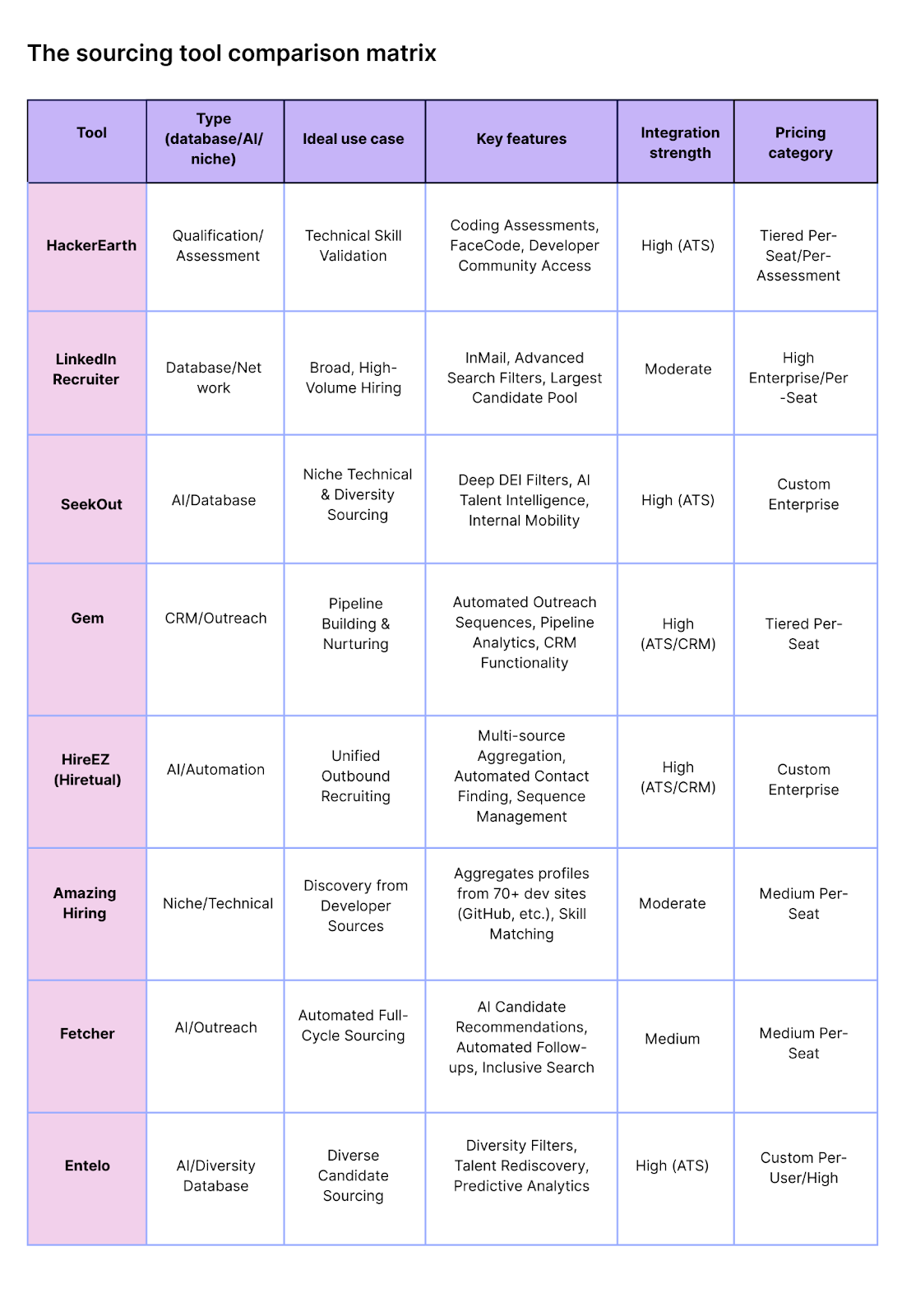
View all