Home
/
Blog
/
AI Recruiting
/
How to Conduct a Technical Interview: 7-Step Guide

How to Conduct a Technical Interview: 7-Step Guide

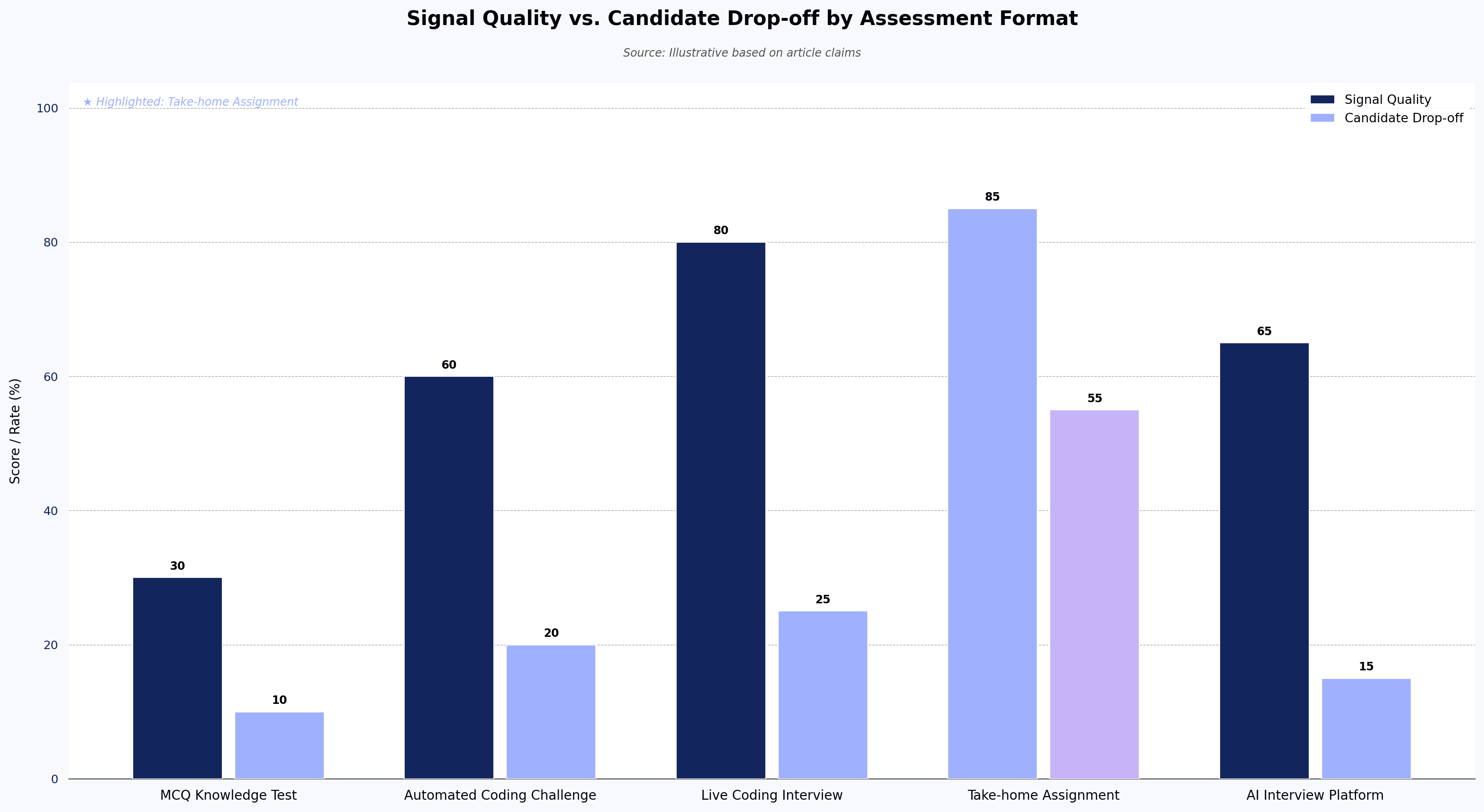
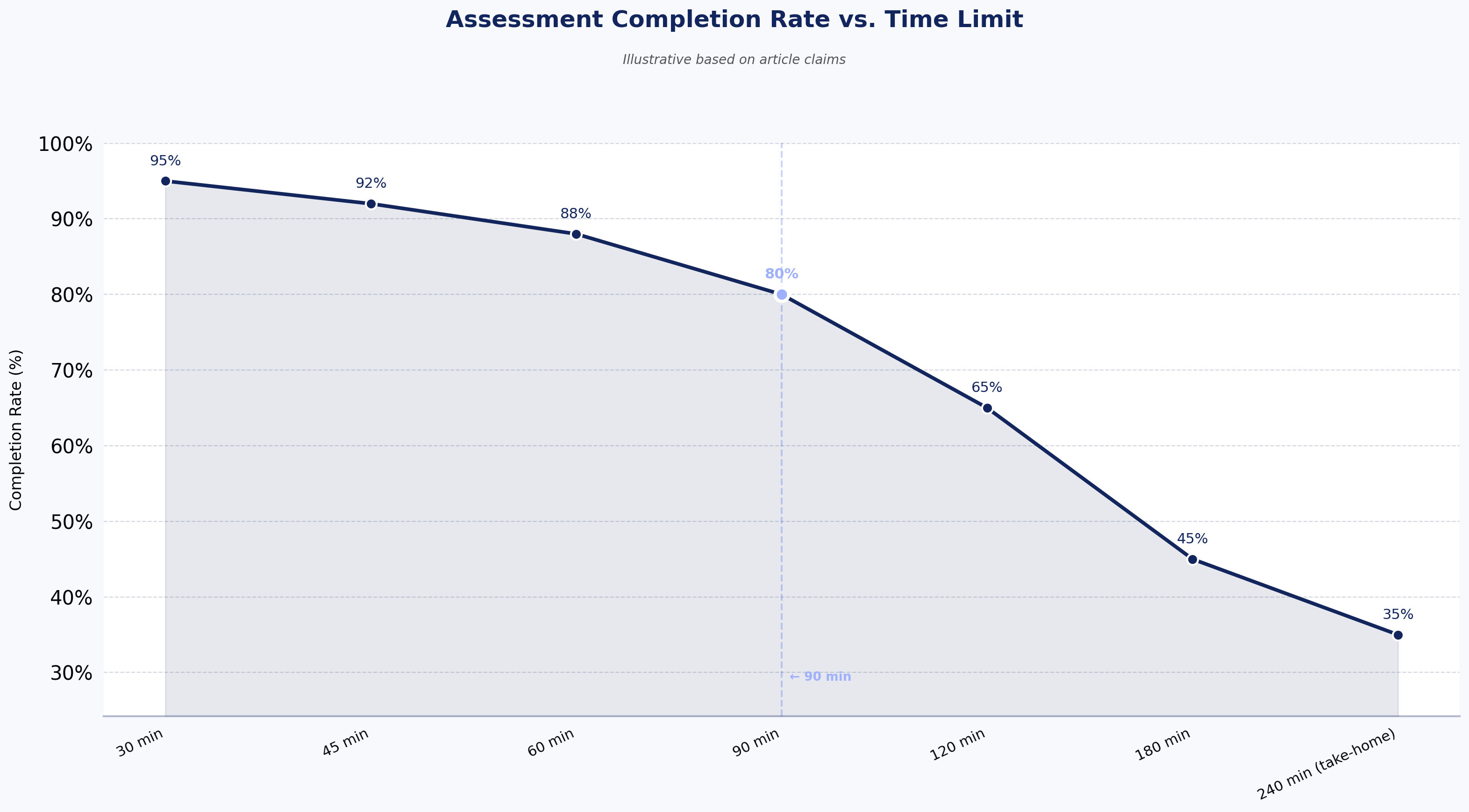
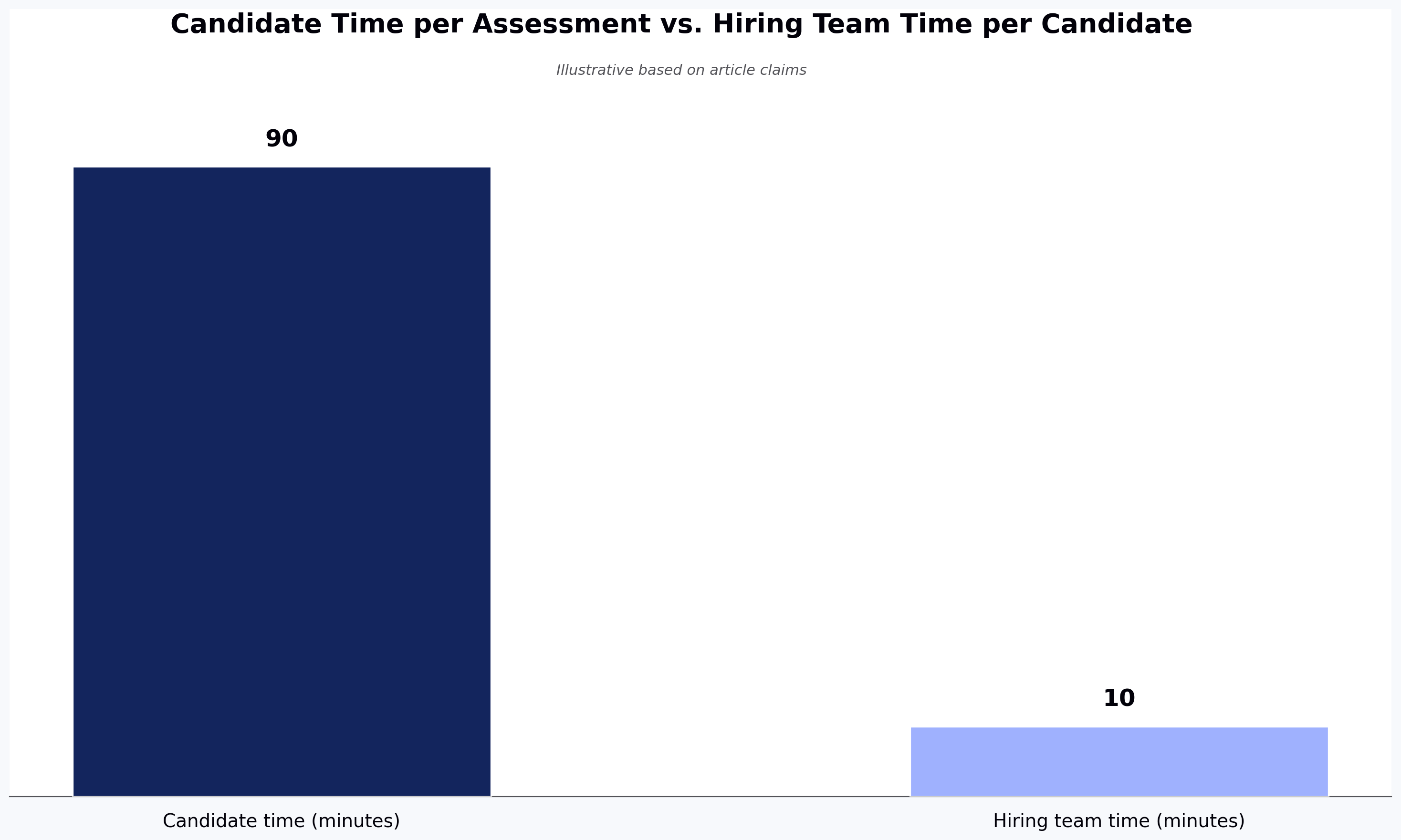
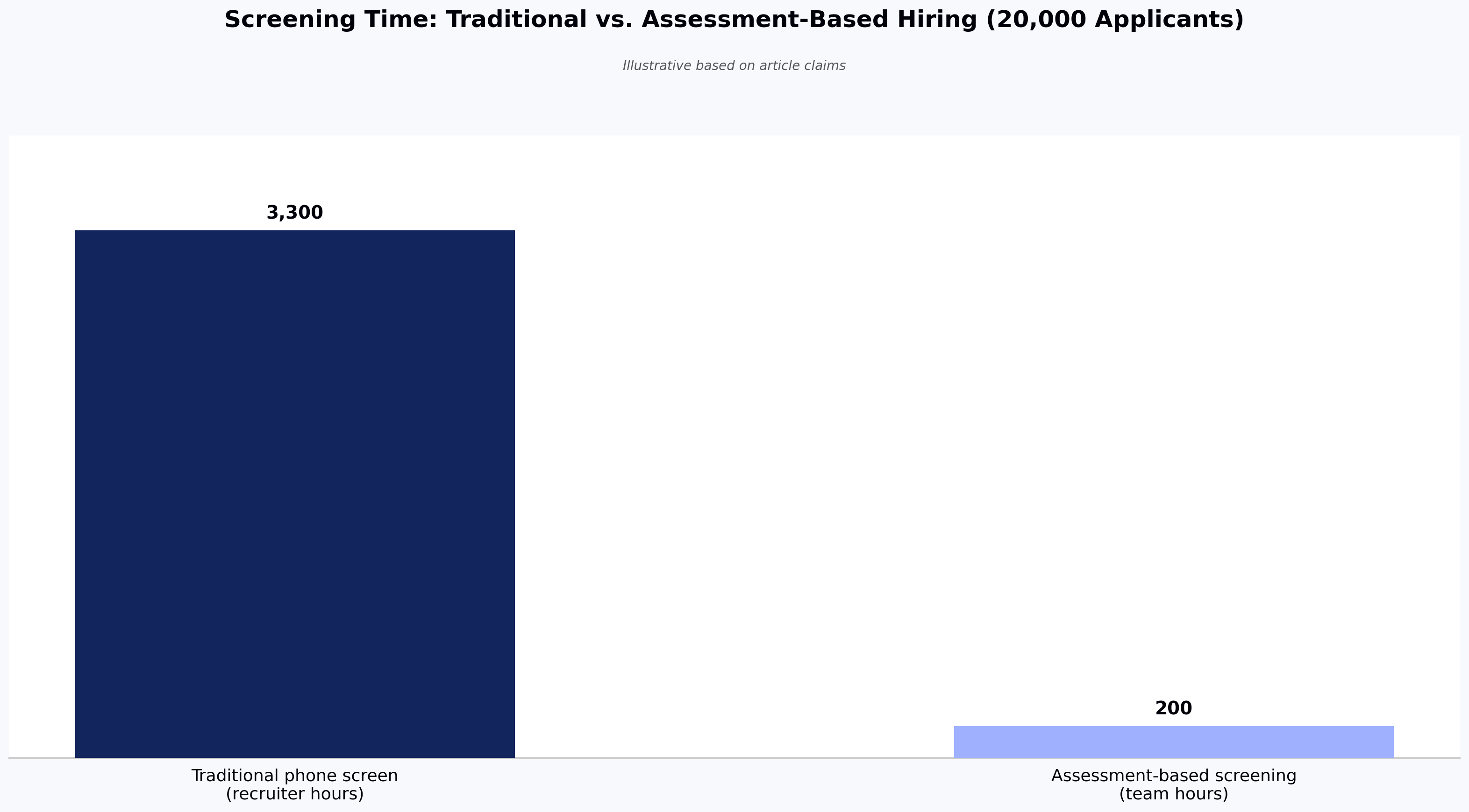
Author
Shruti Sarkar
Calendar Icon
June 11, 2026
Timer Icon
3 min read
Share

Explore this post with:

Key Takeaways:
  • Knowing how to conduct a technical interview that produces consistent, defensible data requires a 7-step framework: define competencies, choose structured formats, build rubric-scored questions, set up the environment, standardize first rounds with AI, evaluate by evidence, and deliver feedback within five business days.
  • Structured technical interviews predict on-the-job performance at nearly twice the rate of unstructured ones, with predictive validity coefficients of approximately .51 versus .38 according to Schmidt & Hunter (1998) and subsequent meta-analytic research.
  • AI interview agents like OnScreen work best positioned at the first-round screening stage, where they apply the same question set and rubric to every candidate 24/7 — but they do not replace human judgment for final rounds requiring culture, collaboration, or senior-level design assessment.
  • A scoring rubric with behavioral anchors for each rating level converts post-interview calibration from an argument about impressions into a comparison of evidence-based scores, completed individually before any group discussion.
  • Feedback delivered within five business days — referencing specific rubric criteria rather than vague impressions — converts a rejection into actionable information and protects a company's reputation in tight engineering communities.

How to Conduct a Technical Interview: 7-Step Guide

If you're a recruiter trying to figure out how to conduct a technical interview that produces comparable, defensible candidate data, the bottleneck is rarely the questions — it's the inconsistency between interviewers. Your engineering team just rejected three candidates in a row, and none of the interviewers can agree on why. One wanted stronger system design instincts. Another marked down a candidate for nerves during a whiteboard exercise. A third made an offer to someone the others found underwhelming. The evaluations were inconsistent because the technical interview process was inconsistent.

Research suggests structured technical interviews predict on-the-job performance at nearly twice the rate of unstructured ones: structured formats are reported at a predictive validity coefficient of around .51 compared to .38 for ad-hoc approaches (Schmidt & Hunter, 1998, Psychological Bulletin; the .51/.38 ordering has been revisited in more recent meta-analytic work, including Sackett et al., 2022, Journal of Applied Psychology). Yet most technical interview processes remain a patchwork of interviewer preferences, inherited question banks, and gut-feel scoring.

This guide gives recruiters a direct answer to how to conduct a technical interview: a seven-step framework for conducting technical interviews that generate comparable, defensible candidate data every time. It covers where AI interview agents — software that runs a structured first-round technical interview without a human interviewer, asking adaptive questions and scoring responses against a fixed rubric — fit into the technical hiring process and where they can measurably improve it. It is written primarily for recruiters and talent acquisition leads, with shared vocabulary for the hiring managers and engineering leads they partner with.
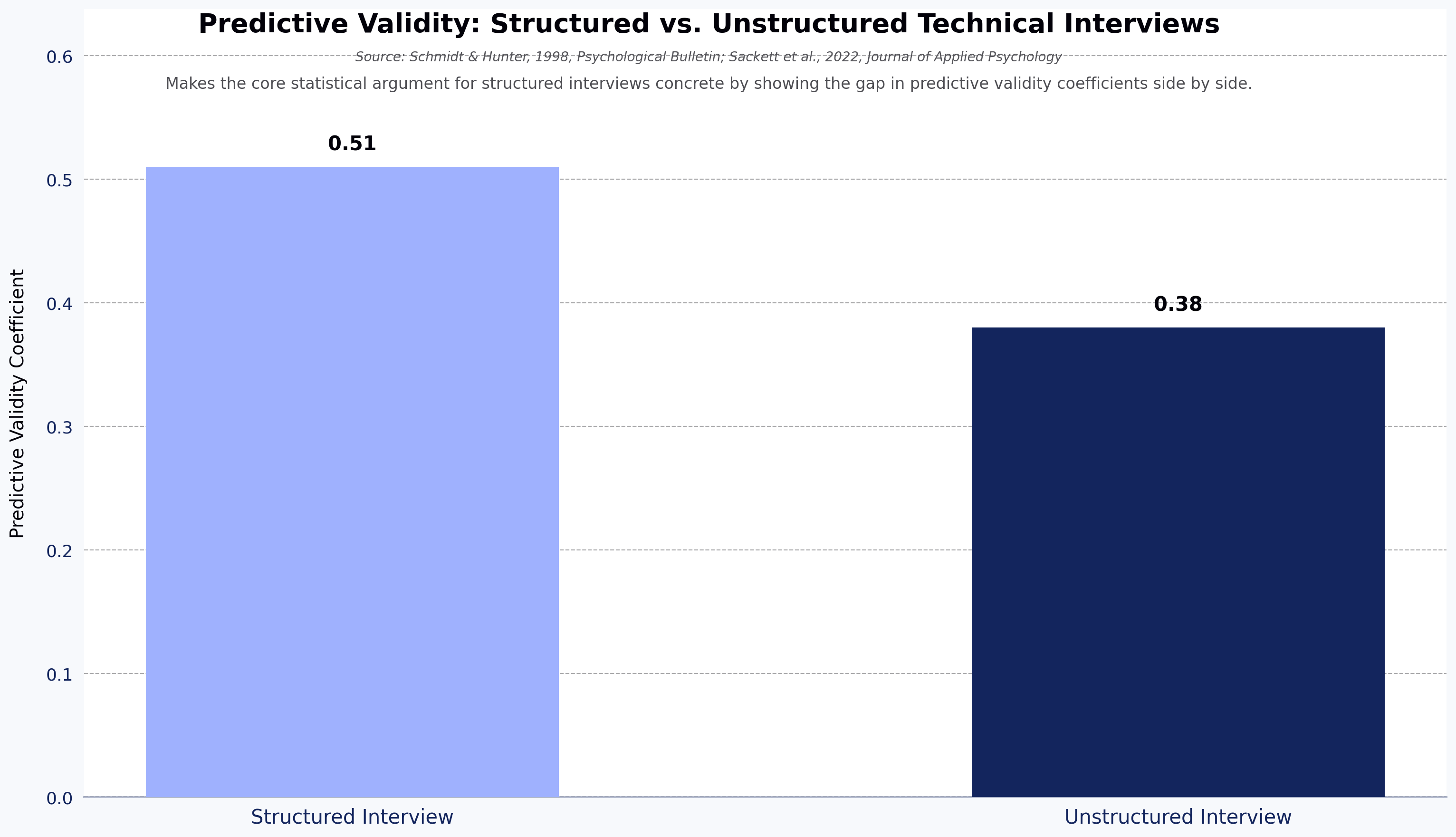
Predictive Validity: Structured vs. Unstructured Technical Interviews
Source: Schmidt & Hunter, 1998, Psychological Bulletin; Sackett et al., 2022, Journal of Applied Psychology

What Is a Technical Interview (and Why Your Process Needs a Rethink)?

A technical interview is a structured candidate evaluation that assesses engineering skills through role-relevant challenges, including live coding, system design problems, debugging exercises, pair programming, and technical phone screens. Unlike a general interview, its goal is to surface evidence of actual technical capability rather than self-reported experience.

The main formats generate different signal types. Live coding tests algorithmic thinking under pressure. System design evaluates architecture instincts at scale. Pair programming reveals how someone works alongside teammates. Take-home assignments show production-quality code without time pressure. Technical phone screens handle high-volume screening early in the pipeline.

The cost of getting the evaluation wrong is not abstract. A commonly cited industry estimate, frequently attributed to the U.S. Department of Labor, puts the cost of a bad hire at roughly 30% of the employee's first-year salary; the original source is disputed, so treat the figure as directional rather than precise. As an illustration: if a mid-level engineer earns around $140,000, that 30% rule-of-thumb would imply roughly $42,000 in recruiting, onboarding, and lost productivity before you start over. The cause is usually not that the wrong person got through; it is that the process never collected enough consistent signal to tell candidates apart.

Step 1 — Define the Role Requirements and Technical Competencies for the Interview

Building interview questions before defining what you are evaluating is the technical hiring equivalent of writing test cases for a feature that has not been specified. Partner with the engineering lead to document must-have versus nice-to-have skills before writing a single question. The output is a competency matrix that anchors every evaluation decision from screening through the final panel.

How to Build a Technical Competency Matrix

Work through three steps: list the role's core daily tasks, map each task to a measurable skill, and assign a minimum proficiency level on a beginner, intermediate, or expert scale.

Sample matrix for a mid-level backend engineer:

Core Task Required Skill Minimum Level Interview Signal
Design RESTful APIs API design patterns Intermediate System design round
Write production Python/Go Language proficiency Intermediate Live coding round
Debug production incidents Debugging and logging Intermediate Code review exercise
Review pull requests Code quality standards Intermediate Pair programming
Work with databases SQL and data modeling Intermediate Domain-specific questions
Understand system trade-offs Distributed systems basics Beginner System design round

If an interviewer cannot tie their evaluation to a row in this matrix, their feedback belongs in notes, not in the scoring rubric.

Step 2 — Choose a Structured Technical Interview Format

Not every format generates the same signal for every role. Choosing formats before the pipeline opens ensures every candidate gets the same evaluation, which is the precondition for fair comparison.

Matching Interview Formats to Role Type

  • Live coding: best for algorithmic and data structure roles, junior to mid-level engineers, and positions requiring frequent problem decomposition
  • System design: best for senior and staff engineers; evaluates architecture thinking, trade-off reasoning, and communication under ambiguity
  • Pair programming: best for teams where collaboration style strongly predicts success; reveals how someone works with a partner under real conditions. For live whiteboarding or extended pair-programming with the hiring team, a dedicated live-coding interview tool such as HackerEarth's FaceCode gives both sides a shared editor and standardized rubric to work from.
  • Take-home assignment: best when production-quality code matters more than in-the-moment speed; works well for senior and specialist roles
  • Technical phone screen: best for high-volume first-round filtering; a short, scripted, repeatable format enables fair comparison at scale

A common pipeline combination is automated technical screening, followed by an AI interview agent for first-round evaluation, followed by a live human panel. Each stage adds a different data type: objective code scores, adaptive conversational signal, and interpersonal judgment.

Step 3 — Prepare Technical Interview Questions and Scoring Rubrics

The ability to conduct coding interviews effectively depends less on the questions you choose than on the system you build around them. When technical interview questions are prepared without a shared rubric, post-interview calibration becomes an argument about preferences rather than an analysis of evidence.

Types of Technical Interview Questions

Five categories map directly to the competency matrix from Step 1:

  • Algorithmic and coding: problem decomposition, time and space complexity, implementation correctness
  • System design: scalability, fault tolerance, component trade-offs, technology selection rationale
  • Debugging and code review: identifying defects in provided code, explaining root causes, proposing fixes
  • Domain-specific: cloud architecture, ML pipelines, database optimization, security considerations
  • Behavioral-technical hybrids: past incidents, technical decisions under constraints, disagreements with technical approaches

Avoid trick questions. A question a candidate could never encounter on the job produces data about their interview preparation, not their engineering ability. For role-aligned question sets, see HackerEarth's library of coding assessment questions.

Building a Scoring Rubric That Removes Guesswork

A scoring rubric converts a conversation into data by anchoring every rating to observable evidence, so post-interview debate is about scores rather than competing impressions.

Sample rubric for a live coding round:

Criterion 1 (Does Not Meet) 3 (Meets Expectations) 5 (Exceeds)
Problem-solving approach No clear method; jumps to code immediately Clarifies requirements, outlines approach before coding Asks probing questions, considers edge cases upfront
Code correctness Solution does not pass core test cases Solution handles core cases; minor gaps in edge cases All test cases pass; candidate identifies potential issues
Code quality Unreadable or unstructured code Readable, functional, lacks optimization Clean, efficient, with clear naming and structure
Communication Silent throughout; cannot explain reasoning Narrates approach but struggles with questions Explains every decision; adapts well to follow-up questions
Speed and accuracy Did not complete the task Completed with time to spare; small errors Efficient solution delivered early; error-free

Each interviewer completes the rubric immediately after the interview, before any group discussion. This protects individual judgment from social pressure and makes calibration faster because everyone compares scores, not competing narratives.

Step 4 — Set Up the Interview Environment and Tools

A candidate who spends the first ten minutes troubleshooting a broken code editor is not demonstrating their engineering ability; they are demonstrating patience. Remove environment friction before the interview starts.

For in-person: confirm IDE or whiteboard setup, test the development environment with the actual question the day before, and ensure the candidate knows which language the company expects.

For remote technical interviews, the most common failure points are environmental: use a shared coding environment rather than a screen share, test video and audio at least 15 minutes before the session, and send any installation instructions 48 hours in advance. For live coding and system design rounds run by the hiring team, HackerEarth's FaceCode provides a shared editor, structured question flow, and rubric-aligned scoring inside one tool.

Step 5 — Use AI Interview Agents to Standardize the First-Round Technical Interview

AI interview agents are reshaping how teams run first-round technical screens because they remove the engineer's calendar from the critical path. These tools present candidates with a question set, adapt follow-up questions based on candidate responses in real time, evaluate code as it is written, and flag integrity anomalies, so every candidate gets an identical evaluation environment.

HackerEarth's AI interview tool for this stage is OnScreen — HackerEarth's AI interview tool that conducts structured technical interviews 24/7 using video-avatar interviewers and built-in identity verification. OnScreen pairs lifelike AI video-avatar interviewers with KYC-grade identity verification and enterprise-grade proctoring, then produces a structured evaluation report covering code correctness, approach quality, communication, and time usage. The AI here is doing three specific things: matching candidate answers to a fixed competency rubric, generating adaptive follow-ups from a curated question bank, and scoring code against test cases written by the hiring team. Its limits are equally specific — it does not assess team-fit, long-horizon design judgment, or anything outside the question set the hiring team configures.

As a directional guideline, AI-led first-round screens often run in the 30–45 minute range, though the right length depends on role seniority and question set rather than the tool.

See it in action: Book a demo of OnScreen to walk through how a structured first-round technical interview runs end to end.

Step 6 — Conduct the Interview With Consistency and Fairness

Consistency in a technical interview does not mean reading questions off a script; it means every candidate is evaluated on the same criteria so comparison is meaningful rather than a negotiation between interviewer preferences.

For human-led interviews: introduce yourself and your role, explain the format and time allocation at the start, follow the rubric question sequence, take timestamped notes referencing specific candidate statements, and reserve five minutes at the end for candidate questions. SHRM has reported that a substantial share of HR managers acknowledge bias influences their evaluations; specific figures vary by study, but the practical implication is the same — a rubric reduces that surface area by requiring evidence-based ratings rather than holistic impressions.

How AI Interview Agents Support Consistent Evaluations

Tools like OnScreen are designed to reduce variability at the stage where it does the most damage: first-round screening. Every candidate receives the same questions in the same sequence, scored against the same model, and evaluation does not vary by interviewer mood or fatigue. Adaptive agents go further by generating follow-up questions based on what the candidate just said or coded, so the interview adjusts to actual performance while still applying the same rubric to everyone.

Research from Glassdoor's Worklife Trends 2024 report found a majority of candidates are comfortable with AI screening provided a human makes the final decision — a useful signal that candidates respond to AI screens better when the human role in the funnel is communicated up front.

Candidate Comfort With AI Screening by Condition
Source: Illustrative based on Glassdoor Worklife Trends 2024 report (majority comfortable with AI screening when human makes final decision)
Candidate Comfort With AI Screening by Condition
Source: Glassdoor Worklife Trends 2024 report (majority comfortable with AI screening when human makes final decision)

Step 7 — Evaluate Candidates Using Data, Not Gut Feel

A frequent failure point in technical hiring is not the interview itself; it is the evaluation afterward. Teams that struggle with how to evaluate developers in interviews consistently identify the same root cause: no shared criteria going into calibration.

From Scorecards to Side-by-Side Candidate Comparison

A clean coding interview evaluation follows three steps: individual scorecard completion before any group discussion, a structured calibration meeting using rubric scores as input, and a documented hiring recommendation that maps back to the competency matrix.

AI-generated transcripts and code playback change what is possible at calibration. A hiring manager who was not in the screening round can review the transcript, see exactly how a candidate handled a specific question, and form an independent view before the panel discussion, rather than hearing a secondhand summary shaped by whoever spoke first.

For teams running assessments alongside interviews, combining assessment scores with interview rubric data gives a multi-signal picture more predictive than any single format alone. HackerEarth's assessment platform pulls both data sets into a single candidate profile, including code quality, plagiarism flags, and rubric-aligned interview scores.

Limitations of AI Interview Agents Worth Naming

AI interview agents are not a universal fit. Worth being honest about the failure modes:

  • Training-data bias. Scoring models inherit the biases of the data they were tuned on; rubric design and ongoing audits matter more than vendor marketing suggests.
  • Role mismatch. AI agents tend to perform best on well-bounded technical screens (coding, debugging, scoped system design) and less well on highly senior, ambiguous, or culture-heavy rounds.
  • Candidate experience variability. Some candidates report discomfort with avatar-led or recorded formats; making the AI step explicit and optional-to-discuss with a human reduces drop-off.
  • Identity and integrity edge cases. Even with proctoring and identity verification, no tool is bias-free or cheat-proof; treat AI signal as one input alongside human panels rather than a verdict.

Naming these openly is part of the case for using AI agents only where they add signal — typically the first round — rather than across the entire funnel.

Deliver Feedback and Improve the Candidate Experience

Feedback to rejected candidates feels like optional extra work until you realize every candidate who walks away without it is a potential detractor in a tight engineering community.

Close the loop with every candidate within five business days. For candidates who completed a full technical assessment and interview, provide rubric-referenced feedback: not "you were not quite what we were looking for" but "your solution was correct and your communication was strong; the panel needed more depth on distributed systems trade-offs for this role." That single sentence converts a rejection into information rather than judgment.

AI interview reports make this fast. A hiring manager pulls the evaluation summary, adds one sentence of human context, and delivers actionable feedback in under five minutes instead of synthesizing notes from three different interviewers.

Where AI Interview Agents Fit in the Full Hiring Funnel

Treating AI interview agents as a replacement for the full technical interview process is a common adoption mistake. They are a stage in a multi-signal pipeline, most useful when positioned at the right point in the sequence.

Screening Stage

AI agents handle high-volume first-round screens autonomously. A candidate who applies on Monday can complete a structured technical interview by Tuesday morning, without waiting for a recruiter to find a calendar slot. Time-to-hire gains are largest at this stage because the main bottleneck — scheduling and running screening calls — disappears.

Assessment Stage

Pair AI agents with structured coding assessments for a two-signal evaluation. The assessment provides objective code quality metrics; the AI interview adds conversational signals: how a candidate explains their thinking, handles ambiguity, and responds to follow-up. Together they produce more useful data than either format alone.

Final Interview Stage

Human interviewers use AI-generated transcripts and code playback to run more targeted final-round conversations. Instead of re-covering ground the AI already assessed, the final round focuses on role-specific depth, culture and collaboration signals, and questions only a human conversation can answer.

7 Common Mistakes to Avoid When Conducting Technical Interviews

Gaps between best practice and how technical interviews actually run tend to look similar regardless of company size. Each mistake below is a place where unstructured processes substitute habit for signal.

  1. Skipping the competency matrix. Questions drift toward what interviewers find interesting, not what the role requires, and post-interview calibration has no anchor.
  2. Using the same question bank for junior and senior roles. Difficulty should track seniority; using the same questions at every level tests the wrong things at both ends.
  3. Letting each interviewer freelance their own format. When every interviewer runs a different process, you cannot compare candidates; you are comparing interviewers.
  4. Prioritizing trick questions over real-world problem-solving. Trick questions test whether the candidate has seen the puzzle before, not whether they can do the job.
  5. Ignoring communication and collaboration signals. A candidate who writes correct code but cannot explain their reasoning will struggle in code reviews and incident response; communication belongs in the rubric, not as an afterthought.
  6. Waiting too long to deliver feedback. Candidates who wait two or more weeks will either accept another offer or describe the experience publicly; feedback within five business days is a competitive differentiator.
  7. Not using AI tools to scale and standardize. Running every first-round screen manually trades hiring capacity for process inertia — a structured AI-led first round frees recruiter and engineer hours for the rounds where human judgment actually matters.

Next steps

A technical interview process that produces consistent, defensible hiring decisions is built from seven repeatable moves: define role competencies with a matrix, choose structured formats matched to role type, prepare rubric-scored questions before interview day, set up a frictionless environment, standardize the first round with an AI interview agent like OnScreen, conduct every interview against the same criteria, and close the loop with specific feedback within five business days.

The recruiters who get the most out of this approach tend to share one habit: they treat the rubric and the AI report as the canonical record of the interview, not the conversation people remember afterward. That single shift — from impressions to evidence — is what makes the process more consistent across candidates than human-led screens alone.

Next step: Book a demo of OnScreen to see how a structured, rubric-applied first-round technical interview runs at scale.

FAQs

How long should a technical interview last?

Coding rounds typically need around 45 minutes; system design rounds benefit from a full 60; AI-led first-round screens often run in the 30–45 minute range because adaptive questioning removes some of the conversational drift in human-led screens. Format determines the right length more than convention does.

If interviews routinely run long, the more likely problem is an underspecified question, not an under-allocated time slot.

Can AI conduct a technical interview?

AI interview agents can run full first-round technical interviews, including adaptive questioning, real-time code evaluation, and structured report generation. They tend to work best at the screening stage where consistency and speed matter most. Human interviewers remain the stronger option for final rounds, where nuanced judgment, culture signals, and relationship-building cannot be automated.

The harder question for most teams is operational: will the panel trust the AI report enough to make calibration decisions from it, instead of re-running its work in person?

What questions should I ask in a technical interview?

Questions should map to the role's competency matrix and cover algorithmic challenges, system design prompts for senior roles, debugging exercises, and domain-specific questions relevant to the team's stack. Avoid anything that rewards memorization over applied thinking.

The most predictive questions are usually the ones that look closest to the actual job — not the cleverest puzzle in the question bank.

How do you evaluate a candidate in a technical interview?

Use a pre-built scoring rubric covering problem-solving approach, code correctness, code quality, communication, and time management, rated on a 1 to 5 scale with behavioral anchors, and complete it individually before any group discussion. Combine human rubric scores with AI-generated evaluation data for a fuller picture.

Rubrics feel like bureaucracy until the first calibration meeting where someone changes their recommendation after hearing the room — at which point you wish every score had been locked in before the discussion started.

How do you reduce bias in technical interviews?

Structure is the most consistent lever available: standardized questions, rubrics with behavioral anchors, and diverse panels reduce the conditions under which bias operates. AI-powered interviews — where the AI applies a fixed rubric and question set to every candidate, trained on the hiring team's own evaluation criteria, with limits around team-fit and senior judgment calls — can add rubric-applied evaluation that doesn't vary by interviewer mood or fatigue. According to Glassdoor's Worklife Trends 2024 research, a majority of candidates are comfortable with AI screening as long as a human makes the final decision.

Bias does not disappear with a rubric; it just has less room to operate without becoming visible in the scores.
Subscribe to The HackerEarth Blog

Get expert tips, hacks, and how-tos from the world of tech recruiting to stay on top of your hiring!

Author
Shruti Sarkar
Calendar Icon
June 11, 2026
Timer Icon
3 min read
Share

Hire top tech talent with our recruitment platform

Access Free Demo
Related reads

Discover more articles

Gain insights to optimize your developer recruitment process.

Technical Assessment Tools for Software Engineers

How to evaluate software engineers before the interview: a technical assessment tools guide

The average time to hire a software engineer in the U.S. is 42 days, and teams now conduct an average of 20 interviews per hire, 42% more than in 2021, according to Gem's 2025 recruiting benchmarks report. A significant portion of that time is spent on live interviews with candidates who were never truly qualified in the first place.

Technical assessment tools for software engineers — platforms that evaluate coding ability, problem-solving, and applied technical skill before a live interview — can shift this dynamic. Used correctly, they evaluate developers before the interview stage, filter out mismatched candidates before a single engineer's calendar gets blocked, create a standardized and defensible scoring record, and can improve the interview-to-offer ratio enough to measurably shorten the hiring cycle. Pre-employment technical tests and structured online coding assessments may reduce time-to-hire, with LinkedIn's Future of Recruiting research and SHRM's talent acquisition reports both pointing to meaningful efficiency gains from structured pre-screening. This guide walks through an eight-step framework for evaluating software engineers before the interview, with specific guidance for recruiters and hiring managers at each step.

Skipping pre-screening is an expensive decision, and the numbers make that concrete. The U.S. Department of Labor estimates a bad hire costs at least 30% of that employee's first-year wages. SHRM places the cost of replacing an employee at between 50% and 200% of their annual salary, depending on seniority. For a $120,000 senior engineering role, a single bad hire can cost between $60,000 and $240,000 once you factor in lost productivity, re-hiring, and team disruption.

Structured pre-interview technical evaluation addresses this in three ways. First, it can reduce time-to-hire by replacing subjective resume screens with objective skill signals that help hiring managers move faster with confidence. Second, it raises the interview-to-offer ratio: when only genuinely qualified candidates reach the live interview stage, engineering teams spend less time on conversations that go nowhere. Third, technical candidate screening produces a better candidate experience than a six-round process with no clear structure.

The data on skills-based hiring reinforces this. According to TestGorilla's 2024 State of Skills-Based Hiring report, most employers agree skills-based hiring is more predictive of on-the-job success than resumes alone, and a large share of employers using it report a measurable reduction in mis-hires. The same report indicates that skills-assessed hires can outperform resume-screened hires on first-year job performance metrics.

The tools that make this practical are covered in the steps below. For context on how to build the earlier funnel that feeds into assessment, see this guide to building a candidate pipeline that cuts your cost and time to hire.

Cost of a Bad Hire vs. Salary for a $120K Senior Engineering Role
Source: SHRM Talent Acquisition Research; U.S. Department of Labor estimate

Step 1: Define the technical skills you need to evaluate

The most common reason a software engineer assessment fails to predict job performance is that it tests the wrong things. A useful technical skills evaluation starts not with a question library but with the job itself.

Map skills to role requirements

Work backward from what the engineer will actually do in their first 90 days. Distinguish between language-specific skills (writing Python data pipelines, writing TypeScript components) and broader competencies (system design, debugging, API integration, code review). A backend role that requires building REST APIs in Node.js needs a different assessment than one that requires optimizing SQL queries in a legacy codebase.

The table below provides a starting framework:

Role Core Skill Assessment Type
Backend Engineer API design, data structures, SQL Coding challenge + MCQ
Frontend Engineer JavaScript/TypeScript, DOM manipulation, UI logic Code challenge + project task
Data Engineer Python, SQL, pipeline design Coding challenge
DevOps Engineer Scripting, CI/CD concepts, infrastructure MCQ + scenario task
QA Automation Engineer Test framework design, debugging, edge cases Coding challenge + project task
Full-Stack Developer Frontend + backend integration, architecture Project-based task

Prioritize must-have vs. nice-to-have skills

Over-testing is a real risk. Assessments that try to cover eight skill areas produce two outcomes: senior engineers abandon the process, and the results are harder to interpret because the scoring signal gets noisy.

Limit pre-interview assessments to three to five must-have skills: the ones where a gap would make the candidate unable to perform the role regardless of everything else. Nice-to-have skills (frameworks the team uses but could teach, or secondary language knowledge) are better evaluated in the live interview, where they can be explored conversationally. Keeping the assessment tight respects the candidate's time and keeps your scoring focused on what actually predicts job fit.

Step 2: Choose the right type of technical assessment

Not all developer assessment tools are designed for the same purpose, and mixing up assessment types is one of the more common and costly process mistakes. Here is how the main formats compare:

Coding challenges and algorithm tests

Coding challenges test problem-solving speed, data structure fluency, and language command. They are well-suited for entry-level and junior hiring, and for roles where algorithmic thinking is genuinely central to the work. The limitation is well-documented: algorithm-focused competitive programming tests often favor candidates who have practiced that specific style rather than those who write excellent production code. Senior engineers (the people who could actually do the job) frequently underperform on these tests relative to their actual capability.

Use algorithm tests as one signal, not the only one.

Project-based and take-home assessments

Take-home projects give candidates space to demonstrate how they actually write code: structure, naming, error handling, test coverage, documentation. For mid to senior roles, this format produces the richest signal and is a meaningful step up from pre-hire coding tests that rely entirely on algorithmic correctness. The tradeoff is time: candidates who are currently employed and fielding multiple offers often decline assessments that require more than two to four hours. Poorly designed take-homes with vague instructions compound this problem. Keep scope tight, share the evaluation criteria upfront, and communicate clearly what "done" looks like.

MCQ-based knowledge tests

Multiple choice tests are useful for screening foundational knowledge at scale and for quickly filtering out candidates who lack the minimum baseline for a role. They are fast to complete (typically 20 to 40 minutes) and straightforward to score. What they cannot assess is applied skill: a candidate who knows the definition of a race condition is not necessarily someone who can find one in a codebase. Use MCQs as a first-pass filter, particularly in high-volume hiring, rather than as a primary evaluation tool.

AI-powered and adaptive assessments

Newer technical assessment tools for software engineers adjust difficulty in real time based on how a candidate is performing. The underlying AI is trained on patterns of candidate responses across difficulty levels and uses item-response models to calibrate which question to serve next. Its limit is that it depends on the quality and breadth of the underlying question bank: an adaptive engine on a narrow library will not produce meaningfully better signal than a fixed test. A candidate who answers the first three questions correctly gets progressively harder questions; one who struggles gets redirected to calibrate the baseline. This produces more accurate skill-level profiling than a fixed-difficulty test and reduces the likelihood that a genuinely strong candidate fails on a single hard question. HackerEarth's adaptive assessments use this approach to give hiring teams a more nuanced picture of where a candidate sits within a skill range rather than a simple pass/fail.

Assessment type comparison

Assessment Type Best For Time Required Insight Level Limitations
Coding Challenge Junior/mid-level; algorithmic roles 60–90 min Medium Can favor practice over real-world skill
Take-Home Project Mid/senior roles; code quality evaluation 2–4 hours High Higher drop-off rate; time-intensive to review
MCQ Knowledge Test High-volume screening; baseline checks 20–40 min Low–medium Tests recall, not applied skill
AI-Powered Adaptive (trained on response patterns; limited by question-bank breadth) All levels; nuanced skill profiling 45–75 min High Requires platform support

Step 3: Select a technical assessment tool that fits your workflow

The right technical assessment tool for software engineers is one that integrates with your existing hiring workflow, matches the roles you actually hire for, and produces scoring you can defend. Treat the selection as a procurement decision with the same rigor as any other tooling choice. The market for programming assessment tools ranges from lightweight quiz platforms to full-stack technical hiring suites. A platform with a large question library but no ATS integration will create manual work that slows the process you were trying to speed up.

Key features to evaluate

When comparing technical screening tools, weigh these capabilities against the trade-offs each one carries:

  • Question library breadth vs. relevance: A larger library is not always better. A smaller, well-curated library aligned to your stack may outperform a sprawling one with thin coverage of your actual languages.
  • Language and framework support: Candidates code better in their preferred environment, but supporting every language adds maintenance overhead for the vendor and can dilute question quality.
  • ATS integration: Native integrations reduce manual data entry, but a deep integration with one ATS can mean shallow support for others. Confirm support for your specific system.
  • Automated scoring vs. human review: Automated scoring is consistent and fast but can miss nuance in code quality. The best platforms combine both.
  • Anti-cheat and proctoring: More aggressive proctoring improves integrity but degrades candidate experience. Calibrate to assessment stakes.
  • Customization: Custom questions improve role fit but require internal time to author and maintain.
  • Reporting and analytics: Side-by-side comparison helps hiring decisions, but only if the underlying scoring is consistent.
  • Candidate experience: A clean interface and clear instructions reduce drop-off, particularly for senior candidates.

Integration with your existing tech stack

A technical assessment tool that lives outside your ATS creates friction at every stage: sending invitations manually, importing results by hand, and reconciling candidate records across systems. Prioritize platforms that offer native integrations with the tools your team already uses. Common integrations to verify include Greenhouse, Lever, Workday, SAP SuccessFactors, Jobvite, and Bamboo HR.

Where HackerEarth fits

HackerEarth's technical assessment platform supports 40+ programming languages and a question library spanning 1,000+ skills, with automated candidate reports that let hiring managers compare performance side by side without manual scoring. For a recruiter running parallel hiring for a backend engineer, a data engineer, and a DevOps role in the same quarter, the practical value is that a single platform handles role-specific assessment design, scoring, and ATS handoff without bouncing between vendors. The platform also includes HackerEarth FaceCode for live coding interviews and OnScreen, an AI-led interviewer for first-round screening conversations.

Step 4: Design assessments that reflect real work

A platform with a strong question library still produces poor results if the assessment design is wrong. The most common design failure is sending candidates an assessment that has nothing to do with the actual job.

Replace trick questions with role-relevant scenarios

Recruiter and engineering communities are full of candidates describing assessments they abandoned because the questions tested abstract algorithms they had not touched since school and would never use in the role. That frustration is a signal worth taking seriously: when senior engineers with options encounter an irrelevant assessment, they drop out. The candidates who push through are often the ones with fewer competing offers.

Map each assessment question to a task the engineer would actually perform in their first 90 days. If the role involves optimizing database queries, test that. If it involves debugging a failing API endpoint, test that. The candidate experience should feel like a preview of the work, not an unnecessary obstacle.

Set realistic time limits

As a benchmark: coding challenges should sit in the 60 to 90 minute range. Take-home projects should be capped at two to four hours, with scope defined tightly enough that a strong candidate can finish comfortably within that window. Assessments longer than these thresholds see significantly higher drop-off rates, particularly among candidates who have multiple processes running in parallel.

For guidance on improving the candidate experience throughout the evaluation process, including how to reduce friction at the assessment stage, see HackerEarth's candidate experience resources.

Include clear instructions and context

Candidates perform better, and produce more useful signals, when they understand what is being evaluated. Provide the rubric criteria upfront: tell candidates whether you are weighting correctness, code quality, or test coverage. Share the evaluation framework. This is not giving away the answers; it is giving candidates the context they need to show their best work rather than guessing at what you care about. Rubric transparency also reduces the likelihood that a strong candidate fails on a technicality and a weaker one passes by guessing correctly.

Step 5: Protect assessment integrity with proctoring

Assessment integrity in remote hiring depends on layered safeguards: browser lockdown, webcam monitoring, plagiarism detection, and clear candidate communication. The need is real. According to reports, a significant share of candidates have used AI tools to complete assessments or applications, and the Identity Theft Resource Center has documented sharp increases in resume and application fraud between 2023 and 2024. An assessment process with no integrity measures produces results you cannot trust.

Effective remote proctoring for online assessments typically combines several layers. Browser lockdown prevents tab switching and unauthorized resource access. Webcam monitoring uses computer vision to flag suspicious behavior. Plagiarism detection compares submissions against known solutions. IP tracking surfaces unusual login patterns or proxy use.

Candidate privacy is a real consideration and worth addressing directly. Most candidates understand and accept reasonable proctoring when it is communicated clearly before the assessment begins. The problem is surprise: candidates who discover they are being monitored without warning react negatively, and the employer brand damage from that reaction can spread quickly on platforms like Glassdoor. Communicate your proctoring approach in the assessment invitation, explain why it exists, and keep the monitoring proportionate to the assessment stakes. A first-pass MCQ screen does not need the same level of oversight as a final-stage coding project.

Step 6: Score and rank candidates objectively

A strong assessment process can still produce biased or inconsistent outcomes if the scoring is done inconsistently. Objective scoring is not just a fairness issue — it is a signal quality issue. Inconsistent scoring produces a shortlist that reflects reviewer preference rather than candidate capability.

Use standardized rubrics

Every candidate should be evaluated against the same criteria, weighted the same way. A sample rubric for a coding challenge:

Criterion Weight
Correctness (does the code produce the right output?) 40%
Code Quality (readability, naming, structure) 25%
Efficiency (time and space complexity) 20%
Edge Case Handling (boundary inputs, error states) 15%

Define what "meets expectations" looks like for each criterion before scoring begins. This prevents reviewers from adjusting their standards upward or downward based on the overall impression a candidate makes.

Use automated scoring

Automated test-case evaluation removes much of the subjectivity involved in manually reviewing code output. Automated technical assessment platforms generate performance reports that compare candidates side by side against the same benchmark, giving hiring managers a ranking grounded in objective criteria rather than reviewer impressions. Automated scoring also dramatically reduces the time engineers spend reviewing submissions, which matters when you have 50 assessment results waiting.

Reduce unconscious bias

Removing candidate identifiers from the scoring view is one of the simplest and most evidence-backed changes you can make to improve both fairness and hiring outcomes. Research aggregated by industry sources suggests that removing names and photos from applications can meaningfully increase interview rates for underrepresented candidates, with the underlying findings often traced back to controlled studies in academic labor economics. In the technical hiring context, this means scoring candidates based on their code, not their name, university, or previous employer. Many technical assessment platforms support anonymized submission review as a default setting.

Step 7: Communicate results and move top candidates forward

Clear, timely communication after the assessment is what separates hiring processes that protect employer brand from those that quietly erode it. This step is where most hiring processes break down in a way that costs real money.

Provide timely, constructive feedback

Talent Board research has consistently found that candidates who receive feedback (even a rejection) rate the employer more favorably than those who receive silence. With Greenhouse data indicating widespread candidate ghosting after interviews in 2024, any communication at all puts you ahead of most competitors. For candidates who reach the assessment stage and do not progress, a brief note with at least a general indication of where they did not meet the bar is worth the investment. It protects your employer brand and keeps the door open for future applications from candidates who improve.

Set clear expectations for the interview stage

Tell shortlisted candidates what the live interview will cover before they arrive. Specify whether the interview will include a live coding exercise, a system design discussion, or purely behavioral questions. This serves two purposes: it respects the candidate's time by preventing them from preparing for the wrong thing, and it signals that your process is organized and intentional, which is itself a positive signal about the company.

For a breakdown of platforms and formats for the live interview stage, see HackerEarth's guide to conducting structured technical interviews.

Step 8: Measure and refine your assessment process

An assessment process that never gets reviewed stops being useful. The questions that filtered well last year may not be discriminating effectively this year, especially as AI tools make it easier for candidates to generate plausible-looking answers to standard coding prompts.

Track key metrics

Build a regular review around these signals:

  • Assessment completion rate: What percentage of candidates invited to the assessment actually finish it? A completion rate below 60-70% suggests the assessment is too long, too opaque, or is reaching the wrong candidate profiles.
  • Candidate drop-off rate: At which point in the assessment do candidates abandon? This identifies specific friction points.
  • Score-to-interview pass rate correlation: Are the candidates who score highest on the assessment actually passing the live interview at higher rates? If not, the assessment is not measuring what matters.
  • Time-to-hire: Is the pre-screening step actually compressing the total hiring cycle?
  • Quality of hire: Are engineers who performed well on the assessment also performing well at their 90-day review?

Iterate on question content

Retire questions that have leaked into the internet. Track which questions show suspiciously high pass rates over time as a signal that answers are being shared. A/B test assessment lengths: run a shorter version with your must-have skills only and compare outcomes to a longer version. Solicit candidate feedback post-assessment through a brief survey. The candidates who completed your process have direct experience with it; their feedback is more actionable than most internal assumptions about what a good assessment experience looks like.

Common mistakes to avoid

Even teams with the right tools and intentions make predictable process errors. Five recur most often:

Testing skills that are irrelevant to the role. An algorithm puzzle disconnected from day-to-day work measures interview preparation rather than job readiness. The cost shows up as qualified senior candidates dropping out mid-assessment when they recognize the mismatch.

Using the same assessment for all engineering levels. A test designed for junior engineers will not reveal anything useful about a senior candidate's architecture thinking or system design capability. Level-appropriate assessments require different question types, time expectations, and evaluation criteria — for example, a junior MCQ screen on data structures versus a senior take-home on designing a rate-limited API.

Ignoring candidate experience. Confusing instructions, slow-loading test environments, or missing context about evaluation criteria all signal something about your engineering culture. Candidates draw conclusions from the process before they ever meet the team, and senior candidates are the most willing to opt out.

Skipping proctoring for remote roles. A well-publicized case of assessment fraud in a high-stakes hire can undermine the credibility of your entire screening process. Basic integrity measures — browser lockdown, plagiarism detection, clear candidate disclosure — are straightforward to implement and proportionate to deploy.

Treating assessment scores as the only hiring signal. Assessment scores predict technical capability. They do not predict communication, collaboration, ability to navigate ambiguity, or cultural alignment with a specific team. The strongest hiring processes use assessment results to inform interviews, not replace them.

Frequently asked questions

What are technical assessment tools?

Technical assessment tools are software platforms that evaluate a candidate's programming skills, problem-solving ability, and technical knowledge through coding challenges, quizzes, or project-based tasks. They automate scoring and produce standardized records that hiring teams can use to compare candidates against a consistent benchmark.

How long should a pre-interview technical assessment take?

For coding challenges, 60 to 90 minutes is the standard range; take-home projects should be capped at two to four hours. Beyond those thresholds, drop-off rates increase substantially, and senior engineers with competing offers are the first to leave.

Can technical assessments replace interviews entirely?

No. Assessments screen for technical competency; interviews evaluate communication, collaboration, cultural alignment, and the kind of reasoning that does not show up in code output. The strongest hiring processes use assessments to filter candidates before the interview, not as a substitute for one.

How do you prevent cheating on online technical assessments?

Use a combination of browser lockdown, webcam proctoring, plagiarism detection, and IP monitoring, and communicate all of it to candidates before they begin. HackerEarth's enterprise-grade proctoring monitors for irregularities during the assessment, balancing integrity with candidate trans

How to Conduct a Technical Interview: 7-Step Guide

How to Conduct a Technical Interview: 7-Step Guide

If you're a recruiter trying to figure out how to conduct a technical interview that produces comparable, defensible candidate data, the bottleneck is rarely the questions — it's the inconsistency between interviewers. Your engineering team just rejected three candidates in a row, and none of the interviewers can agree on why. One wanted stronger system design instincts. Another marked down a candidate for nerves during a whiteboard exercise. A third made an offer to someone the others found underwhelming. The evaluations were inconsistent because the technical interview process was inconsistent.

Research suggests structured technical interviews predict on-the-job performance at nearly twice the rate of unstructured ones: structured formats are reported at a predictive validity coefficient of around .51 compared to .38 for ad-hoc approaches (Schmidt & Hunter, 1998, Psychological Bulletin; the .51/.38 ordering has been revisited in more recent meta-analytic work, including Sackett et al., 2022, Journal of Applied Psychology). Yet most technical interview processes remain a patchwork of interviewer preferences, inherited question banks, and gut-feel scoring.

This guide gives recruiters a direct answer to how to conduct a technical interview: a seven-step framework for conducting technical interviews that generate comparable, defensible candidate data every time. It covers where AI interview agents — software that runs a structured first-round technical interview without a human interviewer, asking adaptive questions and scoring responses against a fixed rubric — fit into the technical hiring process and where they can measurably improve it. It is written primarily for recruiters and talent acquisition leads, with shared vocabulary for the hiring managers and engineering leads they partner with.

Predictive Validity: Structured vs. Unstructured Technical Interviews
Source: Schmidt & Hunter, 1998, Psychological Bulletin; Sackett et al., 2022, Journal of Applied Psychology

What Is a Technical Interview (and Why Your Process Needs a Rethink)?

A technical interview is a structured candidate evaluation that assesses engineering skills through role-relevant challenges, including live coding, system design problems, debugging exercises, pair programming, and technical phone screens. Unlike a general interview, its goal is to surface evidence of actual technical capability rather than self-reported experience.

The main formats generate different signal types. Live coding tests algorithmic thinking under pressure. System design evaluates architecture instincts at scale. Pair programming reveals how someone works alongside teammates. Take-home assignments show production-quality code without time pressure. Technical phone screens handle high-volume screening early in the pipeline.

The cost of getting the evaluation wrong is not abstract. A commonly cited industry estimate, frequently attributed to the U.S. Department of Labor, puts the cost of a bad hire at roughly 30% of the employee's first-year salary; the original source is disputed, so treat the figure as directional rather than precise. As an illustration: if a mid-level engineer earns around $140,000, that 30% rule-of-thumb would imply roughly $42,000 in recruiting, onboarding, and lost productivity before you start over. The cause is usually not that the wrong person got through; it is that the process never collected enough consistent signal to tell candidates apart.

Step 1 — Define the Role Requirements and Technical Competencies for the Interview

Building interview questions before defining what you are evaluating is the technical hiring equivalent of writing test cases for a feature that has not been specified. Partner with the engineering lead to document must-have versus nice-to-have skills before writing a single question. The output is a competency matrix that anchors every evaluation decision from screening through the final panel.

How to Build a Technical Competency Matrix

Work through three steps: list the role's core daily tasks, map each task to a measurable skill, and assign a minimum proficiency level on a beginner, intermediate, or expert scale.

Sample matrix for a mid-level backend engineer:

Core Task Required Skill Minimum Level Interview Signal
Design RESTful APIs API design patterns Intermediate System design round
Write production Python/Go Language proficiency Intermediate Live coding round
Debug production incidents Debugging and logging Intermediate Code review exercise
Review pull requests Code quality standards Intermediate Pair programming
Work with databases SQL and data modeling Intermediate Domain-specific questions
Understand system trade-offs Distributed systems basics Beginner System design round

If an interviewer cannot tie their evaluation to a row in this matrix, their feedback belongs in notes, not in the scoring rubric.

Step 2 — Choose a Structured Technical Interview Format

Not every format generates the same signal for every role. Choosing formats before the pipeline opens ensures every candidate gets the same evaluation, which is the precondition for fair comparison.

Matching Interview Formats to Role Type

  • Live coding: best for algorithmic and data structure roles, junior to mid-level engineers, and positions requiring frequent problem decomposition
  • System design: best for senior and staff engineers; evaluates architecture thinking, trade-off reasoning, and communication under ambiguity
  • Pair programming: best for teams where collaboration style strongly predicts success; reveals how someone works with a partner under real conditions. For live whiteboarding or extended pair-programming with the hiring team, a dedicated live-coding interview tool such as HackerEarth's FaceCode gives both sides a shared editor and standardized rubric to work from.
  • Take-home assignment: best when production-quality code matters more than in-the-moment speed; works well for senior and specialist roles
  • Technical phone screen: best for high-volume first-round filtering; a short, scripted, repeatable format enables fair comparison at scale

A common pipeline combination is automated technical screening, followed by an AI interview agent for first-round evaluation, followed by a live human panel. Each stage adds a different data type: objective code scores, adaptive conversational signal, and interpersonal judgment.

Step 3 — Prepare Technical Interview Questions and Scoring Rubrics

The ability to conduct coding interviews effectively depends less on the questions you choose than on the system you build around them. When technical interview questions are prepared without a shared rubric, post-interview calibration becomes an argument about preferences rather than an analysis of evidence.

Types of Technical Interview Questions

Five categories map directly to the competency matrix from Step 1:

  • Algorithmic and coding: problem decomposition, time and space complexity, implementation correctness
  • System design: scalability, fault tolerance, component trade-offs, technology selection rationale
  • Debugging and code review: identifying defects in provided code, explaining root causes, proposing fixes
  • Domain-specific: cloud architecture, ML pipelines, database optimization, security considerations
  • Behavioral-technical hybrids: past incidents, technical decisions under constraints, disagreements with technical approaches

Avoid trick questions. A question a candidate could never encounter on the job produces data about their interview preparation, not their engineering ability. For role-aligned question sets, see HackerEarth's library of coding assessment questions.

Building a Scoring Rubric That Removes Guesswork

A scoring rubric converts a conversation into data by anchoring every rating to observable evidence, so post-interview debate is about scores rather than competing impressions.

Sample rubric for a live coding round:

Criterion 1 (Does Not Meet) 3 (Meets Expectations) 5 (Exceeds)
Problem-solving approach No clear method; jumps to code immediately Clarifies requirements, outlines approach before coding Asks probing questions, considers edge cases upfront
Code correctness Solution does not pass core test cases Solution handles core cases; minor gaps in edge cases All test cases pass; candidate identifies potential issues
Code quality Unreadable or unstructured code Readable, functional, lacks optimization Clean, efficient, with clear naming and structure
Communication Silent throughout; cannot explain reasoning Narrates approach but struggles with questions Explains every decision; adapts well to follow-up questions
Speed and accuracy Did not complete the task Completed with time to spare; small errors Efficient solution delivered early; error-free

Each interviewer completes the rubric immediately after the interview, before any group discussion. This protects individual judgment from social pressure and makes calibration faster because everyone compares scores, not competing narratives.

Step 4 — Set Up the Interview Environment and Tools

A candidate who spends the first ten minutes troubleshooting a broken code editor is not demonstrating their engineering ability; they are demonstrating patience. Remove environment friction before the interview starts.

For in-person: confirm IDE or whiteboard setup, test the development environment with the actual question the day before, and ensure the candidate knows which language the company expects.

For remote technical interviews, the most common failure points are environmental: use a shared coding environment rather than a screen share, test video and audio at least 15 minutes before the session, and send any installation instructions 48 hours in advance. For live coding and system design rounds run by the hiring team, HackerEarth's FaceCode provides a shared editor, structured question flow, and rubric-aligned scoring inside one tool.

Step 5 — Use AI Interview Agents to Standardize the First-Round Technical Interview

AI interview agents are reshaping how teams run first-round technical screens because they remove the engineer's calendar from the critical path. These tools present candidates with a question set, adapt follow-up questions based on candidate responses in real time, evaluate code as it is written, and flag integrity anomalies, so every candidate gets an identical evaluation environment.

HackerEarth's AI interview tool for this stage is OnScreen — HackerEarth's AI interview tool that conducts structured technical interviews 24/7 using video-avatar interviewers and built-in identity verification. OnScreen pairs lifelike AI video-avatar interviewers with KYC-grade identity verification and enterprise-grade proctoring, then produces a structured evaluation report covering code correctness, approach quality, communication, and time usage. The AI here is doing three specific things: matching candidate answers to a fixed competency rubric, generating adaptive follow-ups from a curated question bank, and scoring code against test cases written by the hiring team. Its limits are equally specific — it does not assess team-fit, long-horizon design judgment, or anything outside the question set the hiring team configures.

As a directional guideline, AI-led first-round screens often run in the 30–45 minute range, though the right length depends on role seniority and question set rather than the tool.

See it in action: Book a demo of OnScreen to walk through how a structured first-round technical interview runs end to end.

Step 6 — Conduct the Interview With Consistency and Fairness

Consistency in a technical interview does not mean reading questions off a script; it means every candidate is evaluated on the same criteria so comparison is meaningful rather than a negotiation between interviewer preferences.

For human-led interviews: introduce yourself and your role, explain the format and time allocation at the start, follow the rubric question sequence, take timestamped notes referencing specific candidate statements, and reserve five minutes at the end for candidate questions. SHRM has reported that a substantial share of HR managers acknowledge bias influences their evaluations; specific figures vary by study, but the practical implication is the same — a rubric reduces that surface area by requiring evidence-based ratings rather than holistic impressions.

How AI Interview Agents Support Consistent Evaluations

Tools like OnScreen are designed to reduce variability at the stage where it does the most damage: first-round screening. Every candidate receives the same questions in the same sequence, scored against the same model, and evaluation does not vary by interviewer mood or fatigue. Adaptive agents go further by generating follow-up questions based on what the candidate just said or coded, so the interview adjusts to actual performance while still applying the same rubric to everyone.

Research from Glassdoor's Worklife Trends 2024 report found a majority of candidates are comfortable with AI screening provided a human makes the final decision — a useful signal that candidates respond to AI screens better when the human role in the funnel is communicated up front.

Candidate Comfort With AI Screening by Condition
Source: Illustrative based on Glassdoor Worklife Trends 2024 report (majority comfortable with AI screening when human makes final decision)
Candidate Comfort With AI Screening by Condition
Source: Glassdoor Worklife Trends 2024 report (majority comfortable with AI screening when human makes final decision)

Step 7 — Evaluate Candidates Using Data, Not Gut Feel

A frequent failure point in technical hiring is not the interview itself; it is the evaluation afterward. Teams that struggle with how to evaluate developers in interviews consistently identify the same root cause: no shared criteria going into calibration.

From Scorecards to Side-by-Side Candidate Comparison

A clean coding interview evaluation follows three steps: individual scorecard completion before any group discussion, a structured calibration meeting using rubric scores as input, and a documented hiring recommendation that maps back to the competency matrix.

AI-generated transcripts and code playback change what is possible at calibration. A hiring manager who was not in the screening round can review the transcript, see exactly how a candidate handled a specific question, and form an independent view before the panel discussion, rather than hearing a secondhand summary shaped by whoever spoke first.

For teams running assessments alongside interviews, combining assessment scores with interview rubric data gives a multi-signal picture more predictive than any single format alone. HackerEarth's assessment platform pulls both data sets into a single candidate profile, including code quality, plagiarism flags, and rubric-aligned interview scores.

Limitations of AI Interview Agents Worth Naming

AI interview agents are not a universal fit. Worth being honest about the failure modes:

  • Training-data bias. Scoring models inherit the biases of the data they were tuned on; rubric design and ongoing audits matter more than vendor marketing suggests.
  • Role mismatch. AI agents tend to perform best on well-bounded technical screens (coding, debugging, scoped system design) and less well on highly senior, ambiguous, or culture-heavy rounds.
  • Candidate experience variability. Some candidates report discomfort with avatar-led or recorded formats; making the AI step explicit and optional-to-discuss with a human reduces drop-off.
  • Identity and integrity edge cases. Even with proctoring and identity verification, no tool is bias-free or cheat-proof; treat AI signal as one input alongside human panels rather than a verdict.

Naming these openly is part of the case for using AI agents only where they add signal — typically the first round — rather than across the entire funnel.

Deliver Feedback and Improve the Candidate Experience

Feedback to rejected candidates feels like optional extra work until you realize every candidate who walks away without it is a potential detractor in a tight engineering community.

Close the loop with every candidate within five business days. For candidates who completed a full technical assessment and interview, provide rubric-referenced feedback: not "you were not quite what we were looking for" but "your solution was correct and your communication was strong; the panel needed more depth on distributed systems trade-offs for this role." That single sentence converts a rejection into information rather than judgment.

AI interview reports make this fast. A hiring manager pulls the evaluation summary, adds one sentence of human context, and delivers actionable feedback in under five minutes instead of synthesizing notes from three different interviewers.

Where AI Interview Agents Fit in the Full Hiring Funnel

Treating AI interview agents as a replacement for the full technical interview process is a common adoption mistake. They are a stage in a multi-signal pipeline, most useful when positioned at the right point in the sequence.

Screening Stage

AI agents handle high-volume first-round screens autonomously. A candidate who applies on Monday can complete a structured technical interview by Tuesday morning, without waiting for a recruiter to find a calendar slot. Time-to-hire gains are largest at this stage because the main bottleneck — scheduling and running screening calls — disappears.

Assessment Stage

Pair AI agents with structured coding assessments for a two-signal evaluation. The assessment provides objective code quality metrics; the AI interview adds conversational signals: how a candidate explains their thinking, handles ambiguity, and responds to follow-up. Together they produce more useful data than either format alone.

Final Interview Stage

Human interviewers use AI-generated transcripts and code playback to run more targeted final-round conversations. Instead of re-covering ground the AI already assessed, the final round focuses on role-specific depth, culture and collaboration signals, and questions only a human conversation can answer.

7 Common Mistakes to Avoid When Conducting Technical Interviews

Gaps between best practice and how technical interviews actually run tend to look similar regardless of company size. Each mistake below is a place where unstructured processes substitute habit for signal.

  1. Skipping the competency matrix. Questions drift toward what interviewers find interesting, not what the role requires, and post-interview calibration has no anchor.
  2. Using the same question bank for junior and senior roles. Difficulty should track seniority; using the same questions at every level tests the wrong things at both ends.
  3. Letting each interviewer freelance their own format. When every interviewer runs a different process, you cannot compare candidates; you are comparing interviewers.
  4. Prioritizing trick questions over real-world problem-solving. Trick questions test whether the candidate has seen the puzzle before, not whether they can do the job.
  5. Ignoring communication and collaboration signals. A candidate who writes correct code but cannot explain their reasoning will struggle in code reviews and incident response; communication belongs in the rubric, not as an afterthought.
  6. Waiting too long to deliver feedback. Candidates who wait two or more weeks will either accept another offer or describe the experience publicly; feedback within five business days is a competitive differentiator.
  7. Not using AI tools to scale and standardize. Running every first-round screen manually trades hiring capacity for process inertia — a structured AI-led first round frees recruiter and engineer hours for the rounds where human judgment actually matters.

Next steps

A technical interview process that produces consistent, defensible hiring decisions is built from seven repeatable moves: define role competencies with a matrix, choose structured formats matched to role type, prepare rubric-scored questions before interview day, set up a frictionless environment, standardize the first round with an AI interview agent like OnScreen, conduct every interview against the same criteria, and close the loop with specific feedback within five business days.

The recruiters who get the most out of this approach tend to share one habit: they treat the rubric and the AI report as the canonical record of the interview, not the conversation people remember afterward. That single shift — from impressions to evidence — is what makes the process more consistent across candidates than human-led screens alone.

Next step: Book a demo of OnScreen to see how a structured, rubric-applied first-round technical interview runs at scale.

FAQs

How long should a technical interview last?

Coding rounds typically need around 45 minutes; system design rounds benefit from a full 60; AI-led first-round screens often run in the 30–45 minute range because adaptive questioning removes some of the conversational drift in human-led screens. Format determines the right length more than convention does.

If interviews routinely run long, the more likely problem is an underspecified question, not an under-allocated time slot.

Can AI conduct a technical interview?

AI interview agents can run full first-round technical interviews, including adaptive questioning, real-time code evaluation, and structured report generation. They tend to work best at the screening stage where consistency and speed matter most. Human interviewers remain the stronger option for final rounds, where nuanced judgment, culture signals, and relationship-building cannot be automated.

The harder question for most teams is operational: will the panel trust the AI report enough to make calibration decisions from it, instead of re-running its work in person?

What questions should I ask in a technical interview?

Questions should map to the role's competency matrix and cover algorithmic challenges, system design prompts for senior roles, debugging exercises, and domain-specific questions relevant to the team's stack. Avoid anything that rewards memorization over applied thinking.

The most predictive questions are usually the ones that look closest to the actual job — not the cleverest puzzle in the question bank.

How do you evaluate a candidate in a technical interview?

Use a pre-built scoring rubric covering problem-solving approach, code correctness, code quality, communication, and time management, rated on a 1 to 5 scale with behavioral anchors, and complete it individually before any group discussion. Combine human rubric scores with AI-generated evaluation data for a fuller picture.

Rubrics feel like bureaucracy until the first calibration meeting where someone changes their recommendation after hearing the room — at which point you wish every score had been locked in before the discussion started.

How do you reduce bias in technical interviews?

Structure is the most consistent lever available: standardized questions, rubrics with behavioral anchors, and diverse panels reduce the conditions under which bias operates. AI-powered interviews — where the AI applies a fixed rubric and question set to every candidate, trained on the hiring team's own evaluation criteria, with limits around team-fit and senior judgment calls — can add rubric-applied evaluation that doesn't vary by interviewer mood or fatigue. According to Glassdoor's Worklife Trends 2024 research, a majority of candidates are comfortable with AI screening as long as a human makes the final decision.

Bias does not disappear with a rubric; it just has less room to operate without becoming visible in the scores.
10 Best AI Recruiting Software for Technical Roles in 2026

10 Best AI Recruiting Software for Technical Roles in 2026

AI recruiting software for technical roles refers to platforms that use machine learning, natural language processing, and code evaluation to source, screen, assess, and interview engineering candidates. A 2024 Novoresume survey reported that a majority of hiring managers now use AI in some capacity in their workflows, yet 65% of technology hiring managers still say finding skilled professionals is harder than it was a year ago (Robert Half, 2026 Salary Guide). The problem is not access to candidate assessment platforms; it is that most teams are using tools built for generalist hiring to solve a specialist problem. This guide covers the best AI recruiting software for technical roles in 2026 and identifies which technical screening software actually works for developer evaluation rather than general-purpose screening.

How we evaluated these AI recruiting tools

We scored each platform against six criteria that reflect the realities of technical hiring, not generalist recruiting. The right AI recruiting software for technical roles for a developer hiring team looks very different from the right one for a retail team, and most evaluation frameworks fail to capture the difference.

AI-powered skill assessment accuracy

Does the tool evaluate actual coding ability, or does it infer skills from resume text? Those are not the same thing, and for engineering roles the difference determines whether your shortlist is credible.

Technical role coverage

Coverage across software engineering, data science, DevOps, ML, and other specialized disciplines. A single format for all engineering roles produces noisy signals.

Bias mitigation and compliance

NYC Local Law 144 requires annual independent bias audits for any automated employment decision tool used for NYC positions (effective July 2023). The EU AI Act classifies AI hiring tools as high-risk under Annex III. These are procurement requirements now, not optional considerations.

ATS and HRIS integration

Native connectivity to Greenhouse, Lever, Workday, and SAP SuccessFactors. A platform that cannot route results back to your ATS creates manual reconciliation work that compounds at scale.

Candidate experience

Roughly 31% of candidates have abandoned a job application because AI screening felt impersonal or confusing, according to a 2024 Enhancv report. Candidate experience is a direct signal about employer brand. For a breakdown of how multi-signal proctoring differs from single-signal approaches, see HackerEarth's guide to remote proctoring for online assessments.

Pricing and scalability

Can the platform handle enterprise volume and flex down for growing teams? Custom pricing is common in this category; where public pricing exists, it is noted.

Quick comparison table

Tool Best for AI assessment depth Live coding Proctoring ATS integration Free trial
HackerEarth Technical hiring (all-in-one) High (code + AI interview) Yes (FaceCode) Yes (multi-signal) Yes¹ Contact sales
HireVue AI video interviewing at scale Medium (coding limited) No Basic Yes Demo only
Eightfold AI Talent intelligence and internal mobility Low (sourcing/matching only) No No Yes Demo only
Codility Code-testing focused screening High (coding only) Limited Yes Yes Yes
iMocha Skills-based hiring across tech and non-tech Medium No Yes Yes Yes
Paradox (Olivia) Conversational AI recruiting automation None (scheduling only) No No Yes Demo only
TestGorilla Budget-friendly pre-employment testing Medium No AI-assisted Limited Yes
Fetcher AI-powered talent sourcing None (sourcing only) No No Yes Demo only
CoderPad Live pair programming coding interviews High (live coding only) Yes Limited Yes Yes
Pymetrics (Harver) Neuroscience-based cognitive assessment None (behavioral only) No No Yes Demo only

¹ Integration availability and free-trial terms are configured per enterprise engagement; contact sales for current details.

1. HackerEarth: best overall for technical hiring

Most AI hiring software handles one stage of the funnel and hands off. As a leading example of AI recruiting software for technical roles, HackerEarth covers sourcing-to-shortlist in a single workflow purpose-built for engineering hiring, and it is trusted by 500+ global enterprises including Google, Microsoft, Elastic, Flipkart, and Brillio.

The product that sets it apart is OnScreen, HackerEarth's newly launched AI-driven interview product (public launch: April 14, 2026). Where most platforms auto-grade submitted code, OnScreen conducts an AI-led first-round screening interview using role-calibrated conversations that adapt to candidate responses, then produces a structured scorecard for the hiring manager via a deterministic evaluation framework. For teams running high-volume technical pipelines, this can help reduce one of the costlier manual bottlenecks in the process, freeing engineers and recruiters for later-stage judgment work.

Key capabilities

OnScreen handles AI-led first-round screening interviews with role-calibrated conversations, which can reduce the time engineers spend on early screening calls. HackerEarth's coding assessments evaluate work across 40+ programming languages, and candidate ranking helps hiring managers see a prioritized shortlist rather than a stack of raw submissions. Multi-signal proctoring uses signals across the assessment session to flag integrity concerns. Skill assessments also cover non-technical roles including sales, customer support, and finance, and custom content creation lets larger customers cover any job role.

Best for

Enterprise and mid-market companies hiring across technical disciplines, and engineering teams that want to replace resume-based filtering with evidence of actual coding ability.

Integrations

Integrations with major ATS and HRIS platforms are available on enterprise plans; specific connector availability should be confirmed with HackerEarth sales.

Limitation

Teams whose primary need is generalist high-volume hiring (retail, hospitality) may find that HackerEarth's depth in technical evaluation exceeds their core requirements.

Pricing

Contact sales for pricing; see HackerEarth's technical assessment platform for a full capabilities overview.

2. HireVue: best for AI video interviewing at scale

HireVue is one of the most widely deployed AI interview platforms for structured behavioral evaluation, with a large enterprise footprint across one-way video interviewing. For teams comparing AI interview tools across categories, see this resource on best AI interview assistants for a breakdown of autonomous interview capabilities.

Key AI features

AI-scored video interviews using structured behavioral frameworks; game-based cognitive assessments; conversational AI scheduling; basic coding assessments.

Best for

High-volume enterprise hiring programs spanning both technical and non-technical roles, particularly where structured behavioral evaluation at scale is the primary requirement.

Limitation

Coding assessment depth does not match platforms built exclusively for developer hiring. Some candidates also report that one-way video formats feel impersonal compared to conversational alternatives.

3. Eightfold AI: best for AI talent intelligence and internal mobility

Eightfold AI is an intelligent recruiting platform that operates at the sourcing and matching layer, not the assessment layer. Its deep-learning models infer skills and career trajectories from unstructured resume data and match candidates based on potential rather than keyword alignment, which makes it useful for enterprises sitting on large, underutilized talent databases.

Key AI features

AI talent matching based on inferred skills and career trajectory; internal talent marketplace for redeployment; diversity analytics; resume-to-role scoring without structured input.

Best for

Large enterprises managing both external recruiting and internal mobility for technical talent across multiple business units.

Limitation

Eightfold does not offer live coding interviews or AI-graded code evaluation, which means sourcing matches must still pass through a separate technical validation step before an on-site interview — a workflow gap that adds latency for teams hiring senior engineers at volume.

4. Codility: best for code-testing focused technical screening

Codility has been a reliable choice for technical screening longer than most tools in this category have existed, and its coding challenge library is well-regarded among developers. It is a solid first-pass screening tool for backend and algorithmic roles.

Key AI features

AI-assisted code evaluation with automated test-case scoring; plagiarism detection across the candidate cohort; automated scoring and basic candidate ranking.

Best for

Companies that want a dedicated coding test platform for initial screening, particularly for backend and infrastructure roles.

Limitation

Codility does not offer autonomous AI interview capability, system design evaluation, or adaptive questioning, which means teams expecting AI to extend beyond grading submitted code will find the platform serves as a focused entry point in the funnel rather than a full-stack screening solution.

5. iMocha: best for skills-based assessment across tech and non-tech roles

iMocha is the right choice when the need is one assessment platform across both technical and non-technical functions, rather than depth in either. Its library spans coding, cognitive ability, communication, cloud, DevOps, and finance.

Key AI features

AI-LogicBox for live coding assessment; skills benchmarking against industry norms; AI-driven talent analytics and skills gap identification; automated candidate ranking.

Best for

Organizations hiring across technical and non-technical disciplines who want a single assessment platform and unified reporting layer.

Limitation

Breadth trades against depth, and that trade-off shows up most clearly at senior engineering levels where coding rigor lags behind platforms built exclusively for developer hiring — a meaningful gap for mid-to-senior technical pipelines.

6. Paradox (Olivia): best for conversational AI recruiting automation

Paradox solves a specific, unglamorous problem: the scheduling coordination and top-of-funnel communication work that consumes recruiter hours without requiring recruiter judgment. Olivia handles scheduling and top-of-funnel communication continuously, freeing recruiter time for judgment-dependent work.

Key AI features

AI chatbot for candidate communication and FAQ resolution; automated scheduling with calendar integration; initial screening questionnaires and knockout questions; multilingual support.

Best for

High-volume technical recruiting teams that need to automate top-of-funnel engagement and scheduling without adding headcount.

Limitation

Paradox does not evaluate technical skills in any form, which means engineering teams must pair it with a dedicated coding assessment platform — useful for splitting coordination from evaluation, but a meaningful integration cost to plan for.

7. TestGorilla: best budget-friendly AI assessment platform

TestGorilla is the practical choice for startups and SMBs that need structured pre-employment testing without enterprise pricing. Its 400+ test library spans coding, cognitive ability, language, and personality, and setup is fast without implementation support.

Key AI features

AI-generated custom test creation from job descriptions; anti-cheating AI with screen monitoring and shuffle logic; automated candidate ranking.

Best for

Startups and SMBs that need affordable technical screening across multiple role types without dedicated IT support for implementation.

Limitation

Coding tests do not match dedicated developer evaluation tools in depth or rigor, and there is no live coding interview capability or autonomous AI interviewer — which makes TestGorilla best suited to early-stage filtering rather than final-round technical evaluation where senior coding judgment must be observed in real time.

8. Fetcher: best for AI-powered technical talent sourcing

Fetcher addresses a specific upstream problem: finding qualified technical candidates who are not actively applying. Its AI models search across professional databases and automate personalized outreach without requiring recruiter time per contact.

Key AI features

AI candidate sourcing from multiple professional databases including LinkedIn and GitHub signals; automated multi-touch outreach sequences; diversity pipeline filters; recruiter productivity analytics.

Best for

Technical recruiting teams that need passive candidate pipelines for hard-to-fill engineering roles where inbound volume is insufficient.

Limitation

Fetcher is sourcing only. It does not assess, interview, or evaluate candidates. Every person it surfaces still needs technical screening downstream.

9. CoderPad: best for live collaborative coding interviews

CoderPad is the interviewing room, not the screening tool. Think of it as a shared whiteboard where the candidate and interviewer both have keyboards: useful for final-round evaluation, not a replacement for early-stage filtering. CoderPad supports 30+ programming languages including Python, Java, JavaScript, Go, and Rust (CoderPad supported languages).

Key AI features

Optional AI-assisted hints during live sessions; session playback for post-interview review; language-aware syntax support; interview notes integrated into the session record.

Best for

Engineering teams that prioritize live collaborative coding interviews for final-round evaluation where observing real-time problem-solving matters.

Limitation

CoderPad covers the live interview stage only, with no AI-powered screening, no autonomous interview capability, and no proctored take-home assessment — meaning teams that want a single platform spanning early and late funnel will need to stitch CoderPad together with at least one upstream screening vendor.

10. Pymetrics (Harver): best for neuroscience-based AI assessments

Pymetrics measures what code tests cannot: working memory, risk tolerance, attention, and learning speed, using gamified assessments grounded in neuroscience research. Acquired by Harver in 2022 (Harver press release), it includes bias auditing to check for demographic disparities in outcomes.

Key AI features

Gamified cognitive and behavioral assessments from neuroscience research; AI trait-to-role matching; bias auditing across demographic groups; integration with Harver talent workflows.

Best for

Companies that want cognitive and behavioral fit data alongside technical evaluation, particularly for roles where adaptability and learning speed matter as much as raw coding ability.

Limitation

Pymetrics does not assess coding skills or technical knowledge, so it must be paired with a dedicated developer evaluation tool — and cognitive fit without technical validation produces an incomplete picture for any engineering hire, especially at the senior level where code judgment is the primary signal.

How AI recruiting software changes technical hiring outcomes

AI recruiting software for technical roles affects four measurable outcomes for recruiting teams: screening speed, bias exposure, candidate experience, and cost-per-hire. The numbers below come from vendor and industry reports; treat them as directional rather than benchmarks.

Faster screening without sacrificing quality

Vendor-reported figures suggest AI resume screening can reduce time-to-shortlist by up to 75% compared to manual resume review (vendor-reported by Impress.ai; independent replication is limited). For technical roles where average time-to-hire has been reported at roughly 62 days globally (Workable hiring benchmarks, 2024), cutting two to three weeks from the upstream screening stage is one of the higher-leverage interventions available.

Reduced bias in candidate evaluation

One analysis by Fueler claimed properly audited AI tools may reduce unconscious bias by up to 60%, though the underlying methodology has not been independently replicated and Fueler is not a recognized research authority. The mechanism is that skills-based evaluation removes some demographic proxies that creep into unstructured resume review. Machine learning recruiting tools that are continuously monitored against demographic outcome data are more defensible than those audited once at launch. NYC Local Law 144 and the EU AI Act now require vendors to demonstrate this: before purchasing any AI-based hiring platform, ask for bias audit documentation.

Better candidate experience

AI done well shortens and clarifies the process. AI done badly drives candidates away: according to Enhancv's 2024 AI in recruitment report, roughly 31% of candidates have abandoned an application because of an impersonal AI video or chatbot screen, and 68.5% say AI was never disclosed to them. Transparency and relevance separate AI that improves completion rates from AI that reduces them.

Lower cost-per-hire

Vendor reports suggest teams can see 20 to 40% lower cost-per-hire when AI automates screening and scheduling (Greenhouse and GoodTime, 2025; figures are vendor-sourced and should be validated against your own funnel). For technical hiring specifically, the compounding gain comes from consolidating AI recruiting software for technical roles, AI interview software, and proctoring into one platform rather than paying for and integrating three.

How to choose the right AI recruiting software for your team

Start with the specific stage in your funnel where qualified candidates are falling through or where recruiter time is being spent on work that should not require a human, not with the feature list. When evaluating AI recruiting software for technical roles, the sequence below tends to surface fit faster than feature checklists.

  1. Define your technical hiring volume and role types before evaluating anything.
  2. Decide which funnel stages need AI: sourcing, screening, interviewing, and proctoring each have different tool requirements.
  3. Verify ATS and HRIS integration compatibility before shortlisting. A platform that cannot connect to your system of record creates the same manual work you are trying to eliminate.
  4. Evaluate assessment depth for your specific tech stack, not a generic "coding" capability.
  5. Complete the candidate experience firsthand before committing. Request a demo environment and take the assessment as a candidate.
  6. Request bias audit and compliance documentation. For NYC and EU hiring this is mandatory; for everyone else it signals platform maturity.

Frequently asked questions about AI recruiting software

What is AI recruiting software?

AI recruiting software for technical roles uses machine learning and code evaluation to source, screen, assess, and interview engineering candidates. The category label is broad, but the distinction that matters for technical hiring is narrow: does the tool evaluate actual code output, or does it infer skills from resume text? Two platforms in the same category can produce entirely different shortlists from the same candidate pool depending on which side of that line they fall.

How does AI recruiting software compare to traditional hiring methods?

AI screens in minutes, applies consistent criteria across every candidate, and scales to any volume without additional headcount. The important qualifier is that AI works best as a filter and ranker, not as the final decision-maker: the judgment calls at the offer stage still require human context that no model fully captures.

How does AI recruiting software improve hiring speed?

Some research suggests AI can reduce time-to-hire by up to 50% on average by automating resume parsing, scoring assessments, and conducting first-round interviews without scheduling coordination (attributed to SHRM; the underlying report title and year were not specified in available citations, so treat as directional). The gains compound when a single platform handles multiple stages rather than three tools requiring manual handoffs.

Can AI recruiting software reduce hiring bias?

Skills-based evaluation can replace some demographic proxies that show up in unstructured resume review. One analysis by Fueler claimed properly audited tools may reduce unconscious bias by up to 60%, though that figure has not been independently replicated. The catch is "properly audited": models trained on historical hiring data can replicate historical bias, which is exactly why NYC Local Law 144 mandates annual independent bias audits rather than vendor self-reporting.

How do you integrate AI recruiting software with your existing HRIS or ATS?

Most platforms offer native integrations with Greenhouse, Lever, Workday, and SAP SuccessFactors, plus open API access. The integration that matters is not just whether results flow through but whether they trigger automatic stage changes and pass/fail routing -- if it still requires a recruiter to manually move candidates after each assessment, you have not actually automated the bottleneck.

What should you look for in AI recruiting software for developer hiring?

The genuine tension here is between breadth and depth. Tools that cover sourcing, screening, interviewing, and proctoring in one workflow reduce handoff cost but may underperform specialist tools at any single stage. Tools that specialize at one stage tend to evaluate more rigorously but force you to integrate two or three vendors. The right answer depends on which trade-off your hiring volume and role complexity make more expensive.

Final verdict: which AI recruiting software is best for technical roles?

Purpose-built developer evaluation tools tend to outperform generalist platforms at the assessment and interview stages of the funnel for engineering roles. When choosing AI recruiting software for technical roles, a platform designed to evaluate all roles is structurally less equipped to evaluate code than one built for engineering.

Best overall for technical hiring: HackerEarth. Combines AI coding assessment, the OnScreen interview product, live coding via FaceCode, and multi-signal proctoring in a single workflow. Trusted by 500+ global enterprises.

Best for AI video interviewing: HireVue. Proven enterprise-scale behavioral evaluation. Coding depth is limited for dedicated technical pipelines.

Best for talent intelligence and sourcing: Eightfold AI. Strong skills inference and internal mobility. Requires a separate assessment tool for technical validation.

Best for budget-conscious teams: TestGorilla. Accessible pricing, broad test coverage, fast setup. Suits early-stage filtering rather than final-round evaluation.

Best for technical talent sourcing: Fetcher. Strong passive candidate discovery for hard-to-fill roles. Needs pairing with an assessment platform for any evaluation.

Next steps

See HackerEarth's technical assessment platform for a walkthrough of how coding assessments, OnScreen interviews, and proctoring work together in a single workflow. For a deeper look at one component, read our guide to the [best AI interview assistants](https://

Top Products

Explore HackerEarth’s top products for Hiring & Innovation

Discover powerful tools designed to streamline hiring, assess talent efficiently, and run seamless hackathons. Explore HackerEarth’s top products that help businesses innovate and grow.
Frame
Hackathons
Engage global developers through innovation
Arrow
Frame 2
Assessments
AI-driven advanced coding assessments
Arrow
Frame 3
FaceCode
Real-time code editor for effective coding interviews
Arrow
Frame 4
L & D
Tailored learning paths for continuous assessments
Arrow
Get A Free Demo