Hiring Tools

Thank you! Your submission has been received!
Oops! Something went wrong while submitting the form.

FaceCode Update: 4 New Features That Make Remote Interviews Easier!

We released the updated version of our intelligent coding interview platform - FaceCode 2.0 - earlier this year in March. Following the release, we have seen a spike (57%) in the number of users on our platform.This quarter, our product whizkids also added more new features to the FaceCode platform to make the remote interview experience even better. Allow me to elaborate:
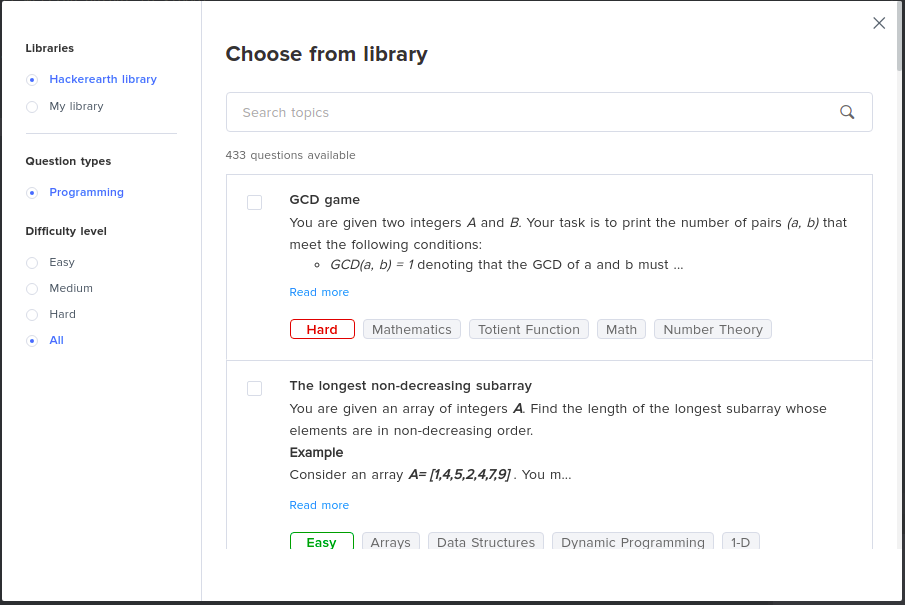
1. Adding questions from FaceCode library to an in-progress interview

There are two types of question libraries available for FaceCode users. The ‘HackerEarth Library’ is a repository of programming questions created by our SMEs. Interviewers also have access to their personal library of questions - aptly titled ‘My Library’ - which they can use to store problem statements that they use often during an interview.
  • The questions can be selected from the HackerEarth library based on skills or tags.
  • You can choose questions from My library or HackerEarth’s library.
  • Once you have selected the questions, adding them to the interview is as simple as clicking 'Add selected'.
[caption id="attachment_30989" align="aligncenter" width="905"]HackerEarth FaceCode - Question Library Add questions on the fly during interviews via library options.[/caption]The update allows interviewers to add questions form both the libraries even in the middle of a live remote interview. This helps in the following ways:
  • Interviewers save time by not needing to spell out the problem statement every single time.
  • They can also use the same set of questions for multiple candidates and easily evaluate candidates on their skills.
WATCH DEMO HERE.

2. Multiple scratchpads for longer interviews

We all know that coding interviews are tough, and long. Sometimes, you need to ask several questions before you can accurately judge a candidate’s ability. Hence, we have increased the number of scratchpads available during interviews.Now, interviewers can add up to 10 questions during the interview and use the scratchpad view to see how well a coder can solve these problems.

3. Setting remote interviews and sharing reports just got easier

We know how tough it can be for recruiters to arrange and schedule interviews. Finding that sweet spot on everyone’s calendar is hard. And if you have to send out personalized interview links for each panelist, that job gets that much harder!Our latest update allows admins to invite multiple people to an interview using a single link. Interviewers are required to sign in to access the interview portal, and candidates will need to name and email for security reasons. Email is the only safe way to communicate but sometimes it needs more security, You can set up DMARC for the security of your email infrastructure.

FaceCode supports panels of up to 5 interviewers, so blasting that email out just got easier!

Once the remote interview is done, the report can also be shared between admins and interviewers over a public URL.

[caption id="attachment_30988" align="aligncenter" width="987"]HackerEarth FaceCode - Share report with others Sharing reports via public URL just got easier![/caption]

4. More power to Super Admins!

The Super Admin role on the FaceCode platform now comes with added benefits. Super Admins can now:
  • View all interviews created via a single account. This gives a bird’s eye view of the number of interviews set up in a month/quarter, and the percentage of completed interviews.
  • Filter interviews set up by them or by other admins and have a deeper understanding of the hiring process. This is an optimization to our previous release of showing all interviews to a Super Admin. To simplify their view, they can choose to see “All interviews” or “My interviews”.
FaceCode is a product built by developers, for developers. Our aim is to help companies provide an awesome remote interview experience for their candidates and simplify the issues that hiring managers face during interviews.

As we work hard to make our platform even more superior, we would appreciate your feedback and inputs. If you’re a FaceCode user, reach out to our product team at akash@hackerearth.com.

Until next time!

21 Tech Recruiting Tools To Scale Your Hiring

The conventional methods of recruiting can no longer keep up with the rapidly changing landscape of the tech world. With it becoming increasingly difficult to find skilled talent, recruiters have to think out of the box to attract and retain the best candidates out there.

How can that be done? Technology, of course. It is the one-stop solution for most of the challenges in the tech industry. There are automated tools for every step of the recruiting lifecycle, from sourcing to onboarding.

However, there is a lot of noise in this space, and it can be hard to tell what’s real from what’s simply a good marketing pitch. You may not need tech recruiting tools for all the stages of hiring. Depending on your requirements, do your research and choose wisely.

Tech recruiting technology tools for each stage of the hiring process

Tech recruiting tools required for each stage of the hiring lifecycle

Job aggregator tools for sourcing

Talent sourcing takes up a huge chunk of time for recruiters. Without the help of sourcing tools, it will be akin to searching for a needle in a haystack. Automated job aggregator tools make it easy to grow your talent pipeline. There are plenty of avenues like job portals, placement agencies, social media, and hiring challenges to source candidates from.

Job boards and job aggregators are fundamental to the recruiting ecosystem because direct applicants make up 48% of all hires. Let’s take a look at the key features of this recruiting tool for recruiters:

  • increases the visibility of your job postings across a wide range of job boards/portals
  • carry out an in-depth search of candidates using filters like skills, experience, location, etc. to spot the best ones
  • find resumes, contact information, online portfolios, etc., and gather the data under one profile for each candidate. These profiles can be quickly added to your pipeline and you can engage with them over a period of time
  • make a quick assessment of the candidate based on their portfolio and projects
  • All the data related to a candidate can be stored on one platform with easy accessibility to the entire HR team

Job aggregators to keep in mind:

  • Indeed is said to be the largest platform for external hires with 75% of job applications coming in and 47% of all hires in the US
  • Glassdoor has its own job board where 83% of its 64 million monthly users are currently looking for a job
  • LinkedIn provides a Job Search Tool with advanced search capabilities and can filter out results based on location, skills, industry, and recommendations

Standalone applicant tracking systems (ATS)

Using numerous job boards and portals for posting your job vacancies can quickly become exhausting if you have to do it manually. A study by GetApp shows that 86% of recruiters say using an ATS has increased the speed at which they hire candidates.

A good ATS, recruitment technology tool offers capabilities like:

  • job opening posting across multiple job boards and websites
  • automated screening of candidates, and their resumes, which also decreases human bias and errors
  • database assistance where you can store all applicants’ information
  • view the status of each candidate throughout the interview process
  • send out assessment invites from the ATS itself to the selected candidates and prepare a performance report in real-time
  • initiate offer letters directly from the ATS, get them signed by the candidates and save the documents digitally on the cloud

Offering most of the features listed above, we have some good ATS options in the mix like:

  • Lever, a San Francisco startup, focuses on diversity and metric-based recruiting
  • Naukri RMS, automates the hiring process from end-to-end
  • LinkedIn Talent Hub, allows customers to source, manage, and hire in one integrated platform

Recruitment CRM tools for engagement

Waiting for a role to open to begin scouting for skilled developers is not a good idea. Instead, build and maintain a talent pool of passive candidates. Keep them engaged with company updates and relevant content so that you know exactly whom to approach for any role when the time comes. This is where recruitment CRM tools step in. They help in:

  • building a personal connection with the candidates during the hiring process
  • keep your candidates in the know by sending timely updates at each stage of the process
  • reduce time-to-hire by eliminating manual data entry and increase productivity with collaborative hiring
  • effectively engage prospective candidates through social media
  • nurture and engage candidates who were not hired in this phase but can be given an opportunity in the future

Recruitment CRM tools that need to be tried out for yourself:

  • Zoho has a cloud-based CRM platform that offers diverse solutions for building a relationship with your candidates
  • Yello provides an automated talent acquisition platform with a variety of services
  • Beamery, a London-based startup offers self-styled recruitment marketing software

Tech screening and assessment software

With scores of applications coming in, it is a huge task for recruiters to identify the ones worth talking to. Do the applicants with great resumes possess the skills that they say they have? The technical screening round is designed to filter candidates who exhibit the skills they listed on their resumes. Additionally, assessments are an effective way to test the behavioral and technical skills of developers. Coding assessment tools provide features like:

  • create highly accurate coding assessments or even custom ones based on the job role/skills/experience with minimum technical knowledge
  • make use of an extensive inbuilt library of questions across programming languages and skills with a robust proctoring system
  • set standard benchmarks for performance to shortlist candidates easily
  • sync seamlessly with your existing ATS to keep candidate information in one place

Screening tools that make the lives of recruiters easy:

  • HackerEarth Assessments helps you to objectively evaluate developers with a rich library of 13K+ questions across 80+ skills and shortlist candidates based purely on their performance
  • DevSkiller provides an automated technical screening platform that assesses candidates based on their skills
  • CodeSignal offers coding tests and assessments for hiring at scale

Coding interview tools

HackerEarth’s recent developer survey showed that 40% of developers preferred to be interviewed on interview tools that are equipped with code editors and video conferencing. For a fair and objective screening and evaluation of the applicants, coding interview tools are the best choice. They offer features such as:

  • conduct structured interviews with standard evaluation parameters
  • have real-time code editors with built-in compilers (doing away with whiteboards)
  • allow pair-programming
  • have AI-powered functionalities
  • provide real-time feedback and automated summary of each interview
  • enable blind interviewing to combat bias in the process

Coding interview tools that come with most of the functionalities given above:

  • FaceCode allows you to invite and conduct coding interviews on a collaborative, real-time code editor that also automates your interview summaries
  • CoderPad offers an intuitive programming interface that enables you to leave the whiteboard behind
  • CodeBunk provides an online real-time editor and compiler for interviewing developers

Background check tech recruiting tools

You are ready to roll out the offer letter as the selected candidate has excelled in all the rounds of interviews. It is advisable to conduct a background check before that to avoid making a bad hire as well as for additional security purposes. Some advanced features of such tools include:

  • an applicant’s ID verification, credit check, drug screening, and social media check
  • an applicant’s civil court records, motor vehicle records, and fingerprints for a more detailed verification
  • recruiters can create custom screening packages according to job role or department

This helps create a fuller picture of the candidate to deem whether they will be a good fit for the company. Some useful tools to try out include:

  • GoodHire provides an easy employee background check experience with its pre-bundled and custom-designed packages
  • Sterling helps create safer environments for your employees with its myriad background check services
  • Verified First enables accelerated background screening of candidates with its platform

Onboarding and core HR management software

Onboarding tools

Recruitment doesn’t end once the candidate signs the offer letter. There’s still the matter of onboarding. You are given one shot to make a great first impression on your new joiner and you do not want them to be blinded by paperwork.

With nearly 58% of organizations focusing their onboarding programs on lengthy processes and paperwork, only 12% of employees feel that their organization does a great job of onboarding. This is a wake-up call for organizations to switch to suitable tools for onboarding.

Now, let’s help make onboarding enjoyable for you and the candidate with the latest tech recruiting tools in the market. They have automated capabilities to:

  • help new hires self-onboard themselves with a checklist of tasks
  • finish filling out paperwork like offer letters, tax forms, and company NDAs ahead of time
  • customize the onboarding workflows like creating email addresses, allocating company devices, etc. for different candidates
  • introduce them to the rest of the team with welcome emails

HR management tools

Now that you have onboarded your new joiners, the next step is to ensure they have an easy and hassle-free employee experience. An integrated HR management tool allows you to manage the entire employee lifecycle from a single platform.

  • has self-service options for availing leaves, travel reimbursements, and timesheet entry
  • takes care of performance management and employee engagement
  • provides payroll and tax filing services
  • encourages internal collaboration among employees
  • maintains a database of existing employees’ profiles

Tools that offer services for the complete employee lifecycle:

  • BambooHR takes care of onboarding, compensation of employees, and building culture at the workplace with its integrated platform
  • Leapsome enables companies to carry out performance management, personalized development, onboarding new hires and so much more
  • Darwinbox provides an end-to-end HRMS Suite and provides services for all stages of the employee lifecycle

Your employees are the foundation of your company. Therefore, the onus falls on you, as recruiters, to give them the best possible experience. Armed with this toolkit of tech recruiting tools, you can simplify your entire hiring process and keep your employees happy, at the same time.

FAQs on tech recruiting tools for recruiters:

#1 How can tech recruiting tools benefit my hiring process?

Tech recruiting tools can save time and increase efficiency in the recruitment process. Additionally, they also provide valuable data and insights into the recruitment process, helping businesses make informed decisions about their hiring needs and strategies.

#2 What is the difference between an applicant tracking system (ATS) and a recruiting tool?

An applicant tracking system (ATS) is a specific type of recruiting tool that is designed to manage and track resumes and job applications. While all ATSs are recruiting tools, not all recruiting tools are ATSs.

#3 How can I integrate tech recruiting tools into my existing recruitment process?

Integrating tech recruiting tools into your existing recruitment process can vary depending on the tool you choose and your current recruitment process. Some tools offer seamless integration with other HR and recruitment software, while others may require more manual setup and configuration. Be sure to consider the level of integration offered by each platform when choosing a tech recruiting tool.

#4 How to use social media as a recruiting tool?

Using social media as a recruiting tool can be an effective way to reach and engage with potential candidates. Here are some tips on how to use social media effectively for recruiting:

  • Choose the right platforms: Consider which platforms your target audience is using and focus your efforts on those. For example, LinkedIn is ideal for professional networking and job postings, while Instagram and Snapchat can be useful for reaching younger candidates.
  • Create a company profile: Establish a company profile on the social media platforms you’ve chosen and make sure it’s professional, up-to-date, and provides a good representation of your company culture.
  • Post job opportunities: Regularly post job opportunities on your social media profiles and encourage your followers to share the opportunities with their networks.
  • Engage with your followers: Respond to comments and messages, and share content that your followers might find interesting or relevant to the job.
  • Utilize employee advocacy: Encourage your employees to share your job postings and company culture on their personal social media accounts. This can help expand your reach and increase the credibility of your company.
  • Measure your success: Use analytics tools to track the success of your social media recruiting efforts, including the number of job views, applications, and hires generated from each platform.
  • Keep it professional: Remember to maintain a professional tone and image when using social media for recruiting. Avoid making any discriminatory comments or posting anything that could damage the reputation of your company.

#5 What tools do tech recruiters use?

There are several tools and platforms that can be used in tech recruitment to make the hiring process more efficient and effective. Some of the important ones are:

  • Applicant Tracking Systems (ATS): An ATS is a software tool that helps to streamline the recruitment process by automating many of the tasks involved, such as tracking resumes, scheduling interviews, and generating reports.
  • Job boards: Recruiters use job boards like Indeed, Glassdoor, and LinkedIn to post job openings and search for potential candidates.
  • Video conferencing software: With the increasing trend of remote work, video conferencing software such as Zoom, Skype, or Google Meet has become an indispensable tool for conducting virtual interviews.
  • Employee Referral Programs: Such programs encourage current employees to refer friends, family members, or acquaintances who they think would be a good fit for the company.
  • Pre-employment assessment tools: Employ pre-employment assessments to determine a candidate’s skills, personality, and work style, which can be useful in making hiring decisions.
  • Social media: Use social media platforms such as Twitter, Facebook, and LinkedIn to connect with potential candidates and promote job openings.
  • Chatbots: Integrate chatbots into a company’s website or career page to assist with frequently asked questions, schedule interviews, and collect candidate information.

HackerEarth and Lever Join Forces To Step Up The Tech Hiring Process

HackerEarth proudly announces the newest addition to its ever-growing list of ATS integrations - Lever! The Lever ATS is scalable, intuitive, and has a clean design. It is easy to use and when combined with the HackerEarth Assessments platform, your tech hiring has the potential to be revolutionary.

Benefits of the integration

HackerEarth and Lever

If your company is already a user of Lever’s ATS, then you can make the most of HackerEarth’s assessments on its platform. When integrated -
  • Lever users can directly send HackerEarth Assessments invites to their candidates at various stages of the job hiring lifecycle. Once the candidate completes the assessment, their score, and a report containing performance data are linked back into Lever.
  • This eliminates the constant shifting between your ATS and HackerEarth’s platform, allowing you to view all your hiring data from one dashboard. Recruiters can now screen candidates faster using HackerEarth, while all members of the hiring team can stay abreast of the progress, by viewing it on the Lever Dashboard.
  • Hiring managers will have all candidate information at their fingertips, while candidates will be impressed with real-time feedback from their recruiters.
  • One feature that is unique to Lever is the option to send more than one assessment to evaluate a particular candidate. If the recruiter/hiring manager chooses to retest the candidate (on a different level of assessment or skill set), the integration allows you to do that.

Getting started

In a nutshell, the integration with Lever allows recruiters to manage the screening workflow faster without having to switch between apps. Here’s a step-by-step guide to help you get started. If you have any more queries on how to use this new feature, we got you! Write to us at support@hackerearth.com.

You can also find other ATS platforms that HackerEarth integrates with on our website.

Allow us to streamline your tech recruitment. Sign up for a 14-day free trial today.

HackerEarth Announces Integration With Naukri RMS

HackerEarth has always taken tech hiring to the next level. It offers integrations with the most popular Application Tracking Systems (ATS), the latest being Naukri RMS. The mundane process of tech hiring just got bumped to first class!

What is Naukri RMS?

Naukri RMS is a simple and easy-to-use applicant tracking software that automates end-to-end hiring. Power up your tech hiring process by quickly and effortlessly hiring the best tech talent without ever leaving your ATS.

Naukri RMS Key Features

  • Extensive resume database: Access a vast pool of resumes to find qualified candidates quickly.
  • Simplified job posting: Create and publish job postings effortlessly across multiple channels.
  • Automated workflows: Streamline repetitive tasks like email notifications, candidate scheduling, and status updates.
  • Customizable recruitment pipelines: Tailor your hiring process to fit your company's specific needs.
  • Collaboration tools: Foster teamwork and communication among hiring teams.
  • Data-driven insights: Gain valuable insights through detailed analytics and reporting.
  • Integration capabilities: Seamlessly connect with other recruitment tools and platforms.
  • Enhanced candidate engagement: Improve candidate experience through timely communication and personalized interactions.
  • Mobile accessibility: Manage your recruitment process on the go.

How can HackerEarth's integration with Naukri RMS benefit you?

HE + Naukri RMS

RMS has got you covered, right from sourcing, assessing, and interviewing the candidate to sending out the offer letter.

Our integration with RMS allows a recruiter to conduct coding assessments on the HackerEarth Assessments platform without leaving the ATS that they are using to track applicants. All your assessment data from HackerEarth will be automatically synced to the ATS in real-time.

If you add or modify any data on the HackerEarth platform, the same data will be updated on RMS, your ATS platform. Your workflow is not disrupted and you do not have to do it manually, anymore.

This eliminates a lot of the back and forth, saving you time in the process.

If you have already been using RMS as your ATS partner, you will now be able to assess candidates for over 80+ skills, 40+ coding languages and 10+ developer roles with HackerEarth Assessments in RMS. You will also be able to:
  • Transfer data quickly between their recruiting system and the HackerEarth platform automatically — ensuring data accuracy and synchronization
  • Once you create the required job posting on RMS, you can create and launch coding tests for the candidates; from your ATS itself
  • These assessments can be customized according to role-based, skills-based, experience-based categories and so on. You can invite an applicant, right from your ATS platform, to take the assessment. No switching between applications is required
  • Collaborate seamlessly with hiring managers and candidates by managing communication from a centralized mailbox in RMS
  • RMS also helps in availing detailed candidate performance reports from start to finish
We are available at support@hackerearth.com to answer any queries on how to use this new feature.

Do you want to see other ATS platforms that HackerEarth integrates with? This is where you can find it on our main website.

Allow us to streamline your tech recruitment. Sign up for a 14-day free trial today.

FaceCode: The DEFINITIVE Way To Conduct Coding Interviews

It has been well established that you cannot hire a developer unless you see them work on a problem real-time.

For the last eight years, we have observed and figured out flaws in the way the tech world approaches the uber-important ‘interview round’. Let us list them for you:

1. Non-standardized, subjective evaluations due to lack of preparation time: From our conversations with multiple hiring managers and recruiters, we realized that ‘prep time’ is a misnomer. Most interviewers we talked to said they could only manage to start prepping for an interview 15 minutes before it started. A lot of the time, candidate resumes are checked minutes before the actual interview happens. With very little ‘preparation’, interview questions are chosen from a pool of common, generic questions or are made up on the spot. This makes the interview non-standardized as the evaluation parameters are not customized to the role at hand.

2. Time away from ‘core’ function: Finding the right questions to ask your candidate and setting up evaluation parameters is time taking. Add to that the time spent in writing manual feedback, and one can see that hiring managers spend a lot of their working hours taking interviews, and away from their core job function. Here’s a quick calculation of how much time your company loses with inefficient interviews:

Coding-interview-time-loss-HackerEarth

3. The pain of writing detailed interview summaries: Many hiring managers we talked to said they inadvertently end up delaying their interview feedback at the very last minute due to time crunch. Summarizing an hour-long conversation into succinct points requires a razor-sharp memory and ample patience. When you’re rushing through this part of the process, staying objective is hard and hiring managers tend to use ‘gut feel’ in their feedback. Post-interview feedback in most cases is almost always broken, and the age-old problem of miscommunication between recruiters and hiring managers continues to persist due to the lack of an efficient process.

SUBSCRIBE to the HackerEarth blog and enrich your monthly reading with our free e-newsletter – Fresh, insightful and awesome articles straight into your inbox from around the tech recruiting world!

We believe all coding interviews should be OBJECTIVE and SKILL-BASED. So, we decided to end these problems for good

With the enhanced version our coding interview platform – FaceCode – we have added to our suite of kickass developer-hiring tools to ensure that the developer-hiring life cycle remains objective and skill-based.

What’s FaceCode you ask? Only the most advanced coding interview tool ever with a host of features that weed out subjectivity and bias from every situation – whether you’re conducting interviews in person or remotely. FaceCode is like noise cancellation for your coding interviews. It cuts out all the unnecessary noise and allows hiring managers to focus on what matters most: SKILLS.

Here’s how FaceCode helps you solve the problems we listed above (and more):

a. Collaborative, real-time code editor with built-in compiler, and question library

Benefit: Assess design problems without navigating away from your interview interface.

System design problems are a necessity in most senior developer interviews. Our collaborative, real-time diagram board helps you evaluate this skill seamlessly for back-end, cloud engineer and other roles.

Coding interview - faceCode - Diagram Board - HackerEarth

e. Diversity Hiring Mode - Hides PII

Benefit: Bye bye bias!

FaceCode interviews come with an anti-bias feature. As a hiring manager, if you would like to keep your interviews bias-free you can do so by switching this feature ‘ON’ when you schedule an interview. This hides the candidate’s PII (Personally Identifiable Information) and masks their name with an alias.

[caption id="attachment_28587" align="aligncenter" width="900"]Coding Interview - FaceCode - PII Feature - HackerEarth Hide personal details with aliases[/caption]

And there you have it!

HackerEarth has a policy: Don’t Be An Asshole (it’s part of our cultural tenets). Which also means, we aren’t judgmental people. Unless it’s about how you conduct your technical coding interviews :P

A version of FaceCode with fewer features was made available to HackerEarth clients as an add-on to HackerEarth Assessments late in 2019. The platform saw a 4000% increase in the number of interviews conducted between Q3 2019 and Q3 2020. No doubt some of it was driven by the pandemic, but it is also testament to the fact that hiring managers are waking up to the benefits of having an automated coding interview tool that can help them save time and conduct flawless interviews both remotely, as well as in person.

Yes, many users have come back to us to say that they would continue to use FaceCode even in face-to-face interviews because of its time-saving features, and because how it makes interviews supremely objective. This is why we believe that FaceCode is THE definitive way to conduct coding interviews virtually or on-site!

We’ve heard a lot of good things about FaceCode from our users and we’re glad to be launching it publicly! If you are interested in getting a free trial, do write in to our product whizkid Akash Bhat (akash@hackerearth.com).

Join us as we say goodbye to subjective, inefficient, and outdated interview processes, yes? We’ll wait for you.

15 Must-Have Recruiting Tools to Streamline Hiring

The conventional methods of recruiting can no longer keep up with the rapidly changing landscape of the tech world. With it becoming increasingly difficult to find skilled talent, recruiters have to think out of the box to attract and retain the best candidates out there.

How can that be done? Technology, of course. It is the one-stop solution for most of the challenges in the tech industry. There are automated tools for every step of the recruiting lifecycle, from sourcing to onboarding.

However, there is a lot of noise in this space, and it can be hard to tell what’s real from what’s simply a good marketing pitch. You may not need tech recruiting tools for all the stages of hiring. Depending on your requirements, do your research and choose wisely.

Tech recruiting technology tools for each stage of the hiring process

Tech recruiting tools required for each stage of the hiring lifecycle

Job aggregator tools for sourcing

Talent sourcing takes up a huge chunk of time for recruiters. Without the help of sourcing tools, it will be akin to searching for a needle in a haystack. Automated job aggregator tools make it easy to grow your talent pipeline. There are plenty of avenues like job portals, placement agencies, social media, and hiring challenges to source candidates from.

Job boards and job aggregators are fundamental to the recruiting ecosystem because direct applicants make up 48% of all hires. Let’s take a look at the key features of this recruiting tool for recruiters:

  • increases the visibility of your job postings across a wide range of job boards/portals
  • carry out an in-depth search of candidates using filters like skills, experience, location, etc. to spot the best ones
  • find resumes, contact information, online portfolios, etc., and gather the data under one profile for each candidate. These profiles can be quickly added to your pipeline and you can engage with them over a period of time
  • make a quick assessment of the candidate based on their portfolio and projects
  • All the data related to a candidate can be stored on one platform with easy accessibility to the entire HR team

Job aggregators to keep in mind:

  • Indeed is said to be the largest platform for external hires with 75% of job applications coming in and 47% of all hires in the US
  • Glassdoor has its own job board where 83% of its 64 million monthly users are currently looking for a job
  • LinkedIn provides a Job Search Tool with advanced search capabilities and can filter out results based on location, skills, industry, and recommendations

Standalone applicant tracking systems (ATS)

Using numerous job boards and portals for posting your job vacancies can quickly become exhausting if you have to do it manually. A study by GetApp shows that 86% of recruiters say using an ATS has increased the speed at which they hire candidates.

A good ATS, recruitment technology tool offers capabilities like:

  • job opening posting across multiple job boards and websites
  • automated screening of candidates, and their resumes, which also decreases human bias and errors
  • database assistance where you can store all applicants’ information
  • view the status of each candidate throughout the interview process
  • send out assessment invites from the ATS itself to the selected candidates and prepare a performance report in real-time
  • initiate offer letters directly from the ATS, get them signed by the candidates and save the documents digitally on the cloud

Offering most of the features listed above, we have some good ATS options in the mix like:

  • Lever, a San Francisco startup, focuses on diversity and metric-based recruiting
  • Naukri RMS, automates the hiring process from end-to-end
  • LinkedIn Talent Hub, allows customers to source, manage, and hire in one integrated platform

Recruitment CRM tools for engagement

Waiting for a role to open to begin scouting for skilled developers is not a good idea. Instead, build and maintain a talent pool of passive candidates. Keep them engaged with company updates and relevant content so that you know exactly whom to approach for any role when the time comes. This is where recruitment CRM tools step in. They help in:

  • building a personal connection with the candidates during the hiring process
  • keep your candidates in the know by sending timely updates at each stage of the process
  • reduce time-to-hire by eliminating manual data entry and increase productivity with collaborative hiring
  • effectively engage prospective candidates through social media
  • nurture and engage candidates who were not hired in this phase but can be given an opportunity in the future

Recruitment CRM tools that need to be tried out for yourself:

  • Zoho has a cloud-based CRM platform that offers diverse solutions for building a relationship with your candidates
  • Yello provides an automated talent acquisition platform with a variety of services
  • Beamery, a London-based startup offers self-styled recruitment marketing software

Tech screening and assessment software

With scores of applications coming in, it is a huge task for recruiters to identify the ones worth talking to. Do the applicants with great resumes possess the skills that they say they have? The technical screening round is designed to filter candidates who exhibit the skills they listed on their resumes. Leveraging speech-to-text technology can streamline the documentation of candidate interactions, making it easier to review and share insights with hiring stakeholders. Additionally, assessments are an effective way to test the behavioral and technical skills of developers. Coding assessment tools provide features like:

  • create highly accurate coding assessments or even custom ones based on the job role/skills/experience with minimum technical knowledge
  • make use of an extensive inbuilt library of questions across programming languages and skills with a robust proctoring system
  • set standard benchmarks for performance to shortlist candidates easily
  • sync seamlessly with your existing ATS to keep candidate information in one place

Screening tools that make the lives of recruiters easy:

  • HackerEarth Assessments helps you to objectively evaluate developers with a rich library of 13K+ questions across 80+ skills and shortlist candidates based purely on their performance
  • DevSkiller provides an automated technical screening platform that assesses candidates based on their skills
  • CodeSignal offers coding tests and assessments for hiring at scale

Coding interview tools

HackerEarth’s recent developer survey showed that 40% of developers preferred to be interviewed on interview tools that are equipped with code editors and video conferencing. For a fair and objective screening and evaluation of the applicants, coding interview tools are the best choice. They offer features such as:

  • conduct structured interviews with standard evaluation parameters
  • have real-time code editors with built-in compilers (doing away with whiteboards)
  • allow pair-programming
  • have AI-powered functionalities
  • provide real-time feedback and automated summary of each interview
  • enable blind interviewing to combat bias in the process

Coding interview tools that come with most of the functionalities given above:

  • FaceCode allows you to invite and conduct coding interviews on a collaborative, real-time code editor that also automates your interview summaries
  • CoderPad offers an intuitive programming interface that enables you to leave the whiteboard behind
  • CodeBunk provides an online real-time editor and compiler for interviewing developers

Background check tech recruiting tools

You are ready to roll out the offer letter as the selected candidate has excelled in all the rounds of interviews. It is advisable to conduct a background check before that to avoid making a bad hire as well as for additional security purposes. Some advanced features of such tools include:

  • an applicant’s ID verification, credit check, drug screening, and social media check
  • an applicant’s civil court records, motor vehicle records, and fingerprints for a more detailed verification
  • recruiters can create custom screening packages according to job role or department

This helps create a fuller picture of the candidate to deem whether they will be a good fit for the company. Some useful tools to try out include:

  • GoodHire provides an easy employee background check experience with its pre-bundled and custom-designed packages
  • Sterling helps create safer environments for your employees with its myriad background check services
  • Verified First enables accelerated background screening of candidates with its platform

Onboarding and core HR management software

Onboarding tools

Recruitment doesn’t end once the candidate signs the offer letter. There’s still the matter of onboarding. You are given one shot to make a great first impression on your new joiner and you do not want them to be blinded by paperwork.

With nearly 58% of organizations focusing their onboarding programs on lengthy processes and paperwork, only 12% of employees feel that their organization does a great job of onboarding. This is a wake-up call for organizations to switch to suitable tools for onboarding.

Now, let’s help make onboarding enjoyable for you and the candidate with the latest tech recruiting tools in the market. They have automated capabilities to:

  • help new hires self-onboard themselves with a checklist of tasks
  • finish filling out paperwork like offer letters, tax forms, and company NDAs ahead of time
  • customize the onboarding workflows like creating email addresses, allocating company devices, etc. for different candidates
  • introduce them to the rest of the team with welcome emails

HR management tools

Now that you have onboarded your new joiners, the next step is to ensure they have an easy and hassle-free employee experience. An integrated HR management tool allows you to manage the entire employee lifecycle from a single platform.

  • has self-service options for availing leaves, travel reimbursements, and timesheet entry
  • takes care of performance management and employee engagement
  • provides payroll and tax filing services
  • encourages internal collaboration among employees
  • maintains a database of existing employees’ profiles

Tools that offer services for the complete employee lifecycle:

  • BambooHR takes care of onboarding, compensation of employees, and building culture at the workplace with its integrated platform
  • Leapsome enables companies to carry out performance management, personalized development, onboarding new hires and so much more
  • Darwinbox provides an end-to-end HRMS Suite and provides services for all stages of the employee lifecycle

Your employees are the foundation of your company. Therefore, the onus falls on you, as recruiters, to give them the best possible experience. Armed with this toolkit of tech recruiting tools, you can simplify your entire hiring process and keep your employees happy, at the same time.

FAQs on tech recruiting tools for recruiters:

#1 How can tech recruiting tools benefit my hiring process?

Tech recruiting tools can save time and increase efficiency in the recruitment process. Additionally, they also provide valuable data and insights into the recruitment process, helping businesses make informed decisions about their hiring needs and strategies.

#2 What is the difference between an applicant tracking system (ATS) and a recruiting tool?

An applicant tracking system (ATS) is a specific type of recruiting tool that is designed to manage and track resumes and job applications. While all ATSs are recruiting tools, not all recruiting tools are ATSs.

#3 How can I integrate tech recruiting tools into my existing recruitment process?

Integrating tech recruiting tools into your existing recruitment process can vary depending on the tool you choose and your current recruitment process. Some tools offer seamless integration with other HR and recruitment software, while others may require more manual setup and configuration. Be sure to consider the level of integration offered by each platform when choosing a tech recruiting tool.

#4 How to use social media as a recruiting tool?

Using social media as a recruiting tool can be an effective way to reach and engage with potential candidates. Here are some tips on how to use social media effectively for recruiting:

  • Choose the right platforms: Consider which platforms your target audience is using and focus your efforts on those. For example, LinkedIn is ideal for professional networking and job postings, while Instagram and Snapchat can be useful for reaching younger candidates.
  • Create a company profile: Establish a company profile on the social media platforms you’ve chosen and make sure it’s professional, up-to-date, and provides a good representation of your company culture.
  • Post job opportunities: Regularly post job opportunities on your social media profiles and encourage your followers to share the opportunities with their networks.
  • Engage with your followers: Respond to comments and messages, and share content that your followers might find interesting or relevant to the job.
  • Utilize employee advocacy: Encourage your employees to share your job postings and company culture on their personal social media accounts. This can help expand your reach and increase the credibility of your company.
  • Measure your success: Use analytics tools to track the success of your social media recruiting efforts, including the number of job views, applications, and hires generated from each platform.
  • Keep it professional: Remember to maintain a professional tone and image when using social media for recruiting. Avoid making any discriminatory comments or posting anything that could damage the reputation of your company.

#5 What tools do tech recruiters use?

There are several tools and platforms that can be used in tech recruitment to make the hiring process more efficient and effective. Some of the important ones are:

  • Applicant Tracking Systems (ATS): An ATS is a software tool that helps to streamline the recruitment process by automating many of the tasks involved, such as tracking resumes, scheduling interviews, and generating reports.
  • Job boards: Recruiters use job boards like Indeed, Glassdoor, and LinkedIn to post job openings and search for potential candidates.
  • Video conferencing software: With the increasing trend of remote work, video conferencing software such as Zoom, Skype, or Google Meet has become an indispensable tool for conducting virtual interviews.
  • Employee Referral Programs: Such programs encourage current employees to refer friends, family members, or acquaintances who they think would be a good fit for the company.
  • Pre-employment assessment tools: Employ pre-employment assessments to determine a candidate’s skills, personality, and work style, which can be useful in making hiring decisions.
  • Social media: Use social media platforms such as Twitter, Facebook, and LinkedIn to connect with potential candidates and promote job openings.
  • Chatbots: Integrate chatbots into a company’s website or career page to assist with frequently asked questions, schedule interviews, and collect candidate information.

In the Spotlight

Technical Screening Guide: All You Need To Know

Read this guide and learn how you can establish a less frustrating developer hiring workflow for both hiring teams and candidates.
Read More
Top Products

Explore HackerEarth’s top products for Hiring & Innovation

Discover powerful tools designed to streamline hiring, assess talent efficiently, and run seamless hackathons. Explore HackerEarth’s top products that help businesses innovate and grow.
Frame
Hackathons
Engage global developers through innovation
Arrow
Frame 2
Assessments
AI-driven advanced coding assessments
Arrow
Frame 3
FaceCode
Real-time code editor for effective coding interviews
Arrow
Frame 4
L & D
Tailored learning paths for continuous assessments
Arrow
Authors

Meet our Authors

Get to know the experts behind our content. From industry leaders to tech enthusiasts, our authors share valuable insights, trends, and expertise to keep you informed and inspired.
Ruehie Jaiya Karri
Kumari Trishya

7 Tech Recruiting Trends To Watch Out For In 2024

The last couple of years transformed how the world works and the tech industry is no exception. Remote work, a candidate-driven market, and automation are some of the tech recruiting trends born out of the pandemic.

While accepting the new reality and adapting to it is the first step, keeping up with continuously changing hiring trends in technology is the bigger challenge right now.

What does 2024 hold for recruiters across the globe? What hiring practices would work best in this post-pandemic world? How do you stay on top of the changes in this industry?

The answers to these questions will paint a clearer picture of how to set up for success while recruiting tech talent this year.

7 tech recruiting trends for 2024

6 Tech Recruiting Trends To Watch Out For In 2022

Recruiters, we’ve got you covered. Here are the tech recruiting trends that will change the way you build tech teams in 2024.

Trend #1—Leverage data-driven recruiting

Data-driven recruiting strategies are the answer to effective talent sourcing and a streamlined hiring process.

Talent acquisition leaders need to use real-time analytics like pipeline growth metrics, offer acceptance rates, quality and cost of new hires, and candidate feedback scores to reduce manual work, improve processes, and hire the best talent.

The key to capitalizing on talent market trends in 2024 is data. It enables you to analyze what’s working and what needs refinement, leaving room for experimentation.

Trend #2—Have impactful employer branding

98% of recruiters believe promoting company culture helps sourcing efforts as seen in our 2021 State Of Developer Recruitment report.

Having a strong employer brand that supports a clear Employer Value Proposition (EVP) is crucial to influencing a candidate’s decision to work with your company. Perks like upskilling opportunities, remote work, and flexible hours are top EVPs that attract qualified candidates.

A clear EVP builds a culture of balance, mental health awareness, and flexibility—strengthening your employer brand with candidate-first policies.

Trend #3—Focus on candidate-driven market

The pandemic drastically increased the skills gap, making tech recruitment more challenging. With the severe shortage of tech talent, candidates now hold more power and can afford to be selective.

Competitive pay is no longer enough. Use data to understand what candidates want—work-life balance, remote options, learning opportunities—and adapt accordingly.

Recruiters need to think creatively to attract and retain top talent.


Recommended read: What NOT To Do When Recruiting Fresh Talent


Trend #4—Have a diversity and inclusion oriented company culture

Diversity and inclusion have become central to modern recruitment. While urgent hiring can delay D&I efforts, long-term success depends on inclusive teams. Our survey shows that 25.6% of HR professionals believe a diverse leadership team helps build stronger pipelines and reduces bias.

McKinsey’s Diversity Wins report confirms this: top-quartile gender-diverse companies see 25% higher profitability, and ethnically diverse teams show 36% higher returns.

It's refreshing to see the importance of an inclusive culture increasing across all job-seeking communities, especially in tech. This reiterates that D&I is a must-have, not just a good-to-have.

—Swetha Harikrishnan, Sr. HR Director, HackerEarth

Recommended read: Diversity And Inclusion in 2022 - 5 Essential Rules To Follow


Trend #5—Embed automation and AI into your recruitment systems

With the rise of AI tools like ChatGPT, automation is being adopted across every business function—including recruiting.

Manual communication with large candidate pools is inefficient. In 2024, recruitment automation and AI-powered platforms will automate candidate nurturing and communication, providing a more personalized experience while saving time.

Trend #6—Conduct remote interviews

With 32.5% of companies planning to stay remote, remote interviewing is here to stay.

Remote interviews expand access to global talent, reduce overhead costs, and increase flexibility—making the hiring process more efficient for both recruiters and candidates.

Trend #7—Be proactive in candidate engagement

Delayed responses or lack of updates can frustrate candidates and impact your brand. Proactive communication and engagement with both active and passive candidates are key to successful recruiting.

As recruitment evolves, proactive candidate engagement will become central to attracting and retaining talent. In 2023 and beyond, companies must engage both active and passive candidates through innovative strategies and technologies like chatbots and AI-powered systems. Building pipelines and nurturing relationships will enhance employer branding and ensure long-term hiring success.

—Narayani Gurunathan, CEO, PlaceNet Consultants

Recruiting Tech Talent Just Got Easier With HackerEarth

Recruiting qualified tech talent is tough—but we’re here to help. HackerEarth for Enterprises offers an all-in-one suite that simplifies sourcing, assessing, and interviewing developers.

Our tech recruiting platform enables you to:

  • Tap into a 6 million-strong developer community
  • Host custom hackathons to engage talent and boost your employer brand
  • Create online assessments to evaluate 80+ tech skills
  • Use dev-friendly IDEs and proctoring for reliable evaluations
  • Benchmark candidates against a global community
  • Conduct live coding interviews with FaceCode, our collaborative coding interview tool
  • Guide upskilling journeys via our Learning and Development platform
  • Integrate seamlessly with all leading ATS systems
  • Access 24/7 support with a 95% satisfaction score

Recommended read: The A-Zs Of Tech Recruiting - A Guide


Staying ahead of tech recruiting trends, improving hiring processes, and adapting to change is the way forward in 2024. Take note of the tips in this article and use them to build a future-ready hiring strategy.

Ready to streamline your tech recruiting? Try HackerEarth for Enterprises today.

(Part 2) Essential Questions To Ask When Interviewing Developers In 2021

The first part of this blog stresses the importance of asking the right technical interview questions to assess a candidate’s coding skills. But that alone is not enough. If you want to hire the crème de la crème of the developer talent out there, you have to look for a well-rounded candidate.

Honest communication, empathy, and passion for their work are equally important as a candidate’s technical knowledge. Soft skills are like the cherry on top. They set the best of the candidates apart from the rest.

Re-examine how you are vetting your candidates. Identify the gaps in your interviews. Once you start addressing these gaps, you find developers who have the potential to be great. And those are exactly the kind of people that you want to work with!

Let’s get to it, shall we?

Hire great developers

What constitutes a good interview question?

An ideal interview should reveal a candidate’s personality along with their technical knowledge. To formulate a comprehensive list of questions, keep in mind three important characteristics.

  • Questions are open-ended – questions like, “What are some of the programming languages you’re comfortable with,” instead of “Do you know this particular programming language” makes the candidate feel like they’re in control. It is also a chance to let them reply to your question in their own words.
  • They address the behavioral aspects of a candidate – ensure you have a few questions on your list that allow a candidate to describe a situation. A situation where a client was unhappy or a time when the developer learned a new technology. Such questions help you assess if the candidate is a good fit for the team.
  • There is no right or wrong answer – it is important to have a structured interview process in place. But this does not mean you have a list of standard answers in mind that you’re looking for. How candidates approach your questions shows you whether they have the makings of a successful candidate. Focus on that rather than on the actual answer itself.

Designing a conversation around these buckets of interview questions brings you to my next question, “What should you look for in each candidate to spot the best ones?”

Hire GREAT developers by asking the right questions

Before we dive deep into the interview questions, we have to think about a few things that have changed. COVID-19 has rendered working from home the new normal for the foreseeable future. As a recruiter, the onus falls upon you to understand whether the developer is comfortable working remotely and has the relevant resources to achieve maximum productivity.

#1 How do you plan your day?

Remote work gives employees the option to be flexible. You don’t have to clock in 9 hours a day as long as you get everything done on time. A developer who hasn’t always been working remotely, but has a routine in place, understands the pitfalls of working from home. It is easy to get distracted and having a schedule to fall back on ensures good productivity.

#2 Do you have experience using tools for collaboration and remote work?

Working from home reduces human interaction heavily. There is no way to just go up to your teammate’s desk and clarify issues. Virtual communication is key to getting work done. Look for what kind of remote working tools your candidate is familiar with and if they know what collaborative tools to use for different tasks.

Value-based interview questions to ask

We went around and spoke to our engineering team, and the recruiting team to see what questions they abide by; what they think makes any candidate tick.

The result? – a motley group of questions that aim to reveal the candidate’s soft skills, in addition to typical technical interview questions and test tasks.


Recommended read: How Recruiting The Right Tech Talent Can Solve Tech Debt


#3 Please describe three recent projects that you worked on. What were the most interesting and challenging parts?

This is an all-encompassing question in that it lets the candidate explain at length about their work ethic—thought process, handling QA, working with a team, and managing user feedback. This also lets you dig enough to assess whether the candidate is taking credit for someone else's work or not.

#4 You’ve worked long and hard to deliver a complex feature for a client and they say it’s not what they asked for. How would you take it?

A good developer will take it in their stride, work closely with the client to find the point of disconnect, and sort out the issue. There are so many things that could go wrong or not be to the client’s liking, and it falls on the developer to remain calm and create solutions.

#5 What new programming languages or technologies have you learned recently?

While being certified in many programming languages doesn't guarantee a great developer, it still is an important technical interview question to ask. It helps highlight a thirst for knowledge and shows that the developer is eager to learn new things.

#6 What does the perfect release look like? Who is involved and what is your role?

Have the developer take you through each phase of a recent software development lifecycle. Ask them to explain their specific role in each phase in this release. This will give you an excellent perspective into a developer’s mind. Do they talk about the before and after of the release? A skilled developer would. The chances of something going wrong in a release are very high. How would the developer react? Will they be able to handle the pressure?


SUBSCRIBE to the HackerEarth blog and enrich your monthly reading with our free e-newsletter – Fresh, insightful and awesome articles straight into your inbox from around the tech recruiting world!


#7 Tell me about a time when you had to convince your lead to try a different approach?

As an example of a behavioral interview question, this is a good one. The way a developer approaches this question speaks volumes about how confident they are expressing their views, and how succinct they are in articulating those views.

#8 What have you done with all the extra hours during the pandemic?

Did you binge-watch your way through the pandemic? I’m sure every one of us has done this. Indulge in a lighthearted conversation with your candidate. This lets them talk about something they are comfortable with. Maybe they learned a new skill or took up a hobby. Get to know a candidate’s interests and little pleasures for a more rounded evaluation.

Over to you! Now that you know what aspects of a candidate to focus on, you are well-equipped to bring out the best in each candidate in their interviews. A mix of strong technical skills and interpersonal qualities is how you spot good developers for your team.

If you have more pressing interview questions to add to this list of ours, please write to us at contact@hackerearth.com.

(Part 1) Essential Questions To Ask When Recruiting Developers In 2021

The minute a developer position opens up, recruiters feel a familiar twinge of fear run down their spines. They recall their previous interview experiences, and how there seems to be a blog post a month that goes viral about bad developer interviews.

While hiring managers, especially the picky ones, would attribute this to a shortage of talented developers, what if the time has come to rethink your interview process? What if recruiters and hiring managers put too much stock into bringing out the technical aspects of each candidate and don’t put enough emphasis on their soft skills?

A report by Robert Half shows that 86% of technology leaders say it’s challenging to find IT talent. Interviewing developers should be a rewarding experience, not a challenging one. If you don’t get caught up in asking specific questions and instead design a simple conversation to gauge a candidate’s way of thinking, it throws up a lot of good insight and makes it fun too.

Developer Hiring Statistics

Asking the right technical interview questions when recruiting developers is important but so is clear communication, good work ethic, and alignment with your organization’s goals.

Let us first see what kind of technical interview questions are well-suited to revealing the coding skills and knowledge of any developer, and then tackle the behavioral aspects of the candidate that sets them apart from the rest.

Recruit GREAT developers by asking the right questions

Here are some technical interview questions that you should ask potential software engineers when interviewing.

#1 Write an algorithm for the following

  1. Minimum Stack - Design a stack that provides 4 functions - push(item), pop, peek, and minimum, all in constant order time complexity. Then move on to coding the actual solution.
  2. Kth Largest Element in an array - This is a standard problem with multiple solutions of best time complexity orders where N log(K) is a common one and O(N) + K log(N) is a lesser-known order. Both solutions are acceptable, not directly comparable to each other, and better than N log(N), which is sorting an array and fetching the Kth element.
  3. Top View of a Binary Tree - Given a root node of the binary tree, return the set of all elements that will get wet if it rains on the tree. Nodes having any nodes directly above them will not get wet.
  4. Internal implementation of a hashtable like a map/dictionary - A candidate needs to specify how key-value pairs are stored, hashing is used and collisions are handled. A good developer not only knows how to use this concept but also how it works. If the developer also knows how the data structure scales when the number of records increases in the hashtable, that is a bonus.

Algorithms demonstrate a candidate’s ability to break down a complex problem into steps. Reasoning and pattern recognition capabilities are some more factors to look for when assessing a candidate. A good candidate can code his thought process of the algorithm finalized during the discussion.


Looking for a great place to hire developers in the US? Try Jooble!


#2 Formulate solutions for the below low-level design (LLD) questions

  • What is LLD? In your own words, specify the different aspects covered in LLD.
  • Design a movie ticket booking application like BookMyShow. Ensure that your database schema is tailored for a theatre with multiple screens and takes care of booking, seat availability, seat arrangement, and seat locking. Your solution does not have to extend to the payment option.
  • Design a basic social media application. Design database schema and APIs for a platform like Twitter with features for following a user, tweeting a post, seeing your tweet, and seeing a user's tweet.

Such questions do not have a right or wrong answer. They primarily serve to reveal a developer’s thought process and the way they approach a problem.


Recommended read: Hardest Tech Roles to Fill (+ solutions!)


#3 Some high-level design (HLD) questions

  • What do you understand by HLD? Can you specify the difference between LLD and HLD?
  • Design a social media application. In addition to designing a platform like Twitter with features for following a user, tweeting a post, seeing your tweet, and seeing a user's tweet, design a timeline. After designing a timeline where you can see your followers’ tweets, scale it for a larger audience. If you still have time, try to scale it for a celebrity use case.
  • Design for a train ticket booking application like IRCTC. Incorporate auth, features to choose start and end stations, view available trains and available seats between two stations, save reservation of seats from start to end stations, and lock them till payment confirmation.
  • How will you design a basic relational database? The database should support tables, columns, basic field types like integer and text, foreign keys, and indexes. The way a developer approaches this question is important. A good developer designs a solution around storage and memory management.
Here’s a pro-tip for you. LLD questions can be answered by both beginners and experienced developers. Mostly, senior developers can be expected to answer HLD questions. Choose your interview questions set wisely, and ask questions relevant to your candidate’s experience.

#4 Have you ever worked with SQL? Write queries for a specific use case that requires multiple joins.

Example: Create a table with separate columns for student name, subject, and marks scored. Return student names and ranks of each student. The rank of a student depends on the total of marks in all subjects.

Not all developers would have experience working with SQL but some knowledge about how data is stored/structured is useful. Developers should be familiar with simple concepts like joins, retrieval queries, and the basics of DBMS.

#5 What do you think is wrong with this code?

Instead of asking developer candidates to write code on a piece of paper (which is outdated, anyway), ask them to debug existing code. This is another way to assess their technical skills. Place surreptitious errors in the code and evaluate their attention to detail.

Now that you know exactly what technical skills to look for and when questions to ask when interviewing developers, the time has come to assess the soft skills of these candidates. Part 2 of this blog throws light on the how and why of evaluating candidates based on their communication skills, work ethic, and alignment with the company’s goals.

View all

Best Pre-Employment Assessments: Optimizing Your Hiring Process for 2024

In today's competitive talent market, attracting and retaining top performers is crucial for any organization's success. However, traditional hiring methods like relying solely on resumes and interviews may not always provide a comprehensive picture of a candidate's skills and potential. This is where pre-employment assessments come into play.

What is Pre-Employement Assessment?

Pre-employment assessments are standardized tests and evaluations administered to candidates before they are hired. These assessments can help you objectively measure a candidate's knowledge, skills, abilities, and personality traits, allowing you to make data-driven hiring decisions.

By exploring and evaluating the best pre-employment assessment tools and tests available, you can:

  • Improve the accuracy and efficiency of your hiring process.
  • Identify top talent with the right skills and cultural fit.
  • Reduce the risk of bad hires.
  • Enhance the candidate experience by providing a clear and objective evaluation process.

This guide will provide you with valuable insights into the different types of pre-employment assessments available and highlight some of the best tools, to help you optimize your hiring process for 2024.

Why pre-employment assessments are key in hiring

While resumes and interviews offer valuable insights, they can be subjective and susceptible to bias. Pre-employment assessments provide a standardized and objective way to evaluate candidates, offering several key benefits:

  • Improved decision-making:

    By measuring specific skills and knowledge, assessments help you identify candidates who possess the qualifications necessary for the job.

  • Reduced bias:

    Standardized assessments mitigate the risks of unconscious bias that can creep into traditional interview processes.

  • Increased efficiency:

    Assessments can streamline the initial screening process, allowing you to focus on the most promising candidates.

  • Enhanced candidate experience:

    When used effectively, assessments can provide candidates with a clear understanding of the required skills and a fair chance to showcase their abilities.

Types of pre-employment assessments

There are various types of pre-employment assessments available, each catering to different needs and objectives. Here's an overview of some common types:

1. Skill Assessments:

  • Technical Skills: These assessments evaluate specific technical skills and knowledge relevant to the job role, such as programming languages, software proficiency, or industry-specific expertise. HackerEarth offers a wide range of validated technical skill assessments covering various programming languages, frameworks, and technologies.
  • Soft Skills: These employment assessments measure non-technical skills like communication, problem-solving, teamwork, and critical thinking, crucial for success in any role.

2. Personality Assessments:

These employment assessments can provide insights into a candidate's personality traits, work style, and cultural fit within your organization.

3. Cognitive Ability Tests:

These tests measure a candidate's general mental abilities, such as reasoning, problem-solving, and learning potential.

4. Integrity Assessments:

These employment assessments aim to identify potential risks associated with a candidate's honesty, work ethic, and compliance with company policies.

By understanding the different types of assessments and their applications, you can choose the ones that best align with your specific hiring needs and ensure you hire the most qualified and suitable candidates for your organization.

Leading employment assessment tools and tests in 2024

Choosing the right pre-employment assessment tool depends on your specific needs and budget. Here's a curated list of some of the top pre-employment assessment tools and tests available in 2024, with brief overviews:

  • HackerEarth:

    A comprehensive platform offering a wide range of validated skill assessments in various programming languages, frameworks, and technologies. It also allows for the creation of custom assessments and integrates seamlessly with various recruitment platforms.

  • SHL:

    Provides a broad selection of assessments, including skill tests, personality assessments, and cognitive ability tests. They offer customizable solutions and cater to various industries.

  • Pymetrics:

    Utilizes gamified assessments to evaluate cognitive skills, personality traits, and cultural fit. They offer a data-driven approach and emphasize candidate experience.

  • Wonderlic:

    Offers a variety of assessments, including the Wonderlic Personnel Test, which measures general cognitive ability. They also provide aptitude and personality assessments.

  • Harver:

    An assessment platform focusing on candidate experience with video interviews, gamified assessments, and skills tests. They offer pre-built assessments and customization options.

Remember: This list is not exhaustive, and further research is crucial to identify the tool that aligns best with your specific needs and budget. Consider factors like the types of assessments offered, pricing models, integrations with your existing HR systems, and user experience when making your decision.

Choosing the right pre-employment assessment tool

Instead of full individual tool reviews, consider focusing on 2–3 key platforms. For each platform, explore:

  • Target audience: Who are their assessments best suited for (e.g., technical roles, specific industries)?
  • Types of assessments offered: Briefly list the available assessment categories (e.g., technical skills, soft skills, personality).
  • Key features: Highlight unique functionalities like gamification, custom assessment creation, or seamless integrations.
  • Effectiveness: Briefly mention the platform's approach to assessment validation and reliability.
  • User experience: Consider including user reviews or ratings where available.

Comparative analysis of assessment options

Instead of a comprehensive comparison, consider focusing on specific use cases:

  • Technical skills assessment:

    Compare HackerEarth and Wonderlic based on their technical skill assessment options, focusing on the variety of languages/technologies covered and assessment formats.

  • Soft skills and personality assessment:

    Compare SHL and Pymetrics based on their approaches to evaluating soft skills and personality traits, highlighting any unique features like gamification or data-driven insights.

  • Candidate experience:

    Compare Harver and Wonderlic based on their focus on candidate experience, mentioning features like video interviews or gamified assessments.

Additional tips:

  • Encourage readers to visit the platforms' official websites for detailed features and pricing information.
  • Include links to reputable third-party review sites where users share their experiences with various tools.

Best practices for using pre-employment assessment tools

Integrating pre-employment assessments effectively requires careful planning and execution. Here are some best practices to follow:

  • Define your assessment goals:

    Clearly identify what you aim to achieve with assessments. Are you targeting specific skills, personality traits, or cultural fit?

  • Choose the right assessments:

    Select tools that align with your defined goals and the specific requirements of the open position.

  • Set clear expectations:

    Communicate the purpose and format of the assessments to candidates in advance, ensuring transparency and building trust.

  • Integrate seamlessly:

    Ensure your chosen assessment tool integrates smoothly with your existing HR systems and recruitment workflow.

  • Train your team:

    Equip your hiring managers and HR team with the knowledge and skills to interpret assessment results effectively.

Interpreting assessment results accurately

Assessment results offer valuable data points, but interpreting them accurately is crucial for making informed hiring decisions. Here are some key considerations:

  • Use results as one data point:

    Consider assessment results alongside other information, such as resumes, interviews, and references, for a holistic view of the candidate.

  • Understand score limitations:

    Don't solely rely on raw scores. Understand the assessment's validity and reliability and the potential for cultural bias or individual test anxiety.

  • Look for patterns and trends:

    Analyze results across different assessments and identify consistent patterns that align with your desired candidate profile.

  • Focus on potential, not guarantees:

    Assessments indicate potential, not guarantees of success. Use them alongside other evaluation methods to make well-rounded hiring decisions.

Choosing the right pre-employment assessment tools

Selecting the most suitable pre-employment assessment tool requires careful consideration of your organization's specific needs. Here are some key factors to guide your decision:

  • Industry and role requirements:

    Different industries and roles demand varying skill sets and qualities. Choose assessments that target the specific skills and knowledge relevant to your open positions.

  • Company culture and values:

    Align your assessments with your company culture and values. For example, if collaboration is crucial, look for assessments that evaluate teamwork and communication skills.

  • Candidate experience:

    Prioritize tools that provide a positive and smooth experience for candidates. This can enhance your employer brand and attract top talent.

Budget and accessibility considerations

Budget and accessibility are essential factors when choosing pre-employment assessments:

  • Budget:

    Assessment tools come with varying pricing models (subscriptions, pay-per-use, etc.). Choose a tool that aligns with your budget and offers the functionalities you need.

  • Accessibility:

    Ensure the chosen assessment is accessible to all candidates, considering factors like language options, disability accommodations, and internet access requirements.

Additional Tips:

  • Free trials and demos: Utilize free trials or demos offered by assessment platforms to experience their functionalities firsthand.
  • Consult with HR professionals: Seek guidance from HR professionals or recruitment specialists with expertise in pre-employment assessments.
  • Read user reviews and comparisons: Gain insights from other employers who use various assessment tools.

By carefully considering these factors, you can select the pre-employment assessment tool that best aligns with your organizational needs, budget, and commitment to an inclusive hiring process.

Remember, pre-employment assessments are valuable tools, but they should not be the sole factor in your hiring decisions. Use them alongside other evaluation methods and prioritize building a fair and inclusive hiring process that attracts and retains top talent.

Future trends in pre-employment assessments

The pre-employment assessment landscape is constantly evolving, with innovative technologies and practices emerging. Here are some potential future trends to watch:

  • Artificial intelligence (AI):

    AI-powered assessments can analyze candidate responses, written work, and even resumes, using natural language processing to extract relevant insights and identify potential candidates.

  • Adaptive testing:

    These assessments adjust the difficulty level of questions based on the candidate's performance, providing a more efficient and personalized evaluation.

  • Micro-assessments:

    Short, focused assessments delivered through mobile devices can assess specific skills or knowledge on-the-go, streamlining the screening process.

  • Gamification:

    Engaging and interactive game-based elements can make the assessment experience more engaging and assess skills in a realistic and dynamic way.

Conclusion

Pre-employment assessments, when used thoughtfully and ethically, can be a powerful tool to optimize your hiring process, identify top talent, and build a successful workforce for your organization. By understanding the different types of assessments available, exploring top-rated tools like HackerEarth, and staying informed about emerging trends, you can make informed decisions that enhance your ability to attract, evaluate, and hire the best candidates for the future.

Tech Layoffs: What To Expect In 2024

Layoffs in the IT industry are becoming more widespread as companies fight to remain competitive in a fast-changing market; many turn to layoffs as a cost-cutting measure. Last year, 1,000 companies including big tech giants and startups, laid off over two lakhs of employees. But first, what are layoffs in the tech business, and how do they impact the industry?

Tech layoffs are the termination of employment for some employees by a technology company. It might happen for various reasons, including financial challenges, market conditions, firm reorganization, or the after-effects of a pandemic. While layoffs are not unique to the IT industry, they are becoming more common as companies look for methods to cut costs while remaining competitive.

The consequences of layoffs in technology may be catastrophic for employees who lose their jobs and the firms forced to make these difficult decisions. Layoffs can result in the loss of skill and expertise and a drop in employee morale and productivity. However, they may be required for businesses to stay afloat in a fast-changing market.

This article will examine the reasons for layoffs in the technology industry, their influence on the industry, and what may be done to reduce their negative impacts. We will also look at the various methods for tracking tech layoffs.

What are tech layoffs?

The term "tech layoff" describes the termination of employees by an organization in the technology industry. A company might do this as part of a restructuring during hard economic times.

In recent times, the tech industry has witnessed a wave of significant layoffs, affecting some of the world’s leading technology companies, including Amazon, Microsoft, Meta (formerly Facebook), Apple, Cisco, SAP, and Sony. These layoffs are a reflection of the broader economic challenges and market adjustments facing the sector, including factors like slowing revenue growth, global economic uncertainties, and the need to streamline operations for efficiency.

Each of these tech giants has announced job cuts for various reasons, though common themes include restructuring efforts to stay competitive and agile, responding to over-hiring during the pandemic when demand for tech services surged, and preparing for a potentially tough economic climate ahead. Despite their dominant positions in the market, these companies are not immune to the economic cycles and technological shifts that influence operational and strategic decisions, including workforce adjustments.

This trend of layoffs in the tech industry underscores the volatile nature of the tech sector, which is often at the mercy of rapid changes in technology, consumer preferences, and the global economy. It also highlights the importance of adaptability and resilience for companies and employees alike in navigating the uncertainties of the tech landscape.

Causes for layoffs in the tech industry

Why are tech employees suffering so much?

Yes, the market is always uncertain, but why resort to tech layoffs?

Various factors cause tech layoffs, including company strategy changes, market shifts, or financial difficulties. Companies may lay off employees if they need help to generate revenue, shift their focus to new products or services, or automate certain jobs.

In addition, some common reasons could be:

Financial struggles

Currently, the state of the global market is uncertain due to economic recession, ongoing war, and other related phenomena. If a company is experiencing financial difficulties, only sticking to pay cuts may not be helpful—it may need to reduce its workforce to cut costs.


Also, read: 6 Steps To Create A Detailed Recruiting Budget (Template Included)


Changes in demand

The tech industry is constantly evolving, and companies would have to adjust their workforce to meet changing market conditions. For instance, companies are adopting remote work culture, which surely affects on-premises activity, and companies could do away with some number of tech employees at the backend.

Restructuring

Companies may also lay off employees as part of a greater restructuring effort, such as spinning off a division or consolidating operations.

Automation

With the advancement in technology and automation, some jobs previously done by human labor may be replaced by machines, resulting in layoffs.

Mergers and acquisitions

When two companies merge, there is often overlap in their operations, leading to layoffs as the new company looks to streamline its workforce.

But it's worth noting that layoffs are not exclusive to the tech industry and can happen in any industry due to uncertainty in the market.

Will layoffs increase in 2024?

It is challenging to estimate the rise or fall of layoffs. The overall state of the economy, the health of certain industries, and the performance of individual companies will play a role in deciding the degree of layoffs in any given year.

But it is also seen that, in the first 15 days of this year, 91 organizations laid off over 24,000 tech workers, and over 1,000 corporations cut down more than 150,000 workers in 2022, according to an Economic Times article.

The COVID-19 pandemic caused a huge economic slowdown and forced several businesses to downsize their employees. However, some businesses rehired or expanded their personnel when the world began to recover.

So, given the current level of economic uncertainty, predicting how the situation will unfold is difficult.


Also, read: 4 Images That Show What Developers Think Of Layoffs In Tech


What types of companies are prone to tech layoffs?

2023 Round Up Of Layoffs In Big Tech

Tech layoffs can occur in organizations of all sizes and various areas.

Following are some examples of companies that have experienced tech layoffs in the past:

Large tech firms

Companies such as IBM, Microsoft, Twitter, Better.com, Alibaba, and HP have all experienced layoffs in recent years as part of restructuring initiatives or cost-cutting measures.

Market scenarios are still being determined after Elon Musk's decision to lay off employees. Along with tech giants, some smaller companies and startups have also been affected by layoffs.

Startups

Because they frequently work with limited resources, startups may be forced to lay off staff if they cannot get further funding or need to pivot due to market downfall.

Small and medium-sized businesses

Small and medium-sized businesses face layoffs due to high competition or if the products/services they offer are no longer in demand.

Companies in certain industries

Some sectors of the technological industry, such as the semiconductor industry or automotive industry, may be more prone to layoffs than others.

Companies that lean on government funding

Companies that rely significantly on government contracts may face layoffs if the government cuts technology spending or contracts are not renewed.

How to track tech layoffs?

You can’t stop tech company layoffs, but you should be keeping track of them. We, HR professionals and recruiters, can also lend a helping hand in these tough times by circulating “layoff lists” across social media sites like LinkedIn and Twitter to help people land jobs quicker. Firefish Software put together a master list of sources to find fresh talent during the layoff period.

Because not all layoffs are publicly disclosed, tracking tech industry layoffs can be challenging, and some may go undetected. There are several ways to keep track of tech industry layoffs:

Use tech layoffs tracker

Layoff trackers like thelayoff.com and layoffs.fyi provide up-to-date information on layoffs.

In addition, they aid in identifying trends in layoffs within the tech industry. It can reveal which industries are seeing the most layoffs and which companies are the most affected.

Companies can use layoff trackers as an early warning system and compare their performance to that of other companies in their field.

News articles

Because many news sites cover tech layoffs as they happen, keeping a watch on technology sector stories can provide insight into which organizations are laying off employees and how many individuals have been affected.

Social media

Organizations and employees frequently publish information about layoffs in tech on social media platforms; thus, monitoring companies' social media accounts or following key hashtags can provide real-time updates regarding layoffs.

Online forums and communities

There are online forums and communities dedicated to discussing tech industry news, and they can be an excellent source of layoff information.

Government reports

Government agencies such as the Bureau of Labor Statistics (BLS) publish data on layoffs and unemployment, which can provide a more comprehensive picture of the technology industry's status.

How do companies reduce tech layoffs?

Layoffs in tech are hard – for the employee who is losing their job, the recruiter or HR professional who is tasked with informing them, and the company itself. So, how can we aim to avoid layoffs? Here are some ways to minimize resorting to letting people go:

Salary reductions

Instead of laying off employees, businesses can lower the salaries or wages of all employees. It can be accomplished by instituting compensation cuts or salary freezes.

Implementing a hiring freeze

Businesses can halt employing new personnel to cut costs. It can be a short-term solution until the company's financial situation improves.


Also, read: What Recruiters Can Focus On During A Tech Hiring Freeze


Non-essential expense reduction

Businesses might search for ways to cut or remove non-essential expenses such as travel, training, and office expenses.

Reducing working hours

Companies can reduce employee working hours to save money, such as implementing a four-day workweek or a shorter workday.

These options may not always be viable and may have their problems, but before laying off, a company owes it to its people to consider every other alternative, and formulate the best solution.

Tech layoffs to bleed into this year

While we do not know whether this trend will continue or subside during 2023, we do know one thing. We have to be prepared for a wave of layoffs that is still yet to hit. As of last month, Layoffs.fyi had already tracked 170+ companies conducting 55,970 layoffs in 2023.

So recruiters, let’s join arms, distribute those layoff lists like there’s no tomorrow, and help all those in need of a job! :)

What is Headhunting In Recruitment?: Types & How Does It Work?

In today’s fast-paced world, recruiting talent has become increasingly complicated. Technological advancements, high workforce expectations and a highly competitive market have pushed recruitment agencies to adopt innovative strategies for recruiting various types of talent. This article aims to explore one such recruitment strategy – headhunting.

What is Headhunting in recruitment?

In headhunting, companies or recruitment agencies identify, engage and hire highly skilled professionals to fill top positions in the respective companies. It is different from the traditional process in which candidates looking for job opportunities approach companies or recruitment agencies. In headhunting, executive headhunters, as recruiters are referred to, approach prospective candidates with the hiring company’s requirements and wait for them to respond. Executive headhunters generally look for passive candidates, those who work at crucial positions and are not on the lookout for new work opportunities. Besides, executive headhunters focus on filling critical, senior-level positions indispensable to companies. Depending on the nature of the operation, headhunting has three types. They are described later in this article. Before we move on to understand the types of headhunting, here is how the traditional recruitment process and headhunting are different.

How do headhunting and traditional recruitment differ from each other?

Headhunting is a type of recruitment process in which top-level managers and executives in similar positions are hired. Since these professionals are not on the lookout for jobs, headhunters have to thoroughly understand the hiring companies’ requirements and study the work profiles of potential candidates before creating a list.

In the traditional approach, there is a long list of candidates applying for jobs online and offline. Candidates approach recruiters for jobs. Apart from this primary difference, there are other factors that define the difference between these two schools of recruitment.

AspectHeadhuntingTraditional RecruitmentCandidate TypePrimarily passive candidateActive job seekersApproachFocused on specific high-level rolesBroader; includes various levelsScopeproactive outreachReactive: candidates applyCostGenerally more expensive due to expertise requiredTypically lower costsControlManaged by headhuntersManaged internally by HR teams

All the above parameters will help you to understand how headhunting differs from traditional recruitment methods, better.

Types of headhunting in recruitment

Direct headhunting: In direct recruitment, hiring teams reach out to potential candidates through personal communication. Companies conduct direct headhunting in-house, without outsourcing the process to hiring recruitment agencies. Very few businesses conduct this type of recruitment for top jobs as it involves extensive screening across networks outside the company’s expanse.

Indirect headhunting: This method involves recruiters getting in touch with their prospective candidates through indirect modes of communication such as email and phone calls. Indirect headhunting is less intrusive and allows candidates to respond at their convenience.Third-party recruitment: Companies approach external recruitment agencies or executive headhunters to recruit highly skilled professionals for top positions. This method often leverages the company’s extensive contact network and expertise in niche industries.

How does headhunting work?

Finding highly skilled professionals to fill critical positions can be tricky if there is no system for it. Expert executive headhunters employ recruitment software to conduct headhunting efficiently as it facilitates a seamless recruitment process for executive headhunters. Most software is AI-powered and expedites processes like candidate sourcing, interactions with prospective professionals and upkeep of communication history. This makes the process of executive search in recruitment a little bit easier. Apart from using software to recruit executives, here are the various stages of finding high-calibre executives through headhunting.

Identifying the role

Once there is a vacancy for a top job, one of the top executives like a CEO, director or the head of the company, reach out to the concerned personnel with their requirements. Depending on how large a company is, they may choose to headhunt with the help of an external recruiting agency or conduct it in-house. Generally, the task is assigned to external recruitment agencies specializing in headhunting. Executive headhunters possess a database of highly qualified professionals who work in crucial positions in some of the best companies. This makes them the top choice of conglomerates looking to hire some of the best talents in the industry.

Defining the job

Once an executive headhunter or a recruiting agency is finalized, companies conduct meetings to discuss the nature of the role, how the company works, the management hierarchy among other important aspects of the job. Headhunters are expected to understand these points thoroughly and establish a clear understanding of their expectations and goals.

Candidate identification and sourcing

Headhunters analyse and understand the requirements of their clients and begin creating a pool of suitable candidates from their database. The professionals are shortlisted after conducting extensive research of job profiles, number of years of industry experience, professional networks and online platforms.

Approaching candidates

Once the potential candidates have been identified and shortlisted, headhunters move on to get in touch with them discreetly through various communication channels. As such candidates are already working at top level positions at other companies, executive headhunters have to be low-key while doing so.

Assessment and Evaluation

In this next step, extensive screening and evaluation of candidates is conducted to determine their suitability for the advertised position.

Interviews and negotiations

Compensation is a major topic of discussion among recruiters and prospective candidates. A lot of deliberation and negotiation goes on between the hiring organization and the selected executives which is facilitated by the headhunters.

Finalizing the hire

Things come to a close once the suitable candidates accept the job offer. On accepting the offer letter, headhunters help finalize the hiring process to ensure a smooth transition.

The steps listed above form the blueprint for a typical headhunting process. Headhunting has been crucial in helping companies hire the right people for crucial positions that come with great responsibility. However, all systems have a set of challenges no matter how perfect their working algorithm is. Here are a few challenges that talent acquisition agencies face while headhunting.

Common challenges in headhunting

Despite its advantages, headhunting also presents certain challenges:

Cost Implications: Engaging headhunters can be more expensive than traditional recruitment methods due to their specialized skills and services.

Time-Consuming Process: While headhunting can be efficient, finding the right candidate for senior positions may still take time due to thorough evaluation processes.

Market Competition: The competition for top talent is fierce; organizations must present compelling offers to attract passive candidates away from their current roles.

Although the above mentioned factors can pose challenges in the headhunting process, there are more upsides than there are downsides to it. Here is how headhunting has helped revolutionize the recruitment of high-profile candidates.

Advantages of Headhunting

Headhunting offers several advantages over traditional recruitment methods:

Access to Passive Candidates: By targeting individuals who are not actively seeking new employment, organisations can access a broader pool of highly skilled professionals.

Confidentiality: The discreet nature of headhunting protects both candidates’ current employment situations and the hiring organisation’s strategic interests.

Customized Search: Headhunters tailor their search based on the specific needs of the organization, ensuring a better fit between candidates and company culture.

Industry Expertise: Many headhunters specialise in particular sectors, providing valuable insights into market dynamics and candidate qualifications.

Conclusion

Although headhunting can be costly and time-consuming, it is one of the most effective ways of finding good candidates for top jobs. Executive headhunters face several challenges maintaining the g discreetness while getting in touch with prospective clients. As organizations navigate increasingly competitive markets, understanding the nuances of headhunting becomes vital for effective recruitment strategies. To keep up with the technological advancements, it is better to optimise your hiring process by employing online recruitment software like HackerEarth, which enables companies to conduct multiple interviews and evaluation tests online, thus improving candidate experience. By collaborating with skilled headhunters who possess industry expertise and insights into market trends, companies can enhance their chances of securing high-caliber professionals who drive success in their respective fields.

View all