Hiring Tools

Thank you! Your submission has been received!
Oops! Something went wrong while submitting the form.

AI Interview Tools: Keep Humans Where They Matter

How to use AI interview tools without losing human judgment

Automate the parts of screening that humans do badly anyway — consistency, scheduling, identity verification, and rubric application — and protect the parts humans still do better: context, judgment, and read-the-room calls. That is the practical division behind every AI hiring rollout worth running.

If you're a recruiter or hiring manager evaluating AI interview tools — software that conducts, scores, or supports structured candidate interviews using machine learning — the question is rarely whether to adopt them. It's where to draw the line. The mistake we see most often is binary thinking. Teams either bolt an AI interviewer onto the top of their funnel and call it done, or they refuse to use AI-assisted screening at all because "hiring is human." Both positions miss the point.

This guide explains where AI interview tools create value, where human involvement remains essential, and how hiring teams can implement automated interviewing without sacrificing hiring quality.

What are AI interview tools?

AI interview tools are platforms that automate specific parts of the hiring process. Depending on the use case, they can:

  • Conduct structured interviews
  • Ask standardized questions
  • Score responses against predefined rubrics
  • Verify candidate identity
  • Detect suspicious assessment behavior
  • Schedule interviews automatically

Note: some vendors in the broader market also offer note-taking, transcription, and post-interview summary features under the label "AI interview assistants." These are general market capabilities and are not part of every platform, including HackerEarth's. Buyers should verify which features any specific product supports.

What these tools share is the ability to introduce consistency into hiring processes that are often highly variable.

Types of AI interview tools and where each fits

Organizations typically use AI interview tools in several ways. AI screening interviews are used for early-stage candidate evaluation and high-volume hiring — for example, screening 500+ applicants for entry-level software engineering or customer support roles before committing recruiter time. AI technical interviews evaluate technical skills using structured coding exercises and predefined scoring criteria, common for mid-level engineering hiring at companies like Atlassian, Stripe, or similar volume technical employers. AI proctoring tools focus on fraud prevention and identity verification during remote assessments — increasingly important as remote-first hiring becomes standard. AI candidate evaluation platforms help recruiters compare, rank, and shortlist candidates based on structured frameworks, typically integrated into an ATS like Greenhouse or Workday.

Most hiring teams use a combination of these rather than relying on a single solution. HackerEarth's technical assessments and OnScreen interview platform cover screening, technical evaluation, and proctoring in one workflow.

Why AI hiring tools matter for recruiters today

The biggest challenge in hiring is not attracting applicants. It is generating reliable hiring signals.

Human interviewers are naturally inconsistent. Different interviewers ask different questions, evaluate candidates differently, and often rely on intuition rather than structured evidence. For a recruiter managing 40+ open requisitions, that variability means two equally qualified candidates can receive opposite recommendations depending on who interviewed them.

A working paper from the National Bureau of Economic Research by Bo Cowgill (Columbia Business School, 2018), "Bias and Productivity in Humans and Algorithms," analyzed over 300,000 hiring decisions and found that managers who overrode algorithmic resume-screening recommendations frequently produced worse downstream hires than the algorithms themselves. The relevance to a recruiter's daily workflow: when hiring managers reject candidates that structured screening surfaces, the override is often the source of the noise — not the algorithm.

Similarly, research in Noise: A Flaw in Human Judgment by Daniel Kahneman, Olivier Sibony, and Cass Sunstein (Little, Brown Spark, 2021) documents that unstructured interviews produce inconsistent candidate evaluations across interviewers evaluating the same candidate (see Chapter 24, "Structure in Hiring"). AI interview tools address this by enforcing structure on the parts of screening where structure works.

Step 1: Identify which hiring activities benefit from automation

Not every hiring activity should be automated. The first step is identifying which parts of hiring are operational and which require judgment.

Activities that work well with AI

AI interview tools perform best when evaluation criteria are structured and repeatable. These include initial technical screening, structured behavioral interviews, identity verification, coding assessment proctoring, interview scheduling, first-pass rubric scoring, and candidate ranking against predefined criteria.

The value comes from consistency. Every candidate receives the same experience and is evaluated using the same standards.

Activities that should remain human-led

Some hiring decisions depend heavily on context. These include team-fit conversations, senior leadership hiring, system design discussions, judgment-based evaluations, borderline candidate reviews, offer negotiations, and final hiring decisions.

These areas require interpretation, nuance, and organizational understanding that AI systems cannot reliably replicate.

Step 2: Understand where AI interview tools fail

The biggest risks emerge when organizations automate decisions that should remain human.

Cultural and team-fit assessment

Successful collaboration depends on interpersonal dynamics. An AI system cannot determine whether a candidate will thrive within a particular team environment or work effectively alongside future colleagues.

Senior and staff-level evaluation

At senior levels, the most important signals involve judgment under ambiguity. Organizations hire staff engineers and leaders for decisions that do not fit predefined rubrics. AI interview tools are optimized for structure, while senior hiring often depends on evaluating how candidates operate without it.

Edge-case context

Strong candidates do not always provide conventional answers. Experienced interviewers can recognize when a candidate has approached a problem differently but correctly. AI systems often struggle to distinguish between incorrect answers and unconventional thinking.

Legally consequential decisions

Hiring regulations increasingly require transparency and oversight for AI-assisted hiring. Examples include:

  • New York City Local Law 144 — requires employers using automated employment decision tools to conduct an annual independent bias audit, publish a summary of results, and notify candidates at least 10 business days before use.
  • The EU AI Act — classifies AI systems used for recruitment and candidate screening as "high-risk," requiring providers and deployers to meet obligations including risk management, data governance, transparency to candidates, human oversight, and conformity assessment before deployment.
  • Emerging AI governance frameworks in Illinois (AI Video Interview Act), Maryland, and Colorado.

Any AI-assisted hiring process should include documented human oversight and auditability. Read more in our hiring compliance overview.

Step 3: Create a practical division of labor

Step 1 covered the what — which activities suit AI versus humans. This step covers the how — building that split into a workflow your team can run on Monday morning.

Set explicit thresholds. For example: candidates scoring above the 70th percentile on a structured technical assessment advance to a human technical interview; candidates between the 50th and 70th percentile receive recruiter review before any rejection; candidates below the 50th percentile are auto-rejected only after a bias audit confirms the rubric is not screening out protected groups disproportionately. Sample rubric weights for a mid-level backend role might look like: code correctness 40%, code quality 25%, problem decomposition 20%, communication 15%.

Track completion rate as a leading indicator. Industry benchmarks for asynchronous AI interviews typically fall between 60–75% completion; if yours drops below 60%, candidate experience or instructions need work before you scale.

Guiding principle: AI should expand and standardize the funnel. Humans should make the decisions that close it.

An AI tool that lets a marginal candidate (say, a 65th-percentile score) reach a human interview costs a small amount of interviewer time. An AI tool that rejects a strong candidate creates a missed hire that may never be recovered.

Step 4: Calibrate AI against historical hiring data

Many organizations deploy AI interview tools without validating whether the system would have identified successful employees from the past.

Before implementation:

  • Run historical candidates through the AI evaluation process.
  • Compare AI recommendations against actual hiring outcomes.
  • Analyze discrepancies.
  • Refine scoring rubrics before launch.

If the AI system would have rejected several successful hires, the problem is usually the rubric, not the candidates.

Step 5: Keep humans in the loop

The best AI hiring programs maintain human oversight throughout the process.

Review borderline rejections

Candidates within 5–10 percentile points of the cutoff should receive human review. A short recruiter review can prevent high-potential candidates from being filtered out unnecessarily.

Monitor rubric drift

Hiring requirements evolve over time. Human oversight helps identify when AI evaluation systems begin drifting away from actual indicators of hiring success — for example, if 12-month retention among AI-recommended hires drops below the retention rate of human-screened hires, the rubric needs recalibration.

Maintain escalation paths

Candidates should always have a path to human interaction when needed. Transparency improves candidate experience and strengthens trust in the hiring process.

Step 6: Measure outcomes instead of activity

Many organizations focus on operational metrics such as interviews completed, candidates screened, and time saved. These metrics do not measure hiring quality.

Measure what matters

  • 12-month retention — tracks whether employees remain with the company and succeed over time.
  • Performance reviews — measures whether hires deliver expected business impact.
  • Hiring manager satisfaction — provides direct feedback on candidate quality.
  • Time-to-hire — measures hiring efficiency without sacrificing quality.
  • Candidate completion rates — help identify friction points and candidate experience issues.

Track these against pre-AI baselines so you can identify whether AI-assisted screening is contributing to better hires or just faster ones.

Step 7: Manage candidate experience carefully

Candidate reactions to AI interviews vary significantly.

What candidates often like

  • Flexible scheduling
  • Faster response times
  • On-demand interview completion
  • Reduced scheduling friction

Common concerns

  • Lack of human interaction
  • Difficulty building rapport
  • Concerns about fairness
  • Uncertainty about how responses are evaluated

Organizations should clearly communicate how AI is being used, what is being evaluated, how decisions are made, and when humans are involved. Transparency is increasingly both an operational norm and a regulatory expectation.

Common mistakes when implementing AI interview tools

Most implementation failures follow predictable patterns:

  • Replacing humans too early in the hiring process
  • Using AI as the sole basis for rejection decisions
  • Failing to validate scoring rubrics
  • Measuring efficiency instead of hiring quality
  • Ignoring candidate experience metrics
  • Neglecting bias audits and compliance reviews

Organizations that avoid these mistakes typically achieve stronger hiring outcomes and higher candidate trust.

Where HackerEarth OnScreen fits

The compliance, calibration, and human-in-the-loop requirements above raise an operational question: which platform actually combines structured AI screening with the proctoring and identity verification that bias audits and remote hiring require? HackerEarth OnScreen combines in-depth interviewing, integrated proctoring, and KYC-grade identity verification — a combination no single product has previously offered in this category. The AI handles the structured-screening layer (rubric-based scoring against role-specific criteria your team defines, identity verification, and proctoring signal) so human interviewers focus their time on the later-stage judgment calls Step 1 identified as off-limits to automation.

Frequently asked questions

Are AI interview tools more biased than human interviewers?

AI interview tools apply evaluation criteria more consistently than human interviewers, but they can encode bias if trained on biased historical data. Annual bias audits, as required by NYC Local Law 144, and ongoing human review of borderline rejections are how organizations keep that risk in check.

When should organizations avoid AI interviews?

Organizations should avoid AI interviews for executive search, C-suite hiring, highly specialized roles where the rubric cannot be defined in advance, and any interview stage where judgment under ambiguity is the primary signal being measured.

How can organizations determine whether an AI interview tool is successful?

The clearest measure of success is whether AI-screened hires retain and perform at least as well as human-screened hires over 12 months. Pair that with hiring manager satisfaction surveys and completion-rate benchmarks to get a full picture.

Do candidates dislike AI interviews?

Candidate reaction depends on transparency and optionality. Some candidates appreciate flexibility and convenience, while others prefer human interaction; offering an opt-in human touchpoint and clearly explaining how the AI evaluation works closes most of the experience gap.

What compliance considerations apply to AI interview tools?

Organizations using AI interview tools must maintain bias audit documentation, candidate disclosures, audit trails, and documented human oversight to meet regulations including NYC Local Law 144, the EU AI Act, and Illinois's AI Video Interview Act.

Key takeaways

  • The Cowgill (NBER, 2018) finding — that human overrides of algorithmic screening produced worse hires across 300,000 decisions — is the single strongest argument for keeping AI in the early funnel and humans in the late funnel.
  • NYC Local Law 144 requires an annual independent bias audit and 10-business-day candidate notification; the EU AI Act classifies hiring AI as high-risk and requires human oversight by law.
  • Calibrate AI tools by running 12–24 months of historical hires through the system before launch; if it would have rejected your top performers, fix the rubric.
  • Set percentile-based escalation thresholds (e.g., review every candidate within 5–10 points of the cutoff) so borderline cases always reach human eyes.
  • Measure 12-month retention and hiring manager satisfaction against pre-AI baselines — not interviews completed.
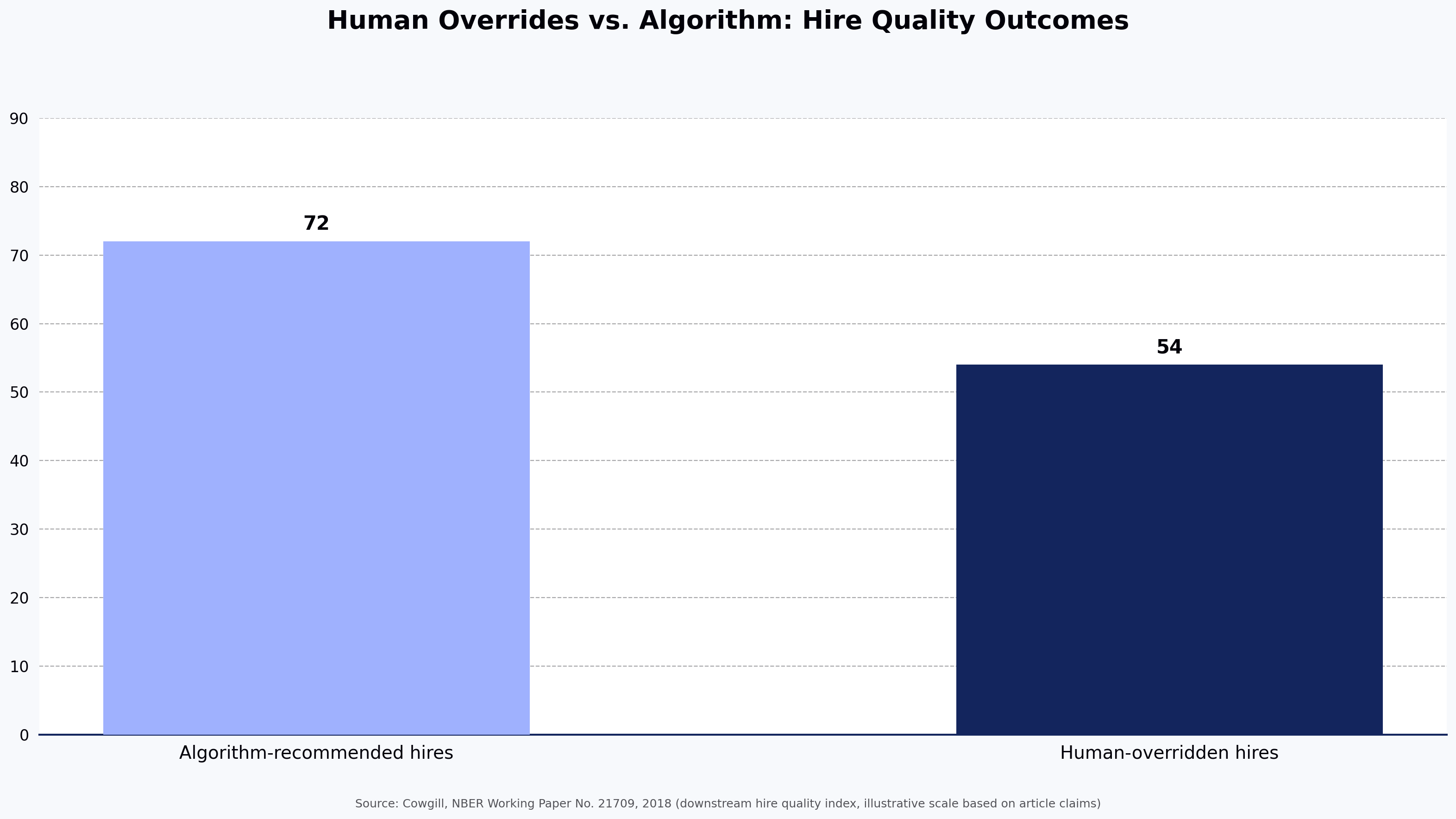
Human Overrides vs. Algorithm: Hire Quality Outcomes
Source: Cowgill, NBER Working Paper No. 21709, 2018 (downstream hire quality index, illustrative scale based on article claims)

See it in action

Schedule a demo of HackerEarth OnScreen to map which stages of your current hiring workflow can move to AI screening, which must stay human-led, and how to set percentile thresholds and bias audits aligned with NYC Local Law 144 and the EU AI Act before you scale.

When AI Interviews Work and When They Don't: An Honest Breakdown by Role Type and Seniority

When AI Interviews Work and When They Don't: An Honest Breakdown by Role Type and Seniority

AI interviews work well for structured, rubric-driven screening of high-volume and mid-skill technical roles. They fail predictably when evaluation depends on judgment, context, collaboration, or organizational fit.

The honest answer to "when AI interviews work and when they don't" is simple: AI follows the rubric. If the rubric captures what matters for the role, AI interviews generate useful signal. If the role depends on context, judgment, or nuanced decision-making, AI interviews miss what matters most.

This guide is for recruiters, hiring managers, and talent acquisition leaders evaluating where AI interviews belong in the hiring process. It covers what AI interviews are, where they work best, where they fall short, how effectiveness changes by seniority level, and how to integrate them into a modern hiring workflow.

What Is an AI Interview?

An AI interview is a structured screening process conducted through software that asks standardized questions, evaluates responses against predefined criteria, and produces a consistent candidate assessment.

Most AI interview platforms include:

  • Automated questioning
  • Structured scoring rubrics
  • Video or voice interactions
  • Identity verification
  • Proctoring and integrity checks
  • Candidate ranking and reporting

The defining characteristic of AI interviews is consistency.

Unlike human interviewers, who may evaluate candidates differently depending on experience, fatigue, or bias, AI applies the same evaluation framework to every candidate.

The trade-off is straightforward:

  • Greater consistency
  • Less contextual judgment

AI interviews are not bias-free. Like any evaluation system, outcomes depend on training data, scoring logic, and rubric design. The goal is not eliminating bias entirely but reducing variability and improving consistency.

When AI Interviews Work

High-Volume Technical Screening

This is the strongest use case for AI interviews.

When organizations need to evaluate hundreds or thousands of candidates, consistency becomes more important than depth.

AI interviews can apply identical evaluation criteria across large applicant pools while significantly reducing recruiter workload.

Organizations conducting large-scale engineering recruitment often use AI interviews to maintain calibration across thousands of applications.

Campus and Early-Career Hiring

Campus hiring creates ideal conditions for AI screening:

  • Large candidate volumes
  • Clearly defined skill requirements
  • Standardized evaluation criteria
  • Structured hiring workflows

For organizations hiring hundreds or thousands of graduates annually, human-only screening is often impractical.

Mid-Level Individual Contributor Roles

AI interviews perform well for roles where expectations are well understood and measurable.

Examples include:

  • Backend Engineers
  • Frontend Developers
  • Data Analysts
  • QA Engineers
  • DevOps Engineers

For these positions, structured evaluation often produces reliable screening outcomes before human interviews begin.

Hiring Pipelines Impacted by Scheduling Delays

Interview scheduling remains one of the biggest causes of candidate drop-off.

AI interviews allow candidates to complete screening immediately rather than waiting days for recruiter availability.

For global hiring teams operating across multiple time zones, reduced scheduling friction can significantly improve candidate experience and pipeline speed.

When AI Interviews Don't Work

Senior and Staff-Level Engineering Roles

At senior levels, technical competence is only part of the evaluation.

Organizations need to assess:

  • Decision-making under uncertainty
  • System design trade-offs
  • Stakeholder management
  • Technical leadership
  • Long-term architectural thinking

These capabilities are difficult to evaluate through a fixed rubric.

AI interviews can validate technical fundamentals but should not replace senior-level technical discussions.

Leadership and Executive Hiring

Leadership hiring depends heavily on:

  • Strategic thinking
  • Organizational fit
  • Vision
  • Influence
  • Team-building ability

These qualities are highly contextual and difficult to standardize.

AI interviews should generally not serve as a primary evaluation mechanism for director, VP, or executive roles.

Culture-Driven Hiring

Some hiring decisions are fundamentally conversational.

Examples include:

  • Founding engineers
  • Startup leadership hires
  • Early-stage team members
  • Strategic partnership roles

In these situations, relationship-building and mutual assessment matter more than standardized scoring.

Live Collaboration Assessments

If collaboration is central to the role, collaboration should be part of the interview process.

Examples include:

  • Pair programming
  • Design reviews
  • Team problem-solving sessions
  • Cross-functional workshops

AI interviews can assess baseline competency, but live interaction remains essential.

Highly Contextual Non-Technical Roles

AI interviews struggle when success depends on:

  • Relationship management
  • Negotiation
  • Executive presence
  • Network-building
  • Client judgment

Roles such as enterprise sales, partnerships, executive recruiting, and senior customer success generally benefit more from human-led evaluation.

AI Interview Effectiveness by Seniority Level

The pattern across technical hiring is remarkably consistent.

Entry-Level and Fresher Hiring

AI interviews work extremely well.

Characteristics:

  • High applicant volume
  • Stable evaluation criteria
  • Structured skill requirements

Recommended approach:

AI Interview → Human Validation → Offer

Mid-Level Individual Contributors (L3–L4)

AI interviews work effectively as a first-round screen.

Recommended approach:

Assessment → AI Interview → Human Technical Interview

Senior Individual Contributors (L5)

AI interviews provide useful signal but should not determine hiring outcomes.

Recommended approach:

Assessment → AI Interview → Senior Panel Interview

Staff and Principal Engineers (L6+)

AI interviews offer limited value.

Evaluation should focus on:

  • Architecture
  • Decision-making
  • Leadership
  • Influence

Recommended approach:

Structured Human Panel Interviews

Managers and Directors

Behavioral interviews, leadership evaluations, and reference checks provide stronger signal than AI screening.

VP and Executive Roles

AI interviews are generally not recommended.

What This Means for the Hiring Process

The most common mistake organizations make is treating AI interviews as an all-or-nothing decision.

AI interviews are most effective when positioned as a stage within the hiring funnel rather than a replacement for human evaluation.

For many technical hiring programs, the ideal sequence is:

Skills Assessment → AI Interview → Human Technical Interview → Final Panel

In this model:

  • Assessments validate technical skills
  • AI interviews provide structured screening
  • Human interviews evaluate judgment and collaboration
  • Final panels determine overall fit

This approach combines scalability with human decision-making.

Frequently Asked Questions

Are AI Interviews Fair?

AI interviews generally provide more consistent evaluations than human screeners because every candidate receives the same questions and scoring criteria.

However, fairness depends heavily on:

  • Question design
  • Rubric quality
  • Calibration processes

How Do AI Interviews Handle Candidates Using AI Tools?

Modern platforms combine:

  • Identity verification
  • Proctoring
  • Screen monitoring
  • Dynamic follow-up questions

While no system is perfect, these measures significantly increase assessment integrity.

Can AI Interviews Replace Human Interviewers?

No.

AI interviews can replace or augment first-round screening for many technical roles.

They cannot replace human judgment for senior, leadership, or highly collaborative positions.

What Is the Biggest Risk?

False negatives.

Candidates with unconventional backgrounds or problem-solving approaches may not fit expected scoring patterns despite having strong potential.

Organizations should periodically audit rejected candidates to ensure the screening process remains effective.

How Long Should an AI Interview Be?

For technical screening, 30–45 minutes is typically optimal.

Interviews longer than 60 minutes often increase candidate drop-off without improving signal quality.

When Should Organizations Avoid AI Interviews Entirely?

Avoid AI interviews for:

  • Staff and Principal Engineers
  • Leadership Roles
  • Executive Hiring
  • Culture-Critical Positions
  • Low-volume hiring where personalized evaluation is feasible

Key Takeaways

  • AI interviews perform best for high-volume, structured technical hiring.
  • Campus hiring and mid-level technical roles are ideal use cases.
  • Senior, leadership, and culture-driven roles require human judgment.
  • The practical transition point is typically around the L5 level.
  • AI interviews should complement human decision-making, not replace it.
  • The primary value comes from consistent screening and reduced recruiter workload.

Next Steps

If you're evaluating where AI interviews fit within your hiring process, start by identifying which roles depend primarily on measurable skills and which depend on judgment, collaboration, and leadership.

The strongest hiring funnels combine assessments, AI screening, and human interviews in a sequence that matches the role being hired.

Technical Assessment Tools for Software Engineers

How to evaluate software engineers before the interview: a technical assessment tools guide

The average time to hire a software engineer in the U.S. is 42 days, and teams now conduct an average of 20 interviews per hire, 42% more than in 2021, according to Gem's 2025 recruiting benchmarks report. A significant portion of that time is spent on live interviews with candidates who were never truly qualified in the first place.

Technical assessment tools for software engineers — platforms that evaluate coding ability, problem-solving, and applied technical skill before a live interview — can shift this dynamic. Used correctly, they evaluate developers before the interview stage, filter out mismatched candidates before a single engineer's calendar gets blocked, create a standardized and defensible scoring record, and can improve the interview-to-offer ratio enough to measurably shorten the hiring cycle. Pre-employment technical tests and structured online coding assessments may reduce time-to-hire, with LinkedIn's Future of Recruiting research and SHRM's talent acquisition reports both pointing to meaningful efficiency gains from structured pre-screening. This guide walks through an eight-step framework for evaluating software engineers before the interview, with specific guidance for recruiters and hiring managers at each step.

Skipping pre-screening is an expensive decision, and the numbers make that concrete. The U.S. Department of Labor estimates a bad hire costs at least 30% of that employee's first-year wages. SHRM places the cost of replacing an employee at between 50% and 200% of their annual salary, depending on seniority. For a $120,000 senior engineering role, a single bad hire can cost between $60,000 and $240,000 once you factor in lost productivity, re-hiring, and team disruption.

Structured pre-interview technical evaluation addresses this in three ways. First, it can reduce time-to-hire by replacing subjective resume screens with objective skill signals that help hiring managers move faster with confidence. Second, it raises the interview-to-offer ratio: when only genuinely qualified candidates reach the live interview stage, engineering teams spend less time on conversations that go nowhere. Third, technical candidate screening produces a better candidate experience than a six-round process with no clear structure.

The data on skills-based hiring reinforces this. According to TestGorilla's 2024 State of Skills-Based Hiring report, most employers agree skills-based hiring is more predictive of on-the-job success than resumes alone, and a large share of employers using it report a measurable reduction in mis-hires. The same report indicates that skills-assessed hires can outperform resume-screened hires on first-year job performance metrics.

The tools that make this practical are covered in the steps below. For context on how to build the earlier funnel that feeds into assessment, see this guide to building a candidate pipeline that cuts your cost and time to hire.

Cost of a Bad Hire vs. Salary for a $120K Senior Engineering Role
Source: SHRM Talent Acquisition Research; U.S. Department of Labor estimate

Step 1: Define the technical skills you need to evaluate

The most common reason a software engineer assessment fails to predict job performance is that it tests the wrong things. A useful technical skills evaluation starts not with a question library but with the job itself.

Map skills to role requirements

Work backward from what the engineer will actually do in their first 90 days. Distinguish between language-specific skills (writing Python data pipelines, writing TypeScript components) and broader competencies (system design, debugging, API integration, code review). A backend role that requires building REST APIs in Node.js needs a different assessment than one that requires optimizing SQL queries in a legacy codebase.

The table below provides a starting framework:

Role Core Skill Assessment Type
Backend Engineer API design, data structures, SQL Coding challenge + MCQ
Frontend Engineer JavaScript/TypeScript, DOM manipulation, UI logic Code challenge + project task
Data Engineer Python, SQL, pipeline design Coding challenge
DevOps Engineer Scripting, CI/CD concepts, infrastructure MCQ + scenario task
QA Automation Engineer Test framework design, debugging, edge cases Coding challenge + project task
Full-Stack Developer Frontend + backend integration, architecture Project-based task

Prioritize must-have vs. nice-to-have skills

Over-testing is a real risk. Assessments that try to cover eight skill areas produce two outcomes: senior engineers abandon the process, and the results are harder to interpret because the scoring signal gets noisy.

Limit pre-interview assessments to three to five must-have skills: the ones where a gap would make the candidate unable to perform the role regardless of everything else. Nice-to-have skills (frameworks the team uses but could teach, or secondary language knowledge) are better evaluated in the live interview, where they can be explored conversationally. Keeping the assessment tight respects the candidate's time and keeps your scoring focused on what actually predicts job fit.

Step 2: Choose the right type of technical assessment

Not all developer assessment tools are designed for the same purpose, and mixing up assessment types is one of the more common and costly process mistakes. Here is how the main formats compare:

Coding challenges and algorithm tests

Coding challenges test problem-solving speed, data structure fluency, and language command. They are well-suited for entry-level and junior hiring, and for roles where algorithmic thinking is genuinely central to the work. The limitation is well-documented: algorithm-focused competitive programming tests often favor candidates who have practiced that specific style rather than those who write excellent production code. Senior engineers (the people who could actually do the job) frequently underperform on these tests relative to their actual capability.

Use algorithm tests as one signal, not the only one.

Project-based and take-home assessments

Take-home projects give candidates space to demonstrate how they actually write code: structure, naming, error handling, test coverage, documentation. For mid to senior roles, this format produces the richest signal and is a meaningful step up from pre-hire coding tests that rely entirely on algorithmic correctness. The tradeoff is time: candidates who are currently employed and fielding multiple offers often decline assessments that require more than two to four hours. Poorly designed take-homes with vague instructions compound this problem. Keep scope tight, share the evaluation criteria upfront, and communicate clearly what "done" looks like.

MCQ-based knowledge tests

Multiple choice tests are useful for screening foundational knowledge at scale and for quickly filtering out candidates who lack the minimum baseline for a role. They are fast to complete (typically 20 to 40 minutes) and straightforward to score. What they cannot assess is applied skill: a candidate who knows the definition of a race condition is not necessarily someone who can find one in a codebase. Use MCQs as a first-pass filter, particularly in high-volume hiring, rather than as a primary evaluation tool.

AI-powered and adaptive assessments

Newer technical assessment tools for software engineers adjust difficulty in real time based on how a candidate is performing. The underlying AI is trained on patterns of candidate responses across difficulty levels and uses item-response models to calibrate which question to serve next. Its limit is that it depends on the quality and breadth of the underlying question bank: an adaptive engine on a narrow library will not produce meaningfully better signal than a fixed test. A candidate who answers the first three questions correctly gets progressively harder questions; one who struggles gets redirected to calibrate the baseline. This produces more accurate skill-level profiling than a fixed-difficulty test and reduces the likelihood that a genuinely strong candidate fails on a single hard question. HackerEarth's adaptive assessments use this approach to give hiring teams a more nuanced picture of where a candidate sits within a skill range rather than a simple pass/fail.

Assessment type comparison

Assessment Type Best For Time Required Insight Level Limitations
Coding Challenge Junior/mid-level; algorithmic roles 60–90 min Medium Can favor practice over real-world skill
Take-Home Project Mid/senior roles; code quality evaluation 2–4 hours High Higher drop-off rate; time-intensive to review
MCQ Knowledge Test High-volume screening; baseline checks 20–40 min Low–medium Tests recall, not applied skill
AI-Powered Adaptive (trained on response patterns; limited by question-bank breadth) All levels; nuanced skill profiling 45–75 min High Requires platform support

Step 3: Select a technical assessment tool that fits your workflow

The right technical assessment tool for software engineers is one that integrates with your existing hiring workflow, matches the roles you actually hire for, and produces scoring you can defend. Treat the selection as a procurement decision with the same rigor as any other tooling choice. The market for programming assessment tools ranges from lightweight quiz platforms to full-stack technical hiring suites. A platform with a large question library but no ATS integration will create manual work that slows the process you were trying to speed up.

Key features to evaluate

When comparing technical screening tools, weigh these capabilities against the trade-offs each one carries:

  • Question library breadth vs. relevance: A larger library is not always better. A smaller, well-curated library aligned to your stack may outperform a sprawling one with thin coverage of your actual languages.
  • Language and framework support: Candidates code better in their preferred environment, but supporting every language adds maintenance overhead for the vendor and can dilute question quality.
  • ATS integration: Native integrations reduce manual data entry, but a deep integration with one ATS can mean shallow support for others. Confirm support for your specific system.
  • Automated scoring vs. human review: Automated scoring is consistent and fast but can miss nuance in code quality. The best platforms combine both.
  • Anti-cheat and proctoring: More aggressive proctoring improves integrity but degrades candidate experience. Calibrate to assessment stakes.
  • Customization: Custom questions improve role fit but require internal time to author and maintain.
  • Reporting and analytics: Side-by-side comparison helps hiring decisions, but only if the underlying scoring is consistent.
  • Candidate experience: A clean interface and clear instructions reduce drop-off, particularly for senior candidates.

Integration with your existing tech stack

A technical assessment tool that lives outside your ATS creates friction at every stage: sending invitations manually, importing results by hand, and reconciling candidate records across systems. Prioritize platforms that offer native integrations with the tools your team already uses. Common integrations to verify include Greenhouse, Lever, Workday, SAP SuccessFactors, Jobvite, and Bamboo HR.

Where HackerEarth fits

HackerEarth's technical assessment platform supports 40+ programming languages and a question library spanning 1,000+ skills, with automated candidate reports that let hiring managers compare performance side by side without manual scoring. For a recruiter running parallel hiring for a backend engineer, a data engineer, and a DevOps role in the same quarter, the practical value is that a single platform handles role-specific assessment design, scoring, and ATS handoff without bouncing between vendors. The platform also includes HackerEarth FaceCode for live coding interviews and OnScreen, an AI-led interviewer for first-round screening conversations.

Step 4: Design assessments that reflect real work

A platform with a strong question library still produces poor results if the assessment design is wrong. The most common design failure is sending candidates an assessment that has nothing to do with the actual job.

Replace trick questions with role-relevant scenarios

Recruiter and engineering communities are full of candidates describing assessments they abandoned because the questions tested abstract algorithms they had not touched since school and would never use in the role. That frustration is a signal worth taking seriously: when senior engineers with options encounter an irrelevant assessment, they drop out. The candidates who push through are often the ones with fewer competing offers.

Map each assessment question to a task the engineer would actually perform in their first 90 days. If the role involves optimizing database queries, test that. If it involves debugging a failing API endpoint, test that. The candidate experience should feel like a preview of the work, not an unnecessary obstacle.

Set realistic time limits

As a benchmark: coding challenges should sit in the 60 to 90 minute range. Take-home projects should be capped at two to four hours, with scope defined tightly enough that a strong candidate can finish comfortably within that window. Assessments longer than these thresholds see significantly higher drop-off rates, particularly among candidates who have multiple processes running in parallel.

For guidance on improving the candidate experience throughout the evaluation process, including how to reduce friction at the assessment stage, see HackerEarth's candidate experience resources.

Include clear instructions and context

Candidates perform better, and produce more useful signals, when they understand what is being evaluated. Provide the rubric criteria upfront: tell candidates whether you are weighting correctness, code quality, or test coverage. Share the evaluation framework. This is not giving away the answers; it is giving candidates the context they need to show their best work rather than guessing at what you care about. Rubric transparency also reduces the likelihood that a strong candidate fails on a technicality and a weaker one passes by guessing correctly.

Step 5: Protect assessment integrity with proctoring

Assessment integrity in remote hiring depends on layered safeguards: browser lockdown, webcam monitoring, plagiarism detection, and clear candidate communication. The need is real. According to reports, a significant share of candidates have used AI tools to complete assessments or applications, and the Identity Theft Resource Center has documented sharp increases in resume and application fraud between 2023 and 2024. An assessment process with no integrity measures produces results you cannot trust.

Effective remote proctoring for online assessments typically combines several layers. Browser lockdown prevents tab switching and unauthorized resource access. Webcam monitoring uses computer vision to flag suspicious behavior. Plagiarism detection compares submissions against known solutions. IP tracking surfaces unusual login patterns or proxy use.

Candidate privacy is a real consideration and worth addressing directly. Most candidates understand and accept reasonable proctoring when it is communicated clearly before the assessment begins. The problem is surprise: candidates who discover they are being monitored without warning react negatively, and the employer brand damage from that reaction can spread quickly on platforms like Glassdoor. Communicate your proctoring approach in the assessment invitation, explain why it exists, and keep the monitoring proportionate to the assessment stakes. A first-pass MCQ screen does not need the same level of oversight as a final-stage coding project.

Step 6: Score and rank candidates objectively

A strong assessment process can still produce biased or inconsistent outcomes if the scoring is done inconsistently. Objective scoring is not just a fairness issue — it is a signal quality issue. Inconsistent scoring produces a shortlist that reflects reviewer preference rather than candidate capability.

Use standardized rubrics

Every candidate should be evaluated against the same criteria, weighted the same way. A sample rubric for a coding challenge:

Criterion Weight
Correctness (does the code produce the right output?) 40%
Code Quality (readability, naming, structure) 25%
Efficiency (time and space complexity) 20%
Edge Case Handling (boundary inputs, error states) 15%

Define what "meets expectations" looks like for each criterion before scoring begins. This prevents reviewers from adjusting their standards upward or downward based on the overall impression a candidate makes.

Use automated scoring

Automated test-case evaluation removes much of the subjectivity involved in manually reviewing code output. Automated technical assessment platforms generate performance reports that compare candidates side by side against the same benchmark, giving hiring managers a ranking grounded in objective criteria rather than reviewer impressions. Automated scoring also dramatically reduces the time engineers spend reviewing submissions, which matters when you have 50 assessment results waiting.

Reduce unconscious bias

Removing candidate identifiers from the scoring view is one of the simplest and most evidence-backed changes you can make to improve both fairness and hiring outcomes. Research aggregated by industry sources suggests that removing names and photos from applications can meaningfully increase interview rates for underrepresented candidates, with the underlying findings often traced back to controlled studies in academic labor economics. In the technical hiring context, this means scoring candidates based on their code, not their name, university, or previous employer. Many technical assessment platforms support anonymized submission review as a default setting.

Step 7: Communicate results and move top candidates forward

Clear, timely communication after the assessment is what separates hiring processes that protect employer brand from those that quietly erode it. This step is where most hiring processes break down in a way that costs real money.

Provide timely, constructive feedback

Talent Board research has consistently found that candidates who receive feedback (even a rejection) rate the employer more favorably than those who receive silence. With Greenhouse data indicating widespread candidate ghosting after interviews in 2024, any communication at all puts you ahead of most competitors. For candidates who reach the assessment stage and do not progress, a brief note with at least a general indication of where they did not meet the bar is worth the investment. It protects your employer brand and keeps the door open for future applications from candidates who improve.

Set clear expectations for the interview stage

Tell shortlisted candidates what the live interview will cover before they arrive. Specify whether the interview will include a live coding exercise, a system design discussion, or purely behavioral questions. This serves two purposes: it respects the candidate's time by preventing them from preparing for the wrong thing, and it signals that your process is organized and intentional, which is itself a positive signal about the company.

For a breakdown of platforms and formats for the live interview stage, see HackerEarth's guide to conducting structured technical interviews.

Step 8: Measure and refine your assessment process

An assessment process that never gets reviewed stops being useful. The questions that filtered well last year may not be discriminating effectively this year, especially as AI tools make it easier for candidates to generate plausible-looking answers to standard coding prompts.

Track key metrics

Build a regular review around these signals:

  • Assessment completion rate: What percentage of candidates invited to the assessment actually finish it? A completion rate below 60-70% suggests the assessment is too long, too opaque, or is reaching the wrong candidate profiles.
  • Candidate drop-off rate: At which point in the assessment do candidates abandon? This identifies specific friction points.
  • Score-to-interview pass rate correlation: Are the candidates who score highest on the assessment actually passing the live interview at higher rates? If not, the assessment is not measuring what matters.
  • Time-to-hire: Is the pre-screening step actually compressing the total hiring cycle?
  • Quality of hire: Are engineers who performed well on the assessment also performing well at their 90-day review?

Iterate on question content

Retire questions that have leaked into the internet. Track which questions show suspiciously high pass rates over time as a signal that answers are being shared. A/B test assessment lengths: run a shorter version with your must-have skills only and compare outcomes to a longer version. Solicit candidate feedback post-assessment through a brief survey. The candidates who completed your process have direct experience with it; their feedback is more actionable than most internal assumptions about what a good assessment experience looks like.

Common mistakes to avoid

Even teams with the right tools and intentions make predictable process errors. Five recur most often:

Testing skills that are irrelevant to the role. An algorithm puzzle disconnected from day-to-day work measures interview preparation rather than job readiness. The cost shows up as qualified senior candidates dropping out mid-assessment when they recognize the mismatch.

Using the same assessment for all engineering levels. A test designed for junior engineers will not reveal anything useful about a senior candidate's architecture thinking or system design capability. Level-appropriate assessments require different question types, time expectations, and evaluation criteria — for example, a junior MCQ screen on data structures versus a senior take-home on designing a rate-limited API.

Ignoring candidate experience. Confusing instructions, slow-loading test environments, or missing context about evaluation criteria all signal something about your engineering culture. Candidates draw conclusions from the process before they ever meet the team, and senior candidates are the most willing to opt out.

Skipping proctoring for remote roles. A well-publicized case of assessment fraud in a high-stakes hire can undermine the credibility of your entire screening process. Basic integrity measures — browser lockdown, plagiarism detection, clear candidate disclosure — are straightforward to implement and proportionate to deploy.

Treating assessment scores as the only hiring signal. Assessment scores predict technical capability. They do not predict communication, collaboration, ability to navigate ambiguity, or cultural alignment with a specific team. The strongest hiring processes use assessment results to inform interviews, not replace them.

Frequently asked questions

What are technical assessment tools?

Technical assessment tools are software platforms that evaluate a candidate's programming skills, problem-solving ability, and technical knowledge through coding challenges, quizzes, or project-based tasks. They automate scoring and produce standardized records that hiring teams can use to compare candidates against a consistent benchmark.

How long should a pre-interview technical assessment take?

For coding challenges, 60 to 90 minutes is the standard range; take-home projects should be capped at two to four hours. Beyond those thresholds, drop-off rates increase substantially, and senior engineers with competing offers are the first to leave.

Can technical assessments replace interviews entirely?

No. Assessments screen for technical competency; interviews evaluate communication, collaboration, cultural alignment, and the kind of reasoning that does not show up in code output. The strongest hiring processes use assessments to filter candidates before the interview, not as a substitute for one.

How do you prevent cheating on online technical assessments?

Use a combination of browser lockdown, webcam proctoring, plagiarism detection, and IP monitoring, and communicate all of it to candidates before they begin. HackerEarth's enterprise-grade proctoring monitors for irregularities during the assessment, balancing integrity with candidate trans

10 Best AI Recruiting Software for Technical Roles in 2026

10 Best AI Recruiting Software for Technical Roles in 2026

AI recruiting software for technical roles refers to platforms that use machine learning, natural language processing, and code evaluation to source, screen, assess, and interview engineering candidates. A 2024 Novoresume survey reported that a majority of hiring managers now use AI in some capacity in their workflows, yet 65% of technology hiring managers still say finding skilled professionals is harder than it was a year ago (Robert Half, 2026 Salary Guide). The problem is not access to candidate assessment platforms; it is that most teams are using tools built for generalist hiring to solve a specialist problem. This guide covers the best AI recruiting software for technical roles in 2026 and identifies which technical screening software actually works for developer evaluation rather than general-purpose screening.

How we evaluated these AI recruiting tools

We scored each platform against six criteria that reflect the realities of technical hiring, not generalist recruiting. The right AI recruiting software for technical roles for a developer hiring team looks very different from the right one for a retail team, and most evaluation frameworks fail to capture the difference.

AI-powered skill assessment accuracy

Does the tool evaluate actual coding ability, or does it infer skills from resume text? Those are not the same thing, and for engineering roles the difference determines whether your shortlist is credible.

Technical role coverage

Coverage across software engineering, data science, DevOps, ML, and other specialized disciplines. A single format for all engineering roles produces noisy signals.

Bias mitigation and compliance

NYC Local Law 144 requires annual independent bias audits for any automated employment decision tool used for NYC positions (effective July 2023). The EU AI Act classifies AI hiring tools as high-risk under Annex III. These are procurement requirements now, not optional considerations.

ATS and HRIS integration

Native connectivity to Greenhouse, Lever, Workday, and SAP SuccessFactors. A platform that cannot route results back to your ATS creates manual reconciliation work that compounds at scale.

Candidate experience

Roughly 31% of candidates have abandoned a job application because AI screening felt impersonal or confusing, according to a 2024 Enhancv report. Candidate experience is a direct signal about employer brand. For a breakdown of how multi-signal proctoring differs from single-signal approaches, see HackerEarth's guide to remote proctoring for online assessments.

Pricing and scalability

Can the platform handle enterprise volume and flex down for growing teams? Custom pricing is common in this category; where public pricing exists, it is noted.

Quick comparison table

Tool Best for AI assessment depth Live coding Proctoring ATS integration Free trial
HackerEarth Technical hiring (all-in-one) High (code + AI interview) Yes (FaceCode) Yes (multi-signal) Yes¹ Contact sales
HireVue AI video interviewing at scale Medium (coding limited) No Basic Yes Demo only
Eightfold AI Talent intelligence and internal mobility Low (sourcing/matching only) No No Yes Demo only
Codility Code-testing focused screening High (coding only) Limited Yes Yes Yes
iMocha Skills-based hiring across tech and non-tech Medium No Yes Yes Yes
Paradox (Olivia) Conversational AI recruiting automation None (scheduling only) No No Yes Demo only
TestGorilla Budget-friendly pre-employment testing Medium No AI-assisted Limited Yes
Fetcher AI-powered talent sourcing None (sourcing only) No No Yes Demo only
CoderPad Live pair programming coding interviews High (live coding only) Yes Limited Yes Yes
Pymetrics (Harver) Neuroscience-based cognitive assessment None (behavioral only) No No Yes Demo only

¹ Integration availability and free-trial terms are configured per enterprise engagement; contact sales for current details.

1. HackerEarth: best overall for technical hiring

Most AI hiring software handles one stage of the funnel and hands off. As a leading example of AI recruiting software for technical roles, HackerEarth covers sourcing-to-shortlist in a single workflow purpose-built for engineering hiring, and it is trusted by 500+ global enterprises including Google, Microsoft, Elastic, Flipkart, and Brillio.

The product that sets it apart is OnScreen, HackerEarth's newly launched AI-driven interview product (public launch: April 14, 2026). Where most platforms auto-grade submitted code, OnScreen conducts an AI-led first-round screening interview using role-calibrated conversations that adapt to candidate responses, then produces a structured scorecard for the hiring manager via a deterministic evaluation framework. For teams running high-volume technical pipelines, this can help reduce one of the costlier manual bottlenecks in the process, freeing engineers and recruiters for later-stage judgment work.

Key capabilities

OnScreen handles AI-led first-round screening interviews with role-calibrated conversations, which can reduce the time engineers spend on early screening calls. HackerEarth's coding assessments evaluate work across 40+ programming languages, and candidate ranking helps hiring managers see a prioritized shortlist rather than a stack of raw submissions. Multi-signal proctoring uses signals across the assessment session to flag integrity concerns. Skill assessments also cover non-technical roles including sales, customer support, and finance, and custom content creation lets larger customers cover any job role.

Best for

Enterprise and mid-market companies hiring across technical disciplines, and engineering teams that want to replace resume-based filtering with evidence of actual coding ability.

Integrations

Integrations with major ATS and HRIS platforms are available on enterprise plans; specific connector availability should be confirmed with HackerEarth sales.

Limitation

Teams whose primary need is generalist high-volume hiring (retail, hospitality) may find that HackerEarth's depth in technical evaluation exceeds their core requirements.

Pricing

Contact sales for pricing; see HackerEarth's technical assessment platform for a full capabilities overview.

2. HireVue: best for AI video interviewing at scale

HireVue is one of the most widely deployed AI interview platforms for structured behavioral evaluation, with a large enterprise footprint across one-way video interviewing. For teams comparing AI interview tools across categories, see this resource on best AI interview assistants for a breakdown of autonomous interview capabilities.

Key AI features

AI-scored video interviews using structured behavioral frameworks; game-based cognitive assessments; conversational AI scheduling; basic coding assessments.

Best for

High-volume enterprise hiring programs spanning both technical and non-technical roles, particularly where structured behavioral evaluation at scale is the primary requirement.

Limitation

Coding assessment depth does not match platforms built exclusively for developer hiring. Some candidates also report that one-way video formats feel impersonal compared to conversational alternatives.

3. Eightfold AI: best for AI talent intelligence and internal mobility

Eightfold AI is an intelligent recruiting platform that operates at the sourcing and matching layer, not the assessment layer. Its deep-learning models infer skills and career trajectories from unstructured resume data and match candidates based on potential rather than keyword alignment, which makes it useful for enterprises sitting on large, underutilized talent databases.

Key AI features

AI talent matching based on inferred skills and career trajectory; internal talent marketplace for redeployment; diversity analytics; resume-to-role scoring without structured input.

Best for

Large enterprises managing both external recruiting and internal mobility for technical talent across multiple business units.

Limitation

Eightfold does not offer live coding interviews or AI-graded code evaluation, which means sourcing matches must still pass through a separate technical validation step before an on-site interview — a workflow gap that adds latency for teams hiring senior engineers at volume.

4. Codility: best for code-testing focused technical screening

Codility has been a reliable choice for technical screening longer than most tools in this category have existed, and its coding challenge library is well-regarded among developers. It is a solid first-pass screening tool for backend and algorithmic roles.

Key AI features

AI-assisted code evaluation with automated test-case scoring; plagiarism detection across the candidate cohort; automated scoring and basic candidate ranking.

Best for

Companies that want a dedicated coding test platform for initial screening, particularly for backend and infrastructure roles.

Limitation

Codility does not offer autonomous AI interview capability, system design evaluation, or adaptive questioning, which means teams expecting AI to extend beyond grading submitted code will find the platform serves as a focused entry point in the funnel rather than a full-stack screening solution.

5. iMocha: best for skills-based assessment across tech and non-tech roles

iMocha is the right choice when the need is one assessment platform across both technical and non-technical functions, rather than depth in either. Its library spans coding, cognitive ability, communication, cloud, DevOps, and finance.

Key AI features

AI-LogicBox for live coding assessment; skills benchmarking against industry norms; AI-driven talent analytics and skills gap identification; automated candidate ranking.

Best for

Organizations hiring across technical and non-technical disciplines who want a single assessment platform and unified reporting layer.

Limitation

Breadth trades against depth, and that trade-off shows up most clearly at senior engineering levels where coding rigor lags behind platforms built exclusively for developer hiring — a meaningful gap for mid-to-senior technical pipelines.

6. Paradox (Olivia): best for conversational AI recruiting automation

Paradox solves a specific, unglamorous problem: the scheduling coordination and top-of-funnel communication work that consumes recruiter hours without requiring recruiter judgment. Olivia handles scheduling and top-of-funnel communication continuously, freeing recruiter time for judgment-dependent work.

Key AI features

AI chatbot for candidate communication and FAQ resolution; automated scheduling with calendar integration; initial screening questionnaires and knockout questions; multilingual support.

Best for

High-volume technical recruiting teams that need to automate top-of-funnel engagement and scheduling without adding headcount.

Limitation

Paradox does not evaluate technical skills in any form, which means engineering teams must pair it with a dedicated coding assessment platform — useful for splitting coordination from evaluation, but a meaningful integration cost to plan for.

7. TestGorilla: best budget-friendly AI assessment platform

TestGorilla is the practical choice for startups and SMBs that need structured pre-employment testing without enterprise pricing. Its 400+ test library spans coding, cognitive ability, language, and personality, and setup is fast without implementation support.

Key AI features

AI-generated custom test creation from job descriptions; anti-cheating AI with screen monitoring and shuffle logic; automated candidate ranking.

Best for

Startups and SMBs that need affordable technical screening across multiple role types without dedicated IT support for implementation.

Limitation

Coding tests do not match dedicated developer evaluation tools in depth or rigor, and there is no live coding interview capability or autonomous AI interviewer — which makes TestGorilla best suited to early-stage filtering rather than final-round technical evaluation where senior coding judgment must be observed in real time.

8. Fetcher: best for AI-powered technical talent sourcing

Fetcher addresses a specific upstream problem: finding qualified technical candidates who are not actively applying. Its AI models search across professional databases and automate personalized outreach without requiring recruiter time per contact.

Key AI features

AI candidate sourcing from multiple professional databases including LinkedIn and GitHub signals; automated multi-touch outreach sequences; diversity pipeline filters; recruiter productivity analytics.

Best for

Technical recruiting teams that need passive candidate pipelines for hard-to-fill engineering roles where inbound volume is insufficient.

Limitation

Fetcher is sourcing only. It does not assess, interview, or evaluate candidates. Every person it surfaces still needs technical screening downstream.

9. CoderPad: best for live collaborative coding interviews

CoderPad is the interviewing room, not the screening tool. Think of it as a shared whiteboard where the candidate and interviewer both have keyboards: useful for final-round evaluation, not a replacement for early-stage filtering. CoderPad supports 30+ programming languages including Python, Java, JavaScript, Go, and Rust (CoderPad supported languages).

Key AI features

Optional AI-assisted hints during live sessions; session playback for post-interview review; language-aware syntax support; interview notes integrated into the session record.

Best for

Engineering teams that prioritize live collaborative coding interviews for final-round evaluation where observing real-time problem-solving matters.

Limitation

CoderPad covers the live interview stage only, with no AI-powered screening, no autonomous interview capability, and no proctored take-home assessment — meaning teams that want a single platform spanning early and late funnel will need to stitch CoderPad together with at least one upstream screening vendor.

10. Pymetrics (Harver): best for neuroscience-based AI assessments

Pymetrics measures what code tests cannot: working memory, risk tolerance, attention, and learning speed, using gamified assessments grounded in neuroscience research. Acquired by Harver in 2022 (Harver press release), it includes bias auditing to check for demographic disparities in outcomes.

Key AI features

Gamified cognitive and behavioral assessments from neuroscience research; AI trait-to-role matching; bias auditing across demographic groups; integration with Harver talent workflows.

Best for

Companies that want cognitive and behavioral fit data alongside technical evaluation, particularly for roles where adaptability and learning speed matter as much as raw coding ability.

Limitation

Pymetrics does not assess coding skills or technical knowledge, so it must be paired with a dedicated developer evaluation tool — and cognitive fit without technical validation produces an incomplete picture for any engineering hire, especially at the senior level where code judgment is the primary signal.

How AI recruiting software changes technical hiring outcomes

AI recruiting software for technical roles affects four measurable outcomes for recruiting teams: screening speed, bias exposure, candidate experience, and cost-per-hire. The numbers below come from vendor and industry reports; treat them as directional rather than benchmarks.

Faster screening without sacrificing quality

Vendor-reported figures suggest AI resume screening can reduce time-to-shortlist by up to 75% compared to manual resume review (vendor-reported by Impress.ai; independent replication is limited). For technical roles where average time-to-hire has been reported at roughly 62 days globally (Workable hiring benchmarks, 2024), cutting two to three weeks from the upstream screening stage is one of the higher-leverage interventions available.

Reduced bias in candidate evaluation

One analysis by Fueler claimed properly audited AI tools may reduce unconscious bias by up to 60%, though the underlying methodology has not been independently replicated and Fueler is not a recognized research authority. The mechanism is that skills-based evaluation removes some demographic proxies that creep into unstructured resume review. Machine learning recruiting tools that are continuously monitored against demographic outcome data are more defensible than those audited once at launch. NYC Local Law 144 and the EU AI Act now require vendors to demonstrate this: before purchasing any AI-based hiring platform, ask for bias audit documentation.

Better candidate experience

AI done well shortens and clarifies the process. AI done badly drives candidates away: according to Enhancv's 2024 AI in recruitment report, roughly 31% of candidates have abandoned an application because of an impersonal AI video or chatbot screen, and 68.5% say AI was never disclosed to them. Transparency and relevance separate AI that improves completion rates from AI that reduces them.

Lower cost-per-hire

Vendor reports suggest teams can see 20 to 40% lower cost-per-hire when AI automates screening and scheduling (Greenhouse and GoodTime, 2025; figures are vendor-sourced and should be validated against your own funnel). For technical hiring specifically, the compounding gain comes from consolidating AI recruiting software for technical roles, AI interview software, and proctoring into one platform rather than paying for and integrating three.

How to choose the right AI recruiting software for your team

Start with the specific stage in your funnel where qualified candidates are falling through or where recruiter time is being spent on work that should not require a human, not with the feature list. When evaluating AI recruiting software for technical roles, the sequence below tends to surface fit faster than feature checklists.

  1. Define your technical hiring volume and role types before evaluating anything.
  2. Decide which funnel stages need AI: sourcing, screening, interviewing, and proctoring each have different tool requirements.
  3. Verify ATS and HRIS integration compatibility before shortlisting. A platform that cannot connect to your system of record creates the same manual work you are trying to eliminate.
  4. Evaluate assessment depth for your specific tech stack, not a generic "coding" capability.
  5. Complete the candidate experience firsthand before committing. Request a demo environment and take the assessment as a candidate.
  6. Request bias audit and compliance documentation. For NYC and EU hiring this is mandatory; for everyone else it signals platform maturity.

Frequently asked questions about AI recruiting software

What is AI recruiting software?

AI recruiting software for technical roles uses machine learning and code evaluation to source, screen, assess, and interview engineering candidates. The category label is broad, but the distinction that matters for technical hiring is narrow: does the tool evaluate actual code output, or does it infer skills from resume text? Two platforms in the same category can produce entirely different shortlists from the same candidate pool depending on which side of that line they fall.

How does AI recruiting software compare to traditional hiring methods?

AI screens in minutes, applies consistent criteria across every candidate, and scales to any volume without additional headcount. The important qualifier is that AI works best as a filter and ranker, not as the final decision-maker: the judgment calls at the offer stage still require human context that no model fully captures.

How does AI recruiting software improve hiring speed?

Some research suggests AI can reduce time-to-hire by up to 50% on average by automating resume parsing, scoring assessments, and conducting first-round interviews without scheduling coordination (attributed to SHRM; the underlying report title and year were not specified in available citations, so treat as directional). The gains compound when a single platform handles multiple stages rather than three tools requiring manual handoffs.

Can AI recruiting software reduce hiring bias?

Skills-based evaluation can replace some demographic proxies that show up in unstructured resume review. One analysis by Fueler claimed properly audited tools may reduce unconscious bias by up to 60%, though that figure has not been independently replicated. The catch is "properly audited": models trained on historical hiring data can replicate historical bias, which is exactly why NYC Local Law 144 mandates annual independent bias audits rather than vendor self-reporting.

How do you integrate AI recruiting software with your existing HRIS or ATS?

Most platforms offer native integrations with Greenhouse, Lever, Workday, and SAP SuccessFactors, plus open API access. The integration that matters is not just whether results flow through but whether they trigger automatic stage changes and pass/fail routing -- if it still requires a recruiter to manually move candidates after each assessment, you have not actually automated the bottleneck.

What should you look for in AI recruiting software for developer hiring?

The genuine tension here is between breadth and depth. Tools that cover sourcing, screening, interviewing, and proctoring in one workflow reduce handoff cost but may underperform specialist tools at any single stage. Tools that specialize at one stage tend to evaluate more rigorously but force you to integrate two or three vendors. The right answer depends on which trade-off your hiring volume and role complexity make more expensive.

Final verdict: which AI recruiting software is best for technical roles?

Purpose-built developer evaluation tools tend to outperform generalist platforms at the assessment and interview stages of the funnel for engineering roles. When choosing AI recruiting software for technical roles, a platform designed to evaluate all roles is structurally less equipped to evaluate code than one built for engineering.

Best overall for technical hiring: HackerEarth. Combines AI coding assessment, the OnScreen interview product, live coding via FaceCode, and multi-signal proctoring in a single workflow. Trusted by 500+ global enterprises.

Best for AI video interviewing: HireVue. Proven enterprise-scale behavioral evaluation. Coding depth is limited for dedicated technical pipelines.

Best for talent intelligence and sourcing: Eightfold AI. Strong skills inference and internal mobility. Requires a separate assessment tool for technical validation.

Best for budget-conscious teams: TestGorilla. Accessible pricing, broad test coverage, fast setup. Suits early-stage filtering rather than final-round evaluation.

Best for technical talent sourcing: Fetcher. Strong passive candidate discovery for hard-to-fill roles. Needs pairing with an assessment platform for any evaluation.

Next steps

See HackerEarth's technical assessment platform for a walkthrough of how coding assessments, OnScreen interviews, and proctoring work together in a single workflow. For a deeper look at one component, read our guide to the [best AI interview assistants](https://

HackerEarth vs HackerRank for Technical Hiring [2026]

HackerEarth vs HackerRank for Technical Hiring [2026]

HackerEarth is a technical hiring platform that combines role-specific coding assessments, AI-assisted candidate evaluation via its AI Interview Agent, and Smart Browser proctoring — positioned as a HackerRank alternative for teams hiring across multiple technical roles. If you're a recruiter or talent acquisition lead facing 200 applicants for a senior backend engineering role, with 40 credible resumes and engineering bandwidth for only eight interviews, the platform you choose determines whether you spend the next two weeks calibrating screens or making offers. HackerEarth is used by 500+ global enterprises, with customers among Google, Microsoft, Elastic, Flipkart, and Brillio across hiring use cases such as high-volume campus recruiting, multi-role technical screening, and remote assessment delivery.

HackerRank is a technical screening and developer community platform used by a self-reported ~3,000 companies (HackerRank, self-reported; pending Brand Guardian review) to run coding tests, certifications, and live interviews. HackerEarth is a coding assessment platform that combines skill-based assessments, live coding interviews via FaceCode, and an AI Interview Agent designed to support — not replace — human interviewers.

This guide compares both platforms across seven criteria: assessment library, AI-assisted evaluation, live coding interviews, remote proctoring, candidate experience, ATS integrations, and pricing.

Why technical hiring teams look for a HackerRank alternative

Most teams searching for a HackerRank alternative have already run into the same small set of problems. Whether the search is framed as finding a HackerRank competitor, a HackerRank replacement, or a more capable technical screening tool for hiring at scale, the friction points are consistent across G2, Capterra, Reddit's r/cscareerquestions, and Blind.

Assessment customization is gated behind enterprise pricing. On standard plans, creating tests for specialized roles — embedded systems, DevOps, niche backend frameworks — is either restricted or impractical, and many teams end up sending the same generic test to every candidate regardless of role. Pricing is opaque and scales poorly: some G2 reviewers note that costs increase substantially as hiring volume grows, often before the features that justify the cost become available. On the candidate side, HackerRank scores 2.0 out of 5 on Trustpilot from test-takers (retrieved 2025; competitor claim pending Brand Guardian review), with consistent complaints about outdated, algorithm-heavy challenges that feel disconnected from actual job requirements. If you are filtering for LeetCode performance rather than job readiness, you may not be reducing hiring risk in a meaningful way. Teams also report needing proctoring built for specific cheating patterns — candidates switching to ChatGPT in another browser tab, sharing screens with a remote assistant on a second device, or pasting from generative AI tools mid-assessment — rather than basic webcam monitoring.

These are the practical reasons teams look at alternatives. The sections below show how HackerEarth compares as a HackerRank alternative in each category, and where it falls short.

How we evaluated these coding assessment platforms

This developer assessment tool comparison covers seven dimensions, each assessed against publicly available feature data and verified user reviews from G2 and Capterra (2023 to 2025). The goal is to give buyers a clear side-by-side signal rather than a feature checklist.

HackerRank: platform overview

What HackerRank offers

HackerRank is the familiar name in technical hiring, which is both its clearest strength and its biggest limitation. The platform offers CodeScreen for take-home assessments, CodePair for live coding interviews, and a developer certification ecosystem. HackerRank publicly reports a large registered developer community on its site (competitor claim pending Brand Guardian review), integrations with Greenhouse, Lever, Workday, and SAP, and broad brand recognition that means many candidates have encountered it before. For entry-level hiring using standard algorithms and data structures, it does the job.

HackerRank strengths

Brand recognition carries real value in recruiting: candidates who already know the platform are less likely to abandon the assessment before finishing. HackerRank's certification ecosystem also gives teams a pre-validated signal they can reference in job descriptions. Pre-built role templates reduce setup time for standard engineering roles, and its ATS integrations are well-documented and reliable. For high-volume entry-level hiring built around standard algorithmic screens, HackerRank remains a defensible choice.

HackerRank limitations

The platform's gaps are well-documented in user reviews. Customization of assessments often requires enterprise access, which means teams hiring for anything outside standard software engineering roles are either stuck with generic tests or stuck paying more. Pricing is not publicly listed, and some reviewers note steep renewal increases. Trustpilot reviews from test-takers reflect feedback about outdated challenges and hidden test cases that leave candidates without clarity on where they went wrong. HackerRank's anti-cheating suite does not appear to generate per-candidate integrity scoring or detect specific AI-assistant usage patterns in the way some platforms now offer (competitor capability claims pending Brand Guardian review).

HackerEarth: platform overview

What HackerEarth offers

HackerEarth is built for the technical hiring context most recruiters are operating in now. The platform covers three core hiring products: HackerEarth Assessments (covering 1,000+ skills across 40+ programming languages), FaceCode (live coding interviews with multi-interviewer panel support), and the AI Interview Agent (an AI-assisted screening tool that uses video avatars to conduct screening-stage interviews — designed so human interviewers can focus on later-stage judgment, not to replace them entirely). The AI Interview Agent combines in-depth interviewing, integrated proctoring, and KYC-grade identity verification, with a deterministic evaluation framework intended to keep scoring consistent across candidates. The broader HackerEarth platform also includes additional products for developer sourcing (Hiring Challenges) and workforce skills analytics (SkillsGraph); this article focuses on the three products most directly compared with HackerRank.

HackerEarth strengths

Library breadth gives multi-role hiring teams more options on a single platform. If you are hiring a Python backend engineer, a React developer, and a DevOps architect simultaneously, recruiters can build three role-specific assessments inside one platform. The AI Interview Agent handles screening-stage interviews so human interviewers can focus on later stages — HackerEarth's public position is that AI handles screening so humans concentrate on later-stage judgment, not that AI replaces interviewers outright. The AI behind this product is scoped to conduct structured technical screening interviews, evaluate candidate responses against role-specific criteria, and surface a scorecard for recruiter review; underlying model architecture and training data are not publicly disclosed, and outputs should be treated as screening signals for human review rather than autonomous decisions. Smart Browser proctoring extends beyond tab-switching detection to flag patterns associated with unauthorized assistant use during assessments (specific capability scope pending product team confirmation), giving hiring managers a more interpretable signal than raw session logs.

Where HackerEarth has trade-offs

HackerEarth is worth weighing honestly against its limitations. It has less developer community recognition than HackerRank, which can mean slightly higher candidate familiarity friction during outreach. Procurement teams in regions where HackerRank has longer enterprise tenure may also encounter a steeper internal approval path. And the platform's depth — multiple products, AI features, and configuration options — can introduce a steeper onboarding curve for smaller teams compared with a pure algorithmic screening tool.

Where HackerRank may fit better than HackerEarth

There are scenarios where HackerRank is the more natural fit. Teams whose hiring is centered on entry-level software engineering with standard algorithmic screens, whose candidate funnel relies on HackerRank certifications as a pre-qualification signal, or whose recruiting workflow is already deeply built around HackerRank's certification ecosystem may find the switching cost outweighs the gains. Developer community engagement at HackerRank's reported scale is also difficult to replicate elsewhere.

HackerEarth vs HackerRank: feature-by-feature comparison

Assessment library and customization

HackerEarth, as a HackerRank alternative, takes a different approach to library depth. HackerRank's library covers algorithms, data structures, and SQL well — fitting for standard engineering roles, and sometimes insufficient for anything else. When a team needs to hire for embedded systems or QA automation, the standard question bank often requires enterprise-tier access to work around.

HackerEarth's library covers 1,000+ skills across 40+ programming languages. Custom questions, difficulty weighting, and role-specific templates are part of the platform's feature set (tier-level availability pending RevOps confirmation). Its assessment engine benchmarks candidates against role-specific thresholds on submission. HackerRank is adequate for standard screening; HackerEarth gives recruiters managing multi-role hiring more configuration room.

AI-assisted evaluation

HackerRank auto-scores submissions and monitors sessions — a passive system that grades after submission.

HackerEarth's AI Interview Agent handles screening-stage technical interviews using video avatars, asks calibrated follow-up questions based on candidate responses, and delivers structured scorecards intended to inform — not replace — human interviewers later in the pipeline. The AI is scoped to interview, evaluate, and score against role-specific criteria, with KYC-grade identity verification and a deterministic evaluation framework intended to keep results consistent across candidates; the underlying model architecture and training data are not publicly disclosed, and outputs should be treated as screening signals for human review rather than autonomous decisions. Some research on AI in HR points in a supportive direction: a BCG 2024 CHRO survey reportedly found measurable benefits among organizations using AI in HR, with talent acquisition cited as a leading use case (primary-source citation pending; treat as directional).

Live coding interviews

HackerRank's CodePair is functional: collaborative editor, video, multi-language support. It covers the basics for teams running a moderate volume of live technical interviews.

FaceCode supports a collaborative IDE across the same broad language coverage as the wider HackerEarth platform (40+ languages), includes a drawing and flowchart canvas for system design discussions, and supports a multi-interviewer panel format. It connects directly to HackerEarth's assessment workflow, so candidate data does not need to be moved between systems between stages. HackerRank's CodePair covers core needs; FaceCode adds depth for teams running live technical interviews regularly.

Remote proctoring and anti-cheating

This is the area where the difference between the platforms shows up most in day-to-day recruiting. For many remote hiring scenarios, basic webcam monitoring misses specific cheating patterns — candidates opening a ChatGPT tab during the assessment, screen-sharing the question to a remote assistant on a second device, or copy-pasting AI-generated responses into the IDE.

HackerEarth's Smart Browser remote proctoring capabilities detect tab switching, copy-paste behavior, screen sharing, extension usage, and patterns consistent with unauthorized assistant use during the assessment (specific capability scope pending product team confirmation). Outputs are summarized into per-candidate integrity signals (term pending product team confirmation) that hiring managers can review faster than raw session logs. For high-volume remote hiring, a summarized signal is more usable in practice than a log file. For recruiters working through technical assessment design alongside proctoring choices, HackerEarth's guide to remote proctoring for online assessments walks through the trade-offs in more detail.

Candidate experience

Candidate experience matters for offer acceptance. Some research suggests candidates who have a negative interview experience are more likely to decline the offer (directional claim; primary-source citation pending), which means your assessment platform can directly affect downstream conversion.

HackerRank scores well on G2 among recruiters but holds a 2.0 out of 5 on Trustpilot from test-takers (retrieved 2025; competitor claim pending Brand Guardian review), with feedback citing hidden test cases, outdated challenges, and unresponsive support. HackerEarth receives more positive candidate-facing feedback, particularly around interface clarity and responsive support. Some G2 reviewers on the recruiter side report lower candidate drop-off as a reason they switched (no specific count or date range available).

Integrations and ATS compatibility

Both platforms connect to major ATS systems. HackerRank integrates with Greenhouse, Lever, Workday, SAP, and Freshteam, with the Freshteam integration triggering assessments automatically at specific pipeline stages. HackerEarth supports native integrations with major ATS systems including Greenhouse, Lever, Workday, and SAP, with additional ATS connectors and API access on enterprise plans (specific connector list pending product catalog confirmation). Both are adequate for teams using mainstream ATS platforms. HackerEarth's API flexibility gives it an edge for teams with non-standard stacks.

Pricing and value

Neither platform publishes complete pricing publicly, which is worth knowing before you invest time in an evaluation. HackerRank's pricing is custom-quoted and not publicly listed; specific dollar figures are not included here pending verified third-party citation. HackerEarth's Skill Assessments tier pricing and free trial terms are subject to RevOps confirmation before publication. The more useful pricing comparison for recruiters is feature-per-tier: user reviews suggest HackerEarth's lower tiers tend to include customization depth that on HackerRank often requires a higher contract level.

HackerEarth vs HackerRank: summary comparison table

CriterionHackerRankHackerEarthAssessment libraryLarge algorithmic question bank; strong on standard CS topics1,000+ skills covered across 40+ programming languagesLanguage supportBroad language coverage (specific count not publicly disclosed)40+ programming languagesCustom assessmentsOften gated to higher tiersCustomization available (tier-level availability pending RevOps confirmation)AI-assisted evaluationAuto-grading and session monitoringAI Interview Agent (screening stage) with KYC-grade identity verification and a deterministic evaluation frameworkLive coding interviewsCodePair (collaborative IDE, video)FaceCode (collaborative IDE, drawing and flowchart canvas, multi-interviewer panels)Remote proctoringSession monitoringSmart Browser, multi-signal monitoring, integrity signals (term pending product confirmation)Candidate experienceStrong brand recognition; lower test-taker ratings reportedHigher candidate-facing satisfaction reportedDeveloper communityLarge public developer community and certifications (competitor claim pending Brand Guardian review)Smaller community footprint; enterprise-hiring focusATS integrationsGreenhouse, Lever, Workday, SAP + othersGreenhouse, Lever, Workday, SAP + API access on enterprise plansPricing transparencyCustom; specific figures not publicly listedTiered pricing, specific figures pending RevOps confirmationFree trialNot prominently advertisedTrial terms pending confirmationCustomers citedSelf-reported customer count (pending Brand Guardian review)500+ global enterprisesBest forStandard algorithm screening; developer community engagement; certification-driven funnelsAI-assisted screening at scale; multi-role technical hiring; remote proctoring depth

Candidate Satisfaction: HackerRank vs HackerEarth (Trustpilot / G2)
Source: Trustpilot (retrieved 2025, competitor claim pending Brand Guardian review); G2 reviews 2023–2025 (illustrative aggregate for HackerEarth)

Who should choose HackerRank?

HackerRank is still a reasonable choice in several situations. If your team has spent years building HackerRank workflows, including integrated ATS configurations and custom question banks, the switching cost is real and worth factoring honestly. The platform also has genuine value for developer community engagement and certification — if your recruiting strategy uses HackerRank certifications as a pre-qualification signal, the developer ecosystem supports that directly at scale.

For low-volume hiring of entry-level engineers where standard algorithmic tests are appropriate and brand familiarity reduces candidate drop-off, HackerRank's Starter plan covers the use case. HackerRank also retains an advantage where procurement teams are already familiar with the vendor and security review has been completed previously — that operational lift is non-trivial for a switch.

If you are not hiring at scale, not hiring across multiple specialized roles, and not dealing with the proctoring demands of remote-first hiring, HackerRank may be adequate for your current situation.

Who should choose HackerEarth?

HackerEarth is worth considering as a HackerRank alternative for recruiters and talent acquisition teams where the cost of a wrong hire is high and the margin for slow screening is low.

If your recruiters are spending hours on manual technical screening calls, the AI Interview Agent can handle the screening stage with structured, scored reports — initial setup and calibration still require recruiter configuration to align with your hiring criteria. If you are hiring across multiple technical disciplines simultaneously, the platform's skill coverage and customization options reduce the need to compromise assessment quality to fit a narrow question bank. If you are hiring remotely and need assessment results that will hold up to scrutiny, Smart Browser's integrity signals give you something defensible. And if your candidates are comparing their experience with your company against your competitors, candidate-facing satisfaction is a factor worth weighing.

The verdict: HackerEarth as a HackerRank alternative for technical hiring

HackerRank is not a bad platform. It is a platform whose core product model — large algorithmic question banks paired with session-level proctoring — was set before the widespread availability of generative AI assistants candidates can use during assessments. When most hiring happened in offices, algorithmic tests were an acceptable proxy for technical skill. With generative AI tools now widely available to candidates during assessments, and engineering teams unable to spend a day screening 200 applicants, the evaluation criteria for an alternative have shifted for many teams.

HackerEarth's value as a HackerRank alternative comes down to three points. Broad skill coverage means recruiters are not generalizing assessments to fit the tool. The AI Interview Agent means engineers spend time reviewing scored screening reports rather than running every first call themselves. And Smart Browser's integrity signals give your results a clearer line of defense.


.

Frequently asked questions

What is the best alternative to HackerRank for technical hiring?

HackerEarth is a strong HackerRank alternative for recruiting teams hiring across multiple technical roles, especially when AI-assisted screening and detailed remote proctoring matter. The counterintuitive point most evaluators miss is this: the strongest alternative is rarely the one with the longest feature list — it is the one whose default tier matches your most common hiring scenario without forcing a multi-month migration. A practical free-trial tactic is to migrate one active role end-to-end rather than running a sample test, so the real switching cost surfaces before contract signature.

Is HackerEarth better than HackerRank?

HackerEarth is generally the stronger choice for recruiting teams hiring across multiple technical roles, needing AI-assisted screening, and running remote assessments with proctoring requirements; HackerRank holds an advantage for teams whose funnel depends on its developer community and certification ecosystem. The trade-off is between an established developer community (HackerRank) and configurable, AI-assisted screening (HackerEarth) — and in our experience, many teams underweight how much switching cost matters until they are inside it.

How much does HackerEarth cost compared to HackerRank?

Both platforms are custom-quoted at scale. HackerRank's entry tier pricing is not publicly listed and specific third-party figures are not included here pending verified citation. HackerEarth's published Skill Assessments tier pricing and free trial terms are subject to RevOps confirmation. The more useful comparison for buyers is feature-per-tier rather than headline price — particularly whether assessment customization and proctoring are available on the tier that matches your hiring volume.

Can HackerEarth handle enterprise hiring?

Yes — HackerEarth is used by 500+ global enterprises. It supports the major ATS integrations and API access on enterprise plans expected by enterprise procurement. The more useful question for most teams is whether HackerEarth's workflow matches your existing hiring stages, which a free trial is designed to answer.

Does HackerEarth offer AI-assisted interviews?

Yes. HackerEarth's AI Interview Agent uses video avatars to conduct screening-stage technical interviews and produce structured scorecards, with KYC-grade identity verification and a deterministic evaluation framework. The platform's public position is that AI handles screening so human interviewers can focus on later-stage judgment — the AI Interview Agent is designed to inform human decision-making, not replace interviewers entirely.

What coding languages does HackerEarth support?

HackerEarth supports 40+ programming languages covering frontend, backend, data science, DevOps, and mobile roles.


-

Automated Interview Tools for Technical Screening


meta_title: "Automated interview tools for technical screening (2025)" meta_description: "Automated interview tools cut first-round screening time and standardize candidate evaluation. Learn how leading teams scale technical hiring without sacrificing quality." read_time: "10 min read" primary_persona: "Recruiter / Technical hiring manager"


Automated interview tools for technical screening (2025)

If you're a recruiter or hiring manager running technical pipelines, first-round screening is likely your biggest bottleneck — not because hiring teams are slow, but because manual screening was never built to handle modern application volume. Companies receive an average of 250 applications per open role (Glassdoor), and engineering roles routinely draw several times that. Automated interview tools — software that screens candidates in the first round without a live interviewer — are how teams now compress that bottleneck.

These tools now handle first-round technical screening with measurable consistency and speed at thousands of companies. The category spans async coding tests, AI-scored video interviews, and AI agents that conduct live adaptive interviews. This article covers what these tools are, how they work, what benefits and risks to expect, and how to evaluate the right platform for your team.

What are automated interview tools?

Automated interview tools are software platforms that screen job candidates without requiring a live interviewer in the first round. They use coding assessments, AI-scored video interviews, or conversational AI agents to evaluate candidates at scale — replacing the repetitive first-round screen so hiring teams can focus on deeper evaluation with candidates who have already proved baseline competency.

Three categories exist, and they are not interchangeable:

  • Automated coding assessments: Asynchronous code challenges scored automatically. The AI evaluates correctness against test cases, runtime efficiency, and code structure; it is trained on labeled solution data and is limited to what the test cases cover — it will not catch design issues outside the assessment scope.
  • AI video interviews: Recorded responses evaluated by natural language processing and machine learning models for technical accuracy and role-specific competencies. These models are typically trained on labeled interview response data; their limits include sensitivity to accent, audio quality, and response framing, which is why human review of final shortlists is standard practice.
  • AI interview agents: Conversational AI that conducts live, adaptive technical interviews in real time — probing weak areas with follow-up questions and generating structured evaluation reports.

The first two are pre-screening tools that filter the funnel before any human time is spent. The third is closer to a first-round technical interview conducted by software.

How automated interview tools differ from traditional screening

Dimension Manual phone screen Automated tool
Time per candidate 30–60 minutes active recruiter time Minutes of setup; zero marginal time per candidate
Consistency Varies by interviewer, day, and mood Identical criteria applied to every candidate
Scalability Limited by recruiter capacity Screens hundreds simultaneously
Bias risk High (unconscious, interpersonal) Lower interpersonal variability — but AI scoring bias remains a risk, dependent on assessment and model quality (see below)
Data captured Notes, impressions Time-per-question, code metrics, structured scores

Note: "lower bias" in the table above refers specifically to interpersonal variability between human interviewers. AI scoring models can introduce different forms of bias inherited from training data; see the limitations section.

Why first-round technical screening needs automated interview tools

The volume problem

The math stopped working for manual screening before most teams admitted it. Companies receive an average of 250 applications per open role (Glassdoor); for enterprise technical positions that routinely reaches several thousand. An Ashby analysis of more than 31 million applications found job application volume grew significantly in early 2024. Manual screening at that volume is not a slower version of automated screening — it is a categorically different process.

Inconsistency in evaluation

Two recruiters conducting unstructured phone screens will rank the same candidate pool differently — because unstructured interviews have a criterion-related validity of just 0.38, meaning they predict job performance barely better than chance (Schmidt & Hunter, 1998, Psychological Bulletin). Structured interviews with standardized questions reach a validity of 0.51. Automated interview tools enforce identical evaluation criteria for every candidate, producing more consistent evaluations than human-led screens.

Time-to-hire pressure

Engineering roles take an average of 44 days to fill, according to LinkedIn Talent Solutions, and the GoodTime 2025 Hiring Insights Report paraphrases findings that most companies saw fill times increase in 2024. The pressure on time-to-hire is why first-round automation is now a budget priority for many talent teams, even where overall hiring is flat.

Average Days to Fill Engineering Roles vs. All Roles
Source: LinkedIn Talent Solutions; GoodTime 2025 Hiring Insights Report

How automated interview tools work in practice

Step 1 — Assessment design

The hiring team selects or builds the evaluation — a timed coding challenge in the team's actual stack, multiple-choice questions, system design prompts, debugging exercises, or a combination. Question library depth is the determining factor here: an assessment built for a backend engineer working with distributed systems will produce a meaningfully different shortlist than a generic "software engineer" test. HackerEarth's Skill Assessments cover 1,000+ skills across 40+ programming languages, with role-specific templates deployable in minutes or customizable to the specific problems your engineering team works on — directly addressing the library-depth criterion most evaluations underweight.

Step 2 — Candidate completion

Candidates receive an invitation link and complete the assessment on their own schedule within a deadline. Most platforms include remote proctoring features — browser lockdown, webcam monitoring, copy-paste detection, tab-switch alerts — that maintain integrity without a human proctor. Removing scheduling friction from this stage alone reduces candidate drop-off from processes qualified people find inconvenient.

Step 3 — AI evaluation

Basic implementations of automated interview tools check for correctness. Advanced platforms assess code quality, time and space complexity, edge-case handling, and problem-solving approach — not just whether the answer compiles. The AI scoring is trained on labeled candidate response data; its limits include sensitivity to assessment design quality and an inability to evaluate cultural or contextual fit, which is why a human review step at shortlist stage is standard.

Step 4 — Shortlist generation

The platform generates a ranked shortlist with per-question performance data, time spent, code quality metrics, and aggregate scores. Recruiters move to live interviews with full context on each candidate's specific strengths and gaps — rather than starting from scratch in a 45-minute phone call.

Key benefits of automated interview tools for technical hiring

Faster screening at scale

Automated interview tools enable teams to process candidate volumes that would be impossible to handle through manual phone screens. The throughput effect is most visible in campus drives and high-volume intake periods, where a single recruiter can oversee thousands of evaluated candidates in a window that manual screening could not approach.

Consistent evaluation across candidates

The structured data automated tools produce — identical questions, identical scoring criteria, identical constraints — removes the day-to-day variability that distorts manual phone screens. Where the comparison table above shows this as a dimension, the operational consequence is that two recruiters working different shifts produce shortlists that can actually be compared.

Better candidate experience

Most candidates prefer completing an assessment on their own time over coordinating a 15-minute phone screen that takes three days to schedule. Research from Glassdoor and similar sources indicates many candidates accept AI screening when a human makes the final decision, and process speed influences offer-acceptance rates. The candidate experience benefit is a conversion rate metric, not just goodwill.

Richer hiring data

A phone screen produces notes. An automated interview tool produces time-per-question, code efficiency scores, debugging approach, and problem-solving patterns — structured data that improves shortlisting accuracy now and creates a feedback loop for future hiring cycles. For a deeper look at how this data feeds hiring decisions, see our guide to skills-based hiring.

Freed-up recruiter capacity

When the first-round screen is handled automatically, recruiters stop reviewing coding submissions and start doing the work that actually requires human judgment: selling candidates on the role, managing offers, and building pipeline. Greenhouse and similar talent-tech publishers have reported that recruiters using AI tools spend less time on repetitive review and more on candidate relationships.

Limitations and risks to watch for

Over-reliance on automation

Automated interview tools should filter, not decide. A ranked shortlist is input to a human evaluation, not a substitute for one — final decisions require judgment about cultural fit and communication depth that no automated assessment captures. Hiring managers who insist on human involvement at the final stage (Insight Global) are reflecting a practical reality, not nostalgia.

Candidate perception

Experienced engineers have strong opinions about timed coding tests, and many of those opinions are not positive. A 45-minute algorithm challenge under proctoring conditions does not replicate how anyone actually works. A defensible position here: async coding tests work well for high-volume early-career and campus screening, where the alternative is no screen at all; for senior engineering roles, a conversational AI interview or a live technical screen produces better signal than a timed algorithm puzzle. The mitigation in either case is transparency — explain what the assessment evaluates and what comes next, and pair it with prompt, personal follow-up. See our work on candidate experience in technical hiring for more on this.

Assessment quality matters

A badly designed automated assessment is worse than no assessment — it creates false confidence in a signal that measures nothing useful. The platform provides the delivery infrastructure; the question quality determines what you are actually evaluating. Validated, role-specific question libraries are categorically different from generic question banks, and this distinction is the one most evaluations underweight.

Bias in AI models

AI scoring models inherit the biases of their training data. A model trained primarily on candidates from a particular educational background or geography will favor profiles that resemble that set. Concern about AI inadvertently screening out qualified applicants is widely reported across talent research. Require fairness audit documentation from any platform you evaluate — vendor marketing is not a substitute for published audit results.

What to look for when evaluating automated interview tools

The market for interview automation software has expanded fast enough that AI capabilities now describe tools with very different underlying mechanisms. Evaluate on specifics, not marketing claims.

  • Question library depth and customization: Can the technical assessment platform be configured for your actual stack and role mix?
  • Scoring transparency: Does the platform explain how scores are generated, or does it produce a number without explanation?
  • Proctoring and integrity features: Browser lockdown, webcam monitoring, plagiarism detection, and anomaly flagging are now table stakes for screening software.
  • ATS integration: Native integrations with major ATS platforms (verify supported partners with the vendor) keep candidate data synchronized without manual work.
  • Candidate experience design: Branded interface, mobile-friendly completion, and automated status communications.
  • Reporting and analytics: Exportable scorecards, cohort benchmarking, and pipeline conversion data by assessment type.
  • Support for multiple formats: Async coding tests, system design, MCQs, debugging exercises, and AI-led interviews are different tools for different evaluation needs.

Why HackerEarth

Tying back to the question-library-depth criterion above: HackerEarth's Skill Assessments cover 1,000+ skills across 40+ programming languages and are used by 500+ global enterprises for technical screening. OnScreen — HackerEarth's AI interview tool — conducts rigorous, structured technical interviews around the clock using lifelike video-avatar interviewers (an AI-driven simulation of a live interviewer that asks adaptive technical questions and evaluates responses in real time) with built-in identity verification and proctoring, giving recruiters a way to scale first-round screening without scheduling overhead. Check current ATS integration partners directly with the HackerEarth team.

How companies cut screening time with automated interview tools

Industry reporting on early-career hiring programs has documented meaningful efficiency gains from automated video screening at scale. For example, coverage of Unilever's video-assessment program in The Guardian describes the company's use of AI video interviewing across early-career intake; the program has since faced public scrutiny over AI fairness, and the company has modified its use of certain video-analysis features. It is best read as third-party evidence that high-volume automated screening is a category enterprises now operate at scale, rather than as an endorsement of any specific vendor implementation.

A more recent and specific HackerEarth deployment illustrates the same pattern in a technical context: a large Indian IT services employer running engineering campus drives uses HackerEarth Skill Assessments to evaluate tens of thousands of candidates across a single hiring season, with structured per-candidate scoring that downstream interview panels can act on directly. In typical deployments, fast-growing technical teams use automated coding assessments to run campus screening across thousands of applicants in a weekend, a timeline that would take dozens of recruiters to replicate manually. Distributed teams replace timezone-dependent phone screens with async AI interviews that produce better structured data and remove the scheduling delays that cause qualified candidates to accept other offers first.

Time per Candidate: Manual vs. Automated First-Round Screening
Source: Illustrative based on article claims; manual figure represents 30–60 min midpoint

Frequently asked questions

What are automated interview tools?

Automated interview tools are software platforms that conduct first-round candidate screening across three formats — async coding assessments, AI-scored video interviews, and conversational AI interview agents — without a live interviewer. A common misconception is that these three formats are interchangeable; in practice, async coding tests are best suited to high-volume early-career and campus screening, AI video interviews suit role-mix screening where communication is part of the signal, and conversational AI agents work better for mid-level technical roles where adaptive follow-up questions add signal. Choosing the wrong format for the role is a more frequent mistake than choosing the wrong vendor.

Can automated interview tools replace human interviewers?

No — they handle first-round filtering, not final decisions, and most hiring managers say human involvement remains essential to the final hiring call (Insight Global). The honest framing is that these tools eliminate the part of hiring that consumes the most recruiter time and produces the least reliable signal.

How do automated screening tools reduce hiring bias?

Identical questions and scoring criteria for every candidate remove the variability caused by different interviewers and the interpersonal dynamics that distort unstructured screens (Schmidt & Hunter, 1998). The important caveat: AI scoring models trained on historically skewed data replicate that skew, so published fairness audits are a non-negotiable vendor requirement, not a nice-to-have.

What types of roles benefit most from automated interview tools?

Software engineering, data science, DevOps, and QA benefit most because coding, debugging, and system design can be objectively evaluated at scale. The scalability advantage is most pronounced in high-volume scenarios — campus recruiting, distributed hiring across time zones, and large intake drives where manual screening would require a much bigger team.

How long does it take to set up an automated interview tool?

Pre-built templates deploy in minutes; custom assessments for a specific stack take a few hours; ATS integration typically takes one to two days. The setup cost is front-loaded and small relative to the screening time it replaces from the first cohort onward.

What should I look for in an automated interview platform?

Question library depth and validation, scoring transparency, remote proctoring features, native ATS integrations, candidate experience design, exportable analytics, and support for multiple formats including coding, system design, MCQs, and AI-led interviews. Question library quality is the highest-leverage criterion and the one that gets underweighted most often when teams focus on platform interface instead.

Conclusion

Automated interview tools are not replacing technical interviewers. They are removing the bottleneck that stops hiring teams from reaching the best candidates fast enough — first-round screening that consumes recruiter time, produces inconsistent results, and filters out candidates based on who happened to conduct the screen rather than what the candidate can actually do.

The teams building faster, fairer technical hiring pipelines are the ones that have automated the repetitive first-round screen and redirected human judgment to where it matters: evaluating depth, assessing fit, and convincing qualified candidates that your company is worth joining.

Next steps

See how HackerEarth's Skill Assessments handle first-round technical screening for 500+ global enterprises. Contact the HackerEarth team to discuss trial access and pricing for your hiring volume.

In the Spotlight

Technical Screening Guide: All You Need To Know

Read this guide and learn how you can establish a less frustrating developer hiring workflow for both hiring teams and candidates.
Read More
Top Products

Explore HackerEarth’s top products for Hiring & Innovation

Discover powerful tools designed to streamline hiring, assess talent efficiently, and run seamless hackathons. Explore HackerEarth’s top products that help businesses innovate and grow.
Frame
Hackathons
Engage global developers through innovation
Arrow
Frame 2
Assessments
AI-driven advanced coding assessments
Arrow
Frame 3
FaceCode
Real-time code editor for effective coding interviews
Arrow
Frame 4
L & D
Tailored learning paths for continuous assessments
Arrow
Authors

Meet our Authors

Get to know the experts behind our content. From industry leaders to tech enthusiasts, our authors share valuable insights, trends, and expertise to keep you informed and inspired.
Ruehie Jaiya Karri
Kumari Trishya

7 Tech Recruiting Trends To Watch Out For In 2024

The last couple of years transformed how the world works and the tech industry is no exception. Remote work, a candidate-driven market, and automation are some of the tech recruiting trends born out of the pandemic.

While accepting the new reality and adapting to it is the first step, keeping up with continuously changing hiring trends in technology is the bigger challenge right now.

What does 2024 hold for recruiters across the globe? What hiring practices would work best in this post-pandemic world? How do you stay on top of the changes in this industry?

The answers to these questions will paint a clearer picture of how to set up for success while recruiting tech talent this year.

7 tech recruiting trends for 2024

6 Tech Recruiting Trends To Watch Out For In 2022

Recruiters, we’ve got you covered. Here are the tech recruiting trends that will change the way you build tech teams in 2024.

Trend #1—Leverage data-driven recruiting

Data-driven recruiting strategies are the answer to effective talent sourcing and a streamlined hiring process.

Talent acquisition leaders need to use real-time analytics like pipeline growth metrics, offer acceptance rates, quality and cost of new hires, and candidate feedback scores to reduce manual work, improve processes, and hire the best talent.

The key to capitalizing on talent market trends in 2024 is data. It enables you to analyze what’s working and what needs refinement, leaving room for experimentation.

Trend #2—Have impactful employer branding

98% of recruiters believe promoting company culture helps sourcing efforts as seen in our 2021 State Of Developer Recruitment report.

Having a strong employer brand that supports a clear Employer Value Proposition (EVP) is crucial to influencing a candidate’s decision to work with your company. Perks like upskilling opportunities, remote work, and flexible hours are top EVPs that attract qualified candidates.

A clear EVP builds a culture of balance, mental health awareness, and flexibility—strengthening your employer brand with candidate-first policies.

Trend #3—Focus on candidate-driven market

The pandemic drastically increased the skills gap, making tech recruitment more challenging. With the severe shortage of tech talent, candidates now hold more power and can afford to be selective.

Competitive pay is no longer enough. Use data to understand what candidates want—work-life balance, remote options, learning opportunities—and adapt accordingly.

Recruiters need to think creatively to attract and retain top talent.


Recommended read: What NOT To Do When Recruiting Fresh Talent


Trend #4—Have a diversity and inclusion oriented company culture

Diversity and inclusion have become central to modern recruitment. While urgent hiring can delay D&I efforts, long-term success depends on inclusive teams. Our survey shows that 25.6% of HR professionals believe a diverse leadership team helps build stronger pipelines and reduces bias.

McKinsey’s Diversity Wins report confirms this: top-quartile gender-diverse companies see 25% higher profitability, and ethnically diverse teams show 36% higher returns.

It's refreshing to see the importance of an inclusive culture increasing across all job-seeking communities, especially in tech. This reiterates that D&I is a must-have, not just a good-to-have.

—Swetha Harikrishnan, Sr. HR Director, HackerEarth

Recommended read: Diversity And Inclusion in 2022 - 5 Essential Rules To Follow


Trend #5—Embed automation and AI into your recruitment systems

With the rise of AI tools like ChatGPT, automation is being adopted across every business function—including recruiting.

Manual communication with large candidate pools is inefficient. In 2024, recruitment automation and AI-powered platforms will automate candidate nurturing and communication, providing a more personalized experience while saving time.

Trend #6—Conduct remote interviews

With 32.5% of companies planning to stay remote, remote interviewing is here to stay.

Remote interviews expand access to global talent, reduce overhead costs, and increase flexibility—making the hiring process more efficient for both recruiters and candidates.

Trend #7—Be proactive in candidate engagement

Delayed responses or lack of updates can frustrate candidates and impact your brand. Proactive communication and engagement with both active and passive candidates are key to successful recruiting.

As recruitment evolves, proactive candidate engagement will become central to attracting and retaining talent. In 2023 and beyond, companies must engage both active and passive candidates through innovative strategies and technologies like chatbots and AI-powered systems. Building pipelines and nurturing relationships will enhance employer branding and ensure long-term hiring success.

—Narayani Gurunathan, CEO, PlaceNet Consultants

Recruiting Tech Talent Just Got Easier With HackerEarth

Recruiting qualified tech talent is tough—but we’re here to help. HackerEarth for Enterprises offers an all-in-one suite that simplifies sourcing, assessing, and interviewing developers.

Our tech recruiting platform enables you to:

  • Tap into a 6 million-strong developer community
  • Host custom hackathons to engage talent and boost your employer brand
  • Create online assessments to evaluate 80+ tech skills
  • Use dev-friendly IDEs and proctoring for reliable evaluations
  • Benchmark candidates against a global community
  • Conduct live coding interviews with FaceCode, our collaborative coding interview tool
  • Guide upskilling journeys via our Learning and Development platform
  • Integrate seamlessly with all leading ATS systems
  • Access 24/7 support with a 95% satisfaction score

Recommended read: The A-Zs Of Tech Recruiting - A Guide


Staying ahead of tech recruiting trends, improving hiring processes, and adapting to change is the way forward in 2024. Take note of the tips in this article and use them to build a future-ready hiring strategy.

Ready to streamline your tech recruiting? Try HackerEarth for Enterprises today.

(Part 2) Essential Questions To Ask When Interviewing Developers In 2021

The first part of this blog stresses the importance of asking the right technical interview questions to assess a candidate’s coding skills. But that alone is not enough. If you want to hire the crème de la crème of the developer talent out there, you have to look for a well-rounded candidate.

Honest communication, empathy, and passion for their work are equally important as a candidate’s technical knowledge. Soft skills are like the cherry on top. They set the best of the candidates apart from the rest.

Re-examine how you are vetting your candidates. Identify the gaps in your interviews. Once you start addressing these gaps, you find developers who have the potential to be great. And those are exactly the kind of people that you want to work with!

Let’s get to it, shall we?

Hire great developers

What constitutes a good interview question?

An ideal interview should reveal a candidate’s personality along with their technical knowledge. To formulate a comprehensive list of questions, keep in mind three important characteristics.

  • Questions are open-ended – questions like, “What are some of the programming languages you’re comfortable with,” instead of “Do you know this particular programming language” makes the candidate feel like they’re in control. It is also a chance to let them reply to your question in their own words.
  • They address the behavioral aspects of a candidate – ensure you have a few questions on your list that allow a candidate to describe a situation. A situation where a client was unhappy or a time when the developer learned a new technology. Such questions help you assess if the candidate is a good fit for the team.
  • There is no right or wrong answer – it is important to have a structured interview process in place. But this does not mean you have a list of standard answers in mind that you’re looking for. How candidates approach your questions shows you whether they have the makings of a successful candidate. Focus on that rather than on the actual answer itself.

Designing a conversation around these buckets of interview questions brings you to my next question, “What should you look for in each candidate to spot the best ones?”

Hire GREAT developers by asking the right questions

Before we dive deep into the interview questions, we have to think about a few things that have changed. COVID-19 has rendered working from home the new normal for the foreseeable future. As a recruiter, the onus falls upon you to understand whether the developer is comfortable working remotely and has the relevant resources to achieve maximum productivity.

#1 How do you plan your day?

Remote work gives employees the option to be flexible. You don’t have to clock in 9 hours a day as long as you get everything done on time. A developer who hasn’t always been working remotely, but has a routine in place, understands the pitfalls of working from home. It is easy to get distracted and having a schedule to fall back on ensures good productivity.

#2 Do you have experience using tools for collaboration and remote work?

Working from home reduces human interaction heavily. There is no way to just go up to your teammate’s desk and clarify issues. Virtual communication is key to getting work done. Look for what kind of remote working tools your candidate is familiar with and if they know what collaborative tools to use for different tasks.

Value-based interview questions to ask

We went around and spoke to our engineering team, and the recruiting team to see what questions they abide by; what they think makes any candidate tick.

The result? – a motley group of questions that aim to reveal the candidate’s soft skills, in addition to typical technical interview questions and test tasks.


Recommended read: How Recruiting The Right Tech Talent Can Solve Tech Debt


#3 Please describe three recent projects that you worked on. What were the most interesting and challenging parts?

This is an all-encompassing question in that it lets the candidate explain at length about their work ethic—thought process, handling QA, working with a team, and managing user feedback. This also lets you dig enough to assess whether the candidate is taking credit for someone else's work or not.

#4 You’ve worked long and hard to deliver a complex feature for a client and they say it’s not what they asked for. How would you take it?

A good developer will take it in their stride, work closely with the client to find the point of disconnect, and sort out the issue. There are so many things that could go wrong or not be to the client’s liking, and it falls on the developer to remain calm and create solutions.

#5 What new programming languages or technologies have you learned recently?

While being certified in many programming languages doesn't guarantee a great developer, it still is an important technical interview question to ask. It helps highlight a thirst for knowledge and shows that the developer is eager to learn new things.

#6 What does the perfect release look like? Who is involved and what is your role?

Have the developer take you through each phase of a recent software development lifecycle. Ask them to explain their specific role in each phase in this release. This will give you an excellent perspective into a developer’s mind. Do they talk about the before and after of the release? A skilled developer would. The chances of something going wrong in a release are very high. How would the developer react? Will they be able to handle the pressure?


SUBSCRIBE to the HackerEarth blog and enrich your monthly reading with our free e-newsletter – Fresh, insightful and awesome articles straight into your inbox from around the tech recruiting world!


#7 Tell me about a time when you had to convince your lead to try a different approach?

As an example of a behavioral interview question, this is a good one. The way a developer approaches this question speaks volumes about how confident they are expressing their views, and how succinct they are in articulating those views.

#8 What have you done with all the extra hours during the pandemic?

Did you binge-watch your way through the pandemic? I’m sure every one of us has done this. Indulge in a lighthearted conversation with your candidate. This lets them talk about something they are comfortable with. Maybe they learned a new skill or took up a hobby. Get to know a candidate’s interests and little pleasures for a more rounded evaluation.

Over to you! Now that you know what aspects of a candidate to focus on, you are well-equipped to bring out the best in each candidate in their interviews. A mix of strong technical skills and interpersonal qualities is how you spot good developers for your team.

If you have more pressing interview questions to add to this list of ours, please write to us at contact@hackerearth.com.

(Part 1) Essential Questions To Ask When Recruiting Developers In 2021

The minute a developer position opens up, recruiters feel a familiar twinge of fear run down their spines. They recall their previous interview experiences, and how there seems to be a blog post a month that goes viral about bad developer interviews.

While hiring managers, especially the picky ones, would attribute this to a shortage of talented developers, what if the time has come to rethink your interview process? What if recruiters and hiring managers put too much stock into bringing out the technical aspects of each candidate and don’t put enough emphasis on their soft skills?

A report by Robert Half shows that 86% of technology leaders say it’s challenging to find IT talent. Interviewing developers should be a rewarding experience, not a challenging one. If you don’t get caught up in asking specific questions and instead design a simple conversation to gauge a candidate’s way of thinking, it throws up a lot of good insight and makes it fun too.

Developer Hiring Statistics

Asking the right technical interview questions when recruiting developers is important but so is clear communication, good work ethic, and alignment with your organization’s goals.

Let us first see what kind of technical interview questions are well-suited to revealing the coding skills and knowledge of any developer, and then tackle the behavioral aspects of the candidate that sets them apart from the rest.

Recruit GREAT developers by asking the right questions

Here are some technical interview questions that you should ask potential software engineers when interviewing.

#1 Write an algorithm for the following

  1. Minimum Stack - Design a stack that provides 4 functions - push(item), pop, peek, and minimum, all in constant order time complexity. Then move on to coding the actual solution.
  2. Kth Largest Element in an array - This is a standard problem with multiple solutions of best time complexity orders where N log(K) is a common one and O(N) + K log(N) is a lesser-known order. Both solutions are acceptable, not directly comparable to each other, and better than N log(N), which is sorting an array and fetching the Kth element.
  3. Top View of a Binary Tree - Given a root node of the binary tree, return the set of all elements that will get wet if it rains on the tree. Nodes having any nodes directly above them will not get wet.
  4. Internal implementation of a hashtable like a map/dictionary - A candidate needs to specify how key-value pairs are stored, hashing is used and collisions are handled. A good developer not only knows how to use this concept but also how it works. If the developer also knows how the data structure scales when the number of records increases in the hashtable, that is a bonus.

Algorithms demonstrate a candidate’s ability to break down a complex problem into steps. Reasoning and pattern recognition capabilities are some more factors to look for when assessing a candidate. A good candidate can code his thought process of the algorithm finalized during the discussion.


Looking for a great place to hire developers in the US? Try Jooble!


#2 Formulate solutions for the below low-level design (LLD) questions

  • What is LLD? In your own words, specify the different aspects covered in LLD.
  • Design a movie ticket booking application like BookMyShow. Ensure that your database schema is tailored for a theatre with multiple screens and takes care of booking, seat availability, seat arrangement, and seat locking. Your solution does not have to extend to the payment option.
  • Design a basic social media application. Design database schema and APIs for a platform like Twitter with features for following a user, tweeting a post, seeing your tweet, and seeing a user's tweet.

Such questions do not have a right or wrong answer. They primarily serve to reveal a developer’s thought process and the way they approach a problem.


Recommended read: Hardest Tech Roles to Fill (+ solutions!)


#3 Some high-level design (HLD) questions

  • What do you understand by HLD? Can you specify the difference between LLD and HLD?
  • Design a social media application. In addition to designing a platform like Twitter with features for following a user, tweeting a post, seeing your tweet, and seeing a user's tweet, design a timeline. After designing a timeline where you can see your followers’ tweets, scale it for a larger audience. If you still have time, try to scale it for a celebrity use case.
  • Design for a train ticket booking application like IRCTC. Incorporate auth, features to choose start and end stations, view available trains and available seats between two stations, save reservation of seats from start to end stations, and lock them till payment confirmation.
  • How will you design a basic relational database? The database should support tables, columns, basic field types like integer and text, foreign keys, and indexes. The way a developer approaches this question is important. A good developer designs a solution around storage and memory management.
Here’s a pro-tip for you. LLD questions can be answered by both beginners and experienced developers. Mostly, senior developers can be expected to answer HLD questions. Choose your interview questions set wisely, and ask questions relevant to your candidate’s experience.

#4 Have you ever worked with SQL? Write queries for a specific use case that requires multiple joins.

Example: Create a table with separate columns for student name, subject, and marks scored. Return student names and ranks of each student. The rank of a student depends on the total of marks in all subjects.

Not all developers would have experience working with SQL but some knowledge about how data is stored/structured is useful. Developers should be familiar with simple concepts like joins, retrieval queries, and the basics of DBMS.

#5 What do you think is wrong with this code?

Instead of asking developer candidates to write code on a piece of paper (which is outdated, anyway), ask them to debug existing code. This is another way to assess their technical skills. Place surreptitious errors in the code and evaluate their attention to detail.

Now that you know exactly what technical skills to look for and when questions to ask when interviewing developers, the time has come to assess the soft skills of these candidates. Part 2 of this blog throws light on the how and why of evaluating candidates based on their communication skills, work ethic, and alignment with the company’s goals.

View all

Best Pre-Employment Assessments: Optimizing Your Hiring Process for 2024

In today's competitive talent market, attracting and retaining top performers is crucial for any organization's success. However, traditional hiring methods like relying solely on resumes and interviews may not always provide a comprehensive picture of a candidate's skills and potential. This is where pre-employment assessments come into play.

What is Pre-Employement Assessment?

Pre-employment assessments are standardized tests and evaluations administered to candidates before they are hired. These assessments can help you objectively measure a candidate's knowledge, skills, abilities, and personality traits, allowing you to make data-driven hiring decisions.

By exploring and evaluating the best pre-employment assessment tools and tests available, you can:

  • Improve the accuracy and efficiency of your hiring process.
  • Identify top talent with the right skills and cultural fit.
  • Reduce the risk of bad hires.
  • Enhance the candidate experience by providing a clear and objective evaluation process.

This guide will provide you with valuable insights into the different types of pre-employment assessments available and highlight some of the best tools, to help you optimize your hiring process for 2024.

Why pre-employment assessments are key in hiring

While resumes and interviews offer valuable insights, they can be subjective and susceptible to bias. Pre-employment assessments provide a standardized and objective way to evaluate candidates, offering several key benefits:

  • Improved decision-making:

    By measuring specific skills and knowledge, assessments help you identify candidates who possess the qualifications necessary for the job.

  • Reduced bias:

    Standardized assessments mitigate the risks of unconscious bias that can creep into traditional interview processes.

  • Increased efficiency:

    Assessments can streamline the initial screening process, allowing you to focus on the most promising candidates.

  • Enhanced candidate experience:

    When used effectively, assessments can provide candidates with a clear understanding of the required skills and a fair chance to showcase their abilities.

Types of pre-employment assessments

There are various types of pre-employment assessments available, each catering to different needs and objectives. Here's an overview of some common types:

1. Skill Assessments:

  • Technical Skills: These assessments evaluate specific technical skills and knowledge relevant to the job role, such as programming languages, software proficiency, or industry-specific expertise. HackerEarth offers a wide range of validated technical skill assessments covering various programming languages, frameworks, and technologies.
  • Soft Skills: These employment assessments measure non-technical skills like communication, problem-solving, teamwork, and critical thinking, crucial for success in any role.

2. Personality Assessments:

These employment assessments can provide insights into a candidate's personality traits, work style, and cultural fit within your organization.

3. Cognitive Ability Tests:

These tests measure a candidate's general mental abilities, such as reasoning, problem-solving, and learning potential.

4. Integrity Assessments:

These employment assessments aim to identify potential risks associated with a candidate's honesty, work ethic, and compliance with company policies.

By understanding the different types of assessments and their applications, you can choose the ones that best align with your specific hiring needs and ensure you hire the most qualified and suitable candidates for your organization.

Leading employment assessment tools and tests in 2024

Choosing the right pre-employment assessment tool depends on your specific needs and budget. Here's a curated list of some of the top pre-employment assessment tools and tests available in 2024, with brief overviews:

  • HackerEarth:

    A comprehensive platform offering a wide range of validated skill assessments in various programming languages, frameworks, and technologies. It also allows for the creation of custom assessments and integrates seamlessly with various recruitment platforms.

  • SHL:

    Provides a broad selection of assessments, including skill tests, personality assessments, and cognitive ability tests. They offer customizable solutions and cater to various industries.

  • Pymetrics:

    Utilizes gamified assessments to evaluate cognitive skills, personality traits, and cultural fit. They offer a data-driven approach and emphasize candidate experience.

  • Wonderlic:

    Offers a variety of assessments, including the Wonderlic Personnel Test, which measures general cognitive ability. They also provide aptitude and personality assessments.

  • Harver:

    An assessment platform focusing on candidate experience with video interviews, gamified assessments, and skills tests. They offer pre-built assessments and customization options.

Remember: This list is not exhaustive, and further research is crucial to identify the tool that aligns best with your specific needs and budget. Consider factors like the types of assessments offered, pricing models, integrations with your existing HR systems, and user experience when making your decision.

Choosing the right pre-employment assessment tool

Instead of full individual tool reviews, consider focusing on 2–3 key platforms. For each platform, explore:

  • Target audience: Who are their assessments best suited for (e.g., technical roles, specific industries)?
  • Types of assessments offered: Briefly list the available assessment categories (e.g., technical skills, soft skills, personality).
  • Key features: Highlight unique functionalities like gamification, custom assessment creation, or seamless integrations.
  • Effectiveness: Briefly mention the platform's approach to assessment validation and reliability.
  • User experience: Consider including user reviews or ratings where available.

Comparative analysis of assessment options

Instead of a comprehensive comparison, consider focusing on specific use cases:

  • Technical skills assessment:

    Compare HackerEarth and Wonderlic based on their technical skill assessment options, focusing on the variety of languages/technologies covered and assessment formats.

  • Soft skills and personality assessment:

    Compare SHL and Pymetrics based on their approaches to evaluating soft skills and personality traits, highlighting any unique features like gamification or data-driven insights.

  • Candidate experience:

    Compare Harver and Wonderlic based on their focus on candidate experience, mentioning features like video interviews or gamified assessments.

Additional tips:

  • Encourage readers to visit the platforms' official websites for detailed features and pricing information.
  • Include links to reputable third-party review sites where users share their experiences with various tools.

Best practices for using pre-employment assessment tools

Integrating pre-employment assessments effectively requires careful planning and execution. Here are some best practices to follow:

  • Define your assessment goals:

    Clearly identify what you aim to achieve with assessments. Are you targeting specific skills, personality traits, or cultural fit?

  • Choose the right assessments:

    Select tools that align with your defined goals and the specific requirements of the open position.

  • Set clear expectations:

    Communicate the purpose and format of the assessments to candidates in advance, ensuring transparency and building trust.

  • Integrate seamlessly:

    Ensure your chosen assessment tool integrates smoothly with your existing HR systems and recruitment workflow.

  • Train your team:

    Equip your hiring managers and HR team with the knowledge and skills to interpret assessment results effectively.

Interpreting assessment results accurately

Assessment results offer valuable data points, but interpreting them accurately is crucial for making informed hiring decisions. Here are some key considerations:

  • Use results as one data point:

    Consider assessment results alongside other information, such as resumes, interviews, and references, for a holistic view of the candidate.

  • Understand score limitations:

    Don't solely rely on raw scores. Understand the assessment's validity and reliability and the potential for cultural bias or individual test anxiety.

  • Look for patterns and trends:

    Analyze results across different assessments and identify consistent patterns that align with your desired candidate profile.

  • Focus on potential, not guarantees:

    Assessments indicate potential, not guarantees of success. Use them alongside other evaluation methods to make well-rounded hiring decisions.

Choosing the right pre-employment assessment tools

Selecting the most suitable pre-employment assessment tool requires careful consideration of your organization's specific needs. Here are some key factors to guide your decision:

  • Industry and role requirements:

    Different industries and roles demand varying skill sets and qualities. Choose assessments that target the specific skills and knowledge relevant to your open positions.

  • Company culture and values:

    Align your assessments with your company culture and values. For example, if collaboration is crucial, look for assessments that evaluate teamwork and communication skills.

  • Candidate experience:

    Prioritize tools that provide a positive and smooth experience for candidates. This can enhance your employer brand and attract top talent.

Budget and accessibility considerations

Budget and accessibility are essential factors when choosing pre-employment assessments:

  • Budget:

    Assessment tools come with varying pricing models (subscriptions, pay-per-use, etc.). Choose a tool that aligns with your budget and offers the functionalities you need.

  • Accessibility:

    Ensure the chosen assessment is accessible to all candidates, considering factors like language options, disability accommodations, and internet access requirements.

Additional Tips:

  • Free trials and demos: Utilize free trials or demos offered by assessment platforms to experience their functionalities firsthand.
  • Consult with HR professionals: Seek guidance from HR professionals or recruitment specialists with expertise in pre-employment assessments.
  • Read user reviews and comparisons: Gain insights from other employers who use various assessment tools.

By carefully considering these factors, you can select the pre-employment assessment tool that best aligns with your organizational needs, budget, and commitment to an inclusive hiring process.

Remember, pre-employment assessments are valuable tools, but they should not be the sole factor in your hiring decisions. Use them alongside other evaluation methods and prioritize building a fair and inclusive hiring process that attracts and retains top talent.

Future trends in pre-employment assessments

The pre-employment assessment landscape is constantly evolving, with innovative technologies and practices emerging. Here are some potential future trends to watch:

  • Artificial intelligence (AI):

    AI-powered assessments can analyze candidate responses, written work, and even resumes, using natural language processing to extract relevant insights and identify potential candidates.

  • Adaptive testing:

    These assessments adjust the difficulty level of questions based on the candidate's performance, providing a more efficient and personalized evaluation.

  • Micro-assessments:

    Short, focused assessments delivered through mobile devices can assess specific skills or knowledge on-the-go, streamlining the screening process.

  • Gamification:

    Engaging and interactive game-based elements can make the assessment experience more engaging and assess skills in a realistic and dynamic way.

Conclusion

Pre-employment assessments, when used thoughtfully and ethically, can be a powerful tool to optimize your hiring process, identify top talent, and build a successful workforce for your organization. By understanding the different types of assessments available, exploring top-rated tools like HackerEarth, and staying informed about emerging trends, you can make informed decisions that enhance your ability to attract, evaluate, and hire the best candidates for the future.

Tech Layoffs: What To Expect In 2024

Layoffs in the IT industry are becoming more widespread as companies fight to remain competitive in a fast-changing market; many turn to layoffs as a cost-cutting measure. Last year, 1,000 companies including big tech giants and startups, laid off over two lakhs of employees. But first, what are layoffs in the tech business, and how do they impact the industry?

Tech layoffs are the termination of employment for some employees by a technology company. It might happen for various reasons, including financial challenges, market conditions, firm reorganization, or the after-effects of a pandemic. While layoffs are not unique to the IT industry, they are becoming more common as companies look for methods to cut costs while remaining competitive.

The consequences of layoffs in technology may be catastrophic for employees who lose their jobs and the firms forced to make these difficult decisions. Layoffs can result in the loss of skill and expertise and a drop in employee morale and productivity. However, they may be required for businesses to stay afloat in a fast-changing market.

This article will examine the reasons for layoffs in the technology industry, their influence on the industry, and what may be done to reduce their negative impacts. We will also look at the various methods for tracking tech layoffs.

What are tech layoffs?

The term "tech layoff" describes the termination of employees by an organization in the technology industry. A company might do this as part of a restructuring during hard economic times.

In recent times, the tech industry has witnessed a wave of significant layoffs, affecting some of the world’s leading technology companies, including Amazon, Microsoft, Meta (formerly Facebook), Apple, Cisco, SAP, and Sony. These layoffs are a reflection of the broader economic challenges and market adjustments facing the sector, including factors like slowing revenue growth, global economic uncertainties, and the need to streamline operations for efficiency.

Each of these tech giants has announced job cuts for various reasons, though common themes include restructuring efforts to stay competitive and agile, responding to over-hiring during the pandemic when demand for tech services surged, and preparing for a potentially tough economic climate ahead. Despite their dominant positions in the market, these companies are not immune to the economic cycles and technological shifts that influence operational and strategic decisions, including workforce adjustments.

This trend of layoffs in the tech industry underscores the volatile nature of the tech sector, which is often at the mercy of rapid changes in technology, consumer preferences, and the global economy. It also highlights the importance of adaptability and resilience for companies and employees alike in navigating the uncertainties of the tech landscape.

Causes for layoffs in the tech industry

Why are tech employees suffering so much?

Yes, the market is always uncertain, but why resort to tech layoffs?

Various factors cause tech layoffs, including company strategy changes, market shifts, or financial difficulties. Companies may lay off employees if they need help to generate revenue, shift their focus to new products or services, or automate certain jobs.

In addition, some common reasons could be:

Financial struggles

Currently, the state of the global market is uncertain due to economic recession, ongoing war, and other related phenomena. If a company is experiencing financial difficulties, only sticking to pay cuts may not be helpful—it may need to reduce its workforce to cut costs.


Also, read: 6 Steps To Create A Detailed Recruiting Budget (Template Included)


Changes in demand

The tech industry is constantly evolving, and companies would have to adjust their workforce to meet changing market conditions. For instance, companies are adopting remote work culture, which surely affects on-premises activity, and companies could do away with some number of tech employees at the backend.

Restructuring

Companies may also lay off employees as part of a greater restructuring effort, such as spinning off a division or consolidating operations.

Automation

With the advancement in technology and automation, some jobs previously done by human labor may be replaced by machines, resulting in layoffs.

Mergers and acquisitions

When two companies merge, there is often overlap in their operations, leading to layoffs as the new company looks to streamline its workforce.

But it's worth noting that layoffs are not exclusive to the tech industry and can happen in any industry due to uncertainty in the market.

Will layoffs increase in 2024?

It is challenging to estimate the rise or fall of layoffs. The overall state of the economy, the health of certain industries, and the performance of individual companies will play a role in deciding the degree of layoffs in any given year.

But it is also seen that, in the first 15 days of this year, 91 organizations laid off over 24,000 tech workers, and over 1,000 corporations cut down more than 150,000 workers in 2022, according to an Economic Times article.

The COVID-19 pandemic caused a huge economic slowdown and forced several businesses to downsize their employees. However, some businesses rehired or expanded their personnel when the world began to recover.

So, given the current level of economic uncertainty, predicting how the situation will unfold is difficult.


Also, read: 4 Images That Show What Developers Think Of Layoffs In Tech


What types of companies are prone to tech layoffs?

2023 Round Up Of Layoffs In Big Tech

Tech layoffs can occur in organizations of all sizes and various areas.

Following are some examples of companies that have experienced tech layoffs in the past:

Large tech firms

Companies such as IBM, Microsoft, Twitter, Better.com, Alibaba, and HP have all experienced layoffs in recent years as part of restructuring initiatives or cost-cutting measures.

Market scenarios are still being determined after Elon Musk's decision to lay off employees. Along with tech giants, some smaller companies and startups have also been affected by layoffs.

Startups

Because they frequently work with limited resources, startups may be forced to lay off staff if they cannot get further funding or need to pivot due to market downfall.

Small and medium-sized businesses

Small and medium-sized businesses face layoffs due to high competition or if the products/services they offer are no longer in demand.

Companies in certain industries

Some sectors of the technological industry, such as the semiconductor industry or automotive industry, may be more prone to layoffs than others.

Companies that lean on government funding

Companies that rely significantly on government contracts may face layoffs if the government cuts technology spending or contracts are not renewed.

How to track tech layoffs?

You can’t stop tech company layoffs, but you should be keeping track of them. We, HR professionals and recruiters, can also lend a helping hand in these tough times by circulating “layoff lists” across social media sites like LinkedIn and Twitter to help people land jobs quicker. Firefish Software put together a master list of sources to find fresh talent during the layoff period.

Because not all layoffs are publicly disclosed, tracking tech industry layoffs can be challenging, and some may go undetected. There are several ways to keep track of tech industry layoffs:

Use tech layoffs tracker

Layoff trackers like thelayoff.com and layoffs.fyi provide up-to-date information on layoffs.

In addition, they aid in identifying trends in layoffs within the tech industry. It can reveal which industries are seeing the most layoffs and which companies are the most affected.

Companies can use layoff trackers as an early warning system and compare their performance to that of other companies in their field.

News articles

Because many news sites cover tech layoffs as they happen, keeping a watch on technology sector stories can provide insight into which organizations are laying off employees and how many individuals have been affected.

Social media

Organizations and employees frequently publish information about layoffs in tech on social media platforms; thus, monitoring companies' social media accounts or following key hashtags can provide real-time updates regarding layoffs.

Online forums and communities

There are online forums and communities dedicated to discussing tech industry news, and they can be an excellent source of layoff information.

Government reports

Government agencies such as the Bureau of Labor Statistics (BLS) publish data on layoffs and unemployment, which can provide a more comprehensive picture of the technology industry's status.

How do companies reduce tech layoffs?

Layoffs in tech are hard – for the employee who is losing their job, the recruiter or HR professional who is tasked with informing them, and the company itself. So, how can we aim to avoid layoffs? Here are some ways to minimize resorting to letting people go:

Salary reductions

Instead of laying off employees, businesses can lower the salaries or wages of all employees. It can be accomplished by instituting compensation cuts or salary freezes.

Implementing a hiring freeze

Businesses can halt employing new personnel to cut costs. It can be a short-term solution until the company's financial situation improves.


Also, read: What Recruiters Can Focus On During A Tech Hiring Freeze


Non-essential expense reduction

Businesses might search for ways to cut or remove non-essential expenses such as travel, training, and office expenses.

Reducing working hours

Companies can reduce employee working hours to save money, such as implementing a four-day workweek or a shorter workday.

These options may not always be viable and may have their problems, but before laying off, a company owes it to its people to consider every other alternative, and formulate the best solution.

Tech layoffs to bleed into this year

While we do not know whether this trend will continue or subside during 2023, we do know one thing. We have to be prepared for a wave of layoffs that is still yet to hit. As of last month, Layoffs.fyi had already tracked 170+ companies conducting 55,970 layoffs in 2023.

So recruiters, let’s join arms, distribute those layoff lists like there’s no tomorrow, and help all those in need of a job! :)

What is Headhunting In Recruitment?: Types & How Does It Work?

In today’s fast-paced world, recruiting talent has become increasingly complicated. Technological advancements, high workforce expectations and a highly competitive market have pushed recruitment agencies to adopt innovative strategies for recruiting various types of talent. This article aims to explore one such recruitment strategy – headhunting.

What is Headhunting in recruitment?

In headhunting, companies or recruitment agencies identify, engage and hire highly skilled professionals to fill top positions in the respective companies. It is different from the traditional process in which candidates looking for job opportunities approach companies or recruitment agencies. In headhunting, executive headhunters, as recruiters are referred to, approach prospective candidates with the hiring company’s requirements and wait for them to respond. Executive headhunters generally look for passive candidates, those who work at crucial positions and are not on the lookout for new work opportunities. Besides, executive headhunters focus on filling critical, senior-level positions indispensable to companies. Depending on the nature of the operation, headhunting has three types. They are described later in this article. Before we move on to understand the types of headhunting, here is how the traditional recruitment process and headhunting are different.

How do headhunting and traditional recruitment differ from each other?

Headhunting is a type of recruitment process in which top-level managers and executives in similar positions are hired. Since these professionals are not on the lookout for jobs, headhunters have to thoroughly understand the hiring companies’ requirements and study the work profiles of potential candidates before creating a list.

In the traditional approach, there is a long list of candidates applying for jobs online and offline. Candidates approach recruiters for jobs. Apart from this primary difference, there are other factors that define the difference between these two schools of recruitment.

AspectHeadhuntingTraditional RecruitmentCandidate TypePrimarily passive candidateActive job seekersApproachFocused on specific high-level rolesBroader; includes various levelsScopeproactive outreachReactive: candidates applyCostGenerally more expensive due to expertise requiredTypically lower costsControlManaged by headhuntersManaged internally by HR teams

All the above parameters will help you to understand how headhunting differs from traditional recruitment methods, better.

Types of headhunting in recruitment

Direct headhunting: In direct recruitment, hiring teams reach out to potential candidates through personal communication. Companies conduct direct headhunting in-house, without outsourcing the process to hiring recruitment agencies. Very few businesses conduct this type of recruitment for top jobs as it involves extensive screening across networks outside the company’s expanse.

Indirect headhunting: This method involves recruiters getting in touch with their prospective candidates through indirect modes of communication such as email and phone calls. Indirect headhunting is less intrusive and allows candidates to respond at their convenience.Third-party recruitment: Companies approach external recruitment agencies or executive headhunters to recruit highly skilled professionals for top positions. This method often leverages the company’s extensive contact network and expertise in niche industries.

How does headhunting work?

Finding highly skilled professionals to fill critical positions can be tricky if there is no system for it. Expert executive headhunters employ recruitment software to conduct headhunting efficiently as it facilitates a seamless recruitment process for executive headhunters. Most software is AI-powered and expedites processes like candidate sourcing, interactions with prospective professionals and upkeep of communication history. This makes the process of executive search in recruitment a little bit easier. Apart from using software to recruit executives, here are the various stages of finding high-calibre executives through headhunting.

Identifying the role

Once there is a vacancy for a top job, one of the top executives like a CEO, director or the head of the company, reach out to the concerned personnel with their requirements. Depending on how large a company is, they may choose to headhunt with the help of an external recruiting agency or conduct it in-house. Generally, the task is assigned to external recruitment agencies specializing in headhunting. Executive headhunters possess a database of highly qualified professionals who work in crucial positions in some of the best companies. This makes them the top choice of conglomerates looking to hire some of the best talents in the industry.

Defining the job

Once an executive headhunter or a recruiting agency is finalized, companies conduct meetings to discuss the nature of the role, how the company works, the management hierarchy among other important aspects of the job. Headhunters are expected to understand these points thoroughly and establish a clear understanding of their expectations and goals.

Candidate identification and sourcing

Headhunters analyse and understand the requirements of their clients and begin creating a pool of suitable candidates from their database. The professionals are shortlisted after conducting extensive research of job profiles, number of years of industry experience, professional networks and online platforms.

Approaching candidates

Once the potential candidates have been identified and shortlisted, headhunters move on to get in touch with them discreetly through various communication channels. As such candidates are already working at top level positions at other companies, executive headhunters have to be low-key while doing so.

Assessment and Evaluation

In this next step, extensive screening and evaluation of candidates is conducted to determine their suitability for the advertised position.

Interviews and negotiations

Compensation is a major topic of discussion among recruiters and prospective candidates. A lot of deliberation and negotiation goes on between the hiring organization and the selected executives which is facilitated by the headhunters.

Finalizing the hire

Things come to a close once the suitable candidates accept the job offer. On accepting the offer letter, headhunters help finalize the hiring process to ensure a smooth transition.

The steps listed above form the blueprint for a typical headhunting process. Headhunting has been crucial in helping companies hire the right people for crucial positions that come with great responsibility. However, all systems have a set of challenges no matter how perfect their working algorithm is. Here are a few challenges that talent acquisition agencies face while headhunting.

Common challenges in headhunting

Despite its advantages, headhunting also presents certain challenges:

Cost Implications: Engaging headhunters can be more expensive than traditional recruitment methods due to their specialized skills and services.

Time-Consuming Process: While headhunting can be efficient, finding the right candidate for senior positions may still take time due to thorough evaluation processes.

Market Competition: The competition for top talent is fierce; organizations must present compelling offers to attract passive candidates away from their current roles.

Although the above mentioned factors can pose challenges in the headhunting process, there are more upsides than there are downsides to it. Here is how headhunting has helped revolutionize the recruitment of high-profile candidates.

Advantages of Headhunting

Headhunting offers several advantages over traditional recruitment methods:

Access to Passive Candidates: By targeting individuals who are not actively seeking new employment, organisations can access a broader pool of highly skilled professionals.

Confidentiality: The discreet nature of headhunting protects both candidates’ current employment situations and the hiring organisation’s strategic interests.

Customized Search: Headhunters tailor their search based on the specific needs of the organization, ensuring a better fit between candidates and company culture.

Industry Expertise: Many headhunters specialise in particular sectors, providing valuable insights into market dynamics and candidate qualifications.

Conclusion

Although headhunting can be costly and time-consuming, it is one of the most effective ways of finding good candidates for top jobs. Executive headhunters face several challenges maintaining the g discreetness while getting in touch with prospective clients. As organizations navigate increasingly competitive markets, understanding the nuances of headhunting becomes vital for effective recruitment strategies. To keep up with the technological advancements, it is better to optimise your hiring process by employing online recruitment software like HackerEarth, which enables companies to conduct multiple interviews and evaluation tests online, thus improving candidate experience. By collaborating with skilled headhunters who possess industry expertise and insights into market trends, companies can enhance their chances of securing high-caliber professionals who drive success in their respective fields.

View all