Ruehie Jaiya Karri

Author
Ruehie Jaiya Karri

Blogs
Always interested in the “road less traveled”, she went from being a developer to a writer - her dream career. Her writing is simple and uncomplicated, two things she strives to achieve in her life. When not writing, you’ll find her curled up on her couch watching a rom-com or reading a book. A believer of dancing away her blues and a lover of coffee, she is also super passionate about baking.
author’s Articles

Insights & Stories by Ruehie Jaiya Karri

From code to content, Ruehie Jaiya Karri brings a unique perspective to tech and talent assessment. Explore her articles for insightful, easy-to-read takes on hiring trends, recruitment best practices, and the ever-evolving world of technology.
Clear all
Thank you! Your submission has been received!
Oops! Something went wrong while submitting the form.
Filter
Filter

How To Create An Automated Assessment With HackerEarth

The tech industry has undergone major shifts in its processes due to the pandemic—the most significant one being remote work. Existing recruiting strategies like screening and interviewing are being moved to digital platforms with remote work becoming the new standard.

Qualified talent in the tech industry is hard to come by. With remote hiring strategies, your talent pool gets bigger, and you have a better chance of recruiting developers who are keepers. For that, it is important to have a streamlined process in place.How do you accurately assess developers in the shortest time possible? How can you reliably evaluate candidates’ technical skills and screen them pre-interview? Enter automated assessment tools. Coding assessments will help you cut through the noise and find awesome developers from a large talent pool!

Top features of an online automated assessment tool

Features of an online automated assessment tool


There are a lot of automated assessment tools in the market to pick from. Enough to make your head spin.

How do you choose the right tool? A good coding assessment tool contains a rich library of questions, provides realistic insights into a candidate’s technical knowledge and improves candidate experience.We did our research and here are some of the features to look for an automated assessment tool:
  • Extensive range of topics

Any good online assessment tool will offer a comprehensive range of programming languages, and frameworks as well as test for both modern and legacy coding skills. You should be able to test for all developer roles whether it is frontend or backend.

  • Automated assessments tailored to specific roles

The platform should enable you to create your custom coding assessments as per your hiring needs. Every hiring manager’s need is different. You should have the choice of creating different types of questions like MCQs or subjective questions that simulate on-the-job problems.

  • Robust proctoring capabilities

One of the most important features that every tool must have—proctor settings with reports. Proctoring enables you to monitor candidates through video during the test and maintain the integrity of the assessment. The automated assessment tool should also report tab switching, copy-pasting code, and candidate impersonation.

  • Auto scoring based on standardized evaluation parameters

Minimal manual grading reduces the scope for bias and error. Evaluating every candidate against standard parameters helps keep the assessment objective. Automated scoring reports make it simple and quick for you to identify who made the cut and who didn’t. This way you can notify the candidate almost immediately and ensure that they are kept updated at every step of the hiring lifecycle.

  • Detailed candidate performance reports

A good coding assessment tool provides deeper insights into a candidate’s capabilities with summarized, automated performance reports. You require detailed analytics to effectively evaluate their technical knowledge.

  • Seamless integration with ATS

Say no to depending on spreadsheets and emails for keeping track of your potential candidates. It only leads to confusion, loss of data, and chaos. Work with a tool that offers easy integration with an ATS, where you can sync all candidate data and avoid switching between different applications.

Automated assessments made easy with HackerEarth

HE is better than any alternatives for automated assessment tools

Here’s why we think HackerEarth Assessments stands out from other tools in the market. You now have to check if what your shortlisted candidates mentioned on their resumes pans out in a live coding assessment. The online assessment tool should also be easy to use, offer objective evaluation, and deliver detailed reports.Check, check and check. Our automated assessment tool offers all this and more.
  • A rich library of 13,000+ questions across 80+ programming skills enables you to create highly precise coding assessments with minimal technical knowledge.
  • Creation of your own assessment for any role or skill in under 5 minutes or based on job descriptions, with the option to create custom questions.
  • The choice of creating different types of questions like MCQs or project-type questions that simulate on-the-job problems.
  • Seamless integration with popular ATSs like LinkedIn Talent Hub, Lever, Workable, JazzHR, and more, which means you can sync all your candidate data with your ATS.
  • Instantly invite candidates to take the assessment you created on our platform. See at what stage each candidate is in throughout the hiring lifecycle, and avail performance reports, all from your ATS—without switching between multiple tools.
  • Robust proctoring measures with the option to customize the stringency, insight-rich reports on each candidate’s performance, and built-in PII (Personal Identifiable Information) feature that reduces bias in the process to offer an objective, accurate, and impartial screening process.
  • Auto scoring based on standardized evaluation parameters to ensure each candidate is assessed fairly.
  • Provides actionable insights into a candidate’s skills with summarized, automated performance reports.

Recommended read: What Makes US The Tech Behind Great Teams

How To Create An Online Automated Assessment On HackerEarth

The key aspect of pre-employment assessment tools is to be able to create objective tests for a particular job role or skill. An appropriate automated assessment tool hits the sweet spot between offering flexibility and automation of online coding assessments.To help you test the caliber of potential candidates, HackerEarth Assessments enables you to create coding assessments as per your distinct requirements.There are four different ways in which you can create tests on our platform:
  1. Based on skills - create skill-based assessments for over 50 different skills ranging from basics such as C and C++ to more advanced topics such as Big Data.
  2. Based on job descriptions - create carefully-curated assessments based on job descriptions. Built on NLP, the platform pulls the skills and experience from the description and designs an assessment best-suited to evaluate a candidate.
  3. Based on job roles - build assessments based on specific job roles or profiles that your organization requires. This method helps you create a standardized test according to your requirements. The platform will suggest the skills relevant to the selected job role before creating the assessment
  4. Custom tests - design a test customized to your needs. It allows you to build a test from scratch by selecting relevant questions from the library or adding your own custom questions.
You can screen talented developers with ease in seconds on our platform. It automatically generates a leaderboard for every coding assessment helping you shortlist qualified devs.
We wrote a detailed article about the best ways to create tests on HackerEarth. You can read all about it here - 4 Ways To Create Tests With HackerEarth
Using the right coding assessment tool is integral to your recruitment process. An ambiguous job description and wordy candidate resumes will no longer cut it. With the introduction of new and advanced online assessment tools, recruiters can accurately evaluate the candidate’s technical skills—building an extremely streamlined hiring process.

It can be tough to figure out which coding assessment tool will work seamlessly by your side, and which one will just be a waste of your time.

If you ask us about the best one - we’re ready to answer. But we might be biased! Don’t take our word for it. Instead, take a HackerEarth Assessments demo and decide for yourself.

The A-Zs Of Tech Recruiting: A Guide

Developers today require a lot more from their jobs than just decent compensation and bonuses. In 2025, flexibility and work-from-home options take on a lot more priority than ever. In times of The Great Resignation, companies need to rework their tech recruiting policies and practices to attract top talent.

Conventional recruitment strategies don’t hold much water in the current tech hiring landscape. Recruiters and hiring managers who recognize this and start looking at newer recruiting methods will come out on top this year — create a workforce that is engaged, loyal, and future-ready.

With our collection of tech recruiting resources, change the way you build your tech teams for the better.

Engage

The smart recruiter does not wait for a talented employee to resign to jump into action. They would have engaged and started a dialogue with the developer community long before any job role opens up.

If developers recognize your brand they are quick to respond to you and your company’s updates. This way you have a warmed-up, talented developer pool at your fingertips.

What are the best ways for engaging and hiring tech talent?

In our recent survey of recruiters, we asked them to tell us their top methods of pre-hiring engagement. Here’s what they said:

  • Hackathons (32.1%)
  • Coding contests (27.4%)
  • Workshops (22.3%)
  • Webinars (16.2%)

The power of hackathons for tapping into the power of the developer community is something HackerEarth has been harnessing for eight years now.

  • What are the things you need to know going into a hackathon?

Read our Hackathon Survival Guide

  • What were the lessons we learned from running over 200 hackathons?

5 lessons we want to share with you

Attract and Source

Sourcing for a freshly opened job role is a tough ask. It’s becoming increasingly difficult to find great candidates, the deadlines to close a job role are unrealistic, and your talent pool is saturated. And this is where we got you covered!

Developer Hiring Statistics
  • How to write job postings that actually work where applications pour in by the thousands?

Download your copy today!

  • To write even better job postings and understand what you are looking for, design candidate personas. There is also a free template attached.

Guide to creating candidate personas

  • How do you make sure that your job postings are not gender-biased?

Write gender-fluid job descriptions

  • Hiring tech talent from social media is a skill in itself. Tailor your recruitment strategies to each platform with this cheat sheet.

Get the social recruiting cheat sheet

Assess and Screen

Why do traditional recruitment strategies fail, especially when assessing candidates?

  • In most campus hiring scenarios, developers are expected to solve coding problems with pen and paper. This is not how the real world works, and is akin to asking somebody to bake a cake without an oven — only leads to subpar performance. Showcasing their coding skills is the one thing developers need to be able to do and that can’t happen on a word processor tool.
  • If we put aside issues with manual testing methods, there’s the bigger problem of proctoring. With recruiters being worked to the bone during hiring season, human error is inevitable. Robust proctoring measures are the only way to ensure your candidates are not using unfair means to ace the test.

Given that coding assessments play a huge role in screening potential candidates, you ought to employ recruitment strategies that are the most intelligent, objective, and skill-based.

How can you take your recruitment strategies to the next level?

At HackerEarth, our motto has always been to match developers with the right opportunities. We designed our Assessment platform to make it easier for recruiters to create role-based tests.

Features of an online automated assessment tool

Let me show you 4 simple ways to create tests on our platform.

Create coding assessments on HackerEarth

It also comes with a built-in proctoring feature, making it easy for both developers and interviewers.

Explore our built-in proctoring features

Coding Interview

The last step in any tech recruiting process is the ‘Interview’. It is probably the most hated step, with developers over the years complaining about clunky and long-drawn-out interviews.

Why are coding interviews broken?

While this is not an exhaustive list, here are the most common reasons:

  • The interview looks nothing like the job. Developers are asked questions that do not showcase the technical skills required for the job. Solving questions using binary trees cannot be the most efficient way to test a developer’s coding knowledge.
  • Coding interviews are extremely hard, which has made developers wonder who they are designed for. Also, they happen to be conducted in unrealistic environments where developers have no access to code editors or IDEs.
  • Recruiters ghost candidates during the long interview process. They are left in the dark with no feedback, no idea what comes next, and no inkling of how they performed.

Can we fix them? Yes, it’s not too late!

First things first. What to look for when hiring a software developer? Will simply evaluating technical skills suffice? The answer is no.

If you want to hire the crème de la crème of the developer talent out there, you have to look for a well-rounded candidate.

#1 After speaking with several hiring managers, we’ve come up with a list of questions that showcase a developer’s technical skills.

Technical interview questions list

#2 Soft skills are like the cherry on top. They set the best of the candidates apart from the rest.

Behavioral interview questions list

#3 Our product whizkids have added new features to our intelligent remote interviewing tool, FaceCode to make the remote interview experience even better.

New updates for FaceCode

#4 Candidate experience in a tech interview is underrated. It is not given the attention it deserves, which leads to driving away talented candidates. Design a delightful candidate experience with FaceCode.

Get your copy of the ebook today!

What do the developer hiring trends look like in 2025?

It is always a good idea to stay abreast with the latest developer hiring trends that will inform the upcoming year.

  • Our 2021 Developer Survey report is packed with responses from 25,431 developers across 171 countries. Let’s find out what makes a developer tick, shall we?

Get your copy of the report now!

  • The brand new edition of our Developer Recruitment survey captured responses from 2500 HR and Engineering personnel. Let’s see how we can build great tech teams, going forward.

Download your copy of the report

Recruiting top tech talent the right way with our bonus recruiting resources

“How to recruit top tech talent in 2025?” is the main priority of recruiters across the globe. Coupled with everything we spoke about till now, here are some additional resources from HackerEarth’s archives that will set you up for success!

  • What does the developer hiring process include? Read more in this playbook on Better Tech Hiring.
  • Recruitment strategies in 2025 need to be highly data-driven. This is where a recruitment dashboard comes in handy. There’s a free template attached too.
  • Here is a 6-step guide to creating the most detailed and optimized recruiting budget sheet in 2025. Also, attached is a sample sheet for your reference.
  • Diversity and inclusion matter in 2025. With this handbook, ensure you stay on top of your D&I strategies.
  • What would be the best platform for hiring developers? What tools would you require for each stage of the tech recruiting process? Here is a comprehensive list of everything you’ll need.

Boolean Search Strings: 5 Essential Tips For Recruiters

Blindly sinking resources into hiring drives with recruiters scouring the Internet for hours looking for suitable job profiles will not cut it anymore. An alarming insight from our brand new report, 2021 State Of Developer Recruitment, shows that 37% of recruiters agree sourcing is a big challenge, post-pandemic.

Most of us barely scratch the surface when it comes to the Google search engine. Enter a keyword or a key phrase and hit search. But here’s the thing – Google search holds such power to offer highly customized results should you want it. And that’s exactly where Boolean search strings step in!

For a recruiter, Boolean search strings are a godsend. They can make your life painless, and your search exponentially more effective.

What is Boolean search?

Boolean search strings

Boolean search helps you define your search specifically to what you are looking for. Words or phrases such as AND, OR, NOT can be used to limit, broaden and determine the search results — utilize a search engine to its fullest potential.

Why is Boolean searching important for recruiting

Boolean searching isn’t just a fancy tech term; it’s the heart of modern recruitment. In an age where data is vast and candidates numerous, the power to narrow down searches with precision is crucial. Here’s why:

Precision targeting: Ever felt overwhelmed by the sheer number of profiles on LinkedIn or resumes in your database? Boolean search cuts through the noise, targeting specifics like skills, experience, and location.

Time efficiency: Recruiters juggle multiple roles – interviewing, networking, and candidate management. Boolean search speeds up the candidate-finding process, freeing up time for other essential tasks.

Diverse candidate pool: By using the NOT operator, recruiters can avoid repetitive profiles and expand their search, ensuring a diverse mix of potential candidates.

Competitive edge: In the race to find top talent, being quicker and more precise gives recruiters a significant advantage. Boolean search ensures you find the right candidates before the competition does.

Cost-effective: Every hour spent searching is an hour paid for. By streamlining the search process, Boolean logic can lead to significant cost savings.

Adaptable to different platforms: Whether you’re scouting on job portals, LinkedIn, or even Google, Boolean search strings remain applicable and effective.

Boolean search operators to the rescue

Take the most simple search query. Type out a keyword and hit enter. Now add a few additional operators and symbols to the mix and bingo! You have written your very first Boolean search string.

It is simple enough to do. You follow a recipe closely when you bake, and here you need to write the syntax correctly, for your search query to work.

OperatorWhat it doesBoolean Search ExamplesANDIncludes all keywords specified in the search

developer AND JavaOR or |Includes one or both keywords in the resultsEngineer OR developerEngineer | developerNOT or –Excludes unwanted terms from your search

-example“ ”Includes results containing the exact phrase specified“Machine Learning”“Who wants to be hired”()Groups multiple search keywords to set prioritiesDeveloper (android OR python)*Includes all variations of the keyword

recruit* = recruiter, recruiting, recruitment

#1 AND Operator

Boolean-Search-Operator-AND

If you add AND operator between your keywords, the search results will show only results that include all of your keywords.

#2 OR Operator

Boolean-Search-Operator-OR

This operator will show results that include either of the two keywords or both of them simultaneously.

#3 NOT Operator

Boolean-Search-Operator-NOT.

The NOT operator excludes unwanted terms from your search. Instead of NOT, you can also use the minus symbol (-) followed by your unwanted term without leaving a space (e.g. ‘NOT sample’ or ‘-sample.’)

#4 Parenthesis ()

Boolean-Search-Operator-Brackets

Brackets are used to wrap multiple keywords in OR search. This defines the priorities of each segment of the search string. This will come in handy, as most candidate searches are not straightforward and combine various keywords.

#5 Quotation Marks (“ ”)

Quotation marks are used to search for the exact phrase specified. For example, leaving a blank space between ‘product’ and ‘manager’ will provide irrelevant results that contain both of the words ‘product’ and ‘manager,’ but not necessarily together.

#6 Asterisk (*)

The wild card (*) is used to get more variations of the results for the keyword you’re searching for. For example, dev* will provide you with results for both developer and development.

A guide to advanced Boolean search strings

Hiring for rather niche positions or specific skill sets calls for using boolean strings that are slightly more advanced than the norm.

For instance, you need email addresses of candidates who are working in machine learning or data science, then the search string would be:

Syntax

site: linkedin.com/in (“@gmail.com” OR “@yahoo.com”) (“machine learning” OR “ML” OR “data scientist”)

Still, struggling to wrap your head around it? Take a pen and paper to note the following details:

  • Job title of the position you’re hiring for, as well as any other variations that it could have
  • Skills that the candidate needs to be proficient in, or any other industry-specific terms
  • Platforms you want to run your search on
  • Other details that you need like email address, resume, country, etc
  • Swap out the text in the below generic search string for what you’ve written down on your list!
Generic Syntax

site: (platform URL) (“The job title you’re recruiting for” OR “enter another variant”) OR “skill 1” OR “other details”

Narrow down your search by using the country name, postal code, diversity preference, company, or natural language in your Boolean search strings, for better results.

Refine your Boolean search strings further

#1 Limit your search to a specific website with the site: search syntax. It is also called x-raying or an x-ray search. It is particularly useful for obtaining profiles with specific skill sets

Syntax

site:linkedin.com/in (“@gmail.com” OR “@yahoo.com”) (“machine learning” OR “ML”) (“she leads” | “she led”)

You can directly glean the contact information of potential candidates with this search query free of cost instead of using LinkedIn’s InMail service, which is expensive. In this example, “she leads” refers to the natural language we use in a conversation. This query will yield all email addresses containing Gmail or yahoo of women developers who work with machine learning, which are tied to their LinkedIn profile.

#2 Restrict your search to a specific file type with the filetype: search syntax. It could be a resume or a portfolio in a PDF, doc, txt, etc

Syntax

filetype:pdf resume (engineer OR “software developer”) Boston 2017..2020 -example -sample

This query captures the results of all resumes in a PDF format, from the location specified. The minus operator has been used to eliminate sample resumes from your search. You can also specify a date range; in this case, you don’t want resumes older than 2017 or later than 2020.

#3 Use intitle: search syntax to refine your search to websites with specific keywords in their title. Most candidates upload a resume to all job boards. That could be your keyword to scraping suitable resumes for your requirements

Syntax

intitle:resume (“senior developer” | “lead developer”) India 2018..2020 -sample -example

#4 Use inurl: search syntax to refine your search to websites with specific keywords in their URL

Syntax

inurl:(resume OR CV) python India 2018..2020 -sample -example

Using various combinations of Boolean search strings, it becomes a cakewalk for recruiters to source candidates for a particular job. And not just any candidate, but a candidate who exhibits all the necessary skills for that job. Isn’t that every recruiter’s dream?!

Know more about Boolean search strings for diversity sourcing in this video.

5 Boolean Search tips for recruiters

To take your search one step further, you need to think out of the box. Talented candidates are everywhere, if only you know where and how to look.

#1 Podcasts

Podcasts are a great way to get in touch with candidates who possess unique skill sets. Using the site: search syntax you can identify candidates and their interests depending on which podcast you find them. Tailor your pitch accordingly, and voila, you have an interested candidate in your talent pool.

Here’s an example of a query that searches for diverse podcasters.

Syntax

site: podcasts.google.com “@gmail.com” (lgbtq OR advocacy OR ally)

#2 Github

It is a popular developer community and a live bed for talented developers looking for work.

  • Use Octohunt, a tool that allows you to find developers on Github, based on their location and coding skill sets.
  • The resumes uploaded to this platform are in a different format from the usual PDFs, texts, and docs.
Syntax

site:github.com resume (kubernetes OR docker) “new york”

This search query will pull up all results of people in New York who have their resumes tied to their Github profile.

  • Use this search query to pull up different results from the github.io domain when compared to the github.com domain.
Syntax

site:github.io resume (kubernetes OR docker) “new york”

#3 More online communities

Communities and groups will be thriving with developers of all levels. Gathering information about them helps you personalize your cold email with an appropriate proposal for each candidate.

  • Meetup is an online community that is an amalgamation of various groups related to every walk of life. PhantomBuster is a tool that can scrape member information from groups you identify with your search query.
Syntax

site: meetup.com (developer | engineer) “women”

  • Medium is another vast community where identifying candidates with niche skills pays off.
Syntax

site: medium.com (developer | “cybersecurity engineer”) “women”

  • HackerNews has a conversation running where developers looking for work leave their contact information in the comments.
Syntax

site: news.ycombinator.com “who wants to be hired”

#4 Expand your search

Don’t restrict your search efforts to Linkedin. Social media platforms like Twitter, Instagram, and Reddit also respond well to Boolean search strings. Utilize hashtags, and keywords being used in popular communities on there and add them to your search strings.

Syntax

site:twitter.com (“follow me on Twitter”) (engineer OR developer) India

#5 Use tools

There are several image recognition tools like TinEye that help in conducting searches through images. Image sourcing is gaining popularity and can pull up candidate profiles from Github, LinkedIn, and so on.

Recommended read: A List Of Boolean Search Strings

FAQs on Boolean Search String

What are the basic Boolean search operators used in recruiting?

The fundamental operators are AND (to combine terms), OR (to search multiple terms), and NOT (to exclude terms). Additionally, symbols like asterisks (*) for wildcards and parentheses () to group terms are frequently used.

Can I use Boolean searching on all job boards?

Most modern job boards and recruiting platforms support Boolean searching. However, always check the platform’s guidelines or help section to understand the specific syntax they might use.

How can I improve my Boolean search skills?

Regular practice is key. Start with basic strings and as you get comfortable, incorporate more complex operators. Attending webinars, courses, or workshops can also help.

Are there tools to assist with Boolean searches?

Yes, many tools and plugins, especially for browsers, can help craft and test Boolean search strings. These can be invaluable for recruiters looking to enhance their searching capabilities.

Is there a risk of missing out on candidates using Boolean search?

If not used correctly, Boolean search can exclude potential candidates. It’s crucial to strike a balance, ensuring the search is neither too narrow nor too broad. Regularly revisiting and tweaking your search strings can mitigate this risk.

Bonus tip

Instead of spending too much time creating customized search queries, rely on tools like NativeCurrent that curate Boolean string suggestions based on your requirements. Use these pre-built search strings on the Google search engine. Saves you a lot of time and effort!

7 Steps To Eliminate Bias In A Hybrid Workplace

The past nineteen months saw organizations adjust to the fully remote work model and now, the time has come to shift to a hybrid workplace. 74% of full-time employees are using a hybrid work model as seen by The 2021 Workplace Impact Report by VergeSense.

A hybrid workplace in 2022 can be synonymous with making the best of both worlds; flexibility and freedom, on one hand, productivity and structure on the other. You get to balance working from the office and working from wherever you want in a single workweek. You will save up on commute times, spend more hours with family, and not renege on face time with your teammates, all in one go!

This sounds like every employee’s dream, right? Well, not so fast. Every story has two sides to it, and this is no different. A hybrid work model comes with its own set of problems, the most major one being that of unconscious bias.

The downside of bias in a hybrid workplace

Research shows that managers tend to unintentionally favor in-office employees over remote workers. A prime example of proximity bias, it is a mental blind spot for most employers. There is a natural bias to building stronger relationships with people who are right in front of you. Consequently, managers may also tend to think that employees in close proximity to them are better workers and more productive than their hybrid counterparts.

Eliminate bias in a hybrid workplace: Statistics

While only human, managers need to consciously keep their biases in check as the consequences are vast and damaging to the company.
Recommended read: Recruiters Vs Bias - Who's Winning This War?
For starters, it leads to accidental favoritism of on-site workers. Such employees are more likely to get higher raises, bigger bonuses, and better projects than hybrid workers. Unequal treatment of co-workers has a direct impact on productivity, employee engagement, and attrition.

A side effect of proximity bias is the halo effect. You tend to build an inflated view of the people closest to you; in the case of work, management might begin to excuse the poor performance of on-site employees while overlooking the skills and expertise of those they are not in regular contact with.

Proximity bias a.k.a. distance bias can leave remote employees feeling demoralized and excluded. Seeing the side effects of working from home, could pressurize employees into remote-work stigma - they come back to the office in the hopes of being on the good side of their managers. Even if that’s not the best option for them.

Steps to Eliminate Proximity Bias In A Hybrid Workplace

On a better note, proximity bias is not here to stay (unlike the hybrid work model). That’s a big relief, ain’t it? It can be overcome with intention, dedicated training, and awareness.

Hybridity can be a major breeding ground for inequity if not dealt with precise strategy and planning. Ensuring remote employees are treated fairly in a hybrid workplace should be the priority going forward.
Recommended read: 7 Types Of Hiring Bias
Step 1
It all begins with awareness. Transitioning into a hybrid work environment from a fully remote setup is bound to have challenges. Accepting that one of the biggest challenges is cognitive bias at the employer level is a step in the right direction. Arrange for formal training and awareness sessions so that managers can learn to recognize their unconscious biases. Unless you are aware of your own biases, you cannot address the issue effectively.
Step 2
Survey your employees’ perception of proximity bias. Just because there is a high chance of this issue affecting any hybrid workplace does not necessarily mean your company is prey to it. It is always a good idea to find out what your employees are feeling instead of forming your own assumptions. Ask them questions like:
  • Have you ever been affected by proximity bias?
  • Do you believe that on-site workers are given preferential treatment over remote workers?
  • Do you feel pressured into coming back to the office because you believe in-office employees are perceived to be better workers?
Step 3
Employees need a role model whose behavior they can emulate. And the shortest way to nip proximity bias in the bud is for the leaders to work remotely for a certain period. Begin at the top-level management to send a clear message that going hybrid is the future of work. If the managers are coming into the office every day, employees will find it uncomfortable to work from home even if the option is on the table. And unless they experience working from home themselves, the leadership cannot foresee the issues or the plus points of remote work.
Step 4
Design all meetings with a virtual-first mentality. Proactively and intentionally invite remote meeting attendees to participate in the discussion, rather than allowing distance bias to get in the way. Another essential step is to equally distribute the burden of time-zone differences and rotate meeting times so as not to burden remote employees with too many early or late sessions.
Step 5
Offer flexible work schedules for both on-site and remote/hybrid employees. This way it will decrease the effect of distance bias—if you’re allowing in-office workers to customize their office timings, you’ll be less prone to make negative assumptions about the productivity level of remote workers.
Step 6
Create a level playing field for all your employees and as leaders, you have to be much more conscious in everything you do. If a new opportunity arises for an employee, carefully choose the best-qualified person for the job instead of picking someone who is right in front of you. Take the time out to discuss career development with all your employees, individually. This may reveal areas where remote workers are feeling left out. Also, intentionally keep everyone in the know with messaging apps like Slack, Microsoft Teams, etc. With fewer watercooler conversations, it’s easy for hybrid employees to miss out on information, both work-related and non-work-related.
Recommended read: 7 Employee Engagement Strategies For WFH Tech Teams
Step 7
Evaluate all employees (on-site and remote) on standard parameters solely based on performance. Managers need to keep their eye on tangible metrics instead of assessing an employee’s productivity by the number of hours they spend at the office. Set clear employee objectives and evaluate them based on the impact that they provide; this ensures a fair, equitable assessment of each employee. Hybridity causes an imbalance in the resources that different sets of employees have access to and the visibility levels of each set of employees. Quarterly reviews present an opportunity for managers and employees to review and discuss such imbalances and how to approach them going forward.
Pro-tip
Consider hiring a head of remote operations. A head of remote will be the voice of remote/hybrid workers, ensure all employees feel like they belong, have access to similar resources, and create a culture of equitability while keeping proximity bias at bay.

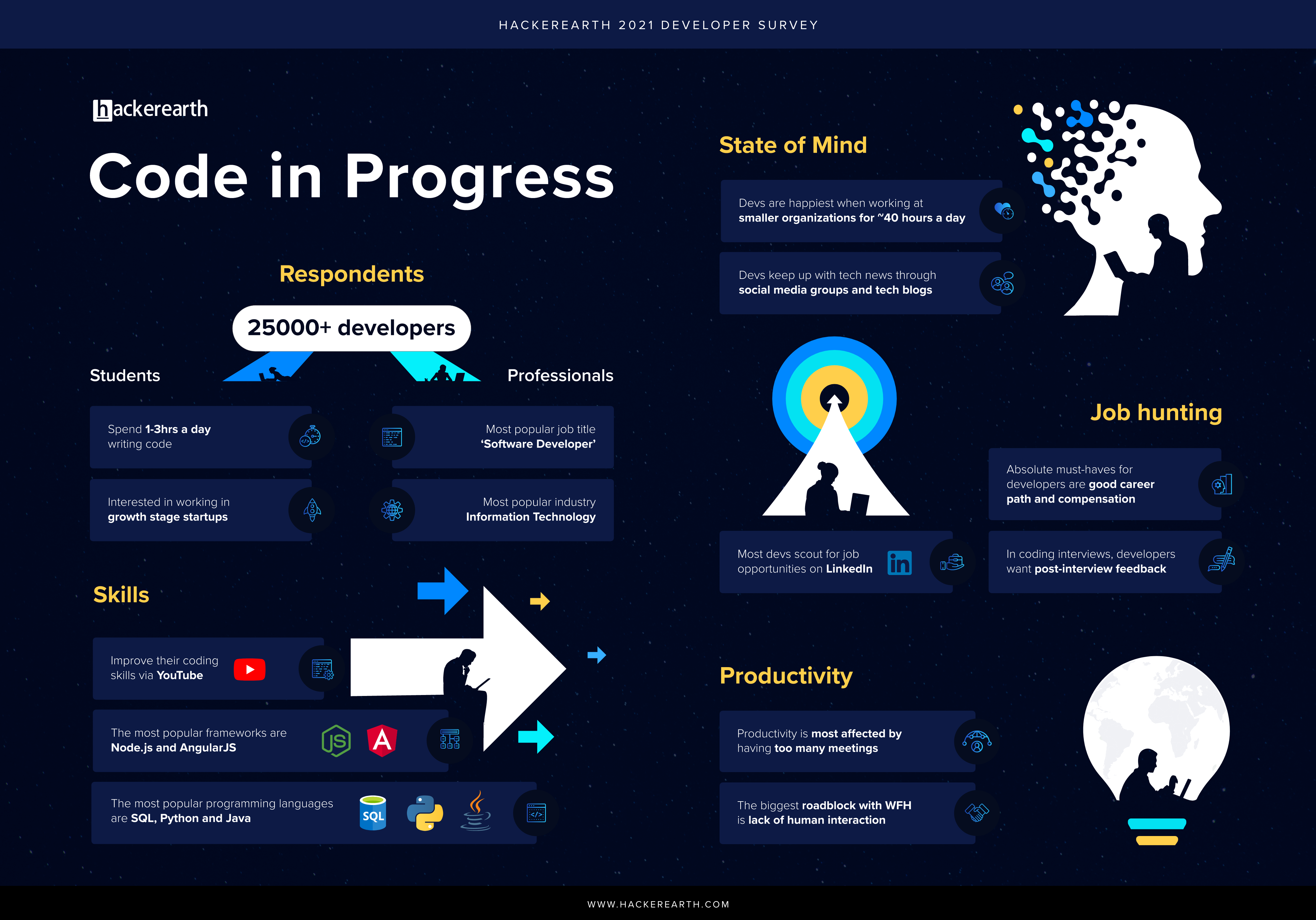
Code In Progress - The Life And Times Of Developers

Developers. Are they as mysterious as everyone makes them out to be? Is coding the only thing they do all day? Good coders work around the clock, right?

While developers are some of the most coveted talent out there, they also have the most myths being circulated. Most of us forget that developers too are just like us. And no, they do not code all day long.

We wanted to bust a lot of these myths and shed light on how the programming world looks through a developer’s lens in 2021; especially in the wake of a global pandemic. This year’s edition of the annual HackerEarth Developer Survey is packed with developers’ wants and needs when choosing jobs, major gripes with the WFH scenario, and the latest market trends to watch out for, among others.

Our 2021 report is bigger and better, with responses from 25,431 developers across 171 countries. Let’s find out what makes a developer tick, shall we?

Developer Survey

“Good coders work around the clock.” No, they don’t.

Busting the myth that developers spend the better part of their day coding, 52% of student developers said that they prefer to code for a maximum of 3 hours per day.When not coding, devs swear by their walks as a way to unwind. When we asked devs the same question last year, they said they liked to indulge in indoor games like foosball. In 2021, going for walks has become the most popular method of de-stressing. We’re chalking it up to working from home and not having a chance to stretch their legs.

Staying ahead of the skills game

Following the same trend as last year, students (39%) and working professionals (44%) voted for Go as one of the most popular programming languages that they want to learn. The other programming languages that devs are interested in learning are Rust, Kotlin, and Erlang.Programming languages that students are most skilled at are HTML/CSS, C++, and Python. Senior developers are more comfortable working with HTML/CSS, SQL, and Java.

How happy are developers

Employees from middle market organizations had the highest 'happiness index' of 7.2. Experienced developers who work at enterprises are marginally less happy in comparison to people who work at smaller companies.However, happiness is not a binding factor for where developers work. Despite scoring the least on the happiness scale, working professionals would still like to work at enterprise companies and growth-stage startups.

What works when looking for work

Student devs (63%), who are just starting in the tech world, said a good career growth curve is a must-have. Working professionals can be wooed by offers of a good career path (69%) and compensation (68%).One trend that has changed since last year is that at least 50% of students and working professionals alike care a lot more about ESOPs and positive Glassdoor reviews now than they did in 2020.
To know more about what developers want, download your copy of the report now!
We went a step further and organized an event with our CEO, Sachin Gupta, Radoslav Stankov, Head of Engineering at Product Hunt, and Steve O’Brien, President of Talent Solutions at Job.com to further dissect the findings of our survey.

Tips straight from the horse’s mouth

Steve highlighted how the information collated from the developer survey affects the recruiting community as well as how they can leverage this data to hire better and faster.
  • The insight where developer happiness is correlated to work hours didn’t find a significant difference between the cohorts. Devs working for less than 40 hours seemed marginally happier than those that clocked in more than 60 hours a week.
“This is an interesting data point, which shows that devs are passionate about what they do. You can increase their workload by 50% and still not affect their happiness. From a work perspective, as a recruiter, you have to get your hiring manager to understand that while devs never say no to more work, HMs shouldn’t overload the devs. Devs are difficult to source and burnout only leads to killing your talent pool, which is something that you do not want,” says Steve.
  • Roughly 45% of both student and professional developers learned how to code in college was another insight that was open to interpretation.
“Let’s look at it differently. Less than half of the surveyed developers learned how to code in college. There’s a major segment of the market today that is not necessarily following the ‘college degree to getting a job’ path. Developers are beginning to look at their skillsets differently and using various platforms to upskill themselves. Development is not about pedigree, it’s more about the potential to demonstrate skills. This is an interesting shift in the way we approach testing and evaluating devs in 2021.”
Rado contextualized the data from the survey to see what it means for the developer community and what trends to watch out for in 2021.
  • Node.js and AngularJS are the most popular frameworks among students and professionals
“I was surprised by how many young students wanted to learn Angular JS, given that it’s more of an enterprise framework. Another thing that stood out to me was that the younger generation wants to learn technologies that are not necessarily cool like ExtJS (35%). This is good because people are picking technologies that they enjoy working with instead of just going along with what everyone else is doing. This also builds a more diverse technology pool.” says Rado.
  • 22% of devs say ‘Zoom Fatigue’ is real and directly affects productivity
“Especially for younger people who still haven’t figured out a routine to develop their skills, there is something I’d like you to try out. Start using noise-canceling headphones. They help keep distractions to a minimum. I find clutter-free working spaces to be an interesting concept as well.”

The last year and a half have been a doozy for developers everywhere, with a lot of things changing, and some things staying the same. With our developer survey, we wanted to shine the spotlight on skill-based hiring, and market trends in 2021, plus highlight the fact that developers too have their gripes and happy hours.

Uncover many more developer trends for 2021 with Steve and Rado below:

5 Steps To Create A Remote-First Candidate Experience In Recruitment

This article has been updated on April 7th, 2023.

The pandemic-led era opened an entirely different world to us: tech companies transitioned to working on-site to working remotely.

With this came the shift in hiring processes too. While it’s been exciting for candidates to get hired virtually, it’s an ongoing battle for tech companies to create an engaging, remote-first candidate experience.

Companies like Docusign and Twilio have created an interactive virtual candidate experience for their candidates and so can you.

Wondering how? Well, this article will breakdown the 5 steps you need to take to create an interactive virtual candidate experience.

Keep reading.

What is candidate experience?

Candidate experience refers to how candidates feel about your company once they’ve been through the wringer, in terms of your hiring process. And these candidate ‘feelings’, whether good, bad or ugly, influence candidates in their decision to apply to your company or accept your job offer.

A good candidate experience will encourage candidates to think about working for your company after they see how you treat them. A better candidate experience might make them want to spread goodwill about your company, helping build up your brand.

A twitter user talking about how valuable a candidate is

Source

On the other hand, a bad candidate experiencewill make candidates lose respect for you, both as an employer and as abrand.

Why is a positive candidate experience important?

Probably, there shouldn’t be the ‘why’ for developing a positive candidate experience. Like your company wants to serve your customers better for them to turn into repeat buyers, you need to develop a positive candidate experience for the following reasons:

Attract and recruit better talent

A lengthy and complicated recruitment process results in higher attrition, with candidates dropping off midway due to poor experience. A strong candidate experience strategy identifies such gaps and helps you tweak the process to ensure more talented candidates stick it out till the end. Now you have a bigger and better talent pool to choose from.

Recommended Read: Ultimate Playbook for Better Tech Hiring

Improves your company’s bottom line

A stronger candidate experience is a direct reflection of how streamlined your hiring is. Investing in creating a positive candidate experience adds a lot more to the bottom line than all the other resources that you invest in your hiring process.

Enhances your employer brand

Your employer branding, especially in 2021, is directly related to candidate experience. Bad reviews on social media and Glassdoor will adversely affect hiring new talent, with newer candidates becoming discouraged from applying for a position at your company. If you want to hire the best candidates in the market, you have to take special care of them at every step in the hiring process.

The impact of bad candidate experience

63% of job seekers will likely reject a job offer because of a bad candidate experience, and this is just the tip of the iceberg.Be it through social media, word of mouth, or employer review sites, any negative connotations associated with your organization will spread like wildfire and it can be hard to discourage or control.

You check multiple reviews of a restaurant before ordering food from that place. How many reviews would a candidate go through before deciding not to work with your company?

One review of a negative experience is enough to create a far-reaching ripple effect; top talent will be deterred from applying for your company, candidates will drop off midway through the application process, or getting candidates to say yes to your offer letter becomes harder than it should be. This directly leads to a decline in profitability.

Recommended read: 5 Reasons For Bad Candidate Experience In Tech Interviews

5 steps to improve candidate interview experience

Good candidate experience is a package. It starts right from the time a candidate applies to your organization up until the candidate accepts your offer letter. How to improve candidate experience in recruitment?

Here are 5 steps you can take to get your candidate experience from good to great in recruitment.

How to create a remote-friendly candidate experience

Step #1—Understand the candidate journey better

A candidate’s journey starts right from the point they start looking for a job. But how are they going to land to your advertised role, apply for it, and most of all—how are you going to keep them engaged through the entire cycle?

You see? Candidate journey is a multi-step process which includes:

  • Awareness
  • Consideration
  • Interest
  • Application
  • Selection
  • Hire
  • Onboarding

If we break down these steps into a basic cycle, here’s what it looks like:

Alex, a Front-end Developer is looking for a new role. He gets to know about HackerEarth hiring for the Front-end Developer role from one of his colleagues; scrolls through the company’s website, their social media, and their Glassdoor reviews.

He is interested in working with the company. So, he fills out the job application.

This is the pre-selection phase. Now, the role of the organization comes into play to make the candidate’s experience positive and nurturing.

The company sends the email to Alex about his selection and what the next selection steps would look like. He has to complete an assessment—the first qualification step in his selection criteria.

Once Alex submits his assessment, the recruiter emails him about the next steps that will take place in both the scenarios—whether he gets selected or not.

Case 1: Alex gets selected

Alex will receive an email invite to join the Facecode’s call where the HRs will ask him their questions, and give live feedback on the code he submitted in his assessment.

Case 2: Alex does not get selected

If Alex fails to pass the assessment, he will receive the email from recruiter about his application not moving forward.

In both the cases, Alex knows he’ll not be left hanging in the middle of the process—and that’s a relief!

Step #2—Master the basic remote interview etiquette

#1 Use online skill assessment tools as the first step of your remote interview process to screen candidates from a high volume of applicants. This cuts down the actual number who progress to the video interview stage, allowing you to spend more time on creating a better candidate experience.

#2 Be accessible to your candidate. With everything operating remotely they will be bound to have plenty of questions, and they need to feel connected to you. Keep them engaged with personalized communication like sending them emails with pointers on what equipment they will need for the interview, and how to create a distraction-free environment.

#3 Send candidates useful resources to help prepare for their interview. Give them references of questions they might be asked, and other similar tips.

Recommended read: Essential Questions To Ask When Recruiting Developers

Step #3—Showcase company culture

A successful recruitment process builds excitement about working for your company. It highlights company culture, values, mission and gives a glimpse into a candidate’s future work environment.

While it’s often easier to show them your company’s culture in person, it’s limited in the remote setup. Here’s what you can do instead:

  • Show them the fun team building activities your company does to keep the entire team bonded.
  • Show them instances of how the managers interact and take care of their team members.
  • Set up informal video calls with the rest of the team for the candidate to get a sense of who they’ll be working with.

Step #4—Don’t leave candidates hanging

In a remote setting, regular communication is key. Set expectations on:

  • How and when you will communicate?
  • What the interview process will be?
  • How long it will take?
Describe each stage of the remote interview along with what tools you will be using. Proactively communicating changes to your hiring process and any hiring delays will help avoid confusion and improve the candidate experience.

How to follow up with candidates after interviewing them

Source

Lack of feedback post interview is a major peeve of candidates as stated by 40% of the respondents of HackerEarth’s Developer Survey 2021. Send out timely feedback after each phase of the process.

And if the candidate was not selected for the role, that needs to be communicated too. Ghosting candidates as a form of rejection is an absolute NO. Tell them what they did well and give actionable tips on how to do better the next time. Candidates will appreciate that you took the time out to inform them personally.
Recommended read: How You Can Leverage Candidate Experience To Attract Top Talent

Step #5—Use remote interviewing tools

When you integrate intelligent remote interviewing tools into your hiring process, it’s easy for hiring managers in all departments and locations to replicate the same experience for each candidate, ensuring consistency.For example, use collaborative coding tools for your developer candidates like FaceCode to see the candidate's code in-action, give them live updates, send automated summaries and recordings.

Reinvent your remote candidate experience

Candidates and recruiters alike are dealing with unprecedented circumstances and anxieties that were unimaginable just over a year ago. A rethink in your remote hiring process to provide candidates a favorable experience is necessary at this point. Doing so, you showcase them the value of empathy.

There's no time like the present to fight the good fight! Invest in candidate-first practices to create a positive candidate experience that is rivaled by none and most importantly, stay empathetic.