How to create automated assessments: A practical recruiter's quick-start guide
Hiring teams review more technical applications per requisition than ever, and manually screening each one against role requirements is no longer a scalable option. Automated assessments — pre-built or configurable tests that evaluate a candidate's skills without requiring a recruiter or engineer to grade each submission — have become a standard part of the technical hiring stack. As of 2025, this guide walks through what to look for in a tool, how to create automated assessments for your open roles, and where the tradeoffs sit.
For context on how the market has shifted, research from staffing firms such as Robert Half has suggested persistent competition for qualified engineering talent, a pattern also reflected in the U.S. Bureau of Labor Statistics' occupational outlook for software developers. That competition is why more recruiters are moving pre-interview screening onto structured, rubric-based platforms rather than relying on resume review alone.
What automated assessments actually do (and where they fall short)
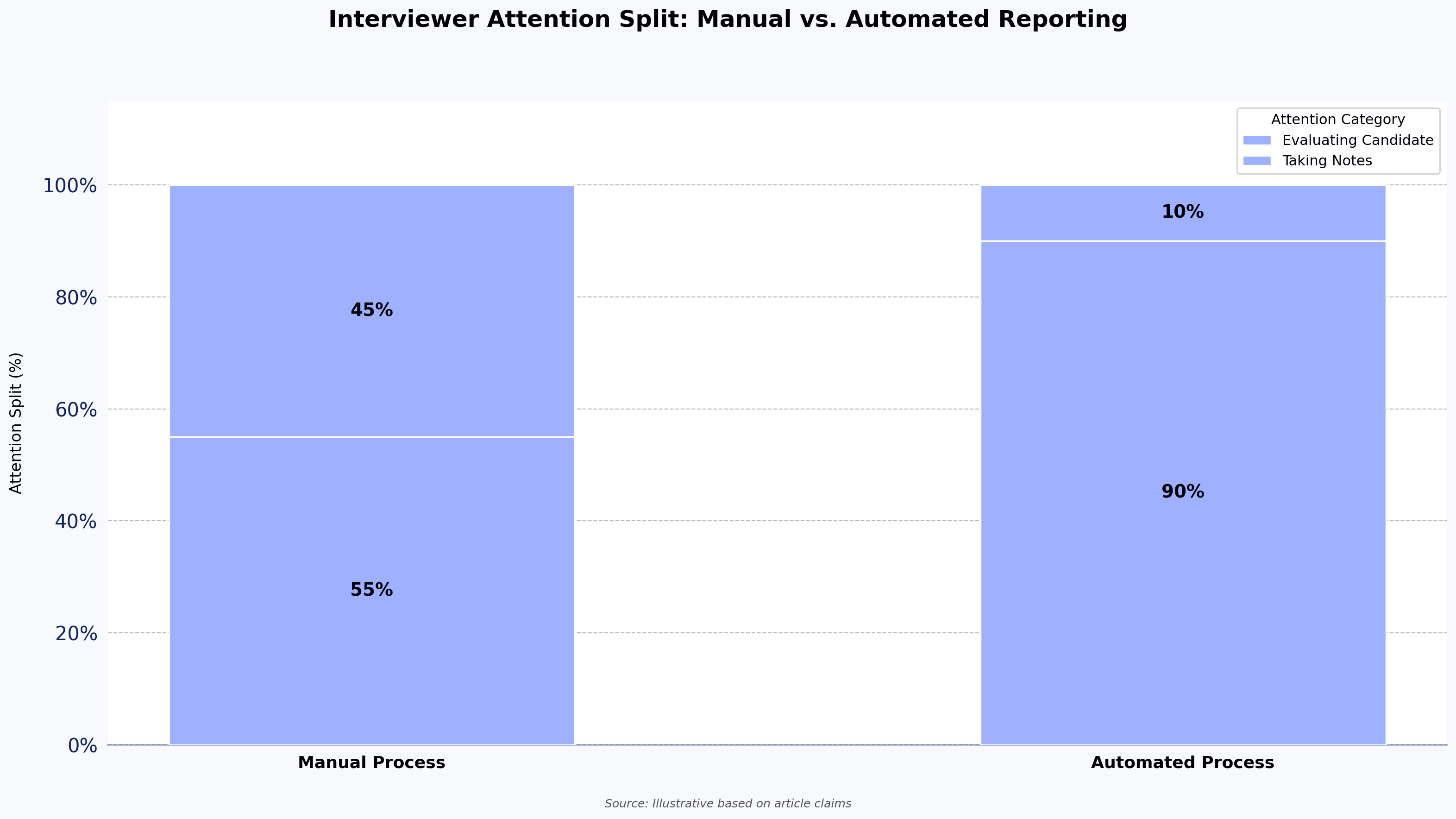
An automated assessment platform lets recruiters send candidates a standardized test — coding challenges, MCQs, project-style problems, or a mix — and returns a scored report without manual grading. Applied consistently, this produces evaluation that is more consistent across candidates than human-led screens, since every candidate is measured against the same rubric rather than varying by interviewer mood or fatigue. Structured assessments also align with the EEOC's Uniform Guidelines on Employee Selection Procedures, which emphasize job-relatedness and consistent measurement when using tests in hiring.
A few honest tradeoffs worth naming:
- Assessments measure what they measure. A coding test tells you whether a candidate can solve a specific type of problem under time pressure. It does not tell you how they collaborate, debug production incidents, or handle ambiguity.
- Question quality matters more than question volume. A large question bank is useful only if the items map to the skills you actually hire for. Off-the-shelf questions can leak online, so proctoring and item rotation matter.
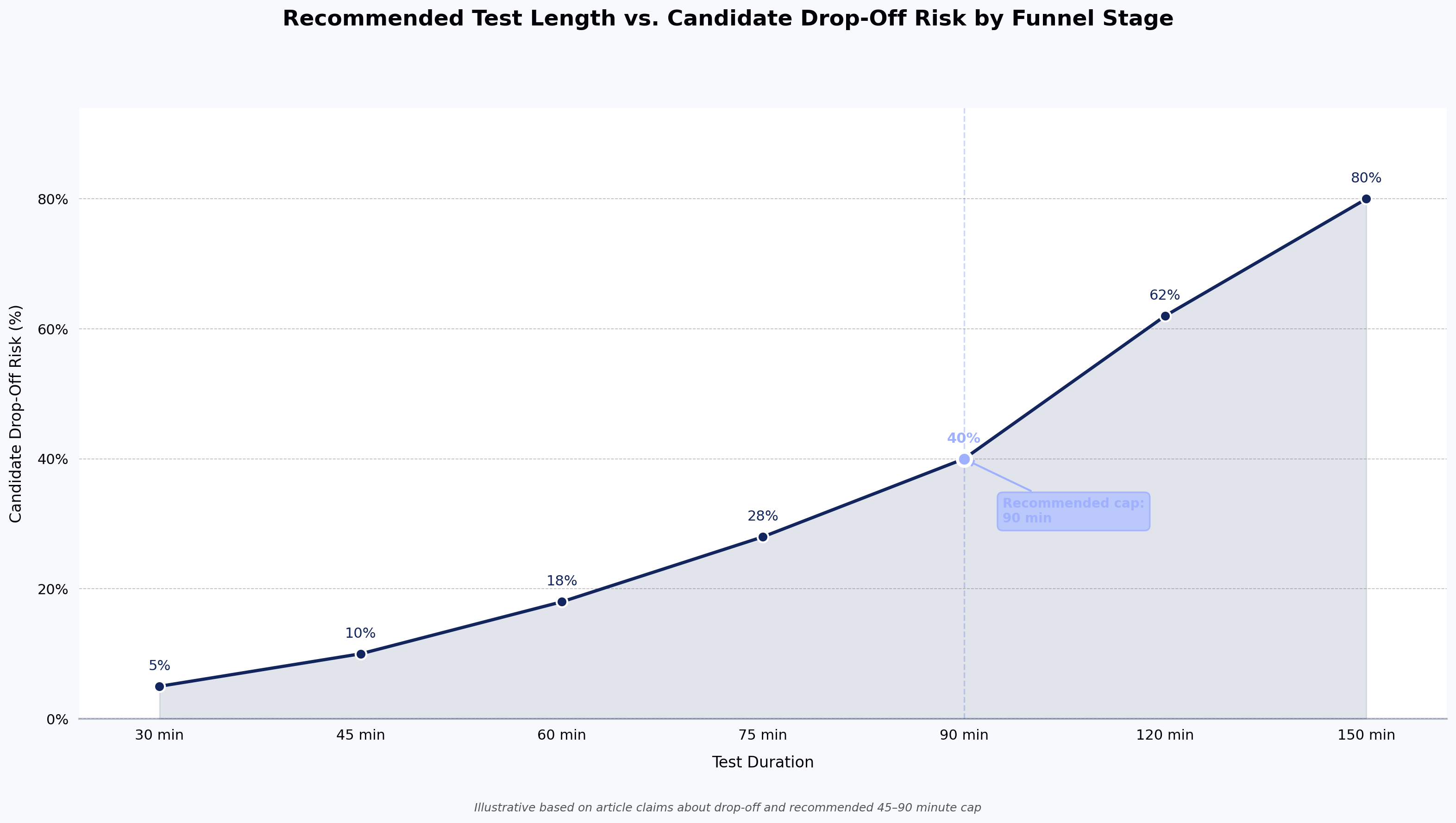
- Candidate experience is a real cost. Long or poorly scoped tests increase drop-off in your pipeline. Keep tests scoped to the skills the role requires.
- Proctoring is not foolproof. Tab-switch detection, plagiarism checks, and video proctoring reduce cheating but don't eliminate it. Peer-reviewed work on remote proctoring, such as the International Test Commission's Guidelines on the Security of Tests, Examinations, and Other Assessments, notes that no single control fully prevents misconduct. Treat assessment scores as one input, not a final decision.
With those caveats in mind, here is what to evaluate when picking a tool.
Features to look for in an automated assessment tool
There are enough automated assessment tools on the market that picking one takes real effort. A workable coding assessment tool should include a well-curated question library, produce meaningful signal on a candidate's technical knowledge, and keep candidate experience intact. HackerEarth's AI-powered assessments are built specifically for technical hiring, with a curated question library and skill intelligence that surfaces candidate capability against role rubrics.
- Breadth across languages and frameworks. The platform should cover the programming languages and frameworks your teams actually hire for, including both modern stacks and any legacy skills you support.
- Role- and skill-specific test creation. Every req is a little different. You should be able to build MCQs, subjective questions, and on-the-job style problems, and mix them into a single assessment.
- Proctoring with reporting. Look for video proctoring, tab-switch detection, copy-paste flags, and impersonation checks — plus a report that shows what was flagged and when.
- Auto scoring against a standard rubric. Automated grading reduces the scope for inconsistency between reviewers and speeds up shortlisting so candidates aren't left waiting.
- Candidate performance analytics. Summary and per-question reports let you compare candidates on the same criteria rather than on gut feel.
- ATS integration. Sync candidate data and assessment results with your ATS so recruiters aren't toggling between tools or maintaining spreadsheets. (Confirm the specific ATS integrations available with the vendor before signing.)
How to create your own assessment tool workflow
If you're building an internal process to create automated assessments — whether on HackerEarth or another platform — the sequence is roughly the same:
- Define the role's skill rubric. List the 3–5 skills a candidate must demonstrate to move to a hiring manager screen. Anchor these to the JD, not to nice-to-haves.
- Set the scoring bar. Decide what "pass" looks like before you see any results. Otherwise, you'll adjust the bar to fit the pipeline.
- Choose or build the questions. Pull from a vetted question library where possible, and add custom questions for skills or domain logic unique to your product.
- Scope the test length. For pre-interview screens, most teams cap at 45–90 minutes. Longer tests raise drop-off.
- Configure proctoring based on stakes. Full video proctoring for final-stage tests; lighter checks for early-funnel screens.
- Pilot with your existing pipeline. Run the assessment against candidates you've already screened. If your top performers don't pass, the test is miscalibrated.
- Integrate with your ATS. Route invites and results through your ATS so status is visible to the whole hiring team.
How to create automated assessments with HackerEarth
HackerEarth Assessments supports four common approaches to create automated assessments. Each is aimed at a different starting point in the recruiter workflow:
- Based on skills — In the assessment builder, choose "Create by skills" and select one or more skills (e.g., Python, React, SQL) from the library. The platform surfaces vetted questions tagged to each skill, and you set the difficulty mix (easy/medium/hard) and total duration. Useful when you know the exact skill you want to screen for.
- Based on job descriptions — Paste your JD into the "Create by JD" flow. The platform parses the JD for skills and seniority signals, then suggests a starter set of questions and a test structure you can accept or edit. You confirm the skill mix, adjust question count, and publish. Useful when the JD is the source of truth for the role.
- Based on job roles — Start from a pre-built role template (e.g., backend engineer, data engineer, full-stack developer). Each template ships with a default skill breakdown, question types, and duration. You can add or remove sections before publishing. Useful for high-volume, standardized hiring.
- Custom tests — Choose "Create from scratch" and assemble the assessment section by section. Pull questions from the HackerEarth library, upload your own MCQs or coding problems, define custom test cases, and set section-level time limits. Useful when you have proprietary problems or domain-specific logic.
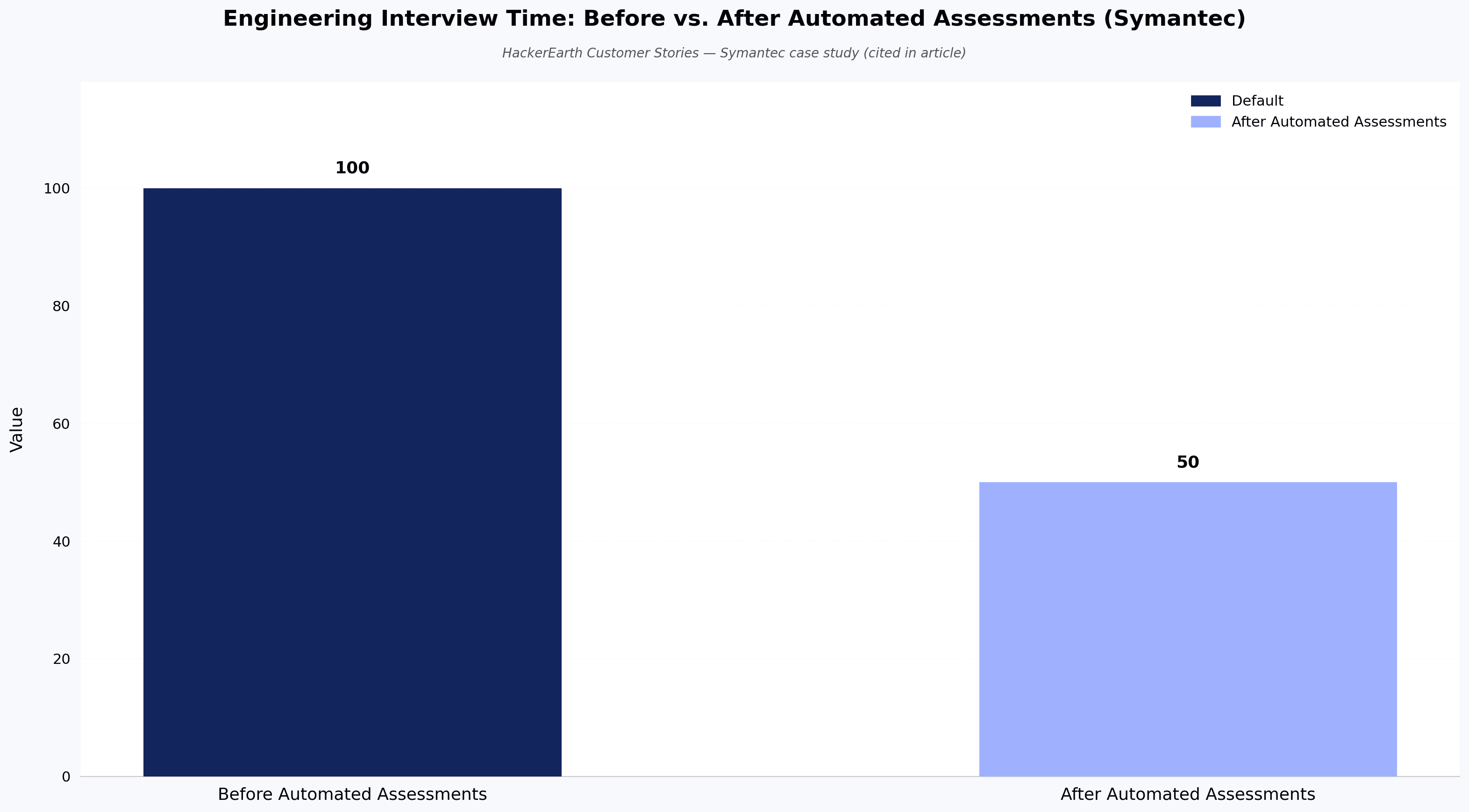
Once the test is built, invite candidates directly, track where each candidate sits in the pipeline, and pull performance reports from the ATS view rather than switching tools. Teams using HackerEarth Assessments have publicly reported meaningful hiring gains — for example, Symantec reduced its engineering interview time by roughly 50% after moving pre-interview screening onto structured assessments.
Assessment platforms aren't only used for technical hiring. L&D teams, university instructors, and training managers also use similar tools to run knowledge checks and certification exams — though the proctoring, code execution, and ATS features that matter for engineering hiring are usually optional in those contexts.
For a walkthrough of each option, see 4 ways to create tests with HackerEarth. For a broader look at how assessments fit into a technical hiring stack, see what's behind great tech teams.
FAQ
How can I create my own assessment tool?
Most hiring teams don't build an assessment tool from scratch — the engineering effort to maintain a question bank, proctoring, and grading logic is significant. The more common path is to use a configurable platform (HackerEarth, or another tool that fits your stack) and treat "your own assessment tool" as your organization's rubric, question set, and scoring bar layered on top of that platform.
What are some AI tools that can be used to create assessments?
AI is increasingly used for automated item generation — creating variations of test questions from a seed prompt or existing item — and for parsing job descriptions into suggested skill rubrics. Some platforms also use AI to summarize candidate performance across multiple attempts. When evaluating AI features, ask the vendor how items are validated for difficulty and bias before they enter the live question pool.
How to generate an assessment?
At a minimum: define the skills the role requires, choose or write questions that map to each skill, set a passing rubric, configure proctoring based on the stage of the funnel, and pilot the test against candidates you've already evaluated. Adjust the bar and question mix based on how your known-good candidates perform.
What is the most common tool for assessment?
There is no single dominant tool. For technical hiring, several platforms — including HackerEarth — appear regularly in buyer shortlists on review sites such as G2's Technical Skills Screening category. For general knowledge or L&D assessments, teams often use tools like Google Forms, Typeform, or dedicated LMS-embedded quiz builders. Choice depends on whether you need code execution, proctoring, and ATS integration or just a scored questionnaire.
Are there free options to create automated assessments?
Some platforms offer free or limited-use tiers, and general-purpose tools like Google Forms can handle basic MCQ assessments at no cost. Free tools typically lack code execution, proctoring, and ATS integration, so they're better suited to L&D quizzes than to pre-interview technical screens. Check each vendor's current pricing page for details on trial availability.
Next steps
If you want to see how a configurable assessment platform handles your specific roles, book a HackerEarth Assessments demo and bring a live JD to the call — the fastest way to evaluate a tool is to build the test you'd actually send.