Arpit Mishra

Author
Arpit Mishra

Blogs
From dorm rooms to boardrooms, Arpit has built a career connecting young talent to opportunity. Their writing brings fresh, student-centric views on tech hiring and early careers.
author’s Articles

Insights & Stories by Arpit Mishra

Arpit Mishra explores what today’s grads want from work—and how recruiters can meet them halfway. Expect a mix of optimism, strategy, and sharp tips.
Clear all
Thank you! Your submission has been received!
Oops! Something went wrong while submitting the form.
Filter
Filter

Top 7 most popular programming languages to learn

This blog has been picked up by the Economic Times Tech


Top Programming Languages to Learn

How do we determine the most preferred programming languages?

By “most preferred,” we don’t mean that Java is superior to C++ or Python is better than MATLAB. This analysis aims to highlight languages most in demand in the industry and most preferred by users.

Languages like C++, MATLAB, and Java are traditionally taught in technical institutes. However, industry requirements often differ from academic focus areas.

Languages to Learn:

  • Javascript
  • Java
  • Python
  • PHP
  • R
  • Matlab
  • Arduino
  • Swift

We pulled data from TIOBE, PYPL, Stack Overflow, GitHub, Indeed, Glassdoor, and our own platform at HackerEarth to identify which languages are preferred by developers and most sought after by companies.

TIOBE Index

TIOBE measures language popularity based on search engine queries. In 2016, Java remained #1, followed by C and C++. Visual Basic and Python scored higher than Javascript, and Assembly entered the top 10.

PYPL Index

PYPL ranks languages by how often tutorials are searched on Google. Java leads worldwide, while Python has grown rapidly in popularity. PHP has seen a decline.

Stack Overflow

Stack Overflow is one of the largest programming communities. Based on questions asked, Javascript tops the list, with Node.js and Angular gaining popularity while PHP declines.

GitHub

GitHub's Octoverse report showed Javascript as the most widely used language in repositories, outpacing other languages significantly.

HackerEarth

HackerEarth hosts thousands of coding challenges. Based on internal data from over 1 million users, the most used languages are C++, Java, Python, and C#.

Indeed

Indeed job listings show Java as the most in-demand, followed by PHP, C, and Javascript. R is also gaining traction.

Glassdoor

Glassdoor job data suggests Java remains top for job demand. Developers increasingly prefer R, while Python and Perl are rising in usage.

Recommended Programming Languages for 2017

  • Javascript: Essential for web development. Widely used for frontend interactions and effects.
  • Java: Backbone of Android apps and financial systems. Known for speed and performance.
  • R: Perfect for statistics and data analysis, with rising job market demand.
  • MATLAB: Regaining popularity due to analytics and scientific computing needs.
  • SQL: Crucial for database management. A must-have for data-focused roles.
  • Arduino: Vital for IoT and embedded systems, based on C/C++.
  • Swift: Apple's modern programming language for iOS/macOS app development.

These languages are expected to be in high demand in the near future. Others won’t vanish, but these are currently trending in the developer and employer communities.

Read more: Best countries to work as a developer

HackerEarth Collegiate Cup '16 - Results

HackerEarth conducted its annual Collegiate Cup, welcoming programming enthusiasts from across the globe to compete for the title of best collegiate programmers.

The contest featured five rounds. Teams of three, from any region, could participate and compete for the coveted title and prize.

Round 1: Let the game begin

Held on September 3, 2016, this was a 24-hour online qualifier with three sets of problems, modeled on the ICPC contest format. From 1885 teams, 755 advanced by solving at least one problem set.

Collegiate Cup Round 1

Round 2: The first elimination round

On September 18, 2016, only the top 3 teams from each college moved forward from this three-hour online contest. A total of 755 teams competed by solving 5 problems.

Collegiate Cup Round 2

Round 3: Wild card entry round

Held on October 2, 2016, this round gave five new teams a chance to re-enter the competition. 318 teams battled in a three-hour contest solving challenging problems.

Collegiate Cup Round 3

Round 4: Second elimination round

214 teams competed in a five-hour contest with 10 problems. The top 20 teams (15 from India and 5 international) were invited for the onsite final in Bengaluru, India, with travel expenses covered by HackerEarth.

Collegiate Cup Round 4

The Final Round

Held on November 5, 2016, at HackerEarth, Bengaluru. The final round consisted of:

  1. The onsite round for 15 Indian teams
  2. The Mirror round for 5 international teams

Each team tackled 12 problems in a five-hour contest.

Final Round

Sample Onsite Problem:

Given 2×N pebbles of N different colors (2 pebbles per color), arrange them on an infinite 2D table with the constraint that a pebble of color X placed at (X,Y) must satisfy Y ≠ X and another pebble of color Y exists. Find the minimum cost of enclosing the arrangement with ribbon, sold in whole units at cost M per unit.

Solution available here.

Another Problem:

Given an array A of length N, count the number of non-empty subarrays such that the sum of elements in each subarray is a palindrome. Find the number of pairs (i, j) where the sum A[i] + ... + A[j] is a palindrome.

Try the solution at palindromic sum editorial.

Top 3 Onsite Teams:

  1. Team FacelessMen – IIT Kanpur – alecsyde, TerryMcGinnis, Sahilgrover
  2. Team FruitSalad – DAIICT – yashkumar18, kuldeeppatel, Sumeet.Varma
  3. Team mobius_treap – IIIT Hyderabad – vmrajas, tanujkhattar, itsalways42

Top 3 Mirror Round Teams:

  1. Team Jinotega – MIPT – Arterm, zemen, ifsmirnov
  2. Team VietAnplusplus – Ho Chi Minh City University of Science – tanphatls987, phvietan, TGod2401
  3. Team Frogless – Kiev National Taras Shevchenko University – mgch, ballon, Fdg
Participants Summary
  • 5665 programmers
  • 1885 teams
  • 200 universities
  • 10 countries
  • 5 grueling rounds
  • 1 coveted title

The competition was intense, yet participants appreciated the HackerEarth platform as a valuable tool for learning and practice.

"Greeaaat!! Problem set was awesome, would love to upsolve them with editorials. HackerEarth has a really nice workplace :) Everything was well managed, we didn't face any glitches. T-shirts were awesome!!! Keep it every year XD" – Arun Yadav

Find it interesting? Try similar challenges at HackerEarth Challenges.

Algorithm on how to find the day of a week

In 1970, John Horton Conway devised an algorithm, known as the “Doomsday Algorithm,” to calculate the day of the week for any given date using mental math. It's easy to remember and doesn’t require a calculator.

This algorithm uses the formula: (d + m + y + [y/4] + c) mod 7

Here, d is the day, m is the month, y is the year, and c is the century number.

Each weekday is assigned a number using modulo 7. For instance:

  • Sunday = 1
  • Monday = 2
  • ... and so on.

What Do We Know?

Common years have 365 days, and leap years have 366. Each week has 7 days. The modulo properties help identify patterns in calendar dates.

Since 365 mod 7 = 1, each new year starts a day ahead of the previous year (unless it's a leap year, which adds one more day shift).

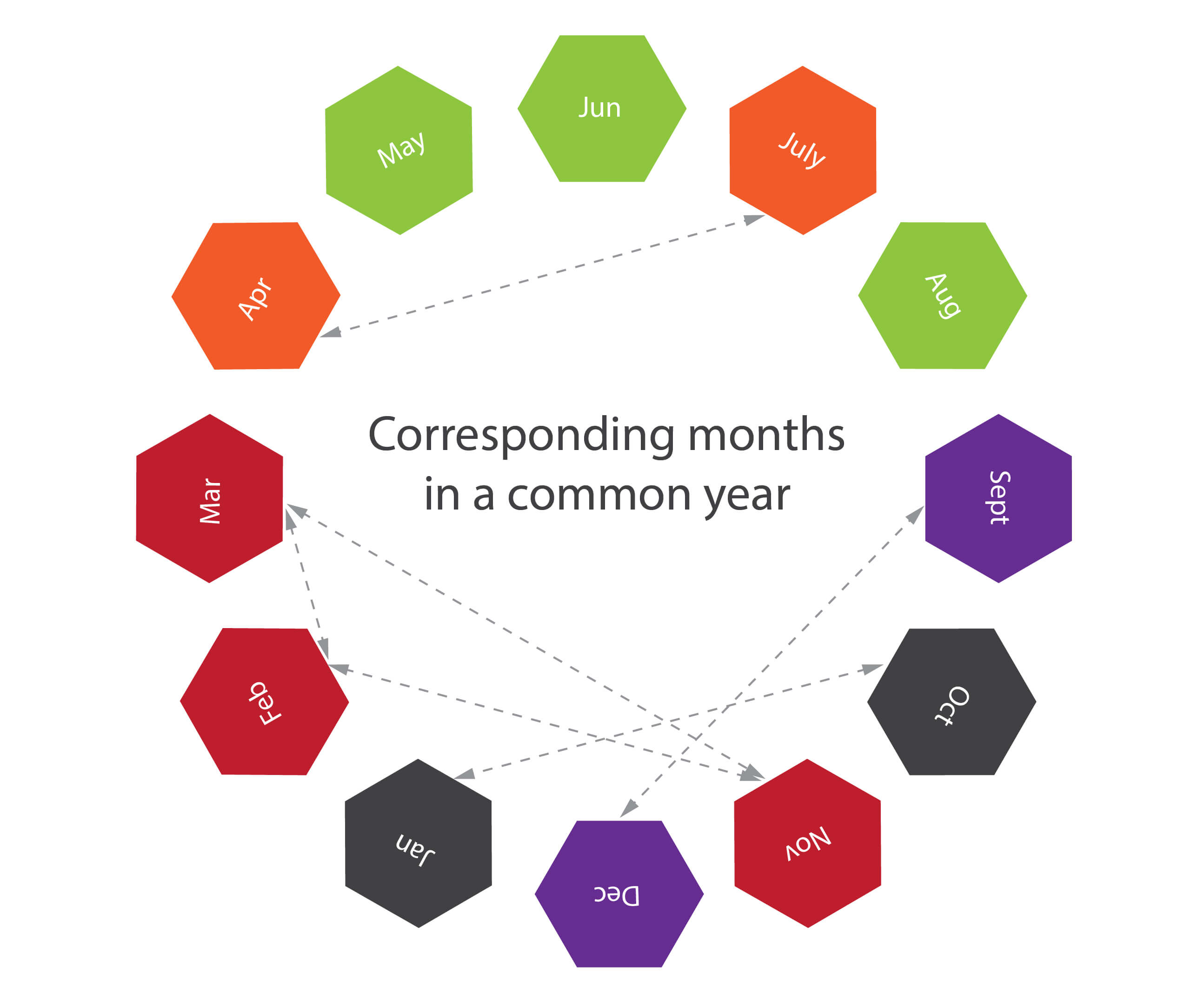
Some months start on the same day of the week. For instance, in a common year, April and July start on the same day.

Corresponding months in common year

Corresponding Months

In common years:

  • January and October
  • February, March, and November
  • April and July
  • No month matches with August
Common year alignment

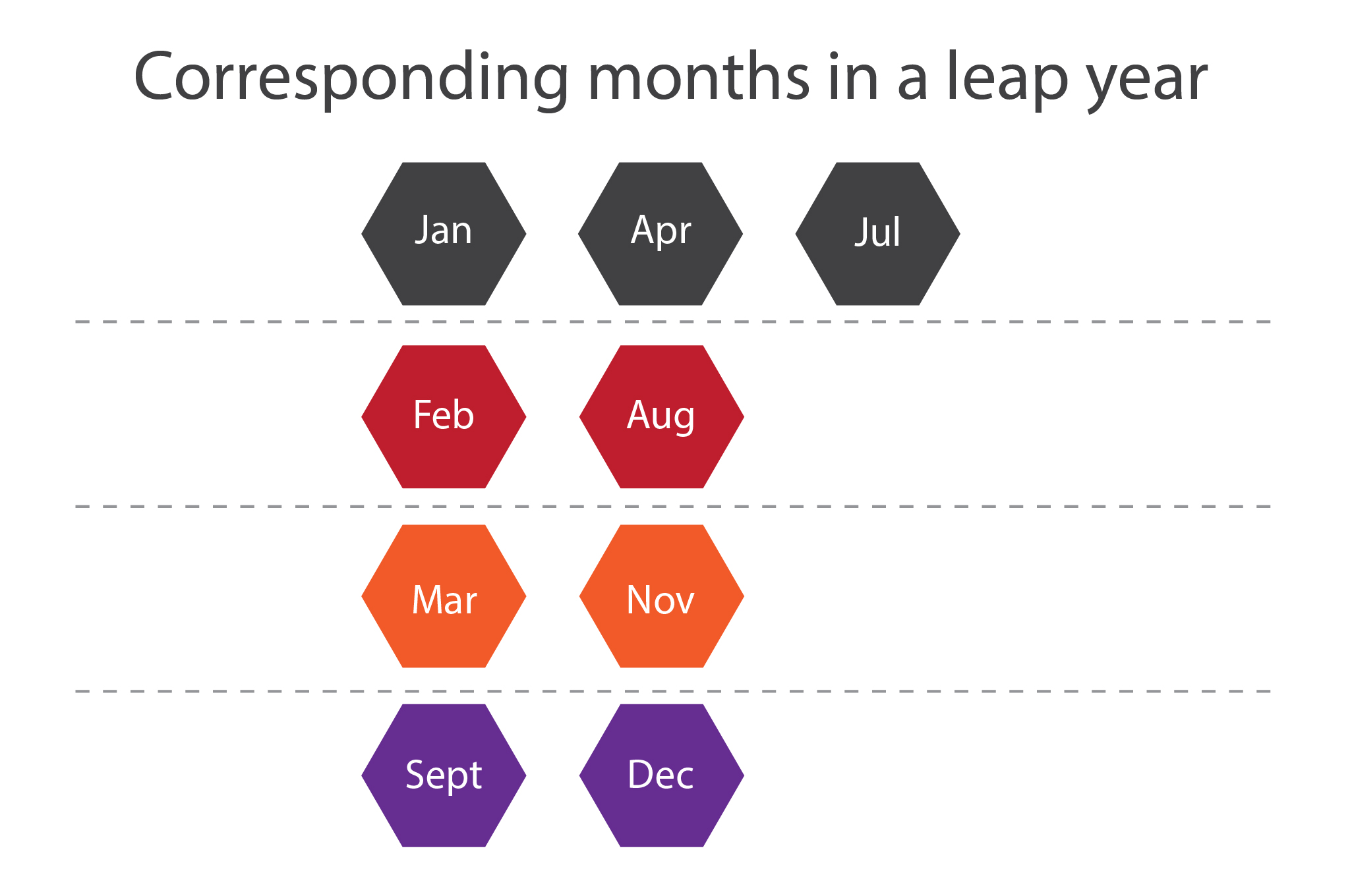
In leap years:

  • January, April, and July
  • February and August
  • March and November
  • No month matches with October
Leap year alignment

Tomohiko Sakamoto's Optimization

Sakamoto created an optimized version of the Doomsday Algorithm considering leap years. For example:

  • January 31 + February 28 = 59 days → 59 mod 7 = 3
  • So, March 1 is 3 days ahead of January 1

To accommodate leap years accurately, use the formula:

y/4 - y/100 + y/400

This adjusts the extra day added every four years, removed every 100 years, and re-added every 400 years.

For months less than March, we subtract one from the year to adjust for leap year effect:

y -= m < 3

We also use a predefined list to handle the month values:

{0, 3, 2, 5, 0, 3, 5, 1, 4, 6, 2, 4}

C++ Code

int dow(int y, int m, int d)
{
  static int t[] = {0, 3, 2, 5, 0, 3, 5, 1, 4, 6, 2, 4};
  y -= m < 3;
  return (y + y/4 - y/100 + y/400 + t[m-1] + d) % 7;
}

Python Code

def day_of_week(year, month, day):
    t = [0, 3, 2, 5, 0, 3, 5, 1, 4, 6, 2, 4]
    year -= month < 3
    return (year + int(year/4) - int(year/100) + int(year/400) + t[month-1] + day) % 7

This algorithm provides a quick and efficient way to calculate the day of the week for any date using simple arithmetic and a small lookup table.

Why study data structures and algorithms?

Many young programmers scour the web trying to find answers to this question: How to study Algorithm and Data structure? Certainly, a good place to start... But a more relevant question would be: What are algorithms and data structures, and why should I study them?

Let’s start with this motivating quote: “Every program depends on algorithms and data structures, but few programs depend on the invention of brand new ones.” -- Kernighan & Pike

What is an algorithm?

Wikipedia says “an algorithm is a self-contained step-by-step set of operations to be performed. Algorithms perform the calculation, data processing, and/or automated reasoning tasks.”

Whether you are cooking a burger or adding two numbers, there’s an algorithm at work. From monitoring stock markets to pairing soul mates, algorithms are omnipresent.

An algorithm is a detailed step-by-step instruction set or formula for solving a problem or completing a task. You need algorithms to achieve the input–output relationship. Repetition, sequencing and conditional logic are computational concepts that manifest in your everyday life. Your morning routine can be an algorithm. Can you guess how?

There’s this great TEDEd cartoon by Harvard computer scientist David J. Malan you should see.

Algorithms are much more than instructions. What matters is that they teach you to define clear steps and conceptualize solutions.

Examples, anyone?

If you're shopping for a prom dress or driving to the mall, you are using a greedy algorithm. You make the locally optimum choice at each stage hoping to find the global optimum.

If you know the famous traveling salesman problem, then you’ll know how it applies to optimizing delivery routes.

Read this article about a two-year project led by Prof. William Cook. His team calculated the shortest distance to nearly 25,000 pubs in the UK using Google Maps.

What approach would you use to find a name in a phonebook? The brute-force algorithm. Try all possibilities until you find a solution. It works, but not well for complex problems.

Remember when IBM’s Deep Blue used brute-force methods to defeat chess champion Garry Kasparov? Times have changed, and so has computational power.

Then there are data compression algorithms—like MP3, JPEG, ZIP—that reduce file size. Huffman coding is a greedy approach that works well for efficient encoding.

The PID algorithm uses feedback to control systems like robots or heating units. It's still widely used, despite newer alternatives like MPC in cutting-edge applications.

What is Data Structure and why study it?

data structures

Data structure refers to an orderly arrangement of data. Think of it like organizing documents in folders. From encyclopedias to bank statements, structure matters.

Think not binary trees or associative arrays; think a shopping list. Data structures store objects and allow their manipulation. A mathematical model of a data structure is an abstract data type (ADT). These can be linear (arrays, stacks, queues) or nonlinear (trees, graphs, sets).

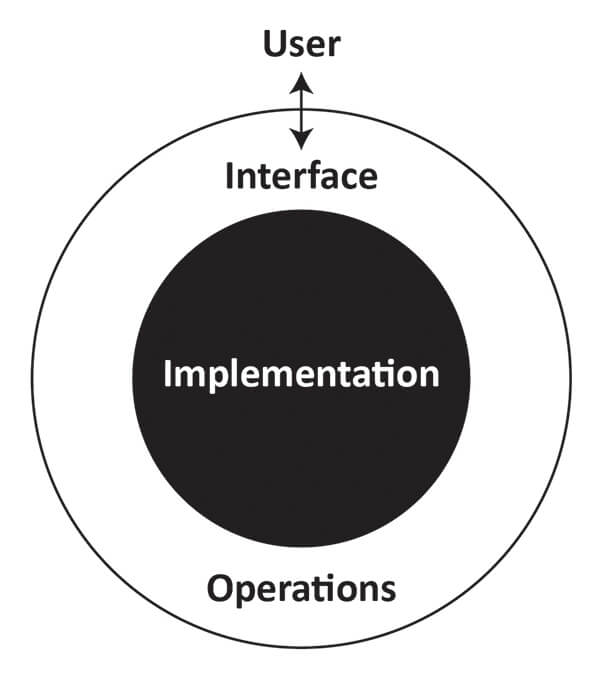
Abstractions help us focus on the big picture. ADTs specify the fields and operations; data structures implement them. For instance, Java source code access is limited so programmers can’t tamper with the software core.

abstract data types

Now how do we connect algorithms to data structures?

You use an algorithm—like looking up synonyms in a thesaurus—using data from a structured source (the thesaurus). Algorithms use the organization provided by data structures. You can’t really split them. “Data structures organize data and algorithms use that organization.”

Understanding these high-level building blocks is essential for programming success.

"I will, in fact, claim that the difference between a bad programmer and a good one is whether he considers his code or his data structures more important. Bad programmers worry about the code. Good programmers worry about data structures and their relationships." – Linus Torvalds

Learn more about how algorithms are taking over our world and how to get started with competitive programming.

Just to reiterate, you can't make a house by just stacking bricks—you need to understand the problem, create a feasible solution, and implement it without losing sight of the big picture.

What is Redis and how to begin with it

Over the last decade, dozens of open-source software applications have revolutionized technology stacks worldwide. From Linux to Mozilla, the developer community has introduced countless innovative concepts.

One such rapidly growing open-source tool is Redis — a data structure for fast in-memory data storage, used by Uber, GitHub, Twitter, Snapchat, and thousands of other companies.

But what is Redis, and how does it benefit developers?

For beginners, Redis is an in-memory data structure that can communicate with a server. If you’re looking for high-speed data storage, Redis is the go-to choice.

To simplify Redis and its importance, here’s an infographic that covers what Redis is, how to use it, and the benefits of using Redis.

What is Redis and how to use it

What is strings
Read more about strings - Here

What is hash table algorithm
Read the basics of hash tables - Here

Explain sets of strings
More about sets of strings - Here

What is hyperlogs data structure
Redis explains the Hyperlogs data structure - Here

All about geospatial indexes
Details on spatial indexes - Here

Benefits of using Redis module

Print

How to install Redis

How to install Redis module
Write your first Redis module

Redis in most programming languages
Supported programming languages

Redis global hackathon

Register for Redis hackathon

Print

Redis in the News

Redis at a glance

Creating your first 2D game with A* Algorithm

Moving from point A to point B is the prime requirement for many games—whether it is a strategic tactic-based RPG (role-playing game) like Warcraft III or one that’s as simple as Snakes and Ladders. The source-to-destination navigation sometimes requires more intelligence from your character than you believe, it needs to find the path with ease. You can’t have your characters walking through a wall or bumping into a car while playing, can you?

This is where pathfinding algorithms are used. Pathfinding is the basic building block for most games. Players have to reach a destination by moving around blocks, cars, rivers, and prisons. The algorithm ensures that the character not only avoids the obstacles but also gets to the destination by using the shortest path.

Games like Warcraft III use the A* pathfinding algorithm, where the protagonist is not only expected to reach his destination by the shortest path, but also move around the castles, not get in through the huts, dungeon, or walk through a dragon on its way.

A* algorithm (Pronounced A-star algorithm)

The A* algorithm is the fastest graph search algorithm that finds the path that costs the least from source node to goal node. (A node can be hexagon, square or circle, etc.)

In the gaming world, a node graph is a map of your gaming world, and the path that costs the least is the shortest path; A* traverses a node graph and finds the path that costs the least.

A* algorithm has properties of both Dijkstra and Best-first search. Unlike DFS and BFS, the A* algorithm selects the node which looks most promising instead of guessing the next node.

The cost function

The cost of node F is calculated as:

F = G + H

  • G is the cost that is required to reach a particular node from the source node.
  • H often termed the Heuristic Value. It is the estimated cost from one square on the grid to the other square, which is the goal on the grid. H being heuristic, can never be perfect and is usually based on assumptions.

Here we implemented the Euclidean distance for the cost function. The Manhattan and the Chebyshev functions are also shown in case required.

def estimate(self, xDest, yDest):
    """
    Estimation function for the remaining distance to the goal.
    """
    dx = xDest - self.x_position
    dy = yDest - self.y_position
    # Euclidian Distance
    d = math.sqrt(dx ** 2 + dy ** 2)
    # Manhattan distance: d = abs(xd) + abs(yd)
    # Chebyshev distance: d = max(abs(xd), abs(yd))
    return d

Let’s look at the following example:

Traversing A* algorithm

Assume that the graph or table above is a game grid where our protagonist needs to move from the source node of the grid to the goal node.

class Node:
    """
    for handling the individual nodes or spaces in the given map
    """

    def __init__(self, coordinates, distance, priority, possible_directions):
        if isinstance(coordinates, Shift):
            self.x_position = coordinates.change_in_x
            self.y_position = coordinates.change_in_y
        elif isinstance(coordinates, Node):
            self.x_position = coordinates.x_position
            self.y_position = coordinates.y_position
        else:
            self.x_position = coordinates[0]
            self.y_position = coordinates[1]
        self.distance = distance
        self.priority = priority
        self.possible_directions = possible_directions

    def __lt__(self, other):
        """
        comparison method for priority queue
        """
        return self.priority < other.priority

    def estimate(self, xDest, yDest):
        dx = xDest - self.x_position
        dy = yDest - self.y_position
        d = math.sqrt(dx ** 2 + dy ** 2)
        return d

    def updatePriority(self, xDest, yDest):
        self.priority = self.distance + self.estimate(xDest, yDest) * 10

    def nextMove(self, d):
        if self.possible_directions == 8 and d % 2 != 0:
            self.distance += 14
        else:
            self.distance += 10

Let’s consider that every block to the left, right, top, and bottom of the selected (parent) node is at a distance of 1 unit. That means that each block is at a diagonal distance of √2, which is equal to 1.4.

To make things easier, multiply each value by 10, thereby converting the distance to 10 and 14 for adjacent and diagonal nodes, respectively.

Let’s make 2 lists of open and closed nodes. Any node that is selected for the path is moved to the closed node list. Any node that is not selected is considered to be an open node.

How to traverse in A* algorithm

Assume that our protagonist is at the location source. Every block surrounding the location source has a certain F cost, which is obtained by summing G and H.

For example, a block that is diagonally opposite to the source and marked in red would have a G value of 14, an H value of 10, and an F value of 52. You can compute the values for all other blocks similarly.

After we have the cost of all the blocks, select the block which has the lowest cost. In this case, F=52 and mark it as closed.

def a_chosen_direction(x, possible_directions):
    return (x + possible_directions // 2) % possible_directions


def generate_path(possible_directions, dir_map, dx, dy, xA, yA, x, y):
    path = ""
    while not (x == xA and y == yA):
        j = dir_map[y][x]
        c = str(a_chosen_direction(j, possible_directions))
        path = c + path
        x += dx[j]
        y += dy[j]
    return path

Repeat the entire process with all the open nodes and select the block with the lowest F value as you head towards your goal.

Once you reach the goal, the path traversed is the lowest possible path for a given matrix.

How A* algorithm works

Assume that, in a game, the section in black is the area which cannot be traversed by the player.

def collision_with_obstacle(x_y_shift, the_map, closed_nodes_map):
    return any((
        the_map[x_y_shift.change_in_y][x_y_shift.change_in_x] == 1,
        closed_nodes_map[x_y_shift.change_in_y][x_y_shift.change_in_x] == 1
    ))

Select the Source node and calculate the F cost of all its surrounding nodes. Now select the node with the smallest value, which in this case is 48. Then repeat the process.

What if two nodes have the same values, like F=48? In such cases, select any one of them and proceed.

Summary of A* Algorithm
  1. Select the starting point and put it in the open list.
  2. Find the F cost to the current node.
  3. Mark it in the closed list.
  4. For each of the 8 nodes adjacent to the current node:
    • If the node is in the closed list or cannot be walked through, then ignore it.
    • If it is not open, then put it on the open list and find the G, H, and F values for it.
    • If it is in the open list, then check if the path has a better cost and make it the parent node.
  5. Stop when your target node is marked as closed, or there are no more nodes to be marked as open.

At this point, you should have a decent conceptual understanding of how the A* pathfinding algorithm can be adapted to a platform. This article is a beginner’s guide of sorts.

Remember that A* only finds the most optimal path. The graph search is only one piece of the puzzle. A* does not handle things like object movement, map changes, etc.

Why don't you create your own 2D game with movement and hone your skills as your game evolves with better algorithms?

If you enjoy algorithms as much as I do, read my other article on the Elo rating algorithm.

PS: For code enthusiasts, here is the Python code to the A* algorithm.

# -*- coding: utf-8 -*-
"""
# A* Shortest Path Algorithm
# http://en.wikipedia.org/wiki/A*
"""
# ... (full code continues here as already shared)