Ashmita

Author
Ashmita

Blogs
With years spent in HR trenches, Ashmita is passionate about what makes organizations tick—people. Their writing dives deep into behavioral interviews, talent strategy, and employee experience.
author’s Articles

Insights & Stories by Ashmita

Whether you're building your first team or scaling culture across regions, Ashmita's articles offer human-first insights rooted in real practice.
Clear all
Thank you! Your submission has been received!
Oops! Something went wrong while submitting the form.
Filter
Filter

A hiring manager’s guide to hiring the right developer

We all know that hiring the right developeris a lot of hard work; you have to identify your requirements, find the right candidate, then integrate them into your team smoothly. Studies reveal that almost 24% percent of employers admit that they face considerable difficulties when searching for tech candidates. What’s worse, over 50% of businesses hire tech employees who don’t meet their top job requirements.

While this process isn’t a simple one, there is nothing like the energy that a talented and motivated employee can bring to your organization. The result is not only a tech project finished on time but an exciting new addition to your company that will make a lasting impact.

Read on to find out how intuitive tech managers attract and hire stellar developers.

1. Identify your requirements

Figure out the type of problems you are trying to solve, the challenges your candidate will face, and the outcomes you want to achieve. From there, let the nature of the work and the goals of the position determine the strengths, innate traits, and foundational knowledge that a candidate needs to possess. For example, if you are looking to hire the right software developer, the key skills to look for are mathematical aptitude, problem-solving, knowledge of programming languages such as Java and Python, accuracy and attention to detail, etc. While you may be an expert, it is always wise to bring more technical expertise and resources into recruiting. You can put your developer team in a room together and talk to them about how you can hire people like them. They can help you with the correct terminologies that are must-have and nice-to-have.

2. Get everyone on the same page

It is of utmost importance for the hiring manager, the development team, and the leadership team to be on the same page about who they are looking to hire, what will be the employee’s responsibilities, what primary technical skills are required, and how the person’s success in the role will be gauged. By having a clear understanding of expectations early on in the process, hiring managers can make sure candidates can perform the tasks efficiently which will be required as part of the role.

3.Know where to find developers

The goal in the sourcing stage is to attract as many talented developers as possible. Piquing interest is key and a simple and gender-fluid job description will definitely help you.

There are different resources that you can use to while hiring the right developers:

  1. Developer communities: Tech communities are full of potential hires waiting to be discovered. Communities from where you can source talent for free include GitHub, Stack Overflow, and Hacker News.
  2. Personal networking: Sometimes, things that we are looking for are right in front of us and we hardly notice them. Take for example your company’s Linkedin profile. You can find some great candidates just by looking at it closely. Also, make use of your personal and professional contacts and resources. Attend local meetups in your area for entrepreneurs in technology and you will find that there are many people who might just be looking for this kind of position.
  3. Social media: Did you know that 53% of young online adults aged 18–29 use Instagram actively? Social media is a powerhouse of talent if used the right way.
  4. Virtual job fairs: This is not exactly a cost-free way of sourcing talent but it is comparatively cheaper (average of $8,000 for one virtual event) than the conventional way of recruitment.
  5. Job boards: Authentic Jobs, Mashable Job Board, Smashing Magazine Jobs, and StackOverflow Careers 2.0 are our top picks.

Also read: 5 Tips to source tech talent without your local staffing agency’s help

Further Reading

How to Attract and Select the Best Developers
Hiring Developers

4. Start with a conversation and only then jump to take-home coding tests

Pre-employment or take-home coding tests are an absolute necessity for evaluating the skills of a developer. However, tossing them at a busy developer in the early stages will drive them away. Hence, before you give them a test of any sort, start with a face-to-face or telephonic discussion about prior work experience and technical projects that they have worked on. This allows both the employer and employee to assess the chemistry and fit, learn from each other, and decide if moving forward with a coding test or additional interviews makes sense.

5. Listen, learn, and collaborate during the interview

Each employer should be asking open-ended, thought-provoking questions to begin a dialogue with the interviewee. Some examples include:

  • Tell me something about a project that you are working on: By asking this question, you should be able to get the developer talking in a comfort area. If candidates are strategic in their answers, they will pick an area that’s aligned to the role they are interviewing for. Look for a candidate’s ability to tell a story and whether they can explain why they are working on it. This question acts like an ice-breaker that can lead to several other questions and discussion areas that will help you understand who is sitting in front of you.
  • Where are you in your job search?: In addition to being a good ice-breaker, asking this question will also give you an idea of how far the candidate is in the job exploration and research process. Ultimately, you’re looking to understand what motivates them in the workplace, so you can assess if there is a likely fit between your technology work and their work style and aspirations.

You can also discuss the work style and practices of the potential candidate. If your candidate is someone who works remotely, you should ask questions about how they’ve been successfully working in a remote environment and the challenges they faced while collaborating with centralized teams. It is important to remember that while some developers like to mentor, others need mentoring and some prefer working alone. These questions are designed to help you evaluate whether the candidate is the right fit, whether he/she will be able to enhance the working style of the team they may join, and what may be the areas of change.

6. Hire the most promising candidate

Yay! You have finally found a great developer you’d like to hire. However, before you roll the offer letter, go with a trial first. You could give them a small project that’s complicated enough to test their problem-solving and role-specific skills and simple enough to be finished in a short time without a considerable cost. Hire the developer only if the code is right, is delivered on time, and you are satisfied with the communication and way of working. Last but not least, define expectations straight from the beginning.

There you have it; our 6-step guide to hiring the right developer. Any tips you’d like to share from your personal experience in hiring a dev? We would love to entertain a conversation. Drop a short excerpt from your experience in the comments below.

Want to create accurate skill-based assessments and hire the best developers? We can help you. Write to us at support@hackerearth.com and we will get back to you shortly.

4 Different Ways To Create Coding Tests On HackerEarth (+ Free Template)

This article has been updated on 8th December 2021.

Many things are easy in life; hiring and building a competent technical team is not on that list. However, including pre-employment or technical assessment tools in the recruitment process can greatly help recruiters identify talented developers.

When leveraging pre-employment tools, the key aspect is to be able to create accurate tests for a given role. Choosing an appropriate assessment tool that allows flexibility as well as automation while generating online coding tests is much needed.

To help you get an objective measure of ability in potential candidates by creating coding tests as per your specific requirements, HackerEarth Assessments allows the creation of coding tests in four different ways:

  1. Based on skills
  2. Based on job descriptions
  3. Based on job roles
  4. Custom tests

Let’s break it down for you:

Creating tests based on coding skills

We understand that many developer roles are similar across organizations, but specific skills can vary significantly. Hence, HackerEarth allows skill-based recruitment test creation for over 50 different skills ranging from basics such as C and C++ to more advanced topics such as Big Data.

Let’s say you want to recruit a frontend developer with tech skills such as HTML, CSS, and JavaScript. All you need to do is:

Step 1:

Log in to your HackerEarth Assessment account by using your admin credentials.

Step 2:

Click on Create new test and select Skills.

Create tests based on skills

Step 3:

Select the desired experience level.

  • Junior hire (0 to 3 years)
  • Mid-level hire (4 to 6 years)
  • Senior hire (more than 6 years)
Step 4:

Choose the required skills from the drop-down menu or search for a skill by typing it in the search bar.

For more information on HackerEarth Recruitment Test, click here.

Creating tests based on job descriptions

A job description enables you to put together a list of skills and criteria that a candidate is expected to meet and it can form a great base to evaluate and benchmark a candidate’s performance.

Job descriptions include the following information:

  • Job title
  • Summary of the role
  • Desired professional experience
  • Skills required for the job
  • Educational level and desired qualifications
  • Job ID
  • Other details like a company overview, responsibilities, work environment, perks, and more

HackerEarth Assessment lets you create carefully-curated tests based on job descriptions. Built on NLP, the platform extracts the skills and experience from the description (mentioned above) and creates an assessment best suited to evaluate a candidate.

This feature extracts five crucial or majorly-required skills to select questions. The numbers and difficulty level of questions are determined based on the years of experience mentioned in the job description.

To create a test based on your job description, follow these steps:

Step 1:

Log in to your HackerEarth Assessment account by using your admin credentials.

Step 2:

Click on Create new test. Select Job description (JD) to upload your requirements for the role.

Create tests based on JDs

Step 3:

Click Add your job description to write your requirements between 100 and 1000 characters. You can also upload or drag and drop a file from your system file that contains the required job description by clicking Upload your job description.

JD

Step 4:

You can view and edit the following details in this step.

JD


To know more about creating tests based on job descriptions, click here.

Creating tests based on job roles

HackerEarth Assessments lets you create tests based on specific job roles or profiles that your organization requires. This method helps you create a standardized test for a given job role. The platform will suggest the skills relevant to the selected job role and add/modify the skills and experience to create the test.

For example, if you are required to assess software developers, the platform will suggest the required skills for a software developer and create a test based on those topics or skills.

To create a HackerEarth test based on the job titles, follow these steps:

Step 1:

Log in to your HackerEarth Assessment account by using your admin credentials.

Step 2:

Click on Create new test and select Job role.

Create tests based on job roles

Step 3:

Select the job title for which you want to create the test (For instance, Software Developer.)

job role

Step 3:

Once you select the job role, this is how it appears on your screen.

Job roles

Step 4:

You can view and edit the following details in this step.

job role


To know more about creating tests based on job roles, click here.

Creating custom coding tests

Custom tests on HackerEarth Assessment allow you to create a test customized to your needs. It allows you to build a test from scratch by selecting desired questions from the library or adding your own custom questions.

To create a custom test on HackerEarth, follow these steps:

Step 1:

Log in to your HackerEarth Assessment account by using your admin credentials.

Step 2:

Click on Create new test and select Custom.

Create custom coding tests

Step 3:

You will be redirected to a dashboard where you can create your own questions or select questions from the pre-built question library. Additionally, you can change and modify the settings as per your requirements.

Custom tests

Advantages of using HackerEarth for creating coding tests

  1. Extensive skill coverage: Offers over 1000+ different skills ranging from basic to advanced topics, ensuring comprehensive test creation for various roles.
  2. Customization and flexibility: Allows for the creation of custom tests tailored to specific needs, along with options to choose from pre-built questions or add custom ones.
  3. Integration with job descriptions: Utilizes NLP to extract skills and experience from job descriptions, enabling tests that are closely aligned with role requirements.
  4. Role-specific test creation: Facilitates the development of standardized tests for specific job roles, with suggested skills relevant to the selected job title.
  5. User-friendly interface: The platform's intuitive design makes it easy to create and manage tests, enhancing the user experience for recruiters.
  6. Advanced analytics: Provides detailed analytics and insights about candidate performance, aiding in more informed hiring decisions.
  7. Scalability: Suitable for organizations of various sizes, supporting both small-scale and large-scale recruitment processes.
  8. Enhanced candidate experience: Focuses on a smooth test-taking experience for candidates, which can positively influence their perception of the hiring company.

To learn more about custom tests, click here.

Try using these features and let us know how they work for you.

If you need any help on how to use them, write to us at support@hackerearth.com and we will be happy to help.

If you’re new to HackerEarth and want to create accurate coding assessments, sign up for a 14-day free trial.

Hiring trends in a post COVID-19 world

The COVID-19 pandemic has disrupted the daily lives of people around the world. In the midst of the pandemic, the world is facing uncertainty across industries, and the recruitment industry is no different. Experts believe that the pandemic will have long-lasting effects on the recruitment industry even after it is left behind us. It will change how organizations attract, hire, and retain talent. Hence, recruiters and hiring managers have to prepare themselves to brace the changes brought about by the COVID-19 outbreak and continue to hire talented candidates. Here’s our take on a few hiring trends that the world will see in a post-COVID-19 world:

1. Recruitment strategies will shift to virtual platforms

Following the unforeseen disruption caused by the coronavirus pandemic, virtual interactions and remote interviews are replacing in-person job interviews and employee onboarding. Organizations are now resorting to intelligent automated systems that offer a virtual interviewing environment as well as provide a great onboarding experience.

Virtual platforms help the recruitment team to stay connected with candidates throughout the entire interview process without meeting them in person. Additionally, experts believe that the usage of coding assessment and video interview tools is expected to increase as part of the hiring process, especially in the tech industry.

One may ask, “Are remote hiring and onboarding just temporary solutions to tackle the COVID-19 pandemic?” We think not! Here’s why:

  • According to recent studies, recruiters reported a 67% spike in video interviews. Candidates were keen too—with a 150% increase in the number of candidates wanting to digitize their CV with a video.
  • Google has informed its candidates that interviews are to be conducted via Google Hangouts or using the organization’s videoconferencing service—BlueJeans. Also, the organization has witnessed a 60% increase in the use of Hangouts Meet.
  • Amazon has set up virtual interview portals for candidates to quickly connect with recruiters and complete necessary documents. The company has canceled several in-person interviews and leverages its video conferencing software, Amazon Chime, to conduct remote interviews with candidates.
  • According to a recent Gartner report, about 74% of CFOs expect some of their employees to continue working remotely even after the COVID-19 pandemic ends. Several organizations are planning to make flexible and remote work models a more permanent part of their cost- and workforce-management strategies after COVID-19 recedes.

Several organizations have moved to the virtual screening and onboarding process, with the aim to mitigate COVID-19-led disruption and sustain business continuity. But even beyond using virtual platforms for interviews, companies that learn to incorporate such platforms in new ways can open up a world of possibilities for reaching and communicating with candidates. That’s why virtual platforms will be one of the most relevant online recruiting strategies in the days to come.

Conduct remote coding interviews with FaceCode.

2. Candidate applications will surge significantly

Nearly 25 million people (and counting) worldwide face unemployment as COVID paralyzes all sectors of the modern economy. A quick recovery is unlikely, says Sangheon LEE, director of employment policy at the International Labor Organization.

In such times, companies are bound to see a spike in the number of applications for a job role. According to studies, youngsters are most likely to lose their jobs or see their income drop because of the pandemic. This can have serious long-term repercussions. If this cohort’s career is disrupted or postponed by even a year, it will have to compete with the new cohorts, joining the labor force after them—arguably, for fewer jobs.

Furthermore, as work from home becomes relatively commonplace, and remote jobs have no specific location requirements, organizations will receive job applications from around the world. Hence, the candidate pool is bound to increase.

As a benchmark, the average job advert receives 59 applicants. However, companies post COVID-19 can expect to receive over 250 applicants per job position.

As a result, recruiters and hiring managers should have smart recruitment strategies in place to tackle such high volume recruiting positions.

3. University recruitment will move online

One of the most fundamental areas that is rapidly changing is university recruitment. Some of these changes were evident even before the pandemic, such as digital portfolios, social media advertisements, and phone calls. They replaced the traditional methods to ease the tedious university recruitment process. In a post-COVID-19 world, students will experience university recruitment in a different light. Where recruiters have traditionally attracted students through on-campus events and tours, they must now shift focus to online activities. A study found that almost 73% of leaders are increasing their marketing efforts during this time. The study states that leaders are reallocating

  • 18% for more content marketing
  • 15% on organic growth
  • 28% toward more online advertising
  • and 12% on social media marketing

More organizations will use Instagram and Facebook to engage with prospective students, share alumni stories, and provide valuable tips. As physical contact will become more restricted, email marketing will offer a great opportunity for recruiters to contact prospective students.

Hire the best tech talent from universities without the need to travel. Find out more.

4. Number of middle-management positions will drop

The 2008 recession saw organizations pulling out all types of middle-management positions. The same trend may continue in 2021, says John Sculley, who served as Apple’s CEO from 1983 to 1993. “A lot of organizations are going to say, ‘Wait a minute, we don’t really need all these layers of middle management that we had in the past,’” Sculley tells CNBC Make It.

Roles in tech companies that were typically assigned to employees in the middle-level bracket may be handled by tools. For instance, Capgemini is using IBM’s cognitive consulting tool Watson to assign people to projects. However, one fear of flattening the middle-management structure is that fewer managers will be available to oversee a higher volume of direct reports. This will create room for error, lack of oversight, and mismanagement.

5. New employee rights will emerge

State and local governments have mandated paid sick leaves for all employees during the COVID-19 outbreak. Hence, many organizations are shifting their focus to hourly workers that were formerly excluded from such perks. It is expected that these laws and policies will accelerate even after the pandemic subsides. As organizations hire new employees and increase retention rates in the face of completion once the economy reviews, this change may become permanent. Companies will need to leverage everything available to keep their employees, partners, and customers as safe as possible.

How has tech recruitment changed after pandemic?

The recruitment landscape, and tech recruitment in specific, has been profoundly reshaped in the post-pandemic era, marked by a significant shift towards remote and hybrid work models, accelerating the digital transformation within hiring processes. Organizations now prioritize digital collaboration skills and autonomy in their search for talent, leveraging advanced digital tools and platforms for virtual interviews, digital onboarding, and AI-driven candidate screening. This transformation extends to an increased focus on employee well-being, work-life balance, and the need for flexibility, fundamentally altering not only how companies recruit but also how candidates evaluate potential employers. As a result, recruitment strategies now emphasize adaptability, digital proficiency, and a strong alignment between organizational values and candidate expectations, setting a new standard for the future of work.

Summing up…

While governments, businesses, and citizens are finding ways to overcome this catastrophe, experts are trying to analyze the impact of COVID-19 on the future of the recruitment industry. Upswings and downturns in the industry are unfortunate, but with this pandemic, one of the biggest changes in hiring trends is likely to be how the recruitment process itself is conducted. Hence, recruiters and hiring managers need to think ahead to stay on top of the curve.

A collaborative online diagram board to help you seamlessly conduct system design interviews

System design interviews are an integral part of tech hiring and are conducted later in the interview process. System design interviews help you assess a candidate’s ability to design complex systems and understand their thought process for creating real-world products. While coding interviews tend to be a pass/fail system, design interviews are graded on a spectrum as they're more open-ended.

What are system design interviews?

Systems design is the process of defining, developing, and designing systems that satisfy the specific needs and requirements of a business or organization. It involves designing elements of a system, such as architecture, modules, components (and their interfaces), and data.

Some examples of system design interviews include:
  • Flowcharts: A step-wise and schematic representation of an algorithm.
  • Unified Modelling Language (UML): Helps system and software developers specify, visualize, construct, and document software systems as well as used for business modeling and other non-software systems.
  • Business Process Modelling Notation (BPMN): Used for creating a flow chart model that outlines the end-to-end steps of a planned business process.
  • Systems Modelling Language (SysML): Supports the analysis, design, and verification of complex systems, including software, hardware, information, procedures, personnel, and facilities in a graphical notation.
  • Architectural design: Describes the views, models, behavior, and structure of the system.
  • Logical design: Represent the inputs, data flow, and outputs of the system. For e.g., entity-relationship (ER) diagrams.

Advantages of system design interviews

1. Holistic skill assessment: These interviews assess a candidate's ability to design, plan, and articulate complex systems, going beyond basic coding skills.2. Evaluating architectural knowledge: They are crucial for roles requiring knowledge of system architecture, allowing interviewers to gauge a candidate's proficiency in this area.3. Testing problem-solving in real-world scenarios: System design interviews often involve real-world problems, testing how candidates approach practical challenges.4. Identifying big-picture thinking: They help identify candidates who can think strategically about system scalability, maintenance, and efficiency.5. Encouraging clear communication: Candidates must articulate their thought process clearly, demonstrating their communication and collaboration skills.

Why are system design interviews important?

Today, most tech companies invest in building scalable, high performant systems. Hence, it's essential for candidates to have impeccable design skills. The purpose of a system design interview is to go beyond the standard data structures and algorithm questions. You can see what candidates think about operational scenarios, edge cases, limitations, and assumptions.

System design interviews are intentionally open-ended. Through system design interviews, an interviewer can evaluate a candidate along different dimensions. It also helps to analyze a candidate's overall thought process, thinking, knowledge of end-to-end systems, and communication skills. However, we all know how hard it can be to conduct system design interviews even on a video call. While one can use a collaborative document like Google Docs to create diagrams and flowcharts, the process can be extremely tedious and result in poor candidate experience.

Integrating draw.io in HackerEarth FaceCode

To help you migrate to a completely remote hiring process, we have integrated draw.io to FaceCode. This allows you to effortlessly conduct system design interviews by letting developers create block diagrams and architecture designs in a live interview. Thus, interviewers can evaluate a developer's system design, problem-solving, and role-specific skills.

The draw.io editor provides a large variety of libraries to choose symbols from. Candidates can draw ER diagrams, network diagrams, mindmaps, wireframes, Venn diagrams, flowcharts, etc. You can select any category based on your requirement for candidates to answer system design questions.

Let's consider an example: you want to test your candidates on AWS/Analytics using the draw.io. editor.

You can go to the general set of shapes on the left, collapse it, and expand the AWS/Analytics set of shapes.

AWS/Analytics shapes

The editor will provide your candidate with a complete set of tools for drawing AWS/Analytics diagrams.

The candidate is required to drag an entity shape on the drawing canvas at the center and streamline their thought process into diagrams or system designs.

System design interview diagram board canvas

The draw.io interface is well-designed and easy to use, which adds to positive candidate experience. Additionally, it is collaborative, which means that the interviewer and interviewee can work on the same design simultaneously from different systems. Once an interview is over, the final diagram is saved for interviewers and admins to preview later.

Try FaceCode to refine your remote hiring process. If you need any help using this feature, write to us at support@hackerearth.com. If you’re new to HackerEarth and want to create accurate coding assessments, sign up for a 14-day free trial.

FAQs related to system design interviews

What is a system design interview?

It's an interview process focusing on a candidate's ability to design and plan complex systems, testing their understanding of architectural and scalability challenges.

How is it different from other technical interviews?

Unlike coding interviews, system design interviews focus more on big-picture thinking, requiring candidates to demonstrate planning, scalability, and architectural skills.

What should I prepare for a system design interview?

Familiarize yourself with basic system architecture, design patterns, scalability, and database management. Practice explaining your thought process clearly.

Are system design interviews only for senior positions?

They are more common for senior roles, but some companies use them for mid-level positions to assess architectural understanding.

How long do these interviews last?

They typically last about 45-60 minutes, depending on the complexity of the problem and the depth of discussion.

4 hiring strategies that the 2008 recession taught me

An eye-opening look at hiring strategies during a recession: What to expect and how to prepare yourself for it.

Do you remember the Great Recession? The hemorrhaging of American jobs accelerated at a record pace at the end of 2008, bringing the year's total job losses to 2.6 million or the highest level in more than six decades. Fast forward to today—countries around the world are feeling significant economic pressure and talks about another recession in 2020 are only getting louder. Many employees have lost their jobs and companies have withheld pay.

In contrast to the underlying financial cause of the 2008 recession, the current crisis is rooted in a health emergency. Many believe that it might cause far-reaching, unexpected economic repercussions.

However, Lou Adler, CEO and founder of The Adler Group, says that the scale of temporary unemployment and lay-offs today is a short term problem.

"In 2008, the business crashed and there was no financial support. Now we have people who do not want to hire anybody and save money. But I see it as a short term problem and not a long term one. Given this scenario, I advise recruiters that their hiring strategy has to be different. We have a different set of financial conditions and we must take a more strategic approach." — Lou Adler

Lou laid out a few pointers on the approach that recruiters and hiring managers should take during a global economic crisis, especially if they plan to hire people.

Strategy 1: Know where you stand

Not all businesses feel the same pain during economic downturns. There are some organizations that do not go out of business and are financially stable. On the other hand, there are some organizations where the business model is fundamentally challenged and they fight for survival. Hence, it is imperative to realize where you stand and take measures accordingly. If your business is done and you want to keep on growing, pause for three to six months. For those that are facing a recession for the first time, it is important to stay focused and become more agile. Your plans may have been scrapped, but the change in the economic climate can also foster new areas of opportunity.

Strategy 2: Always treat your candidates well

Hiring during a recession is a whole new ball game. Usually, it is a candidate-driven market, but now there are more job seekers than jobs available. This gives you the liberty to attract and recruit talent at lower pay, relocation, and so on. However, you must always keep in mind that this approach could cost you in the long run. The same hire you lowballed into a low salary will be the first to leave when the economy bounces back to normal.

Strategy 3: Be quick and efficient

In current times, your candidate management and selection process need to be quick and efficient. One way to do this is by not relying on resumes. A resume is not an indicator of what a person is capable of. Hence, you must ensure that an automated email goes to every candidate’s inbox when they apply for a job at your organization. The email should ask candidates to describe a system or project that they have worked on—something that they are proud of or one that they have worked on recently.

“It doesn’t make any sense to try to match a resumé to a person. However, if you look at someone's best project work, you have a good sense of what the candidate is like. There's a lot of people out of work today. I just want talented people out of work. But you cannot figure how talented a candidate is from a resume.” — Lou Adler

Strategy 4: Build a talent pipeline

Tough times need a proactive recruitment strategy, and one way to do this is by building a strong talent pipeline. Understand which roles are critical to reaching your business goals, and gain visibility on any future growth and expansion plans, or planned projects. Start by building a talent pool of internal candidates who have the potential to succeed in any key role. Identify key competencies or skills that need to be developed to ensure they're ready for the next step. Also, encourage an employee-friendly referral program.

“Recruiters must build a pipeline of top, very strong candidates for potential jobs that they'll be hiring for when the economy bounces back. They should use referrals for building networks with potential candidates. They should talk and reach out to them and build a good relationship.” — Lou Adler

Amid economic downturns, recruiters around the world are facing some obvious difficulties and struggles. When asked about what recruiters can do if they have been laid off, here’s what Lou has to say:

  • Learning and upskilling should be a critical area of focus for recruiters. First, recruiters should list down their skills and figure out what’s in high demand. Secondly, they must understand and work on an approach on how they can be an expert in that field. This way, they will be in a position to eventually get a job when the economic recovery starts.

    “I don't mind someone who is out of work, particularly when it's not their fault. My advice is, get better, take training, do project work, volunteer for something. But don't just sit around complaining that you're not getting paid. And if you're really good during a training program, somebody will find out that you're really good and they'll hire you.” — Lou Adler
  • Track what the market looks like every week. Leverage the rich repository of data that is available easily on the internet and find out about the number of relevant open job positions available in the market today.

    “Research. Read reports. How many open positions are there for jobs that I want to be in? And then when you start to see those jobs opening up, you know that the recovery is a month or two away. And I would probably do it for three or four different jobs in my area of expertise and my location. That would be a pretty simple way of figuring out whether the market is welcoming jobs.” — Lou Adler

Every recession has presented various challenges for everyone, making it difficult for organizations to strive and survive. However, they have also ushered an era of opportunities for new-age industries to sprout and shape consumer behavior for decades. We should remind ourselves that this too shall pass and prepare your strategy for hiring in a post-COVID world.

FaceCode: Unveiling powerful enhancements

Let’s consider the increasingly high demand for remote positions today, and the fact that location is no longer relevant when it comes to hiring candidates. However, just as managing a remote team is slightly different from managing an in-house team, hiring one has its unique challenges too.

It’s no secret that HackerEarth has helped several organizations successfully hire top tech talent, with customer obsession at the center of it all.

To take this further, our team has worked tirelessly over the past few months on amazing features to optimize the user experience and make video interviews more fun. Here’s unveiling new product enhancements in FaceCode to help you streamline your remote hiring process.

Multiple interviewers—the wisdom of the group

Ever heard of the expression, “the wisdom of the group”? That’s the principle behind adding multiple interviewers. Adding multiple interviewers has its benefits, especially in remote interviews where any hint of biased hiring must be eliminated.

Having extra interviewers on board helps keep things impartial. Also, it brings more perspectives on the selection process and saves time. Additionally, having multiple interviewers gives some insight into how well a candidate can handle group dynamics and a variety of people.

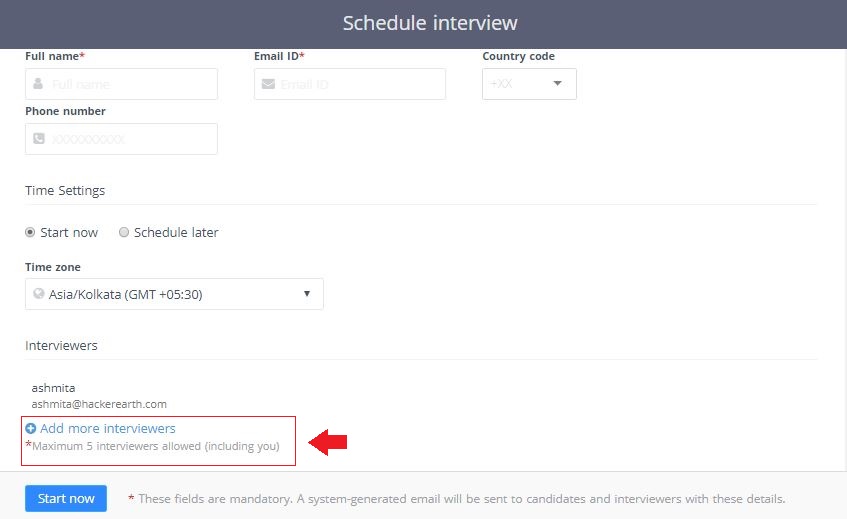
Now, while scheduling an interview on FaceCode, you can add up to 4 more interviewers, before or during an interview, to analyze the skills of a candidate. Additionally, to provide better user experience, FaceCode has separate video feed for candidate and interviewers.

Learn more.

Evaluation parameters—hiring isn’t just a game of chance

Everyone knows the cost of a bad hire. But you know what's also pretty frustrating? Not having a clue about what went wrong in the decision-making process.

Smart hiring managers have processes in place and know that hiring isn't just a game of chance. Additionally, savvy recruiters know that conducting structured interviews is an excellent way to screen and find the best candidates. Asking a set of questions in a structured interview format helps recruiters and hiring managers collect useful information from each interviewee that they can easily compare with other candidates' responses.

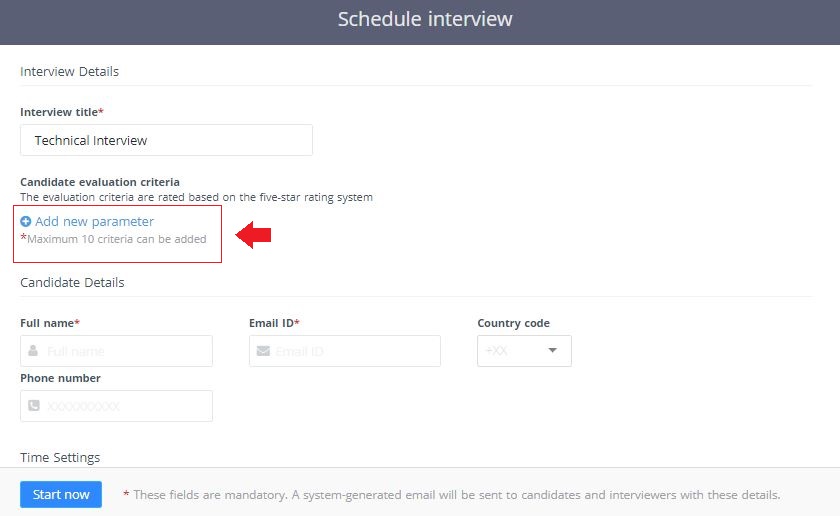
To help you do just that, FaceCode now supports evaluation criteria, allowing you to conduct structured interviews. While scheduling an interview, you can manually enter evaluation criteria such as technical abilities, communication skills, problem-solving skills, etc., which act like interview scorecards.

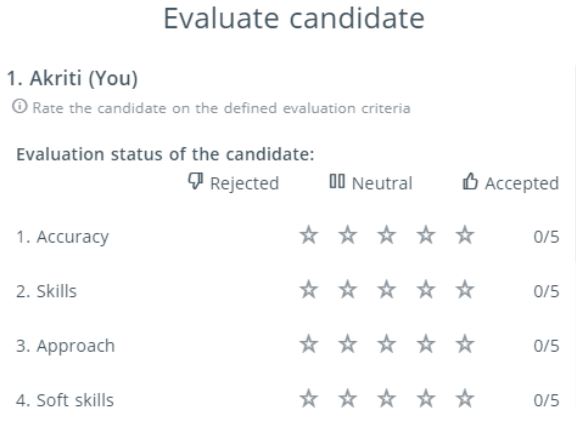
When the interview is over, a pop-up with these criteria is shown to the interviewers, and candidates are evaluated based on a five-star rating system against each criterion. The hiring team can compile the rating for every candidate, compare rankings, and identify the strongest ones.

A collaborative online diagram board to help you seamlessly conduct system design interviews

When interviewers visualize a candidate’s thought process, it's easier to understand, streamline, and communicate with them. A great way of transforming what's in a candidate’s mind into an easily-shareable idea is through diagrams or system design interviews.

However, we all know how hard it can be to conduct system design interviews even on a video call. We heard your feedback and we have integrated draw.io that allows you to create block diagrams and architecture design in a live interview. Thus, interviewers can evaluate a developer’s system design, problem-solving, and role-specific skills.

Once an interview is over, the final diagram is saved for interviewers and admins to preview later.

Speech to text conversion—Say goodbye to distractions

Sometimes, recruiters take notes during an interview to keep track of what is being discussed. However, if recruiters rely heavily on this technique, they may get distracted, reduce their involvement in the conversation, and miss out on important things. Also, it may sometimes be difficult to understand what the participants are saying or you may come across participants who are hearing impaired.

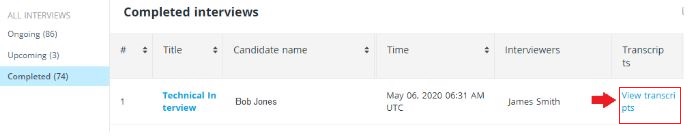
FaceCode can automatically convert spoken words to written text during interviews. You can also turn on the Highlights feature that shows important information in the transcript, thus allowing you to focus on key parts of the conversation.

Please note: This is a premium feature.

Learn more.

What’s next?

We are excited to announce the following upcoming feature updates:

  • To help interviewers pen down their thoughts during an interview, a new feature called “Notes” will be added on the interview page. This feature will allow interviewers to note down highlights of the interview without navigating from the interface or moving to a pen and paper option.
  • When an interview is being set-up, there will be an option to add the candidate assessment report. The assessment report link will be available to the interviewers during the interview in the form of a button.

Try FaceCode to refine your remote hiring process. If you need any help using this feature, write to us at support@hackerearth.com. If you’re new to HackerEarth and want to create accurate coding assessments, sign up for a 14-day free trial.