Rashmi Jain

Author
Rashmi Jain

Blogs
Rashmi began their journey in software development but found their voice in storytelling. Now, Rashmi simplifies complex tech concepts through engaging narratives that resonate with both engineers and hiring managers.
author’s Articles

Insights & Stories by Rashmi Jain

Explore Rashmi Jain’s blogs for thoughtful breakdowns of tech hiring, development culture, and the softer skills that build stronger engineering teams.
Clear all
Thank you! Your submission has been received!
Oops! Something went wrong while submitting the form.
Filter
Filter

Simple Tutorial on SVM and Parameter Tuning in Python and R

Introduction

Data classification is a very important task in machine learning.Support Vector Machines (SVMs) are widely applied in the field of pattern classifications and nonlinear regressions. The original form of the SVM algorithm was introduced by Vladimir N. Vapnik and Alexey Ya. Chervonenkis in 1963. Since then, SVMs have been transformed tremendously to be used successfully in many real-world problemssuch as text (and hypertext) categorization,image classification,bioinformatics (Protein classification,Cancer classification), handwritten character recognition, etc.

Table of Contents

  1. What is a Support Vector Machine?
  2. How does it work?
  3. Derivation of SVM Equations
  4. Pros and Cons of SVMs
  5. Python and R implementation

What is a Support Vector Machine(SVM)?

A Support Vector Machine is a supervised machine learning algorithm which can be used for both classification and regression problems. It follows a technique called the kernel trick to transform the data and based on these transformations, it finds an optimal boundary between the possible outputs.

In simple words, it does some extremely complex data transformations to figure out how to separate the data based on the labels or outputs defined.We will be looking only at the SVM classification algorithm in this article.

Support Vector Machine Classification Algorithm

How does it work?

The main idea is to identify the optimal separating hyperplane which maximizes the margin of the training data. Let us understand this objective term by term.

What is a separating hyperplane?

We can see that it is possible to separate the data given in the plot above. For instance, we can draw a line in which all the points above the line are green and the ones below the line are red. Such a line is said to be a separating hyperplane.

Now the obvious confusion, why is it called a hyperplane if it is a line?

In the diagram above, we have considered the simplest of examples, i.e., the dataset lies in the 2-dimensional plane(R2). But the support vector machine can work for a general n-dimensional dataset too. And in the case of higher dimensions, thehyperplane is the generalization of a plane.

More formally, it is an n-1 dimensional subspace of an n-dimensional Euclidean space. So for a

  • 1D dataset, a single point represents the hyperplane.
  • 2D dataset, a line is a hyperplane.
  • 3D dataset, a plane is a hyperplane.
  • And in the higher dimension, it is called a hyperplane.

We have said that the objective of an SVM is to find the optimal separating hyperplane. When is a separating hyperplane said to be optimal?

The fact that there exists a hyperplane separating the dataset doesn’t mean that it is the best one.

Let us understand the optimal hyperplane through a set of diagrams.

  1. Multiple hyperplanes
    There are multiple hyperplanes, but which one of them is a separating hyperplane? It can be easily seen that line B is the one which best separates the two classes.
Support Vector Machines multiple hyperplanes
  1. Multiple separating hyperplanes
    There can be multiple separating as well. How do wefind the optimal one? Intuitively, if we select a hyperplane which is close to the data points of one class, then it might not generalize well. So the aim is to choose the hyperplane which is as far as possible from the data points of each category.
multiple separating hyperplanes SVM
  1. In the diagram above, the hyperplane that meets the specified criteria for the optimal hyperplane is B.

Therefore, maximizing the distance between the nearest points of each class and the hyperplane would result in an optimal separating hyperplane. This distance is called the margin.

The goal of SVMs is to find the optimal hyperplane because it not only classifies the existing dataset but also helps predict the class of the unseen data. And the optimal hyperplane is the one which has the biggest margin.

Optimal hyperplane SVM

Mathematical Setup

Now that we have understood the basic setup of this algorithm, let us dive straight into the mathematical technicalities of SVMs.

I will be assuming you are familiar withbasic mathematical concepts such as vectors, vector arithmetic(addition, subtraction, dot product) and the orthogonal projection. Some of these concepts can also be found in the article, Prerequisites of linear algebra for machine learning.

Equation of Hyperplane

You musthave come across the equation of a straight line as y=mx+c, where m is the slope and cis the y-intercept of the line.

The generalized equation of a hyperplane is as follows:

wTx=0

Here w and x are the vectors and wTx represents the dot product of the two vectors. The vector w is often called as the weight vector.

Consider the equation of the line as y−mx−c=0.In this case,

w=⎛⎝⎜−c−m1⎞⎠⎟ and x=⎛⎝⎜1xy⎞⎠⎟

wTx=−c×1−m×x+y=y−mx−c=0

It is just two different ways of representing the same thing. So why do we use wTx=0? Simply because it is easier to deal with this representation in thecase of higher dimensional dataset and w represents the vector which is normal to the hyperplane. This property will be useful once we start computing the distance from a point to the hyperplane.

Machine learning challenge, ML challenge

Understanding the constraints

The training data in our classification problem is of the form {(x1,y1),(x2,y2),…,(xn,yn)}∈Rn×−1,1. This means that the training dataset is a pair of xi, an n-dimensional feature vector and yi, the label of xi. When yi=1 implies that the sample with the feature vector xi belongs to class 1 and if yi=−1 implies that the sample belongs to class -1.

In a classification problem, we thus try to find out a function, y=f(x):Rn⟶{−1,1}. f(x) learns from the training data set and then applies its knowledge to classify the unseen data.

There are an infinite number of functions, f(x) that can exist, so we have to restrict the class of functions that we are dealing with. In thecase of SVM’s, this class of functions is that of the hyperplanerepresented as wTx=0.

It can also be represented as w⃗ .x⃗ +b=0;w⃗ ∈Rn and b∈R

This divides the input space into two parts, one containing vectors of class ?1 and the other containing vectors of class +1.

For the rest of this article, we will consider 2-dimensional vectors. Let H0 be a hyperplane separating the dataset and satisfying the following:

w⃗ .x⃗ +b=0

Along with H0, we can select two others hyperplanes H1 and H2 such that they also separate the data and have the following equations:

w⃗ .x⃗ +b=δ and w⃗ .x⃗ +b=-δ

This makes Ho equidistant from H1 as well as H2.

The variable ? is not necessary so we can set ?=1 to simplify the problem as w⃗ .x⃗ +b=1 and w⃗ .x⃗ +b=-1

Next, we want to ensure that there is no point between them. So for this, we will select only those hyperplanes which satisfy the following constraints:

For every vector xieither:

  1. w⃗ .x⃗ +b≤-1 for xi having the class ?1 or
  2. w⃗ .x⃗ +b≥1 for xi having the class 1
constraints_SVM

Combining the constraints

Both the constraints stated above can be combined into a single constraint.

Constraint 1:

For xi having the class -1, w⃗ .x⃗ +b≤-1
Multiplying both sides by yi (which is always -1 for this equation)
yi(w⃗ .x⃗ +b)≥yi(−1) which implies yi(w⃗ .x⃗ +b)≥1 for xi having the class?1.

Constraint 2:yi=1

yi(w⃗ .x⃗ +b)≥1 for xi having the class 1

Combining both the above equations, we get yi(w⃗ .x⃗ +b)≥1 for all 1≤i≤n

This leads to a unique constraint instead of two which are mathematically equivalent. The combined new constraint also has the same effect, i.e., no points between the two hyperplanes.

Maximize the margin

For the sake of simplicity, we will skip the derivation of the formula for calculating the margin, m which is

m=2||w⃗ ||

The only variable in this formula is w, which is indirectly proportional to m, hence to maximize the margin we will have to minimize ||w⃗ ||. This leads to the following optimization problem:

Minimize in (w⃗ ,b){||w⃗ ||22 subject to yi(w⃗ .x⃗ +b)≥1 for any i=1,…,n

The above is the case when our data is linearly separable. There are many cases where the data can not be perfectly classified through linear separation. In such cases, Support Vector Machine looks for the hyperplane that maximizes the margin and minimizes the misclassifications.

For this, we introduce the slack variable,ζi which allows some objects to fall off the margin but it penalizes them.

Slack variables SVM

In this scenario, the algorithm tries to maintain the slack variable to zero while maximizing the margin. However, it minimizes the sum of distances of the misclassification from the margin hyperplanes and not the number of misclassifications.

Constraints now changes to yi(w⃗ .xi→+b)≥1−ζi for all 1≤i≤n,ζi≥0

and the optimization problem changes to

Minimize in (w⃗ ,b){||w⃗ ||22+C∑iζi subject to yi(w⃗ .x⃗ +b)≥1−ζi for any i=1,…,n

Here, the parameter C is the regularization parameter that controls the trade-off between the slack variable penalty (misclassifications) and width of the margin.

  • Small C makes the constraints easy to ignore which leads to a large margin.
  • Large C allows the constraints hard to be ignored which leads to a small margin.
  • For C=inf, all the constraints are enforced.

The easiest way to separate two classes of data is a line in case of 2D data and a plane in case of 3D data. But it is not always possible to use lines or planes and one requires a nonlinear region to separate these classes. Support Vector Machines handle such situations by using a kernel function which maps the data to a different space where a linear hyperplane can be used to separate classes. This is known as thekernel trick where the kernel function transforms the data into the higher dimensional feature space so that a linear separation is possible.

kernel trick SVM

If ϕ is the kernel function which maps xito ϕ(xi), the constraints change toyi(w⃗ .ϕ(xi)+b)≥1−ζi for all 1≤i≤n,ζi≥0

And the optimization problem is

Minimize in (w⃗ ,b){||w⃗ ||22+C∑iζi subject to yi(w⃗ .ϕ(xi)+b)≥1−ζi  for all 1≤i≤n,ζi≥0

We will not get into the solution of these optimization problems. The most common method used to solve these optimization problems is Convex Optimization.

Pros and Cons of Support Vector Machines

Every classification algorithm has its own advantages and disadvantages that are come into play according to the dataset being analyzed. Some of the advantages of SVMs are as follows:

  • The very nature of the Convex Optimization method ensures guaranteed optimality. The solution is guaranteed to be a global minimum and not a local minimum.
  • SVMis an algorithm which is suitable for both linearly and nonlinearly separable data (using kernel trick). The only thing to do is to come up with the regularization term, C.
  • SVMswork well on small as well as high dimensional data spaces. It works effectively for high-dimensional datasets because of the fact that the complexity of the training dataset in SVM is generally characterized by the number of support vectors rather than the dimensionality. Even if all other training examples are removed and the training is repeated, we will get the same optimal separating hyperplane.
  • SVMscan work effectively on smaller training datasets as they don’trely on the entire data.

Disadvantages of SVMs are as follows:

  • Theyarenot suitable for larger datasets because the training time with SVMs can be high and much more computationally intensive.
  • They areless effective on noisier datasets that have overlapping classes.

SVM with Python and R

Let us look at the libraries and functions used to implement SVM in Python and R.

Python Implementation

The most widely used library for implementing machine learning algorithms in Python is scikit-learn. The class used for SVMclassification in scikit-learn issvm.SVC()

sklearn.svm.SVC (C=1.0, kernel=’rbf’, degree=3, gamma=’auto’)

Parameters are as follows:

  • C: It is the regularization parameter, C, of the error term.
  • kernel: It specifies the kernel type to be used in the algorithm. It can be ‘linear’, ‘poly’, ‘rbf’, ‘sigmoid’, ‘precomputed’, or a callable. The default value is ‘rbf’.
  • degree: It is the degree of the polynomial kernel function (‘poly’) and is ignored by all other kernels. The default valueis 3.
  • gamma: It is the kernel coefficient for ‘rbf’, ‘poly’, and ‘sigmoid’. If gamma is ‘auto’, then 1/n_features will be used instead.

There are many advanced parameters too which I have not discussed here. You can check them outhere.

https://gist.github.com/HackerEarthBlog/07492b3da67a2eb0ee8308da60bf40d9

One can tune the SVM by changing the parameters C,γ and the kernel function. The function for tuning the parameters available in scikit-learn is called gridSearchCV().

sklearn.model_selection.GridSearchCV(estimator, param_grid)

Parameters of this function are defined as:

  • estimator: It is theestimator object which is svm.SVC() in our case.
  • param_grid: It is the dictionary or list with parameters names (string) as keys and lists of parameter settings to try as values.

To know more about other parameters of GridSearch.CV(), click here.

https://gist.github.com/HackerEarthBlog/a84a446810494d4ca0c178e864ab2391

In the above code, the parameters we have considered for tuning are kernel, C, and gamma. The values from which the best value is to be are the ones written in the bracket. Here, we have only given a few values to be considered but a whole range of values can be given for tuning but it will take a longer time for execution.

R Implementation

The package that we will use for implementing SVM algorithm in R is e1071. The function used will be svm().

https://gist.github.com/HackerEarthBlog/0336338c5d93dc3d724a8edb67ad0a05

Summary

Inthis article, Ihave gone through a very basic explanation of SVM classification algorithm. I have left outa few mathematical complications such as calculating distances and solving the optimization problem. But I hope this gives you enough know-how abouthow a machine learning algorithm, that is,SVM, can be modified based on the type of dataset provided.

Introduction to Naive Bayes Classification Algorithm in Python and R

Let's say you are given with a fruit which is yellow, sweet, and long and you have to check the class to which it belongs.Step 2: Draw the likelihood table for the features against the classes.
NameYellowSweetLongTotal
Mango350/800=P(Mango|Yellow)450/8500/400650/1200=P(Mango)
Banana400/800300/850350/400400/1200
Others50/800100/85050/400150/1200
Total800=P(Yellow)8504001200
Step 3: Calculate the conditional probabilities for all the classes, i.e., the following in our example:


Step 4: Calculate [latex]\displaystyle\max_{i}{P(C_i|x_1, x_2,\ldots, x_n)}[/latex]. In our example, the maximum probability is for the class banana, therefore, the fruit which is long, sweet and yellow is a banana by Naive Bayes Algorithm.In a nutshell, we say that a new element will belong to the class which will have the maximum conditional probability described above.

Variations of the Naive Bayes algorithm

There are multiple variations of the Naive Bayes algorithm depending on the distribution of [latex]P(x_j|C_i)[/latex]. Three of the commonly used variations are
  1. Gaussian: The Gaussian Naive Bayes algorithm assumes distribution of features to be Gaussian or normal, i.e.,
    [latex]\displaystyle P(x_j|C_i)=\frac{1}{\sqrt{2\pi\sigma_{C_i}^2}}\exp{\left(-\frac{(x_j-\mu_{C_j})^2}{2\sigma_{C_i}^2}\right)}[/latex]
    Read more about it here.
  2. Multinomial: The Multinomial Naive Bayes algorithm is used when the data is distributed multinomially, i.e., multiple occurrences matter a lot. You can read more here.
  3. Bernoulli: The Bernoulli algorithm is used when the features in the data set are binary-valued. It is helpful in spam filtration and adult content detection techniques. For more details, click here.

Pros and Cons of Naive Bayes algorithm

Every coin has two sides. So does the Naive Bayes algorithm. It has advantages as well as disadvantages, and they are listed below:

Pros

  • It is a relatively easy algorithm to build and understand.
  • It is faster to predict classes using this algorithm than many other classification algorithms.
  • It can be easily trained using a small data set.

Cons

  • If a given class and a feature have 0 frequency, then the conditional probability estimate for that category will come out as 0. This problem is known as the "Zero Conditional Probability Problem." This is a problem because it wipes out all the information in other probabilities too. There are several sample correction techniques to fix this problem such as "Laplacian Correction."
  • Another disadvantage is the very strong assumption of independence class features that it makes. It is near to impossible to find such data sets in real life.

Naive Bayes with Python and R

Let us see how we can build the basic model using the Naive Bayes algorithm in R and in Python.

R Code

To start training a Naive Bayes classifier in R, we need to load the e1071 package.
library(e1071)
To split the data set into training and test data we will use the caTools package.
library(caTools)

The predefined function used for the implementation of Naive Bayes in R is called naiveBayes(). There are only a few parameters that are of use:
naiveBayes(formula, data, laplace = 0, subset, na.action = na.pass)
  • formula: The traditional formula [latex]Y\sim X_1+X_2+\ldots+X_n[/latex]
  • data: The data frame containing numeric or factor variables
  • laplace: Provides a smoothing effect
  • subset: Helps in using only a selection subset of the data based on some Boolean filter
  • na.action: Helps in determining what is to be done when a missing value in the data set is encountered
Let us take the example of the iris data set.
> library(e1071)

> library(caTools)


> data(iris)


> iris$spl=sample.split(iris,SplitRatio=0.7)

# By using the sample.split() we are creating a vector with values TRUE and FALSE and by setting

the SplitRatio to 0.7, we are splitting the original Iris dataset of 150 rows to 70% training

and 30% testing data.

> train=subset(iris, iris$spl==TRUE)#the subset of iris dataset for which spl==TRUE

> test=subset(iris, iris$spl==FALSE)


> nB_model <- naiveBayes(train[,1:4], train[,5])


> table(predict(nB_model, test[,-5]), test[,5]) #returns the confusion matrix

setosa versicolor virginica

setosa 17 0 0

versicolor 0 17 2

virginica 0 0 14

Python Code

We will use the Python library scikit-learn to build the Naive Bayes algorithm.
>>> from sklearn.naive_bayes import GaussianNB

>>> from sklearn.naive_bayes import MultinomialNB

>>> from sklearn import datasets

>>> from sklearn.metrics import confusion_matrix

>>> from sklearn.model_selection import train_test_split


>>> iris = datasets.load_iris()

>>> X = iris.data

>>> y = iris.target


# Split the data into a training set and a test set

>>> X_train, X_test, y_train, y_test = train_test_split(X, y, test_size=0.3, random_state=0)

>>> gnb = GaussianNB()

>>> mnb = MultinomialNB()


>>> y_pred_gnb = gnb.fit(X_train, y_train).predict(X_test)

>>> cnf_matrix_gnb = confusion_matrix(y_test, y_pred_gnb)


>>> print(cnf_matrix_gnb)

[[16 0 0]

[ 0 18 0]

[ 0 0 11]]


>>> y_pred_mnb = mnb.fit(X_train, y_train).predict(X_test)

>>> cnf_matrix_mnb = confusion_matrix(y_test, y_pred_mnb)


>>> print(cnf_matrix_mnb)

[[16 0 0]

[ 0 0 18]

[ 0 0 11]]

Applications

The Naive Bayes algorithm is used in multiple real-life scenarios such as
  1. Text classification: It is used as a probabilistic learning method for text classification. The Naive Bayes classifier is one of the most successful known algorithms when it comes to the classification of text documents, i.e., whether a text document belongs to one or more categories (classes).
  2. Spam filtration: It is an example of text classification. This has become a popular mechanism to distinguish spam email from legitimate email. Several modern email services implement Bayesian spam filtering.
    Many server-side email filters, such as DSPAM, SpamBayes, SpamAssassin, Bogofilter, and ASSP, use this technique.
  3. Sentiment Analysis: It can be used to analyze the tone of tweets, comments, and reviews—whether they are negative, positive or neutral.
  4. Recommendation System: The Naive Bayes algorithm in combination with collaborative filtering is used to build hybrid recommendation systems which help in predicting if a user would like a given resource or not.

Conclusion

This article is a simple explanation of the Naive Bayes Classification algorithm, with an easy-to-understand example and a few technicalities.Despite all the complicated math, the implementation of the Naive Bayes algorithm involves simply counting the number of objects with specific features and classes. Once these numbers are obtained, it is very simple to calculate probabilities and arrive at a conclusion.Hope you are now familiar with this machine learning concept you most like would have heard of before.

5 Free Python IDE for Machine Learning

Integrated Development Environment (IDE)

An integrated development environment is an application which provides programmers and developers with basic tools to write and test software. In general, an IDE consists of an editor, a compiler (or interpreter), and a debugger which can be accessed through a graphic user interface (GUI).

According to Wikipedia, “Python is a widely used high-level, general-purpose, interpreted, dynamic programming language.” Python is a fairly old and a very popular language. It is open source and is used for web and Internet development (with frameworks such as Django, Flask, etc.), scientific and numeric computing (with the help of libraries such as NumPy, SciPy, etc.), software development, and much more.

Text editors are not enough for building large systems which require integrating modules and libraries and a good IDE is required.

Here is a list of some Python IDEs with their features to help you decide a suitable IDE for your machine learning problem.

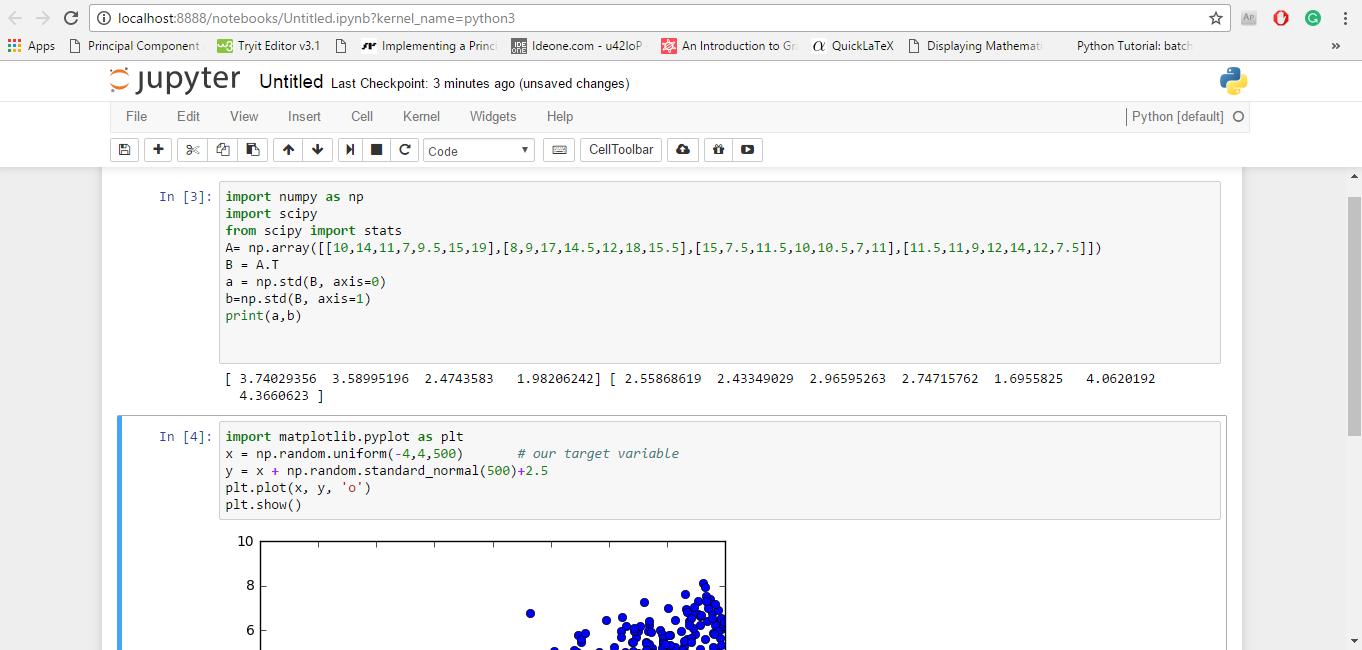
JuPyter/IPython Notebook

Project Jupyter started as a derivative of IPython in 2014 to support scientific computing and interactive data science across all programming languages.

IPython Notebook says that “IPython 3.x was the last monolithic release of IPython. As of IPython 4.0, the language-agnostic parts of the project: the notebook format, message protocol, qtconsole, notebook web application, etc. have moved to new projects under the name Jupyter. IPython itself is focused on interactive Python, part of which is providing a Python kernel for Jupyter.”

Jupyter constitutes of three components - notebook web applications, kernels, and notebook documents.

Some of its key features are the following:
  1. It is open source.
  2. It can support up to 40 languages, and it includes languages popular for data science such as Python, R, Scala, Julia, etc.
  3. It allows one to create and share the documents with equations, visualization and most importantly live codes.
  4. There are interactive widgets from which code can produce outputs such as videos, images, and LaTeX. Not only this, interactive widgets can be used to visualize and manipulate data in real-time.
  5. It has got Big Data integration where one can take advantage of Big Data tools, such as Apache Spark, from Scala, Python, and R. One can explore the same data with libraries such as pandas, scikit-learn, ggplot2, dplyr, etc.
  6. The Markdown markup language can provide commentary for the code, that is, one can save logic and thought process inside the notebook and not in the comments section as in Python.
Jupyter- Python IDE

Some of the uses of Jupyter notebook includes data cleaning, data transformation, statistical modelling, and machine learning.

Some of the features specific to machine learning are that it has been integrated with libraries like matplotlib, NumPy, and Pandas. Another major feature of the Jupyter notebook is that it can display plots that are the output of running code cells.

It is currently used by popular companies such as Google, Microsoft, IBM, etc. and educational institutions such as UC Berkeley and Michigan State University.

Free download: Click here.

Machine learning challenge, ML challenge

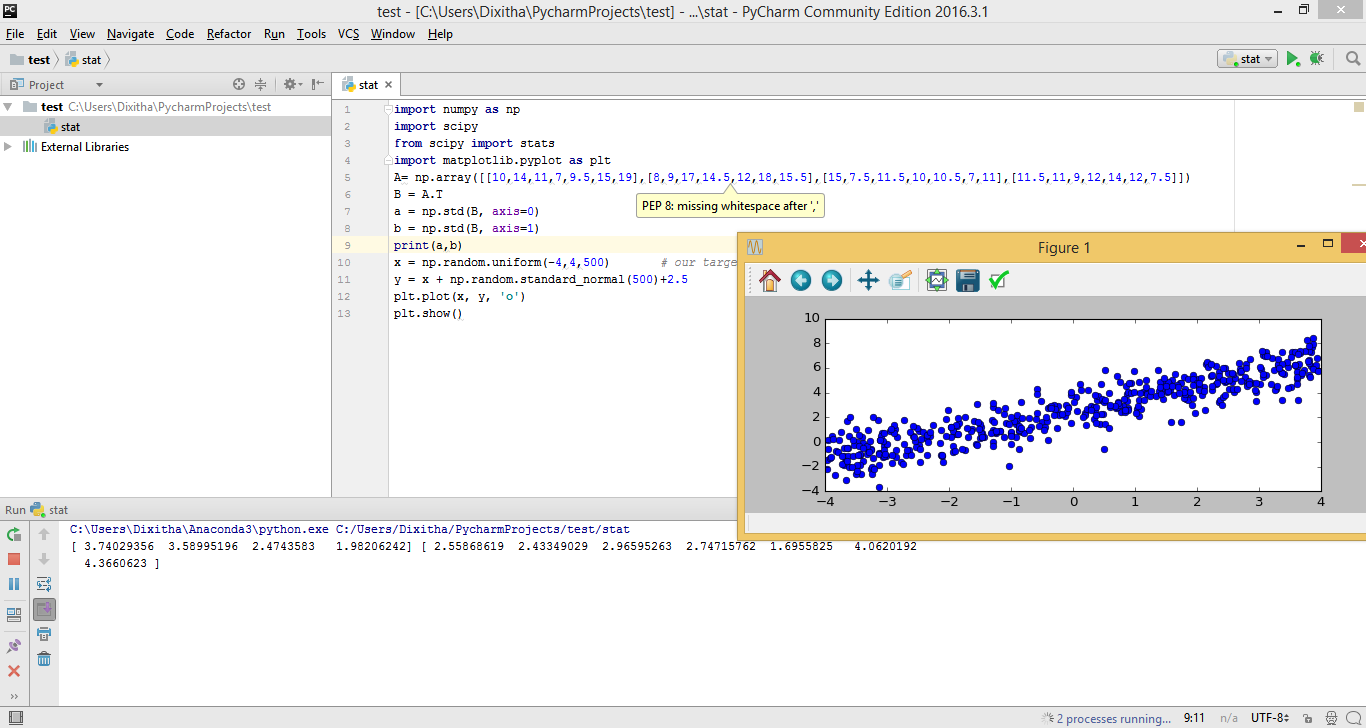
PyCharm

PyCharm is a Python IDE developed by JetBrains, a software company based in Prague, Czech Republic. Its beta version was released in July 2010 and version 1.0 came three months later in October 2010.

PyCharm is a fully featured, professional Python IDE that comes in two versions: PyCharm Community Edition, which is free, and a much more advanced PyCharm Professional Edition, which comes as a 30-day free trial.

The fact that PyCharm is used by many big companies such as HP, Pinterest, Twitter, Symantec, Groupon, etc. proves its popularity.

Some of its key features are the following:
  1. It includes creative code completion for classes, objects and keywords, auto-indentation and code formatting, and customizable code snippets and formats.
  2. It shows on-the-fly error highlighting (displays error as you type). It also contains PEP-8 for Python that helps in writing neat codes that are easy to support for other languages.
  3. It has features for serving fast and safe refactoring.
  4. It includes a debugger for Python and JavaScript with a graphical UI. One can create and run tests with a GUI-based test runner and coding assistance.
  5. It has a quick documentation/definition view where one can see the documentation or object definition in the place without losing the context. Also, the documentation provided by JetBrains (here) is comprehensive, with video tutorials.
PyCharm- Python IDE

The most important feature that makes it fit for machine learning is its support for libraries such as Scikit-Learn, Matplotlib, NumPy, and Pandas.

There are features like Matplotlib interactive mode which work both in Python and debugger console where one can plot, manage, and explore the graphs in real time.

Also, one can define different environments (Python 2.7; Python 3.5; virtual environments) based on individual projects.

Free download: Click here

Spyder

Spyder stands for Scientific PYthon Development EnviRonment. Spyder’s original author is Pierre Raybaut, and it was officially released on October 18, 2009. Spyder is written in Python.

Some of its key features are the following:
  1. It is open source.
  2. Its editor supports code introspection/analysis features, code completion, horizontal and vertical splitting, and goto definition.
  3. It comes with Python and IPython consoles workspace, and it supports debugging runtime, i.e., as soon as you type it will display the errors.
  4. It has got a documentation viewer where it shows documentation related to classes or functions called either in editor or console.
  5. It also supports variable explorer where one can explore and edit the variables that are created during the execution of file from a graphic user interface like Numpy array ones.
Spyder- Python IDE

It integrates NumPy, Scipy, Matplotlib, and other scientific libraries. Spyder is best when used as an interactive console for building and testing numeric and scientific applications and scripts built on libraries such as NumPy, SciPy, and Matplotlib.

Apart from this, it is a simple and light-weight software which is easy to install and has very detailed documentation.

Rodeo

Rodeo is a Python IDE that's built expressly for doing machine learning and data science in Python. It was developed by Yhat. It uses IPython kernel.

Some of its key features are the following:
  1. It makes it easy to explore, compare, and interact with data frames and plots.
  2. The Rodeo text editor comes with auto-completion, syntax highlighting, and built-in IPython support so that writing code gets faster.
  3. Rodeo comes integrated with Python tutorials. It also includes cheat sheets for quick material reference.
Rodeo- Python IDE

It is useful for the researchers and scientists who are used to working in R and RStudio IDE.

It has many features similar to Spyder, but it lacks many features such as code analysis, PEP 8, etc. Maybe Rodeo will come up with new features in future as it is fairly new.

Free download: Click here.

Geany

Geany is a Python IDE originally written by Enrico Tröger in C and C++. It was initially released on October 19, 2005. It is a small and lightweight IDE (14 MB for windows) which is as capable as any other IDE.

Some of its key features are the following:
  1. Its editor supports syntax highlighting and line numbering.
  2. It also comes with features like auto-completion, auto closing of braces, auto closing of HTML, and XML tags.
  3. It includes code folding and code navigation.
  4. One can build systems to compile and execute the code with the help of external codes.
Geany-Python IDE

Free download: Click here.

For those who are familiar with RStudio and want to look for options in Python, RStudio has included editor support for Python, XML, YAML, SQL, and shell scripts in edition 0.98.932, which was released on June 18 2014, although there is a little support for Python as compared to R.

This is not an exhaustive list. There are other Python IDEs such as PyDev, Eric, Wing, etc. To know about more them, you can go to the Python wiki page here.

Descriptive statistics with Python-NumPy

Is it gonna rain today? Should I take my umbrella to the office or not? To know the answer to such questions we will just take out our phone and check the weather forecast. How is this done? There are computer models which use statistics to compare weather conditions from the past with the current conditions to predict future weather conditions. From studying the amount of fluoride that is safe in our toothpaste to predicting the future stock rates, everything requires statistics. Data is everything in statistics. Calculating the range, median, and mode of the data set is all a part of descriptive statistics.

Data representation, manipulation, and visualization are key components in statistics. You can read about it here.

The next important step is analyzing the data, which can be done using both descriptive and inferential statistics. Both descriptive and inferential statistics are used to analyze results and draw conclusions in most of the research studies conducted on groups of people.

Through this article, we will learn descriptive statistics using Python.

Machine learning challenge, ML challenge

Introduction

Descriptive statistics describe the basic and important features of data. Descriptive statistics help simplify and summarize large amounts of data in a sensible manner. For instance, consider the Cumulative Grade Point Index (CGPI), which is used to describe the general performance of a student across a wide range of course experiences.

Descriptive statistics involve evaluating measures of center (centrality measures) and measures of dispersion (spread).

descriptive statistics

Centrality measures

Centrality measures give us an estimate of the center of a distribution. It gives us a sense of a typical value we would expect to see. The three major measures of center include the mean, median, and mode.

Machine Learning and Auto-Evaluation

Machine Learning

In very simple terms, Machine Learning is about training or teaching computers to take decisions or actions without explicitly programming them. For example, whenever you read a tweet or movie review, you can figure out if the views expressed are positive or negative. But can you teach a computer to determine the sentiment of that text? This has many real-life applications. For instance, when Donald Trump makes a speech, Twitter responds with a range of sentiments, and his campaign team can assess the overall sentiment using machine learning.

Another example: Baidu predicted that Germany would win the 2014 World Cup even before the match was played.

Weather Problem

Consider this small dataset of favorable weather conditions for playing a game. The goal is to forecast whether one can play the game based on the given conditions.

Outlook Temperature Humidity Windy Play
Sunny Hot High False No
Rainy Mild High False Yes
Sunny Cool Normal False Yes

Definitions

Feature/Attribute: Outlook, Temperature, Humidity, and Windy are features or attributes that influence the outcome.

Outcome/Target: The result to be predicted, i.e., whether you can play or not.

Vector: A row in the dataset representing an ordered collection of features (e.g., Sunny, Hot, High, False).

ML Model: The algorithm or process generated from the learning process (e.g., Decision Trees, SVM, Naive Bayes).

Error Metric/Evaluation Metric: Used to assess the accuracy of an ML model’s predictions. Different types exist for different problems.

Supporting ML Problems on HackerEarth

HackerEarth’s ML platform supports a typical machine learning flow. A dataset is split into training and test sets. Users train their models on the training set and predict outcomes on the test set. The test set does not include the target variable.

Example Dataset

Outlook Temperature Humidity Windy Play
SunnyHotHighFalseNo
RainyMildHighFalseYes
SunnyCoolNormalFalseYes
OvercastHotHighFalseYes
RainyMildHighFalseYes
OvercastHotNormalFalseYes
SunnyMildNormalTrueYes
SunnyMildHighFalseNo
OvercastCoolNormalTrueYes
RainyMildHighTrueYes

Train Dataset (train.csv)

Outlook Temperature Humidity Windy Play
SunnyHotHighFalseNo
RainyMildHighFalseYes
SunnyCoolNormalFalseYes
OvercastHotHighFalseYes
RainyMildHighFalseYes
OvercastHotNormalFalseYes

Test Dataset (test.csv)

Id Outlook Temperature Humidity Windy
1SunnyMildNormalTrue
2SunnyMildHighFalse
3OvercastCoolNormalTrue
4RainyMildHighTrue

Notice the absence of the target variable in the test data.

User Prediction File (user_prediction.csv)

Id Play
1Yes
2Yes
3No
4No

Correct Prediction File (correct_prediction.csv)

Id Play
1Yes
2No
3Yes
4Yes

Evaluation Metric

During the contest, only 50% of the test dataset is used for evaluation to discourage overfitting. The evaluation metric is defined as:

Score = Number of correct predictions / Total rows

In this case, only ID 1 is predicted correctly out of the first two, so:

Score online = 1 / 2 = 0.5

After the contest, the model is evaluated on the full test dataset:

Score offline = 1 / 4 = 0.25

This demonstrates how overfitting can reduce real-world model performance. Online evaluations using partial data help encourage more generalizable solutions.

Gradient descent algorithm for linear regression

You are probably using machine learning multiple times a day without realizing it. For instance, when checking your mailbox, a spam filter automatically filters out junk mail—thanks to Machine Learning (ML). ML is the science of training a machine to learn from past data, without being explicitly programmed.

There are two main types of ML techniques:

  • Supervised Machine Learning: The system learns from predefined training data to predict future outcomes.
  • Unsupervised Learning: The system identifies hidden patterns in data without prior labels—for example, finding close friend groups on Facebook.

Supervised Learning

Consider the following dataset showing house prices in Bengaluru, India:

Living area (sq ft) Price (USD)
82030105
105058448
155085911
120087967
160073722
111754630
55042441
116279596

To predict housing prices based on living area, we define a hypothesis function: hθ(x) = θ₀ + θ₁x. Here, θ₀ and θ₁ are parameters we aim to optimize. Our goal is to minimize the error between predicted and actual prices using a cost function:

J(θ₀, θ₁) = (1/2m) Σ(hθ(x(i)) − y(i)

This cost function measures the squared error over m training examples. Our objective is to find θ₀ and θ₁ that minimize this cost.

Gradient Descent

Gradient descent is an optimization algorithm used to minimize functions like our cost function. Starting with initial guesses for θ₀ and θ₁, we iteratively update them using:

θj := θj − α ∂/∂θj J(θ₀, θ₁)

Here, α is the learning rate. The updates continue until convergence—when changes become negligible.

Applying Gradient Descent to Linear Regression

The partial derivatives of the cost function with respect to θ₀ and θ₁ are:

  • ∂J/∂θ₀ = (1/m) Σ(hθ(x(i)) − y(i))
  • ∂J/∂θ₁ = (1/m) Σ(hθ(x(i)) − y(i))x(i)

Using these, we can apply gradient descent and iteratively update θ₀ and θ₁ to minimize the cost function.

Gradient Descent with Python

import numpy as np
import matplotlib.pyplot as plt

x = np.random.uniform(-4, 4, 500)
y = x + np.random.standard_normal(500) + 2.5
plt.plot(x, y, 'o')
plt.show()

def cost(X, Y, theta):
    return np.dot((np.dot(X, theta) - Y).T, (np.dot(X, theta) - Y)) / (2 * len(Y))

alpha = 0.1
theta = np.array([[0, 0]]).T
X = np.c_[np.ones(500), x]
Y = np.c_[y]
X_1 = np.c_[x].T
num_iters = 1000
cost_history = []
theta_history = []

for i in range(num_iters):
    a = np.sum(theta[0] - alpha * (1 / len(Y)) * np.sum((np.dot(X, theta) - Y)))
    b = np.sum(theta[1] - alpha * (1 / len(Y)) * np.sum(np.dot(X_1, (np.dot(X, theta) - Y))))
    theta = np.array([[a], [b]])
    cost_history.append(cost(X, Y, theta))
    theta_history.append(theta)
    if i in (1, 3, 7, 10, 14, num_iters):
        plt.plot(x, a + x * b)
        plt.title('Linear regression by gradient descent')
        plt.xlabel('x')
        plt.ylabel('y')
        plt.show()
    elif i in range(20, num_iters, 10):
        plt.plot(x, a + x * b)

print(theta)

Gradient Descent with R

x <- runif(500, -4, 4)
y <- x + rnorm(500) + 2.5

cost <- function(X, y, theta) {
  sum((X %*% theta - y)^2) / (2 * length(y))
}

alpha <- 0.1
num_iters <- 1000
cost_history <- rep(0, num_iters)
theta_history <- list(num_iters)
theta <- c(0, 0)
X <- cbind(1, x)

for (i in 1:num_iters) {
  theta[1] <- theta[1] - alpha * (1 / length(y)) * sum((X %*% theta - y))
  theta[2] <- theta[2] - alpha * (1 / length(y)) * sum((X %*% theta - y) * X[,2])
  cost_history[i] <- cost(X, y, theta)
  theta_history[[i]] <- theta
}

print(theta)

plot(x, y, col=rgb(0.2,0.4,0.6,0.4), main='Linear regression by gradient descent')
for (i in c(1,3,6,10,14,seq(20,num_iters,by=10))) {
  abline(coef=theta_history[[i]], col=rgb(0.8,0,0,0.3))
}
abline(coef=theta, col='blue')

Linear regression via gradient descent is simple and intuitive. Although advanced learning algorithms may use more complex models and cost functions, the underlying principles remain the same.