Guest Author

Author
Guest Author

Blogs
With years spent in HR trenches, Guest is passionate about what makes organizations tick—people. Their writing dives deep into behavioral interviews, talent strategy, and employee experience.
author’s Articles

Insights & Stories by Guest Author

Whether you're building your first team or scaling culture across regions, Guest Author's articles offer human-first insights rooted in real practice.
Clear all
Thank you! Your submission has been received!
Oops! Something went wrong while submitting the form.
Filter
Filter

PYTHON DIARIES CHAPTER 4 → FUNCTION PART - 1

If you’re new to Python, it’s recommended to read the Python Diaries - Chapter 1, Chapter 2, and Chapter 3 as we build on some concepts covered there.

What is a Function?

A function is a block of organized, reusable code that performs a single, related task. It enables modularity and code reuse. Think of a function as a black box—it takes input, processes it, and produces output.

Function Black Box

def name_of_function(arguments):
    # your code
    return result  # returning is optional

Example:

def sum_of_numbers(a, b):
    c = a + b
    return c

print(sum_of_numbers(2, 3))

Output: 5

Three main parts of a function:

  1. Input
  2. Logic/Code
  3. Output

Input

Data provided to the function for processing. It can be passed via:

  1. Parameters/arguments
  2. Global variables
  3. Memory location

Logic/Code

Statements that define what the function does with the input.

Logic can range from a single line to hundreds of lines depending on the task.

Output

The result of processing the input. Output can be provided via:

  1. Return statement
  2. Modification of a memory location
  3. Print statement

Variable Scope

  • Local variables: Defined inside a function and inaccessible outside it.
  • Global variables: Declared outside all functions, accessible inside if declared with global.

Note: Global scope is module-wide. Built-in scope includes variables/literals defined by Python and usable anywhere in a program.

Returning Multiple Values

You can return multiple values from a function using a comma-separated list.

Example:

Given an array, find number K and return its index and the previous element (assume K is not at index 0 and elements are distinct).

array = [5, 6, 7, 12, 2, 4, 3, 9, 25, 29]
k = 29

def searching():
    global array
    global k
    array.sort()
    index = 0
    while index < len(array):
        if array[index] == k:
            return index, array[index - 1]
        index += 1

index, previous_value = searching()
print(index)
print(previous_value)

Output:

9
25

sort() vs sorted()

  • sort() modifies the original list in-place.
  • sorted() returns a new sorted list.

Example:

array = [3, 4, 1, 2, 5]
new_arr = sorted(array)

print("array ->", array)
print("new_arr ->", new_arr)

array_2 = [2, 3, 5, 4, 1]
array_2.sort()
print("array_2 ->", array_2)

Output:

array -> [3, 4, 1, 2, 5]
new_arr -> [1, 2, 3, 4, 5]
array_2 -> [1, 2, 3, 4, 5]

Returning multiple values as a tuple: If you use a single variable on the left-hand side when returning multiple values, Python will pack them into a tuple.

That wraps up the basics of functions in Python. More advanced topics will follow in the upcoming articles. Stay tuned!

Sending emails to our growing user community

At HackerEarth, we frequently send out emails to our user base. These are meant to keep them updated on upcoming challenges and on certain events related to their activity on our platform. For example, we send out emails when a user successfully solves a problem, whenever the user is sent a test invitation for a hiring challenge, or when there are new updates on his comments. Basically, whenever it is appropriate to convey important information to the user, we do it via email.

Architecture

It takes lot of computational power to send emails in such large quantities synchronously. So we implemented an asynchronous architecture to send emails.

Here is brief overview of the architecture:

  1. Construct an email and save the serialized email object in database.
  2. Queue the metadata for later consumption.
  3. Consume the metadata, recreate the email object, and deliver.

The diagram below shows the high-level architecture of emailing system. Solid lines represent the data flow between different components. Dotted lines represent the communications. HackerEarth email infrastructure consists of MySQL database, MongoDB database, and RabbitMQ queues.
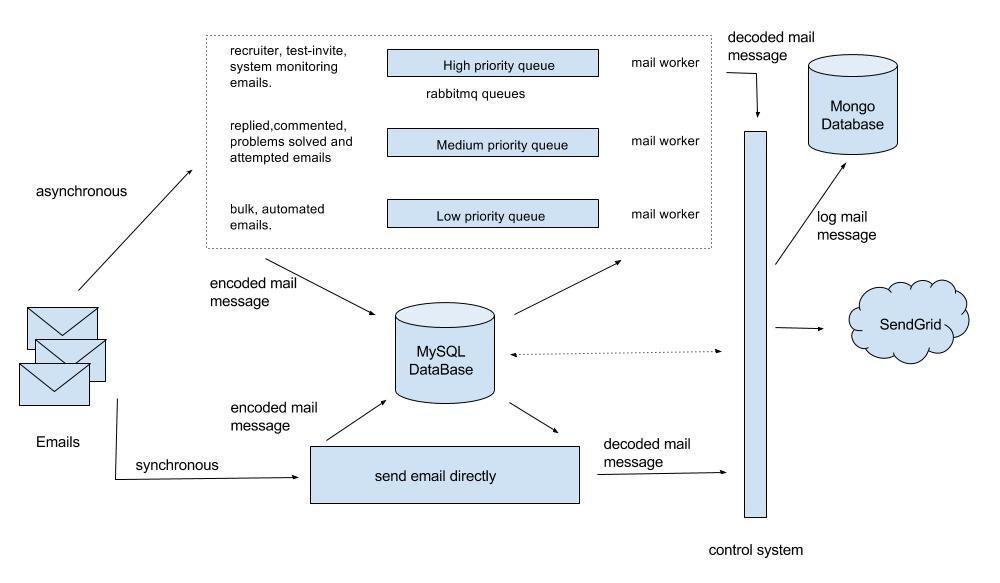
Email Architecture Diagram

Journey Of Email

Step 1 - Construct email:

There are two different types of emails.

  1. Text - Plain text emails
  2. Html - Emails with rich interface using html elements, and made using django templates

API used by HackerEarth developers for sending emails:

send_email(ctx, template, subject, from_email, html=False, async=True, **kwargs)

The API above creates a SendGrid Mail object, serializes, and saves it in the DB with some additional data.

A piece of code similar to the bit shown below is used to create the SendGrid Mail object.

import sendgrid

sg = sendgrid.SendGridClient('YOUR_SENDGRID_API_KEY')

message = sendgrid.Mail()
message.add_to('John Doe <john@email.com>')
message.set_subject('Example')
message.set_html('Body')
message.set_text('Body')
message.set_from('Doe John <doe@email.com>')
status, msg = sg.send(message)

The model below is used to store the serialized mail object and additional data.

class Message():
    # The actual data - a pickled sendgrid.Mail object
    message_data = models.TextField()
    when_added = models.DateTimeField(default=datetime.now, db_index=True)

After constructing and saving the email object in the database, metadata is queued in the RabbitMQ queues.

Step 2 - Queue the metadata:

Not all emails have the same importance in terms of delivery time. So we have created multiple queues to reduce the waiting time in queue for important mails.

  1. High priority queue
  2. Medium priority queue
  3. Low priority queue

It’s up to the application developer to decide the importance of the email and queue it in appropriate queue.

We queue the following metadata in the queue as a JSON object: {‘message_id’: 123}

Step 3 - Reconstruct and deliver:

We run delivery workers, which consume metadata from queues, reconstruct an email object, and deliver it using DMARC solution.

These workers consume the messages from RabbitMQ queues, fetch the message object from Message model, and deserialize the data to reconstruct the SendGrid Mail object.

We run different numbers of workers depending on the volume of emails in each queue.

Before sending an email, we do final checks which help us decide whether to deliver the email or not, such as if the email id is blacklisted or if the emails have non-zero number of receivers.

After a request is sent to SendGrid to deliver the email, the email objects are logged into a MongoDB to maintain the history of delivered emails.

A/B Test In Emails

A million emails require optimization to improve user experience. This is done through A/B tests on emails type. We can test emails for subject and content variations. Every user on HackerEarth is assigned a bucket number to ensure emails are consistent during the experiment. Every A/B experiment is defined as dictionary mapped constants which contain all the information.

Here is one example of an A/B test with subject variation.

"""
EMAIL_VERSION_A_B
format of writing A/B test
key: test_email_type_version_number
value: email_dict

format for email_dict
keys: tuple(user_buckets)
values: category, subject, template
"""

EMAIL_VERSION_A_B = {
    'A_B_TEST_1': {
        tuple(user_bucket_numbers): {
            'a_b_category': 'email_category_v1',
            'subject': 'Hello hackerearth',
            'template': 'emails/email.html'
        },
        tuple(user_bucket_numbers): {
            'a_b_category': 'email_category_v2',
            'subject': 'Welcome hackerearth',
            'template': 'emails/email.html'
        }
    }
}

New experiments must update EMAIL_VERSION_A_B with experiment data. Information from EMAIL_VERSION_A_B is used to update the keyword arguments of HackerEarth sending email API (send_email). The category is propagated to update the category of SendGrid Mail object. Categories are used to see the variations in open rate and click rate for different A/B experiments.

Feel free to comment below or ping us at support@hackerearth.com if you have any suggestions!

This post was originally written for the HackerEarth Engineering blog by Kaushik Kumar.

Thanks to Pradeepkumar Gayam for improving it!

A/B testing using Django

Whenever we roll out an improvement on our platform at HackerEarth, we love to conduct A/B tests on the enhancement to understand which iteration helps our users more in using the platform in a better way. As the available third-party libraries did not quite meet our needs, we wrote our own A/B testing framework in Django. In this post, we will share a few insights into how we accomplished this.

The basics

A lot of products, especially on the web, use a method called A/B testing or split testing to quantify how well a new page or layout performs compared to the old one. The crux of the method is to show layout "A" to a certain set or bucket of users and layout "B" to another set of users. The next step is to track user actions leading to certain milestones, which would provide critical data about the "effectiveness" of both the pages or layouts.

Before we began writing code for the framework, we made a list of all the things we wanted the framework to do:

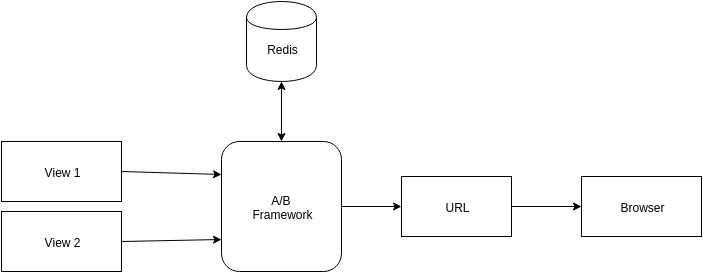
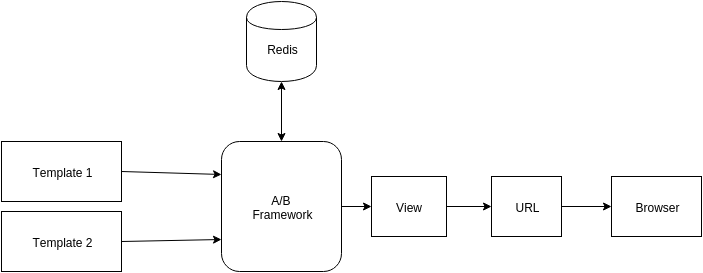
  • Route users to multiple views (with different templates)
  • Route users to a single view (with different templates)
  • Make the views/templates stick for users
  • A/B test visitors who do not have an account on HackerEarth (anonymous users)
  • Sticky views/templates for anonymous users as well
  • Support for A/A/B or A/B/C/D…./n/ testing
  • Analytics

A/B for Views

A/B test views

A/B for Templates

A/B test templates

Getting the logic right

To begin with, we had to categorize our users into buckets. So all our users were assigned a bucket number ranging from 1 to 120. This numbering is not strict and the range can be arbitrary or per your needs. Next, we defined two constants—the first one specifies which view a user is routed to, and the second one specifies the fallback or primary view.

AB_TEST = {
    tuple(xrange(1, 61)): 'example_app.views.view_a',
    tuple(xrange(61, 121)): 'example_app.views.view_b',
}

AB_TEST_PRIMARY = 'example_app.views.view_a'

Next, we wrote two decorators which we could wrap around views—one for handling views and the other for handling templates. In the first scenario, the decorator would take a dictionary of views, a primary view, and a Boolean value which specifies if anonymous users should be A/B tested as well.

Decorator Code

"""
Decorator to A/B test different views.
Args:
    primary_view:       Fallback view.
    anon_sticky:        Determines whether A/B testing should be performed on anonymous users.
    view_dict:          A dictionary of views (as string) with buckets as keys.
"""
def ab_views(primary_view=None, anon_sticky=False, view_dict={}):
    def decorator(f):
        @wraps(f)
        def _ab_views(request, *args, **kwargs):
            view = None
            try:
                if user_is_logged_in():
                    view = _get_view(request, f, view_dict, primary_view)
                else:
                    redis = initialize_redis_obj()
                    view = _get_view_anonymous(request, redis, f, view_dict, primary_view, anon_sticky)
            except:
                view = primary_view
            view = str_to_func(view)
            return view(request, *args, **kwargs)

        def _get_view(request, f, view_dict, primary_view):
            bucket = get_user_bucket(request)
            view = get_view_for_bucket(bucket)
            return view

        def _get_view_anonymous(request, redis, f, view_dict, primary_view, anon_sticky):
            view = None
            if anon_sticky:
                cookie = get_cookie_from_request(request)
                if cookie:
                    view = get_value_from_redis(cookie)
                else:
                    view = random.choice(view_dict.values())
                    set_cookie_value_in_redis(cookie)
            else:
                view = primary_view
            return view

        return _ab_views
    return decorator

Helper Function

def str_to_func(func_string):
    func = None
    func_string_splitted = func_string.split('.')
    module_name = '.'.join(func_string_splitted[:-1])
    function_name = func_string_splitted[-1]
    module = import_module(module_name)
    if module and function_name:
        func = getattr(module, function_name)
    return func

Putting things together

Let’s assume that we have already written the A and B views. Let’s call them view_a and view_b. To get the entire thing working, we will write a new view called view_ab and wrap it with the decorator.

@ab_views(
    primary_view=AB_TEST_PRIMARY,
    anon_sticky=True,
    view_dict=AB_TEST,
)
def view_ab(request):
    ctx = {}
    return ctx

For the sake of convenience, we require this new view to return a dictionary.

Finally, we need to integrate analytics to collect data. We used Mixpanel at the JavaScript end to track user behavior. You can use any analytics or event tracking tool for this purpose.

This is just one of the ways you can do A/B testing using Django. You can always take this basic framework and improve it or add new features.

P.S. If you want to experiment with an A/A/B or A/B/C testing, all you need to do is change the AB_TEST constant.

Feel free to comment or ping us at support@hackerearth.com if you have any suggestions!

This post was originally written for the HackerEarth Engineering blog by Arindam Mani Das.

Our tribute to Django

The essense of Hackathons lie in the never-ending desire to solve problems, to make things work and get things done, no matter what the obstacles. We got to see this in action at Djangothon.

Hackathons are a long-standing tradition where people from all parts of the community come together to work on projects of their choosing.

Last Month, we celebrated 10 years of Django with a hackathon - Djangothon. Close to 30 different ideas were pitched and by the end we saw some great hacks.

The Winners

The winning application used the Django Facebook Social Graph for existing and new social login. It was build by Rajtilak Indrajit .

The hack in 2nd place was Django-LibSpark, an Apache Spark API for Django. It provides easy to use interface with chaining of various methods. The API uses PySpark to communicate with Spark. This was built by 2 very young developer Anik Das and Rashid Khan.

The 3rd winning team came up a simple idea of a pluggable django app. The app shows analytics graphs by picking up data from django models. The Django based app was built by Aishwarya Reddy and Souradeep De, a team from HackerEarth.

Here are some moments from Djangothon!

Djangothon 4

Sunday Morning Presentations

The highly anticipated Sunday morning presentations are always packed with surprises. It’s when groups talk about what they worked on, their successes and failures, and most importantly, what they learned. We heard from groups about exploring Django and even office table tennis game and twitter contest as energy booster for the participants.

While the hackathon has passed and the winners have been announced, the effect of those 24 hour will be felt for much longer.

Djangothon 3

Until next year!

This blog was written by Saumya Kapoor from the HackerEarth team

[Repost] The very brief history of Computer Science

I believe it is fundamental to have an overview of the history that later formed Computer Science. People know work of individuals such as Dijkstra. But there are so many others who've made valuable contributions to make computers we have today happen. It was a process that started in the early 800s and started to grow in the 1800s and the 1900s.

How did simple changes in voltage lead to the development of machines such as computers? Perhaps, we can attribute it to some incredible work by individuals from across different centuries.

Let's look at a few concepts these "greats" came up with during this amazing journey.

300 BC

In 300 BC Euclid wrote a series of 13 books called Elements. The definitions, theorems, and proofs covered in the books became a model for formal reasoning. Elements was instrumental in the development of logic and modern science. It is the first documented work in mathematics that used a series of numbered chunks to break down the solution to a problem.


300 BC — 800 AC

Following Euclid, notes about recipes, etc. were the closest thing to algorithms today. Also, there were inventions of mathematical methods. Sieve of Eratosthenes, Euclid’s algorithms, and methods for factorization square roots are a few examples.

It seems common to us now to list things in the order in which we we will do them. But in mathematics, at that time ,— it was not usual.


800s

The story really starts in the 800s with Al-Khwārizmī. His name roughly translates to Algoritmi in Latin, and he developed a technique called Algorism. Algorism is the technique of performing arithmetic with Hindu-Arabic numerals.

Al-Khwārizmī is the first one to develop the concept of the algorithm in mathematics.


1300s

Then came Ramon Llull, who is considered the pioneer of computation theory. He started working on a new system of logic in his work — Ars magna, which influenced the development of a couple of subfields within mathematics, specifically,

  1. The idea of a formal language
  2. The idea of a logical rule
  3. The computation of combinations
  4. The use of binary and ternary relations
  5. The use of symbols for variables
  6. The idea of substation for a variable
  7. The use of a machine for logic

All these led him to pioneer the idea of representing and manipulating knowledge using symbols and logic.


1600s

Then came Blaise Pascal. Pascal was a French mathematician who, at an early age, was a pioneer in the field of calculating machines. Pascal invented the mechanical calculator, and Pascal’s calculator after about 10 years, in 1642. This was an important milestone in mathematics and engineering. It showed the general public that tools can be built, using mathematics, to simplify things, for example, accounting. (Fun fact: He built the first prototype for his father — an accountant!)

Following Llull’s and Pascal’s work, there was Gottfried Leibniz. He made incredible achievements in symbolic logic and made developments in first-order logic. These were important for the development of theoretical computer science. His work still remains:

  • Leibniz’s law (in first-order logic)
  • Leibniz’s Rule (in mathematics)

Leibniz also discovered the modern binary system that we use today . He wrote about it in his paper “Explication de l’Arithmétique Binaire.


1800s

Charles Babbage, the father of computing, pioneered the concept of a programmable computer. Babbage designed the first mechanical computer. Its architecture was like the that of the modern computer — he called his mechanical computer the Analytical Engine. The Analytical Engine was a general-purpose computer (by today’s standards). It was the first design that we, now, call Turing complete. It incorporated an Arithmetic and Logic unit (ALU), integrated memory, and control flow statements. He designed it, but it wasn’t until 1940s that it was actually built. When he designed it, it was programmed by punch-cards, and the numeral system was decimal.

Working with Charles Baggage on his Analytical Machine was Ada Lovelace. She was the first computer programmer. In her notes on the engine, she wrote the first algorithm that could be run on any machine. The algorithm was to compute Bernoulli numbers. Most of her work contributed to creating the subfield of Scientific Computing. (Fun fact: Her name inspired the programming language Ada!)

Then came a man most computer scientists should know about — George Boole. He was the pioneer of what we call Boolean Logic, which as we know is the basis of the modern digital computer. Boolean Logic is also the basis for digital logic and digital electronics. Most logic within electronics now stands on top of his work. Boole also utilized the binary system in his work on the algebraic system of logic. This work also inspired Claude Shannon to use the binary system in his work. (Fun fact: The boolean data-type is named after him!)

Gottlob Frege defined Frege’s propositional calculus (first-order logic), and predicate calculus. These were vital in the development of theoretical computer science. (Fun fact: The Frege programming language is named after him!)


1900s

In the early 1900s, Bertrand Russell invented type theory to avoid paradoxes in different kinds of formal logic. He proposed this theory when he discovered that Gottlob Frege’s version of naive set theory was in conflict with Russell’s paradox. Russell proposed a solution that avoids Russell’s paradox by first creating a hierarchy of types, then assigning each mathematical entity to a type.

After Russell came the amazing Alonzo Church who introduced Lambda calculus to the world. Lambda calculus introduced a new way of viewing problems in mathematics, and inspired a large number of programming languages. Lambda calculus played a big part in the development of functional programming languages. (Why it is important, and here).

Claude Shannon is famous for his work, the Shannon-Fano algorithm. Shannon founded information theory. He focused on efficiently and reliably transmitting and storing information. At MIT, he wrote a paper that demonstrated the powerful applications of boolean algebra and its electrical applications.

Everyone knows Alan Turing. He formalized a lot of concepts in theoretical Computer Science with his work on the Turing Machine. Turing also contributed heavily to Artificial Intelligence theory — a notable example being the Turing Test. Apart from his research, he was a codebreaker at Bletchley Park during WWII, and was deeply interested in mathematical biology theory. (His work and his papers are deeply insightful — take a look please.)

Grace Hopper was first exposed to Computer Science when she was assigned a role to work on the first large-scale digital computer at Harvard. Her task was to design and implement a method to use computers to calculate the position of ships. In the early 1950s, she designed the language COBOL and built the first program that interprets English code to binary code. Her vision played an incredible part in the development of Computer Science, and she foresaw a lot of trends in computing. (Fun fact: She is credited with popularizing the term debugging!)

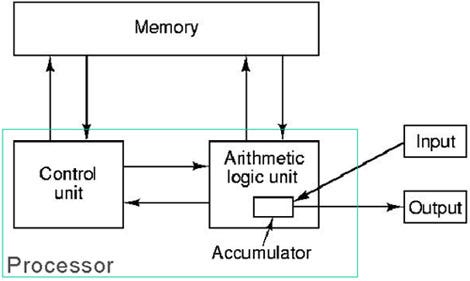
Famous physicist John von Neumann was part of the Manhattan Project. But, he’s also important in the history of Computer Science. He designed the Von Neumann architecture. Basically, if you have not heard of it — I am quite certain you have seen the model he came up with:


http://history-computer.com/ModernComputer/thinkers/Neumann.html

One of his biggest principles was the idea that data and program can be saved in the same space. This idea implies that a machine can alter both its program and its internal data.

He contributed to pretty much everything that has any relation to mathematics.

John Backus was the inventor of the FORTRAN language with his team at IBM. Backus many important contributions to functional programming languages and systems. Also, he served on committees developing the ALGOL system of programming languages. Alongside Peter Naur he also developed the Backus-Naur Form. The Backus-Naur Form is used to describe and depict programming languages.

Interestingly, Backus wrote an article titled “Can Programming Be Liberated from the von Neumann Style? A Functional Style and Its Algebra of Programs,” which is worth reading!

Alongside Backus, Peter Naur made major contributions to the definition ALGOL 60 and pioneered the Backus-Naur Form.

Noam Chomsky, a brilliant linguist, has made some indirect and direct contributions to Computer Science. His work on Chomsky Hierarchy and the Chomsky Normal Form are well known in the study of formal grammars.

Edsger Dijkstra is someone we all learn about in our algorithms class. In 1956, he was given the task of showing the power of the ARMAC computer. He came up with the shortest-path algorithm (Dijkstra’s algorithm). Next, ARMAC engineers wanted to cut the copper wire costs. To solve that task, Dijkstra applied a version of the shortest sub-spanning tree algorithm (Prim’s algorithm).

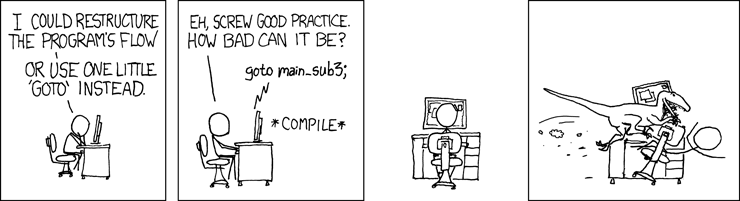
That’s the kind of man Dijkstra was! Dijkstra also formulated the Dining philosophers problem. The xkcd relates to the paper Dijkstra wrote on how Go-to statements are considered harmful.


http://www.xkcd.com/292/

Donald Knuth is a pioneer in the field of analysis of algorithms. He worked on developing both the aspect of finding the computational complexity of algorithms and also the mathematical techniques for performing analysis on algorithms. He’s also widely known for creating the TeX typesetting system, for the book The Art of Computer Programming, for the KMP (Knuth–Morris–Pratt) algorithm, and much much more.


https://xkcd.com/163/

Leslie Lamport laid out the foundations for the field of distributed systems. (Fun fact: he won the Turing Award in 2013. He also lives in New York — so meet him if you get a chance. )

Vint Cerf and Bob Kahn are known as the fathers of the Internet. They designed the TCP/IP protocols, and the architecture of how the Internet would be laid out.

Following their progress, in 1989/1990, Tim Berners-Lee invented the worldwide web. Along with his colleague Robert Cailliau, he sent the first HTTP communication between a server and a client. An important milestone in Computer Science — it represented a new era of communication and also demonstrated the practical nature of theories in Computer Science.


Let me know if I have gotten anything incorrect or have not made anything clear! Also, I wasn’t able to include every individual along the way, but let me know if I’ve missed anyone obvious. Please expand on things I have written through comments.

I also did not go into much detail with every individual. In the future, I am also going to be doing individual posts about each of these individuals. The posts will have more details about their accomplishments.


Resources to learn next:

Key things to research after:

First-order logic, Jacquard loom, Analytical Engine, Boolean algebra, and much more!

One of my favorite talks have been by Donald Knuth. His talk is titled “Let’s Not Dumb Down the History of Computer Science,” is just amazing.


Couple of books:

— Out of their Minds: The Lives and Discoveries of 15 Great Computer Scientists, Dennis Shasha and Cathy Lazere

— Selected Papers on Computer Science, Donald Knuth

Thanks to:

Snow Pettersen, Freia Lobo

Thanks for reading! If you’d like to checkout some of my other projects — visit my portfolio!

The author of this blog is Abhi Agarwal. Follow him on Twitter - https://twitter.com/abhiagarwal

Logging millions of requests every day and what it takes

HackerEarth's web servers handle millions of requests every day. These request logs can be analyzed to mine some really useful insights as well as metrics critical to the business, for example, the number of views per day, the number of views per sub product, most popular user navigation flow, etc.

Initial Thoughts

HackerEarth uses Django as its primary web development framework and a host of other components which have been customized for performance and scalability. During normal operations, our servers handle 80–90 requests/sec on an average and this surges to 200–250 requests/sec when multiple contests overlap in a time delta. We needed a system which could easily scale to a peak traffic of 500 requests/sec. Also, this system should add minimum processing overhead to the webservers, and the data collected needs to be stored for crunching and offline processing.

Architecture

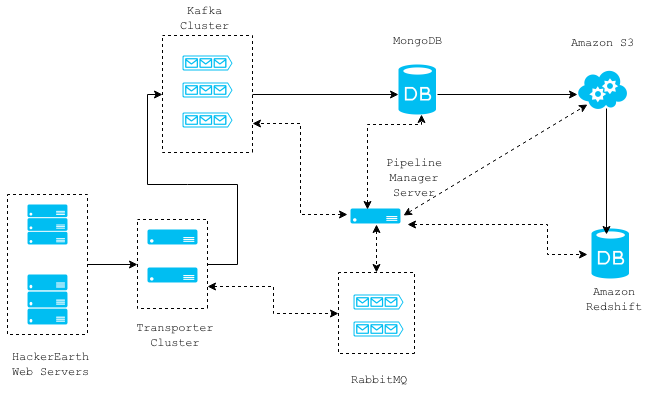
Logging Architecture

The diagram above shows a high level architecture of our request log collection system. The solid connection lines represent the data flow between different components and the dotted lines represent the communications. The whole architecture is message based and stateless, so individual components can easily be removed/replaced without any downtime.

You can read a more detailed explanation about each component in the order of data flow.

Web Servers

On the web servers, we employ a Django Middleware that asynchronously retrieves required data for a given request and then forwards it to the Transporter Cluster servers. This is done using a thread and the middleware adds an overhead of 2 milli seconds to the Django request/response cycle.

class RequestLoggerMiddleware(object):
    """
    Logs data from requests
    """
    def process_request(self, request):
        if settings.LOCAL or settings.DEBUG:
            return None

        is_ajax = request.is_ajax()
        request.META['IS_AJAX'] = is_ajax

        before = datetime.datetime.now()

        DISALLOWED_USER_AGENTS = ["ELB-HealthChecker/1.0"]
        http_user_agent = request.environ.get('HTTP_USER_AGENT', '')

        if http_user_agent in DISALLOWED_USER_AGENTS:
            return None

        # this creates a thread which collects required data and forwards it to the transporter cluster
        run_async(log_request_async, request)
        after = datetime.datetime.now()

        log("TotalTimeTakenByMiddleware %s" % ((after - before).total_seconds()))
        return None

Transporter Cluster

The transporter cluster is an array of non-blocking Thrift servers for the sole purpose of receiving data from the web servers and routing them to any other component like MongoDB, RabbitMQ, Kafka, etc. Where a given message should be routed to is specified in the message itself from the webservers. There is only one-way communication from the webservers to the transporter servers, and this saves time spent in the acknowledgement of message reception by thrift servers. We may lose some request logs due to this, but we can afford to do so. The request logs are currently routed to the Kafka cluster. The communication between the webservers and the transporter servers takes 1–2 milli seconds on an average and can be horizontally scaled to handle an increase in load.

service DataTransporter {
    oneway void transport(1:map<string, string> message)
}

Kafka Cluster

Kafka is a high throughput distributed messaging system that supports the publish/subscribe messaging pattern. This messaging infrastructure enables us to build other pipelines that depend on this stream of request logs. Our Kafka cluster stores last 15 days' worth of logs, so we can make any new consumer that we implement start processing data 15 days back in time.

Useful reference for setting up a kafka cluster.

Pipeline Manager Server

This server manages the consumption of request log messages from the Kafka topics, storing them in MongoDB and then later moving them to Amazon S3 and Amazon Redshift. MongoDB acts merely as a staging area for the data consumed from the Kafka topics and this data is transferred to S3 at hourly intervals. Every file that is saved in S3 is loaded into Amazon Redshift, which is a data warehouse solution that can scale to petabytes of data. We use Amazon Redshift for analyzing/metrics calculation from request log data. This server works in conjunction with a RabbitMQ cluster which it uses to communicate about task completion and initiation.

Here is the script that loads data from S3 into Redshift. This script handles insertion of duplicate data first by removing any duplicate rows and then by inserting the new data.

def load_s3_delta_into_redshift(s3_delta_file_path):
    bigdata_bucket = settings.BIGDATA_S3_BUCKET

    attrs = {
        'bigdata_bucket': bigdata_bucket,
        's3_delta_file_path': s3_delta_file_path,
    }

    complete_delta_file_path = "s3://{bigdata_bucket}/{s3_delta_file_path}".format(**attrs)
    schema_file_path = "s3://{bigdata_bucket}/request_log/s3_col_schema.json".format(**attrs)

    data = {
        'AWS_ACCESS_KEY_ID': settings.AWS_ACCESS_KEY_ID,
        'AWS_SECRET_ACCESS_KEY': settings.AWS_SECRET_ACCESS_KEY,
        'LOG_FILE':  complete_delta_file_path,
        'schema_file_path': schema_file_path
    }

    S3_REDSHIFT_COPY_COMMAND = " ".join([
        "copy requestlog_staging from '{LOG_FILE}' ",
        "CREDENTIALS 'aws_access_key_id={AWS_ACCESS_KEY_ID};aws_secret_access_key={AWS_SECRET_ACCESS_KEY}'",
        "json '{schema_file_path}';"
    ]).format(**data)

    LOADDATA_COMMAND = " ".join([
        "begin transaction;",
        "create temp table if not exists requestlog_staging(like requestlog);",
        S3_REDSHIFT_COPY_COMMAND,
        'delete from requestlog using requestlog_staging where requestlog.row_id=requestlog_staging.row_id;',
        'insert into requestlog select * from requestlog_staging;',
        "drop table requestlog_staging;",
        'end transaction;'
    ])

    redshift_conn_args = {
        'host': settings.REDSHIFT_HOST,
        'port': settings.REDSHIFT_PORT,
        'username': settings.REDSHIFT_DB_USERNAME
    }

    REDSHIFT_CONNECT_CMD = 'psql -U {username} -h {host} -p {port}'.format(**redshift_conn_args)
    PSQL_LOADDATA_CMD = '%s -c "%s"' % (REDSHIFT_CONNECT_CMD, LOADDATA_COMMAND)

    returncode = subprocess.call(PSQL_LOADDATA_CMD, shell=True)
    if returncode != 0:
        raise Exception("Unable to load s3 delta file into redshift ", s3_delta_file_path)

What's next

Data is like gold for any web application. If done the right way, the insights that it can provide and the growth it can drive is amazing. There are dozens of features and insights that can be built with the requests logs, including recommendation engine, better content delivery, and improving the overall product. All of this is a step toward making HackerEarth better every day for our users.

This post was originally written for the HackerEarth Engineering blog by Praveen Kumar.