Home
/
Blog
/
Tech Assessment
/
Best 10 Coding Assessment Tools: Finding the Best Fit for Technical Hiring

Best 10 Coding Assessment Tools: Finding the Best Fit for Technical Hiring

Author
Vineet Khandelwal
Calendar Icon
November 10, 2025
Timer Icon
3 min read
Share

Explore this post with:

  • Coding assessment tools accelerate technical hiring by automating skill evaluations, reducing bias, and integrating smoothly with ATS and interview systems.
  • To select the best tool, prioritize features such as adaptive assessments, cheating prevention, comprehensive skill coverage, and an excellent candidate experience.
  • Top tools like HackerEarth, Coderbyte, Devskiller, and Xobin offer coding challenges, proctoring, live interviews, and detailed analytics for smarter hiring.
  • HackerEarth leads with a massive question library, AI-powered proctoring, real-world coding tests, and scalable solutions for global technical recruitment.

It might look like the market’s overflowing with developers, but hiring skilled ones isn’t as easy as posting a job and calling it a day. That’s why companies now rely on the best coding assessment tools to evaluate skills through real-world challenges instead of theoretical questions. 

With a range of online coding assessment tools available, teams can run skill-based tests, review results instantly, and focus only on qualified talent. The online coding interview tools help reduce hiring time without compromising accuracy. 

In this list, we’ve selected 11 platforms that hiring teams trust to assess skills and make better decisions quickly.

What is a Coding Assessment Tool?

A coding assessment tool is a digital platform that helps companies test a candidate’s programming skills through automated technical assessments. It eliminates the need for manual reviews by providing coding tests that simulate real-world tasks, allowing recruiters to focus on qualified applicants more easily. 

Most online coding assessment tools come with features like code editors, timed tasks, plagiarism detection, and custom scoring systems, all designed to speed up technical hiring. Depending on the role, companies can choose different types of assessments. 

Here are some standard formats found in the best coding assessment tools:

  • Algorithmic challenges: Evaluates problem-solving using data structures, logic, and performance-based scoring
  • Project-based tasks: Replicates real-world scenarios using front-end, back-end, or full-stack projects
  • Real-time IDEs: Let candidates write and execute code within a live coding environment
  • MCQs: Test the theoretical knowledge of programming concepts and language syntax
  • Pair programming: Simulates collaborative work by connecting candidates with interviewers in a shared code space

Most companies use coding assessment tools early in the funnel during screening, but they also work well for technical interviews and internal learning programs in engineering teams.

Why Use a Coding Assessment Tool?

Hiring for technical roles can become complicated without a system that provides structure and efficiency. Coding assessment tools make it easier to assess a high volume of candidates quickly while keeping the process fair and consistent.

Here’s how these tools help teams work smarter:

  • Scale and speed in hiring: Screen hundreds of candidates without increasing the team’s workload.
  • Objectivity and bias reduction: Use structured scoring to focus only on skills, not assumptions.
  • Predictive hiring decisions: Spot strong problem-solvers based on actual performance, not gut feeling.
  • Time-saving for interviewers: Cut down the number of live interviews by filtering early.
  • Improved candidate filtering: Shortlist applicants who meet both skill and role-specific benchmarks.
  • Positive candidate experience (if designed well): Offer a smoother, less stressful way to showcase skills.

📌Also read: The Mobile Dev Hiring Landscape Just Changed

Key Evaluation Criteria to Compare Tools

Choosing the right coding assessment tools means matching features with what your team actually needs. Whether you're running campus drives or hiring senior backend engineers, this checklist can help you figure out what works best:

  • Skill & language support: Ensure the platform supports all relevant programming languages, frameworks, and tech stacks your team regularly uses. A tool with limited coverage will slow down hiring for specialized roles.
  • Assessment formats & flexibility: Look for platforms that offer multiple test formats, such as coding questions, real-world tasks, and project-based assignments. Flexible test options allow you to tailor assessments for each role, eliminating the need for a generic approach.
  • Library depth vs custom questions: While an extensive question library is helpful, your team should also have the freedom to create custom tasks that reflect actual work scenarios. The best coding assessment tools offer both ready-to-use content and complete control over customization.
  • Anti-cheating/ proctoring /IP protection: Select tools with features that minimize cheating risks, such as webcam monitoring, screen tracking, or IP restrictions. These features are especially important when you're concerned about how candidates use technology to cheat in online technical assessments.
  • Integration with ATS/HRMS: A platform that seamlessly connects with your existing hiring tools (like your ATS or HRMS) keeps everything organized and reduces back-and-forth during the recruitment process.
  • Analytics, benchmarking & reports: Strong data dashboards help hiring teams compare candidate performance, spot trends, and improve decisions using predictive analytics for talent management. The more detailed and visual the reports, the easier it is to take action.
  • Scalability/enterprise-readiness: If you plan to run high-volume assessments or roll out tests across global locations, ensure the platform can handle the load, users, and support across time zones without breaking down.
  • Candidate experience: A well-designed interface, clear instructions, and stable tech make candidates more likely to complete the test and feel good about your brand. A bad experience here can harm your ability to attract top talent.
  • Pricing model and transparency: Always review pricing carefully, especially if charges are based on the number of invites, candidates, or test types. The best coding assessment tools clearly lay out all costs, so you don’t get hit with hidden fees.
  • Support and SLAs: When a candidate hits a technical issue during a test, fast and helpful support becomes critical. Look for vendors who provide real-time help along with proper service-level guarantees.
  • Use-case alignment (campus, experienced, niche tech): Some online coding assessment tools are better suited for large-scale campus hiring, while others are more appropriate for niche or senior roles. Ensure the tool aligns with your current hiring mix and supports the development of a recruitment pipeline that meets your long-term goals.

Scoring each option against this list helps recruiters quickly identify the best coding assessment tools in 2025, based on what actually matters to their team.

Quick Overview Table: Coding Assessment Tools

Having established the key features of a great coding-based assessment tool, we will now focus on the specific tools that consistently help companies find the right candidates. 

Below, you will find a comparison of the ten best coding assessment tools for 2025, detailing their key features, ideal use cases, pros, and cons.

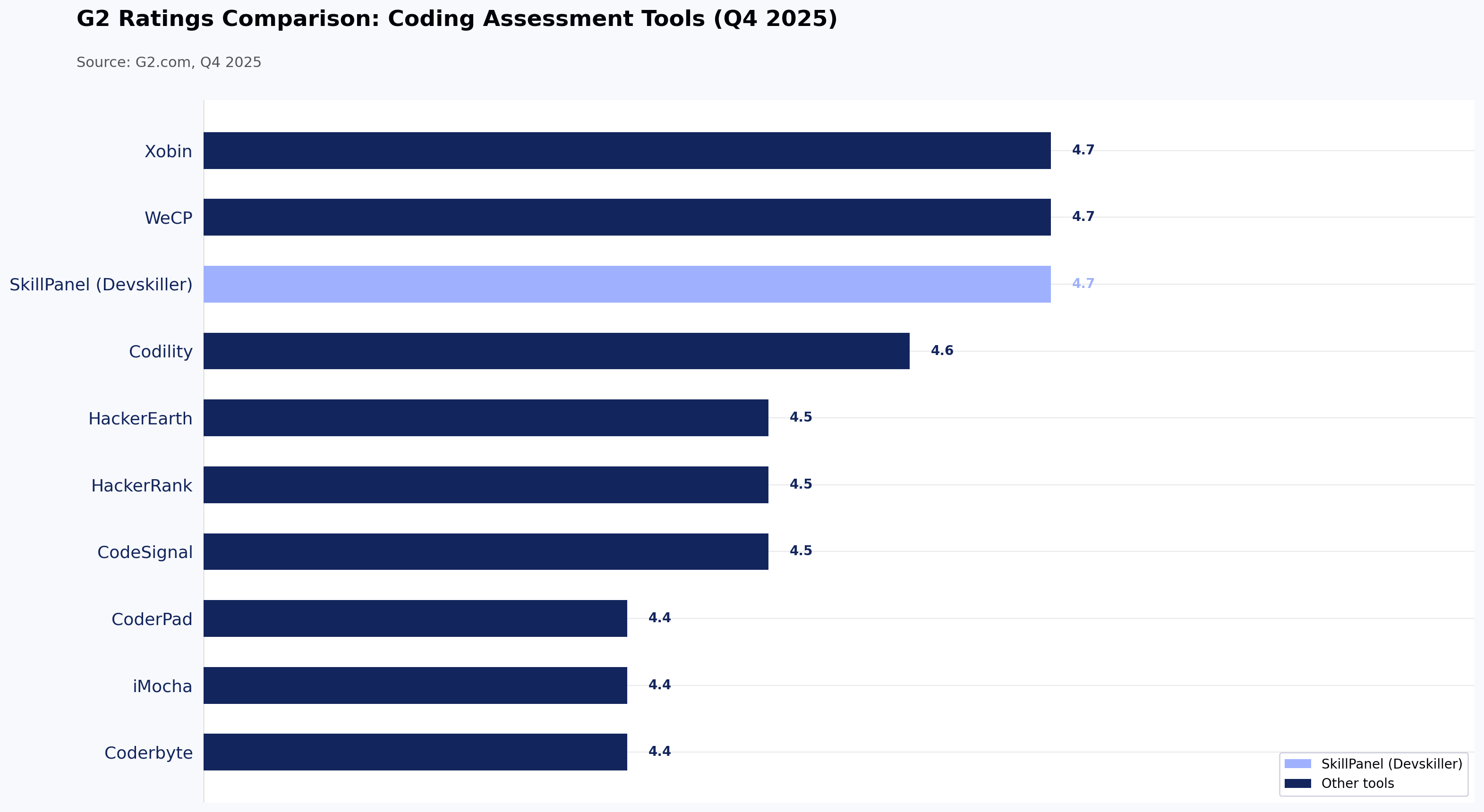
Tool Best For Key Features Pros Cons G2 Rating
HackerEarth All-in-one coding and skills assessments Coding challenges, MCQs, proctoring, hackathons & coding event modules, candidate analytics Strong question library, widely used, supports large-scale screening Limited deep customization, no low-cost, stripped-down plans 4.5
HackerRank Broad technical assessment + developer pipeline Coding + project assessments, language coverage, plagiarism detection, reporting & integrations Very mature platform, strong ecosystem, trusted by many large tech firms Reporting UI complexity; some users call question styles somewhat academic or constrained 4.5
Codility Algorithmic screening + take-home challenges Timed tasks, live assessments, benchmarking, code replay, fairness & evaluation tooling Clean UX, enterprise trust, strong scoring and analytics Less support for extremely custom task designs, may lack some front-end or full-stack scenario depth 4.6
CodeSignal Full interview & certification pipeline Integrated IDE, certified assessments, interview mode, analytics, challenge library Great for structured pipelines and scalable interviewing workflows More expensive; may feel overpowered for small teams; steep learning curve 4.5
Coderbyte Lightweight coding assessments & screening Short coding challenges, quizzes, customizable tests, and candidate metrics Fast to deploy, simpler for smaller companies or preliminary screening Less depth in large-scale interviewing, fewer enterprise features 4.4
CoderPad Live coding/pair programming interviews Real-time code editor, multi-language support, collaborative interviews Very useful for live interviews, strong candidate experience It isn’t a full assessment suite (fewer scheduled assessment features) 4.4
DevSkiller Real-world / project-based assessments RealLifeTesting (simulate actual dev work), replay, custom tasks, test libraries Deep, realistic tests, good feedback & candidate experience Can be more complex to set up; fewer general-use reviews in some markets 4.7
WeCP AI-augmented developer assessment AI test creation, runtime evaluation, proctoring, test library (2000+ dev skills) Good balance of automation and flexibility, solid reporting for non-technical recruiters Since it's newer, it may have fewer third-party integrations or lower brand awareness 4.7
iMocha Broad skill assessments + coding Massive skills library, domain + coding + aptitude assessments, live coding, custom tests Versatile across tech & non-tech roles, high flexibility Might dilute focus for hardcore coding workflows; advanced features can be complex 4.4
Xobin All-in-one candidate assessment for small to mid-sized teams Coding interviews, AI scoring, proctoring, security, analytics, test library Affordable, easy-to-use, strong support & security features May lack some advanced customization or enterprise-level scale features 4.7

Top Coding Assessment Tools in 2025 (Comparative Review)

We’ve already looked at the main features and differences in the comparison table earlier. Now let’s take a closer look at how each of these coding assessment tools performs when used in real-world hiring situations.

1. HackerEarth

HackerEarth Assessments page showing features and coding test overview
HackerEarth platform with 36,000+ coding questions, advanced proctoring, and role-based assessments

HackerEarth acts as a comprehensive platform combining coding assessment tools with developer engagement features to help companies find and hire the right tech talent. It supports a range of features, including customized coding tests, automated evaluation and scoring, and virtual interviews, all facilitated by built-in IDEs. This all-in-one solution provides hiring teams with a powerful way to evaluate technical skills, reducing manual effort.

With a developer community of over 10 million members across 133 countries, HackerEarth connects companies with a broad, diverse talent pool. Its Hiring Challenges enable organizations to engage developers directly through real-world coding problems, moving beyond traditional resumes and job boards. 

What distinguishes HackerEarth is its vast question library of over 36,000 coding problems, combined with tech-based assessments and detailed evaluation reports. These features give recruiters a clear picture of each candidate’s coding ability and problem-solving style. The platform also includes an online assessment proctoring system that uses smart monitoring tools to prevent cheating and impersonation during tests.

Among its AI-powered tools, the AI Screening Agent stands out by intelligently analyzing resumes and conducting dynamic questioning to identify the top 20% of candidates quickly, saving recruiters valuable time. This AI-driven screening compresses hiring cycles by up to 75% and significantly reduces the interviewer workload. Candidates benefit from a user-friendly interface that supports over 40 programming languages and tools, such as Jupyter Notebooks, enabling authentic skill demonstrations.

Many leading tech firms, such as Microsoft, Google, PayPal, and Barclays, rely on HackerEarth for online coding assessment tools that provide reliable evaluations and efficient hiring processes. Its features, combined with AI automation, position it among the best coding assessment tools in 2025 to help companies find high-quality developers quickly and fairly.

Key features

  • End-to-end hiring at scale: Handle everything from coding assessments to candidate sourcing and evaluation within a single, unified platform
  • Hackathons: Host coding competitions that engage a global talent pool, offering real-world scenarios to effectively assess candidates’ skills
  • Advanced proctoring: Maintain assessment integrity using SmartBrowser technology, image recognition, and tab-switch detection to prevent cheating
  • Automated candidate evaluation: Automatically grade technical submissions and generate comprehensive performance reports for informed decision-making
  • ATS integration: Effortlessly connect with applicant tracking systems to simplify and streamline your recruitment process
  • Extensive question library: Access over 36,000 questions across more than 1,000 skills, including emerging AI and specialized tech areas
  • Project-based assessments: Challenge candidates with real-world simulations using custom datasets and test cases to evaluate practical problem-solving abilities

Pros

  • Source pre-vetted talent beyond traditional job boards
  • Simulate real-world challenges through project-based assessments
  • Speed up hiring with AI-driven test creation and evaluation

Cons

  • No low-cost, stripped-down plans

Pricing

  • Growth Plan: $99/month 
  • Scale Plan: $399/month 
  • Enterprise: Custom pricing with volume discounts and advanced support

📌Suggested read: The 12 Most Effective Employee Selection Methods for Tech Teams

2. HackerRank

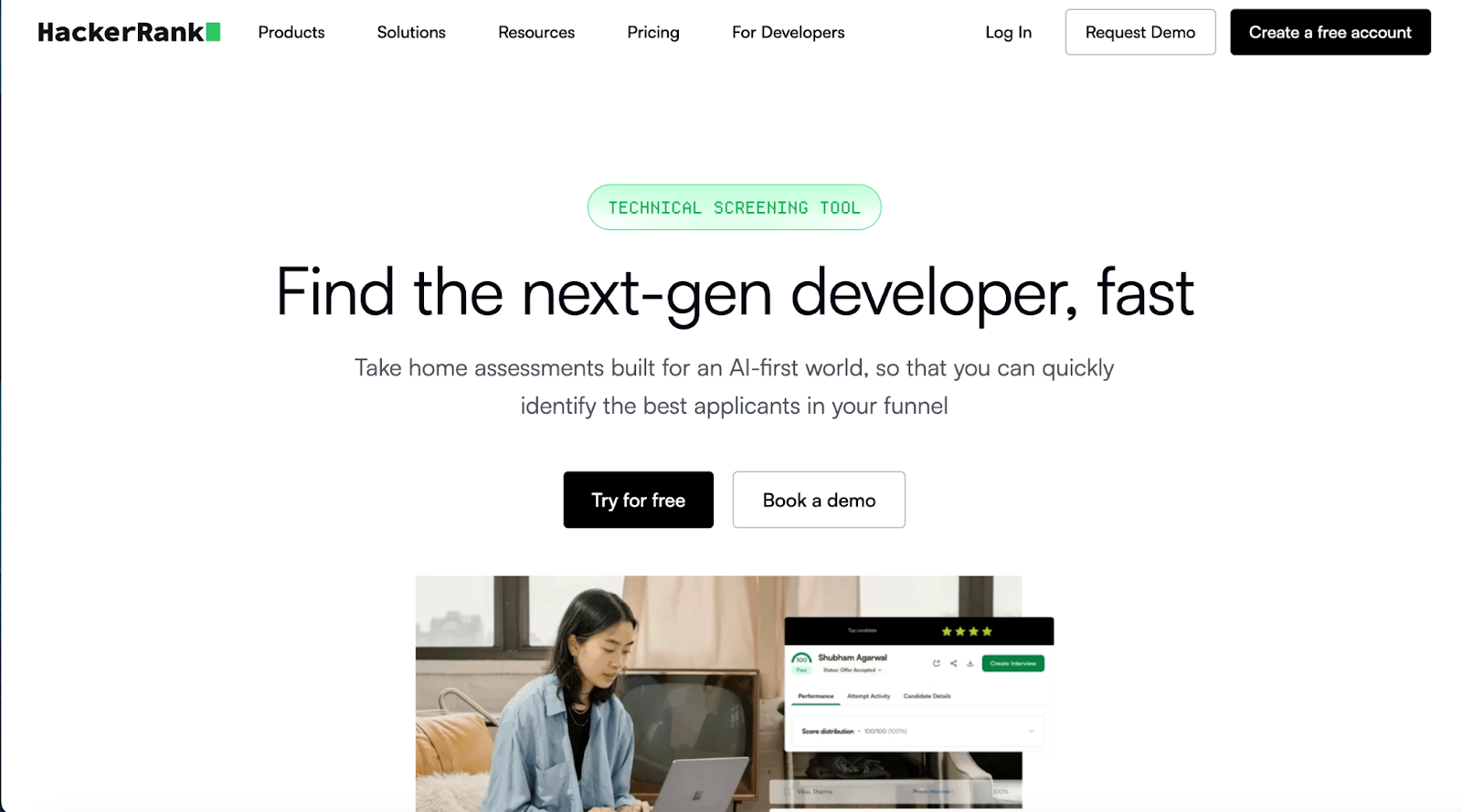
HackerRank technical screening landing page
HackerRank certified assessments validate candidate coding skills 

With HackerRank Screen, recruiters get a powerful tool that detects suspicious coding activity, verifies candidate identity, and monitors test integrity at scale. You can create tests using a vast library or generate role-based assessments instantly from job descriptions. 

The built-in AI Interviewer conducts first-round technical interviews, evaluating problem-solving, code quality, and candidates’ ability to work with AI tools. Its real-time coding environments and integrations with popular ATS make the hiring process smoother. 

Key features

  • Vast assessment library: Access thousands of coding tests covering in-demand roles and skills
  • Real-time coding: Conduct live coding interviews with easy-to-use environments for candidates
  • ATS integrations: Connect smoothly with Greenhouse, Lever, Workday, and other platforms

Pros

  • Build customized assessments for role- or company-specific needs
  • Receive detailed candidate reports for better hiring decisions
  • Engage global talent with hackathons and developer competitions

Cons

  • Limited customization for interview setups

Pricing

  • Starter: $199/month
  • Pro: $449/month

3. Codility

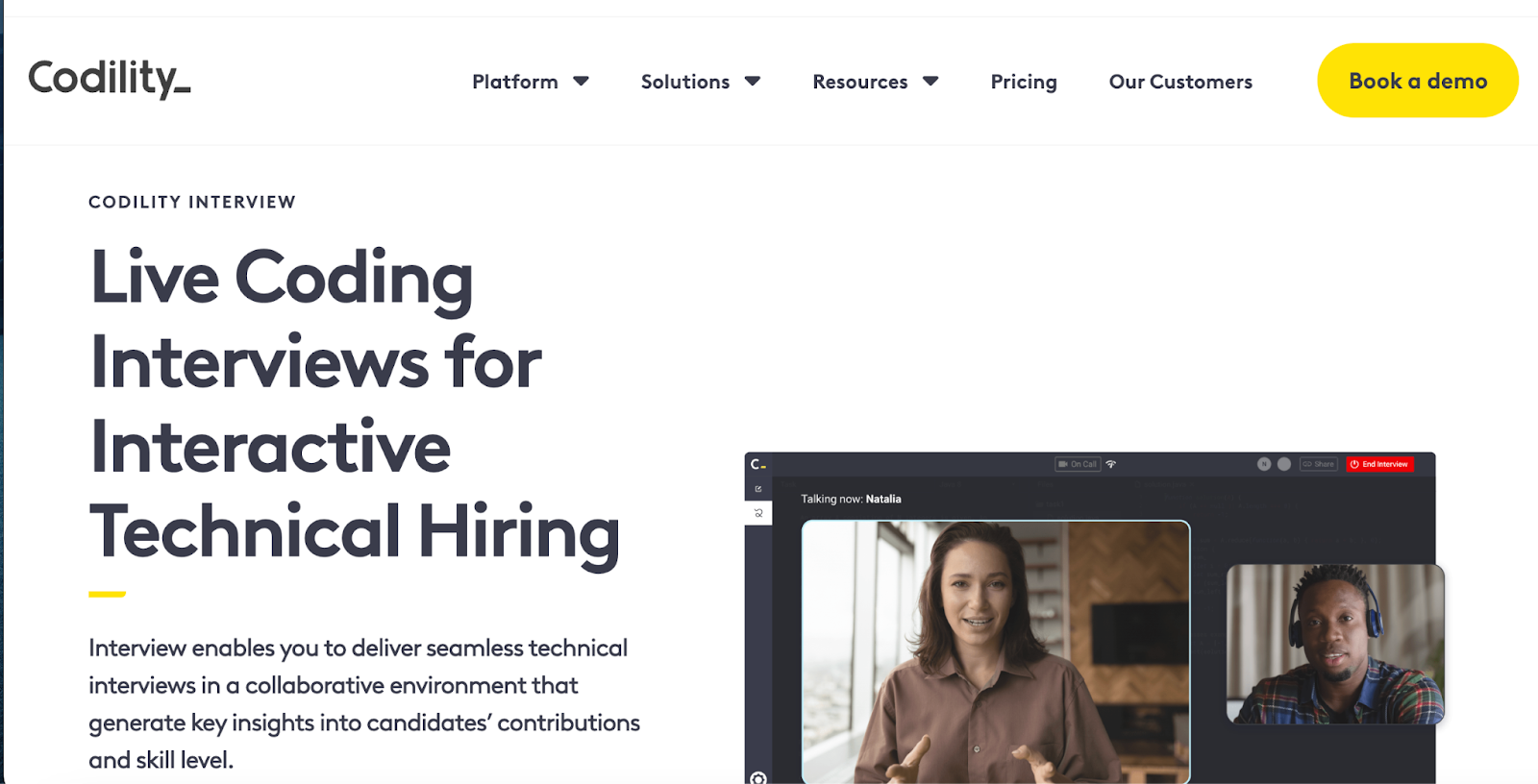
Codility landing page showing live coding interviews and tech hiring tools
Codility offers screen-and-interview products for enterprise technical hiring

Codility helps companies hire top engineering talent faster by creating realistic technical skill assessments and hosting live coding interviews using real code. The platform accelerates hiring by 2.5 times, providing candidates with a seamless experience that boosts the likelihood of attracting top talent before competitors do. 

The platform allows hiring teams to customize assessments based on specific skill sets, fast-tracking the best candidates and removing unqualified ones. 

Key features

  • Live coding interviews: Conduct real-time coding sessions to assess skills instantly
  • Automated grading: Automatically evaluate submissions on accuracy, efficiency, and scalability
  • Customizable assessments: Tailor challenges by skill level, language, and problem type

Pros

  • Access a large library of coding challenges
  • Reduce time-to-hire with automated assessments
  • Seamlessly integrate with ATS systems for workflow management

Cons

  • Pricing is higher compared to some competitors

Pricing

  • Starter: $1200/year
  • Sale: $600/month
  • Custom: Contact for pricing

4. CodeSignal

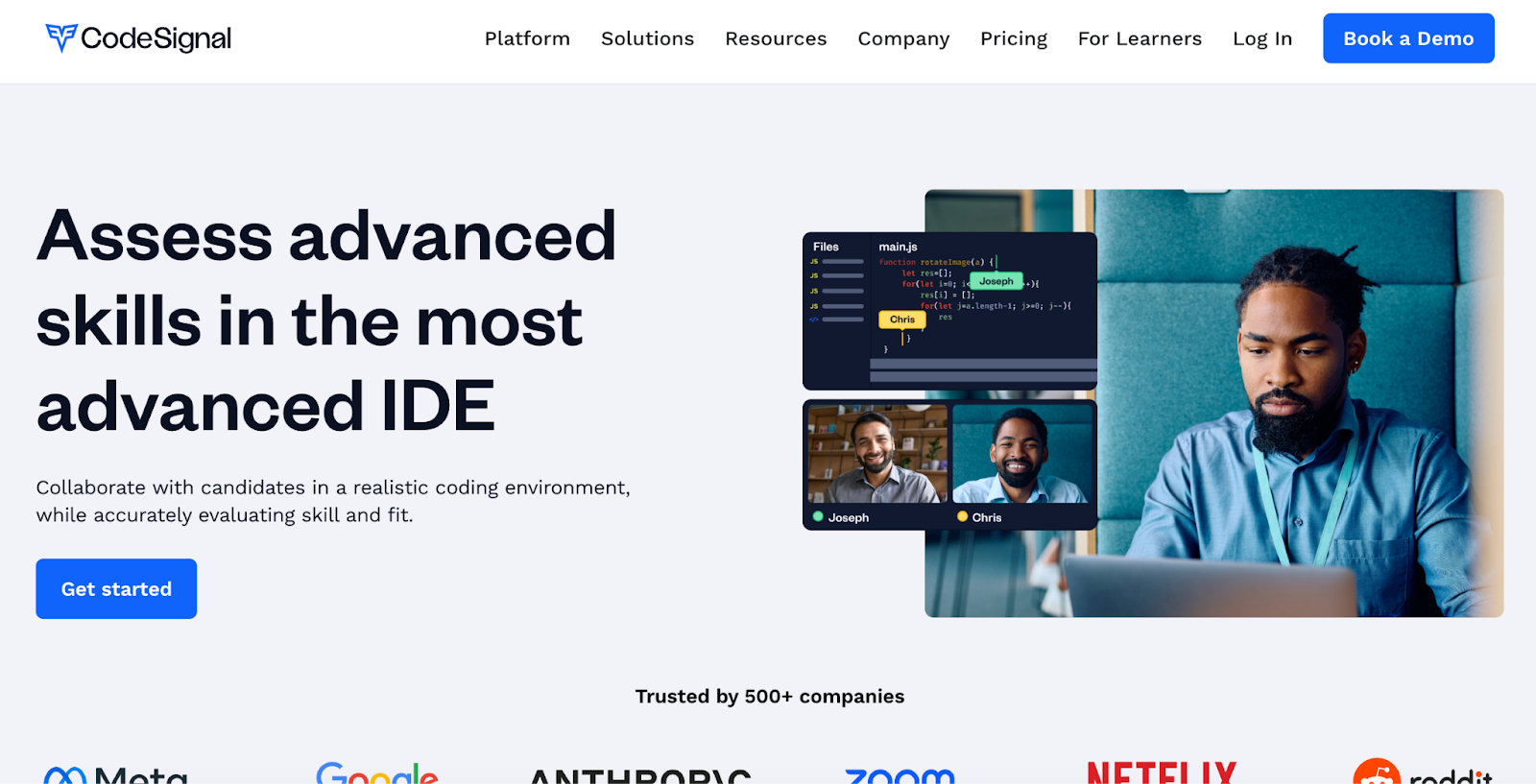
CodeSignal advanced IDE for collaborative technical skills assessment
Assess advanced skills in the most advanced coding IDE

CodeSignal lets you assess advanced skills using a realistic, cloud-based IDE that mirrors real work environments. Its live technical interviews include built-in video and audio calling, a premium question library, and structured interview templates. 

You can customize questions or use role-specific templates to evaluate candidates thoroughly while reducing bias through consistent interview formats. The platform supports multiple programming languages and integrates smoothly with ATS systems.

Key features

  • Advanced IDE: Use a cloud-based IDE with build tools and a mobile emulator
  • Interview templates: Apply structured, role-specific templates for consistent interviews
  • ATS integration: Connect CodeSignal data seamlessly with your existing ATS

Pros

  • Evaluate candidates in realistic, job-like coding environments
  • Customize interviews with premium question libraries
  • Reduce bias with structured interview processes

Cons

  • May have a learning curve for new users

Pricing

  • Custom pricing

5. Coderbyte

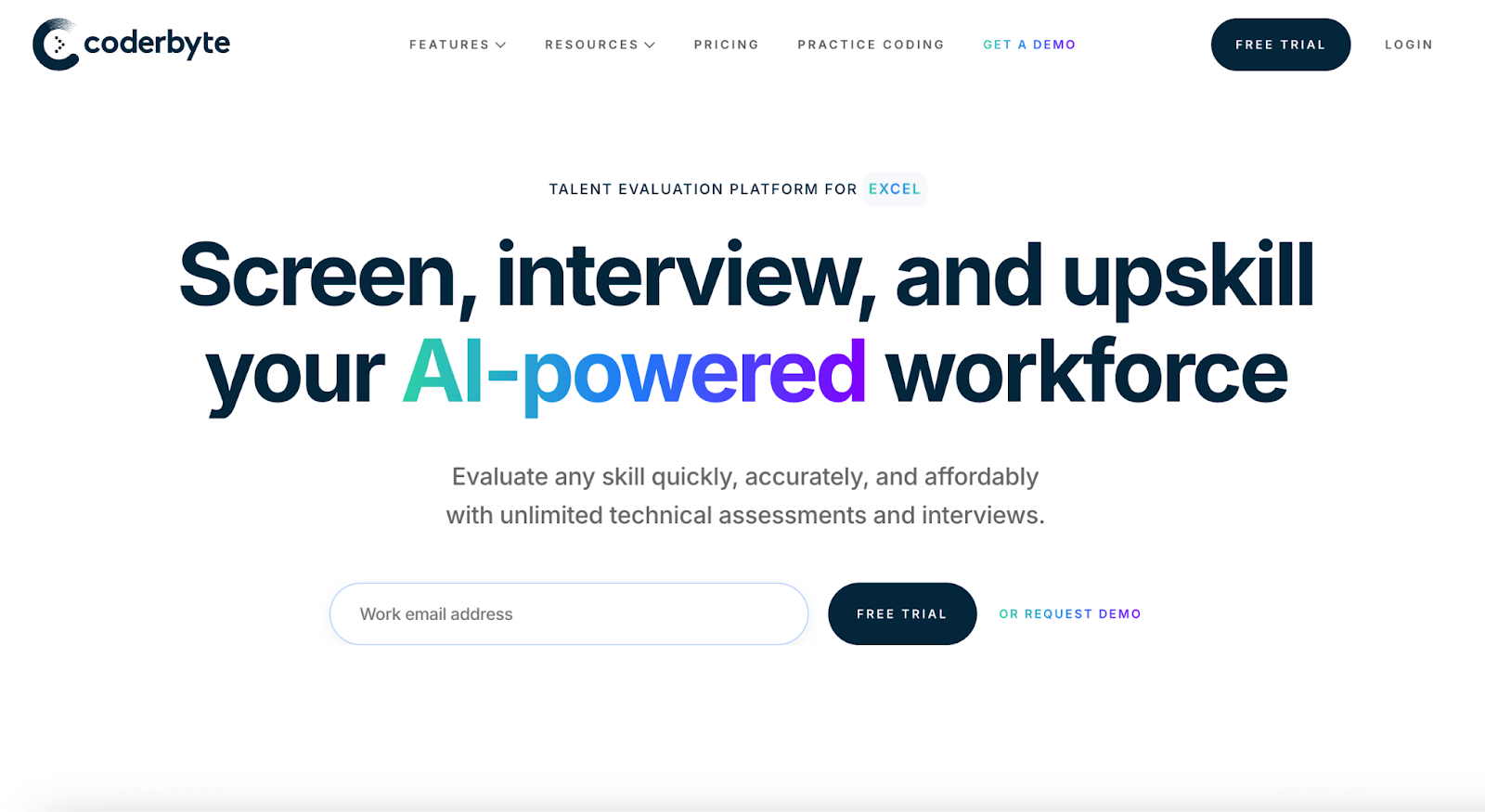
Coderbyte homepage with coding tests and assessments
Coderbyte offers coding tests, interviews, and skill training

Coderbyte offers an AI-powered platform to screen, interview, and upskill technical talent using unlimited assessments and interviews. It supports over 1,000 coding challenges in 30+ languages and 100+ skills, including machine learning and data science. 

The live coding IDE includes video, whiteboard, and real-time collaboration. You can assign take-home projects, use customizable templates, and leverage AI to analyze candidate results for deeper insights. This platform fits startups, staffing agencies, and enterprises alike.

Key features

  • AI-powered assessments: Use auto-graded challenges and AI analysis for quick results
  • Live coding interviews: Collaborate in real-time with video, whiteboard, and IDE tools
  • Take-home projects: Assign real-world coding tasks and review via GitHub integration

Pros

  • Access a vast library of customizable technical challenges
  • Support interactive interviews with whiteboarding and video chat
  • Improve candidate insights with AI-driven result analysis

Cons

  • Pricing may feel expensive if many custom or take-home tasks involved

Pricing

  • Pro: $199/month

Enterprise: Starts at $9,995/year

6. CoderPad

CoderPad online coding tests library for 99+ languages/frameworks
Assess dev skills in action with CoderPad

CoderPad specializes in live coding interviews, enabling interviewers to observe candidates’ real-time problem-solving skills. It supports over 99 languages and frameworks, offering a collaborative coding environment perfect for final-stage interviews, pair programming, and whiteboard-style exercises. 

Instead of mass screening, CoderPad focuses on authentic simulations that reflect real work tasks, helping teams accurately assess technical abilities and collaboration.

Key features

  • Multi-file IDE: Work on multi-file projects using a VS Code-like environment
  • Live coding: Write, execute, and debug code together in real-time browser sessions
  • Gamified challenges: Assess skills with cheat-resistant, interactive coding challenges

Pros

  • Let teams observe candidate work live for immediate feedback
  • Build authentic work-task simulations instead of isolated puzzles
  • Engage candidates with interactive, hands-on coding exercises

Cons

  • Require interviewers to invest time during live sessions vs. asynchronous screening

Pricing

  • Free
  • Starter: $100/month
  • Team: $375/month
  • Custom: Contact for pricing

📌Related read: How Talent Assessment Tests Improve Hiring Accuracy and Reduce Employee Turnover

7. Devskiller (now SkillPanel)

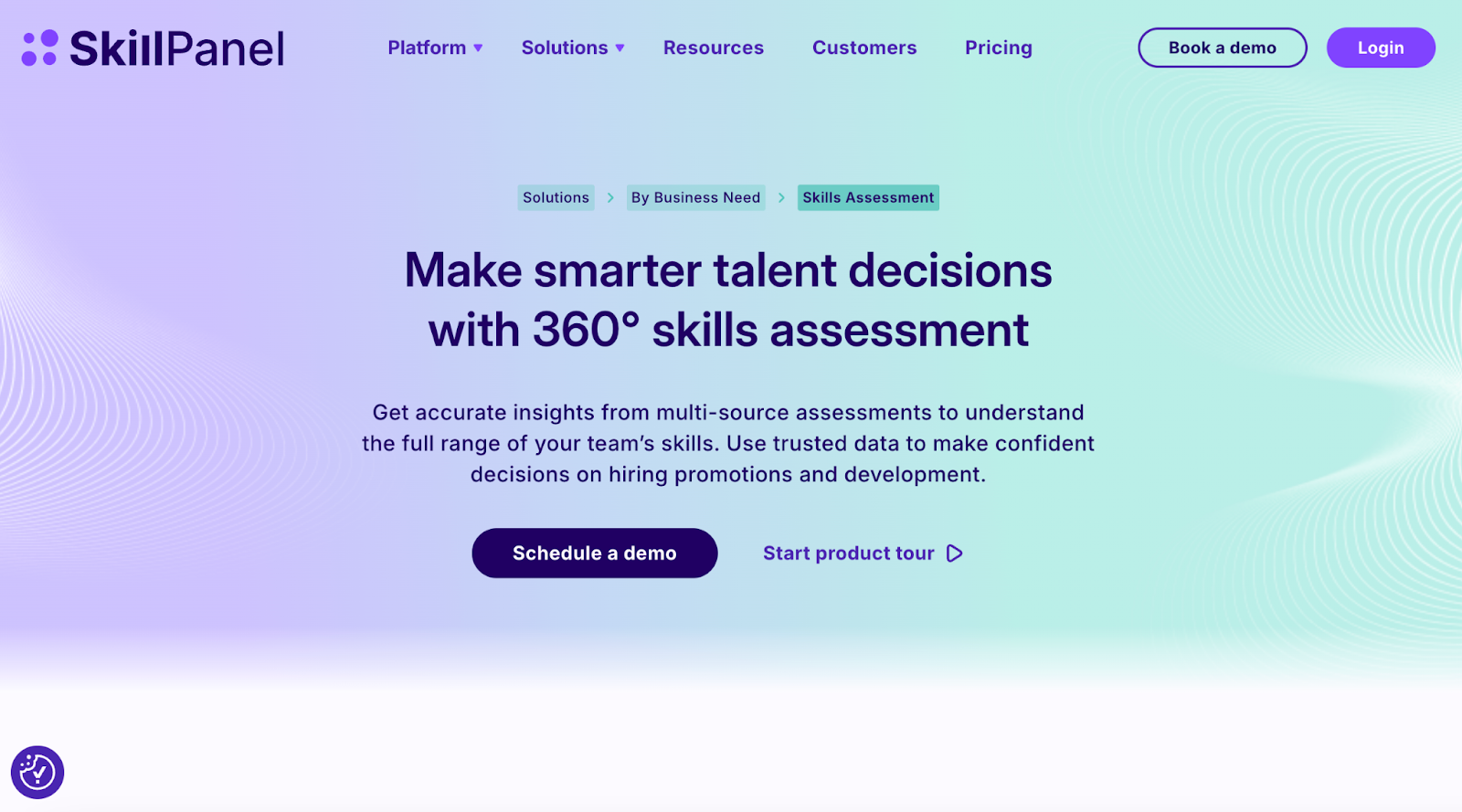
SkillPanel platform for an all-in-one skills assessment and talent decisions
Make smarter talent decisions with an all-in-one skills assessment

Rebranded as SkillsPanel in September 2025, Devskiller is a skills intelligence platform that integrates with coding assessments, often powered by its sister tool DevSkiller SkillCheck, to evaluate and manage software developer skills. The platform combines automated coding tests with multi-source feedback, including self-reviews, manager, peer, and expert insights, to provide a holistic and unbiased view of technical skills. 

SkillPanel’s RealLifeTesting™ methodology uses real-world coding challenges that mirror job tasks across frontend, backend, DevOps, mobile, and more. 

Key features

  • Automated assessments: Use automated tests to screen candidates early, saving time
  • Real-world testing: Simulate job tasks with practical coding challenges for accuracy
  • Broad tech support: Assess skills across 220+ technologies, including major languages and frameworks

Pros

  • Manage skills holistically for talent development and gap identification
  • Improve hiring efficiency by focusing interviews on qualified candidates
  • Reduce bias with multi-source feedback integrated into skill assessments

Cons

  • Longer setup/ evaluation time per candidate due to detailed tasks

Pricing

  • Custom pricing

8. WeCP

Dashboard of a coding assessment platform
Assess candidate coding skills with real-time insights

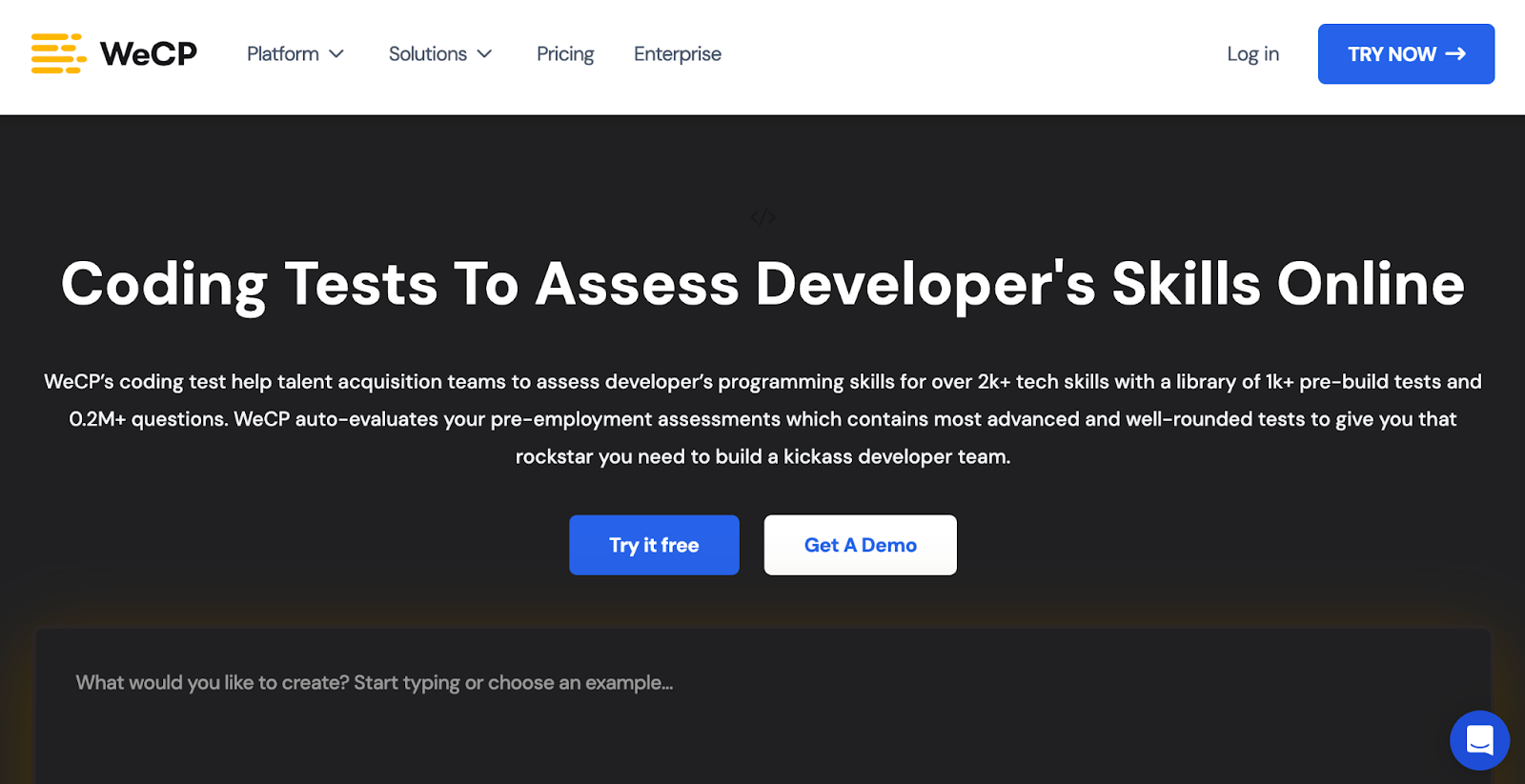
WeCP helps talent acquisition teams evaluate developer programming skills with a library of 1,000+ pre-built tests covering over 2,000 tech skills and 0.2 million+ questions. The platform automates assessment evaluation, enabling companies to hire top developers efficiently. 

Trusted by Fortune 100 brands, WeCP supports large-scale hiring with features like AI video proctoring, tab-switch monitoring, and identity verification to ensure fair and secure assessments. Seamlessly integrate with ATS systems, invite candidates effortlessly, customize tests, and get detailed automated reports to make data-driven hiring decisions confidently.

Key features

  • Customizable assessments: Quickly create or adapt tests using a vast question library
  • AI proctoring: Prevent cheating with video proctoring and tab-switch detection
  • Bulk candidate management: Invite and evaluate thousands of candidates simultaneously

Pros

  • Get support for a wide range of job roles and industries
  • Integrate with various HR tools and ATS
  • User-friendly interface for both recruiters and candidates

Cons

  • May require a learning curve to fully use advanced features

Pricing

  • Premium Plan: $240/month
  • Custom/Enterprise Plan: Contact for pricing

9. iMocha

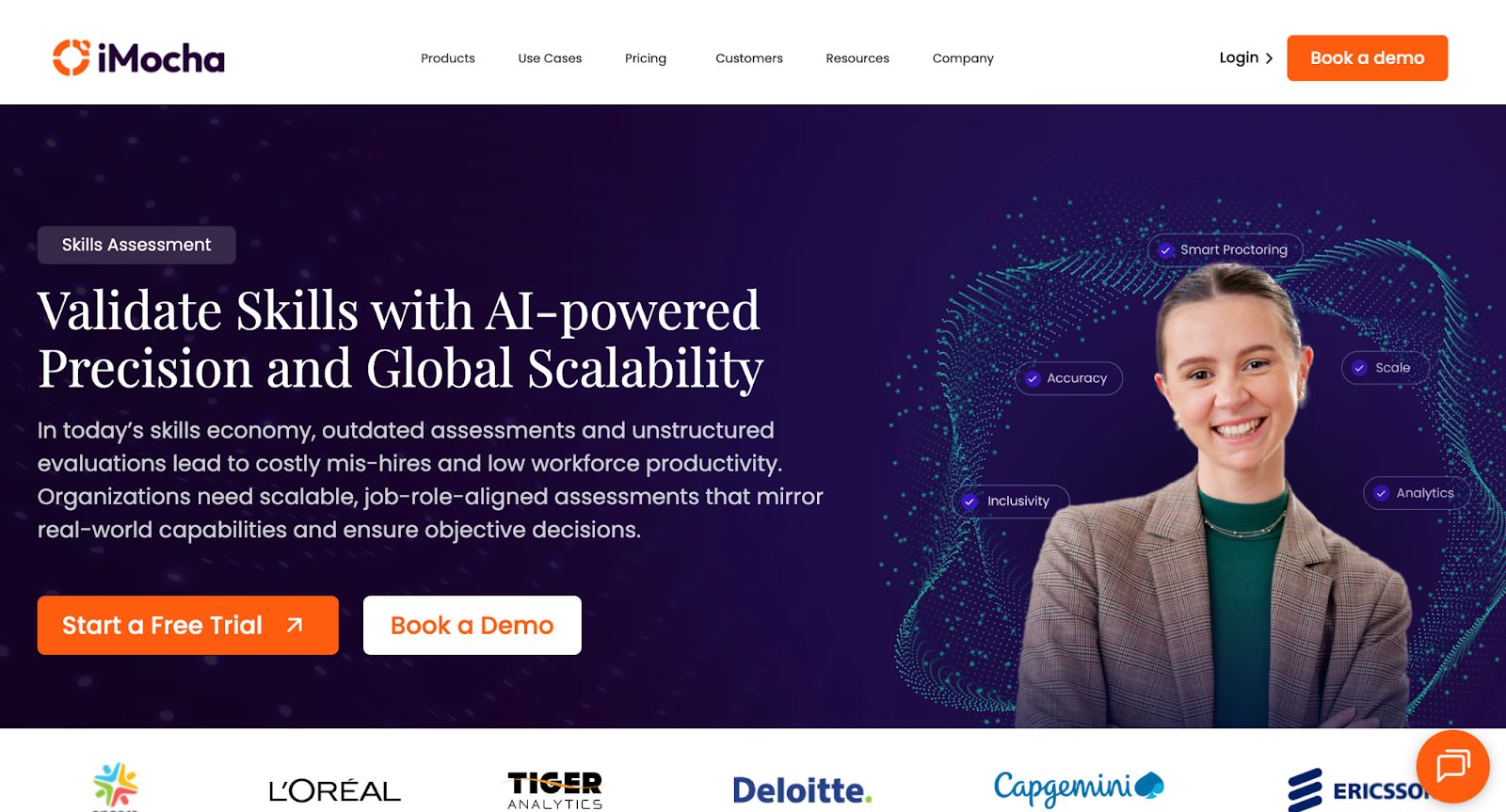
iMocha homepage showcasing an AI-powered skills intelligence platform
iMocha offers 10,000+ skill assessments, AI inference, and skills-based hiring solutions

iMocha provides a comprehensive platform with 10,000+ ready-to-use skill tests across 300+ job roles, covering technical, functional, cognitive, and soft skills. It features over 30 language compilers and more than 5,000 coding problems, all with AI-driven code scoring. 

Some of its key proprietary tools include AI-LogicBox for code-free logic assessments, AI-EnglishPro for CEFR-aligned English communication evaluation, and a Smart Proctoring Suite for advanced AI-powered cheating prevention. The platform also supports live and asynchronous interviews with collaboration tools and Conversational AI interviews to deliver bias-free, scalable, and consistent candidate evaluations. 

Key features

  • AI-LogicBox: Evaluate logic and problem-solving skills without needing code execution
  • Smart Proctoring: Monitor tests using AI for cheating prevention and integrity assurance
  • Conversational AI: Conduct adaptive, AI-driven interviews with automated scoring and transcripts

Pros

  • Scale assessments globally with 10,000+ job-role-specific tests
  • Reduce bias using AI-powered, consistent evaluation methods
  • Support accessibility with 50+ languages and WCAG 2.1 compliance

Cons

  • Excess features for orgs who only need simple technical screening

Pricing

  • 14-day free trial
  • Basic: Contact for pricing
  • Pro: Contact for pricing
  • Enterprise: Contact for pricing

10. Xobin

Coding assessment platform for smarter tech hiring
Xobin’s AI-powered tool simplifies developer skill evaluation

With adaptive coding tests, Xobin adjusts question complexity based on candidate performance. Its advanced proctoring suite includes eye-tracking, screen monitoring, and device detection to ensure test integrity. 

It supports 50+ programming languages, enables multi-language assessments, and offers seamless ATS integrations to streamline hiring. Used across 40+ countries, Xobin provides pre-built and customizable tests for 9,000+ tech job roles, making it enterprise-ready and globally scalable.

Key features

  • Adaptive Coding Tests: Adjust question difficulty based on candidate performance in real-time
  • AI-Powered Evaluation: Automatically assess code quality, logic, and efficiency like a senior engineer
  • Proctoring Suite: Monitor screen, detect devices, and track eye movement to prevent cheating

Pros

  • Screen candidates in 50+ programming languages
  • Access 180,000+ questions across 9,000+ job roles
  • Automate shortlisting with real-time performance analytics

Cons

  • Gaps in language-specific coding challenges as reported by users

Pricing

  • Complete Assessment Suite: Starting from $699/year

📌Also read: The Impact of Talent Assessments on Reducing Employee Turnover

Pitfalls to Avoid & Best Practices

While coding assessment tools offer massive advantages in streamlining developer hiring, misuse or poor implementation can backfire. Here are the most common pitfalls to avoid, and how to address them with best practices:

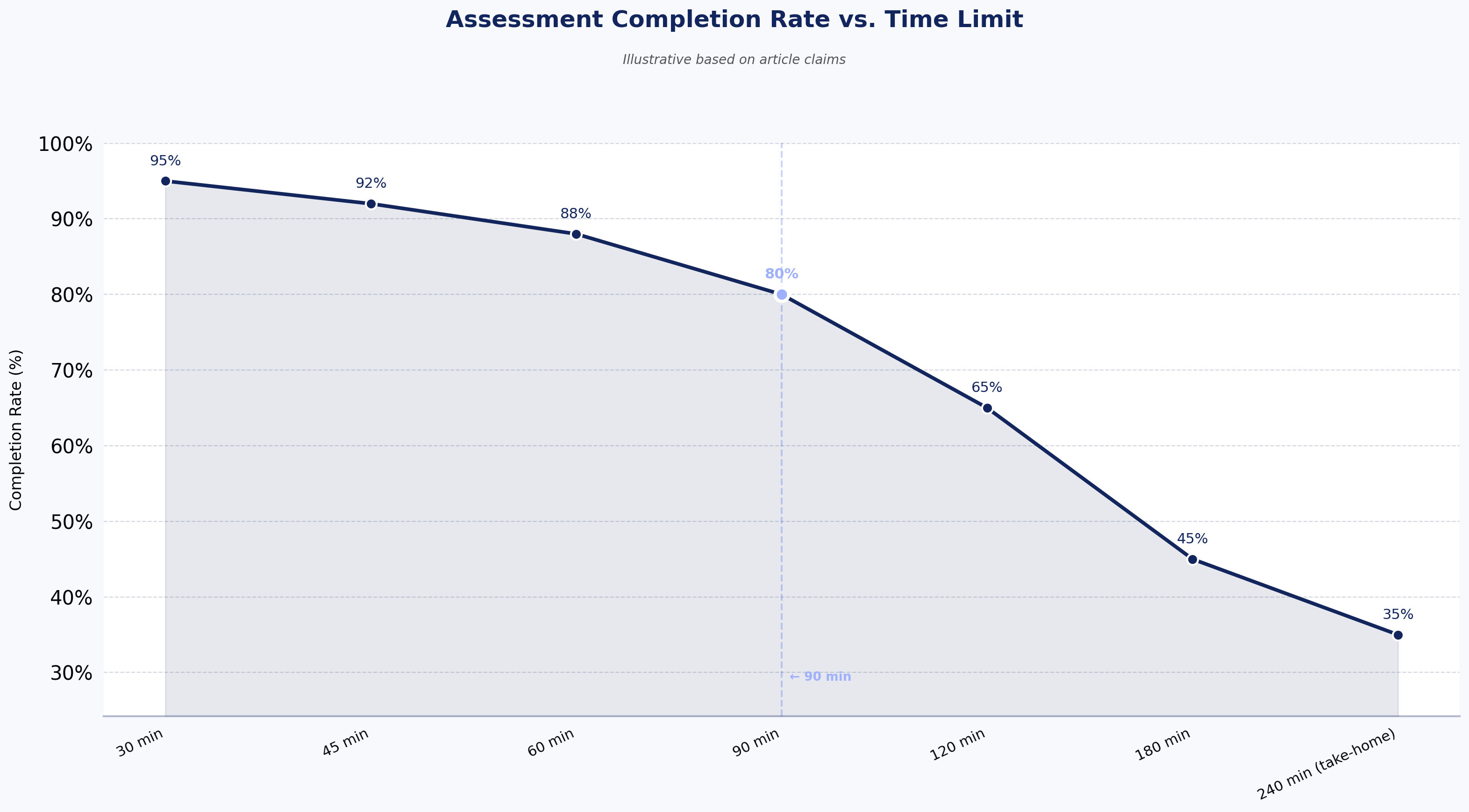
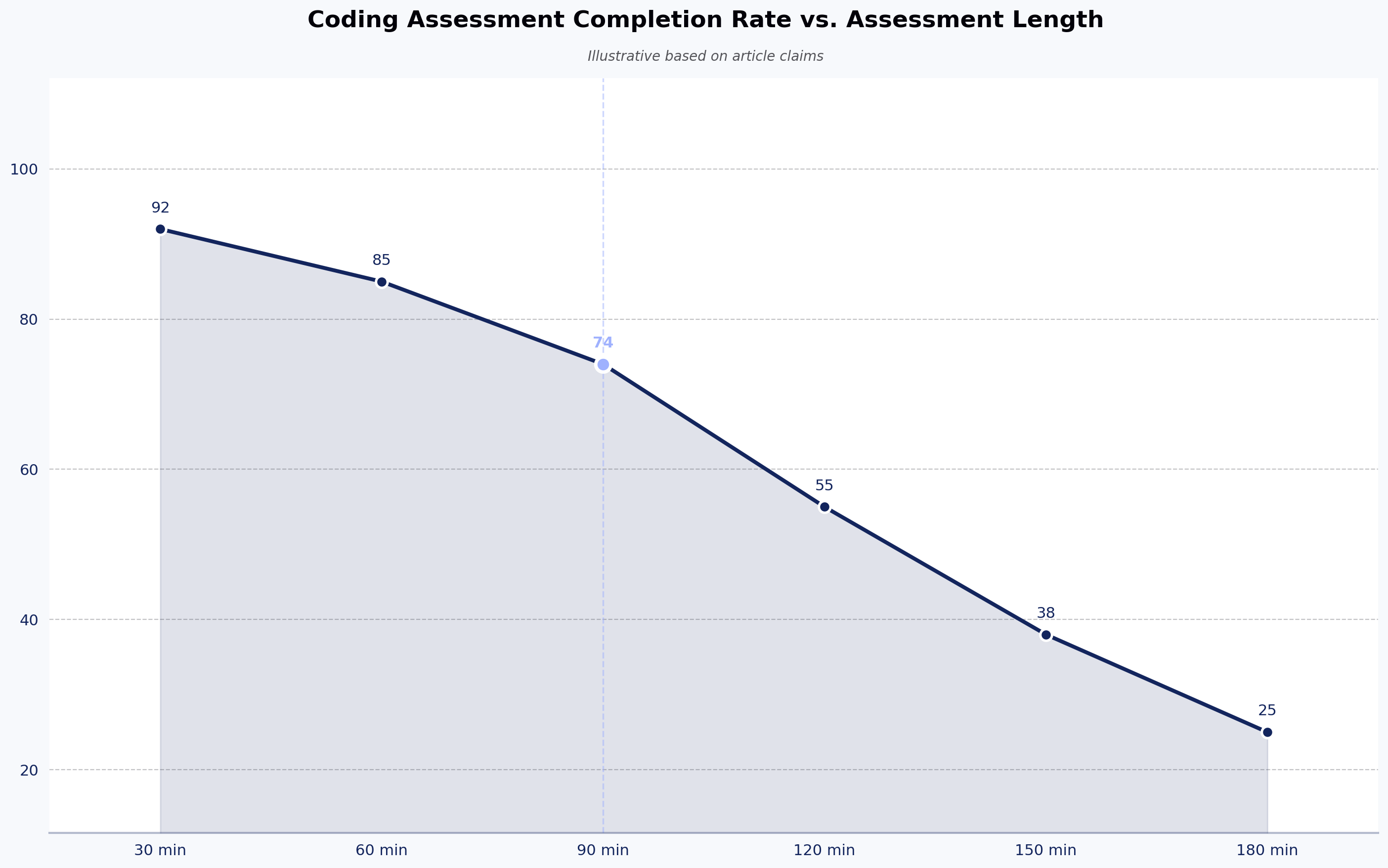
  • High drop-offs with lengthy tests: Lengthy assessments fatigue candidates and lead to incomplete submissions. Keep tests under 60–90 minutes unless it’s a final-round or take-home project.
  • Cheating risks if no proctoring: Without AI proctoring or IP protections, candidates can easily game the system. Always enable features like webcam monitoring, tab-switch detection, and plagiarism checks.
  • Low completion due to poor UX: Clunky interfaces or unclear instructions increase candidate frustration and reduce test completion rates. Choose platforms with intuitive UI and real-time guidance.
  • No feedback: Candidates value constructive feedback. Even auto-generated reports that highlight strengths and areas for improvement can improve your brand perception and encourage future applications.
  • Over-relying on one assessment type: Don’t depend solely on algorithmic problems. Include project-based tasks, MCQs, or real-time collaboration to get a well-rounded view of the candidate.
  • Poorly calibrated difficulty level: Tests that are too easy don’t filter effectively; tests that are too hard cause drop-offs. Use benchmarking data and internal calibration runs to fine-tune your assessments.

How to Choose the Right Tool (Decision Framework)

Selecting the right coding assessment platform starts by matching the tool type to your hiring scenario. For example:

  • For high-volume campus hiring, prioritize scalable platforms with bulk assessment features.
  • For niche tech roles, select tools that offer comprehensive skill libraries and real-world project simulations. 
  • For senior hires, focus on platforms that support live coding interviews or collaborative environments.

Next, use the evaluation criteria discussed earlier, like skill coverage, assessment formats, anti-cheating features, and ATS integrations, to score each vendor. Assign weighted scores based on your specific needs (e.g., enterprise security vs speed vs candidate experience).

When shortlisting, don’t rely solely on sales demos. Always run trial or pilot programs with real candidates or internal team members to test usability, scoring accuracy, and reporting.

To gain buy-in, validate the platform with internal stakeholders, including hiring managers, recruiters, and tech leads, by aligning it to their pain points. Show how it improves decision quality and saves time.

Post-purchase, define clear governance and KPIs, such as time-to-hire, test completion rates, or candidate NPS, to track success and refine usage. Regularly review performance metrics and feedback to ensure continuous improvement.

This framework will help you make a confident, data-backed decision that delivers hiring results.

📌Interesting read: Vibe Coding: Shaping the Future of Software

Real-World Use Cases & Assessment Workflows

Coding assessment tools are used across industries and scenarios to streamline hiring, scale evaluations, and ensure the right technical skills are measured. Below are some of its real-world use cases:

  • Startup scaling across geographies: Fast-growing startups use coding assessments to screen candidates across time zones and reduce reliance on engineering teams for early evaluation. Auto-graded tests help shortlist top applicants efficiently.
  • Enterprise hiring 10K+ candidates per year: Large organizations rely on assessment platforms to automate screening at scale. Tools with bulk invite, ATS integration, and detailed analytics streamline volume hiring while ensuring quality.
  • Niche technical roles (DevOps, ML, mobile): For highly specialized roles, companies use project-based assessments or custom real-world challenges to test domain-specific problem-solving skills and hands-on proficiency.
  • L&D and internal upskilling: Assessments help benchmark current skills, identify learning needs, and track employee progress over time in structured upskilling programs.

A typical technical hiring workflow using assessment platforms often follows this structured, repeatable sequence:

JD creation → Skill mapping → Screening test (MCQ/coding) → Auto-score & shortlist → Live interview (pair programming/project review) → Offer

Where HackerEarth Fits in This Landscape

For companies seeking global scale, an extensive question library, and seamless ATS integrations, HackerEarth stands out as a comprehensive assessment solution. With over 17,000 curated questions, it offers a diverse mix of live coding, take-home projects, multiple-choice questions, and role-based simulations to assess candidates’ skills accurately.

HackerEarth’s AI-powered proctoring and anti-cheating technology ensure test integrity, while integrations with leading platforms like Greenhouse and Lever simplify recruitment workflows. Its benchmarking capabilities provide valuable industry-wide data to help companies compare candidate performance effectively.

Trusted by top enterprises for both campus and lateral hiring, HackerEarth combines transparent pricing with robust global support, making it an ideal choice for organizations looking to cut screening time, improve fairness, and confidently scale their hiring pipelines.

If you’re ready to transform your recruitment process with AI-driven insights and efficiency, schedule a demo with HackerEarth and discover how it can elevate your hiring outcomes.

FAQs

What are coding assessments?

Coding assessments are tests designed to evaluate a candidate’s programming skills, problem-solving ability, and technical knowledge through challenges like coding problems, projects, and simulations relevant to real job tasks.

How to assess coding skills?

Assess coding skills using a mix of live coding, automated tests, take-home projects, and real-world challenges. Use platforms with proctoring and analytics like HackerEarth to ensure accuracy and reduce bias.

How do I prepare for a coding assessment test?

Prepare by practicing coding problems and mock tests on platforms like HackerEarth. Focus on problem-solving, algorithms, and language syntax to improve speed, accuracy, and confidence.

Subscribe to The HackerEarth Blog

Get expert tips, hacks, and how-tos from the world of tech recruiting to stay on top of your hiring!

Author
Vineet Khandelwal
Calendar Icon
November 10, 2025
Timer Icon
3 min read
Share

Hire top tech talent with our recruitment platform

Access Free Demo
Related reads

Discover more articles

Gain insights to optimize your developer recruitment process.

Gamification in Recruitment: Engaging Candidates With Interactive Hiring

Gamification in recruitment involves integrating interactive, game-design elements into the hiring process, transforming what were once passive tasks into engaging experiences. This innovative approach is not merely a novelty; it is a validated methodology that delivers measurable business value. Research indicates that game-based strategies are proven to boost applicant engagement significantly, with documented increases of up to 40%.

Traditional screening methods are failing

The contemporary talent market presents a significant challenge to HR leadership: achieving high-volume efficiency while maintaining high-quality selection. Traditional recruitment methods, reliant primarily on curriculum vitae (CVs), applications, and sequential interviews, are demonstrating systemic failures in meeting this dual mandate. These processes inherently rely heavily on subjective judgment, which is well-documented to introduce significant unconscious biases and yield low predictive validity regarding a candidate's eventual success in a specific role.

The high digital volume of modern job applications compounds this problem, creating systemic friction characterized by high time-to-hire (TTH) metrics and a resulting poor candidate experience (CX). When candidates perceive the application process as tedious or unfair, they often disengage, leading to high dropout rates. This systemic friction suggests that the inefficiency of traditional screening processes is directly proportional to their subjectivity. Gamification emerges as a crucial strategic intervention, designed to replace subjective review with objective, quantifiable behavioral data.

Defining the Discipline and Its Deep Roots

Defining Gamification: Mechanics vs. Serious Games

Gamification is formally defined as the application of game design elements and principles into non-game contexts, specifically within the Human Resource Management (HRM) domain.

This practice leverages typical elements of game playing, such as point scoring, structured competition, and defined rules, and applies them to business activities like recruiting, employee training, or sales force management. In the context of talent acquisition, gamification involves applying game technology—including game theory, mechanics, and design—to attract, select, onboard, and develop employees.

It is essential for HR leaders to distinguish gamification from the concept of "Serious Games." Serious Games are full, self-contained games created for a non-entertainment purpose, such as advanced skills training or simulating complex operational environments. Conversely, gamification is the integration of elements or mechanics (like a leaderboard or a progress bar) into an existing business process (like a standardized candidate screening module). The critical distinction lies in the nature of the integration: gamification enhances the experience of a routine task, whereas a serious game constitutes the task itself.

Leveraging intrinsic and extrinsic motivation

The effectiveness of gamification is rooted firmly in organizational psychology and behavioral economics. Gamification techniques leverage powerful, innate psychological desires, including the need to socialize, learn, master, compete, achieve status, express oneself, and more. By integrating game elements, the system can capture the user's attention and direct their behavior toward specific business objectives.

The critical mechanism is the transition from extrinsic motivation (working for a paycheck or a job offer) to intrinsic motivation (the joy derived from competence and progress). By tying milestones and achievements to recognition, employees and candidates gain a sense of progress similar to advancing levels in a video game. For instance, providing badges for meeting certain metrics or recognizing performance on a leaderboard can incentivize engagement. This triggers the Mastery-Status Cycle: gamified assessments succeed because they subtly shift the candidate's focus away from the high-stakes, extrinsic reward (the final job offer) toward the immediate, intrinsic reward of demonstrating mastery and competence within the assessment environment. 

Core game elements in HR contexts

A successful gamified recruitment system utilizes a suite of well-tested game design elements. These mechanics include points, badges, leaderboards, avatars, performance graphs, and meaningful narrative stories. In the hiring context, these elements are strategically applied:

  • Points and Badges: Candidates earn points for completing specific tasks, achieving assessment milestones, or demonstrating required skills.
  • Progress Bars: Visual representations of completion rates and progress keep candidates motivated, ensuring they maintain momentum through lengthy application sequences.
  • Leaderboards: These foster healthy competition and can be used to unlock later interview stages based on assessment performance.

The application of these elements turns the traditionally dull, one-way steps of screening and testing into engaging, interactive experiences.

Strategic benefits and operational impact

Enhancing Candidate Experience (CX) and employer branding

Gamification transforms the often stressful and bureaucratic recruitment process into a more enjoyable and interactive journey. By making the process feel like "play rather than a chore," gamification substantially increases candidate motivation and investment in the application process. This change in approach is particularly resonant with the modern workforce, especially Gen Z, who are accustomed to interactive technology and value corporate innovation.

Furthermore, gamification is a powerful tool for employer branding. Companies that utilize game-based assessments showcase their culture as modern, innovative, and focused on candidate welfare. Candidate desirability is directly linked to this innovation; research indicates that 78% of applicants stated that the inclusion of gamification in the hiring process would make an employer more desirable.

Data-backed, objective candidate evaluation

A core benefit of gamification is its ability to transition hiring from subjective judgment to objective, quantifiable measurement. Traditional interviews and assessments are susceptible to human biases, but gamified assessments provide objective results based on how candidates behave and perform within realistic, controlled scenarios.

These tools gather rich, multi-faceted data, enabling recruiters to assess skills, cognitive abilities, emotional intelligence, and personality traits, providing a comprehensive 360-degree view of a candidate’s capabilities. Instead of relying on resume keywords or self-reported capabilities, employers can observe candidates demonstrate real-world skills through interactive tasks and simulations. This data-driven approach allows hiring managers to make better decisions, ensuring the selection of candidates who possess the right attributes to succeed in the role and thrive within the organizational culture.

Efficiency gains and time reduction

Efficiency in talent acquisition is fundamentally improved through process automation and standardization. Gamification automates significant aspects of the recruitment process, particularly screening and assessment, which allows hiring managers to concentrate their limited time on the most promising candidates. Since gamified tests often take only minutes to complete and provide instant results, they are highly effective time management tools.

The substantial reduction in time-to-hire (TTH) is a direct consequence of standardizing the assessment input. By requiring all candidates to engage with the same objective metrics, HR can leverage technology for rapid, bias-free elimination, accelerating the high-volume top-of-funnel (MoFu) activities. Measurable results include a demonstrated 40% shorter interview cycle and a 62% higher offer ratio in implementations involving gamified skills assessments. Unilever, for example, successfully reduced its overall screening time by 75% using science-based mobile games.

Mitigation of unconscious bias and increased diversity

One of the most profound benefits of gamified assessments is their effectiveness in removing hiring bias. Since games are designed to focus purely on behavior and performance, they naturally mitigate the influence of irrelevant demographic data, educational background, or professional pedigree. Gamification provides objective insights, allowing organizations to hire for potential rather than solely on past achievements.

To avoid unconscious bias, gamified systems typically employ two key mechanisms:

  1. Blind Scoring: Candidates are evaluated solely based on their test results. The hiring team sees the quantitative assessment scores first, before any identifying information, such as the candidate’s name, resume, or photo, is revealed.
  2. Anonymized Candidate Profiles: This process ensures that personal details, including gender, age, education level, or other protected demographic characteristics, are not visible to the hiring manager during the initial decision-making phase, ensuring the selection is based purely on objective performance.

By focusing on competence and potential, gamification effectively expands and diversifies the talent pool.

Measuring performance and validating investment

Does gamification in recruitment really deliver results?

Gamification in recruitment is definitely supported by research and statistical evidence demonstrating measurable, tangible results. It offers concrete improvements across key areas of the talent lifecycle.

Quantifiable evidence of success: metrics that matter

The performance of gamified processes can be quantified through various metrics:

  • Engagement: The interactive nature of gamified experiences significantly increases user commitment. Engagement rates show a 48% increase when the work experience is gamified, and 85% of users state they would spend more time using gamified software.
  • Efficiency: Gamified skills assessments dramatically compress the hiring timeline. Data supports a 40% reduction in the interview cycle and a 62% higher offer ratio, demonstrating accelerated progression through the funnel.
  • Retention: Leveraging gamification in the onboarding process has shown a documented capability to reduce employee turnover rates from 25% to 8%.
  • Desirability: The modern approach makes the employer brand more attractive, with 78% of applicants viewing employers with gamified hiring processes more favorably.

Calculating Return on Investment (ROI): The strategic view

Measuring the return on investment (ROI) from gamification presents unique challenges. While the operational results (e.g., reduced TTH) are robust, quantifying the financial ROI can be difficult due to the complex cost structure. Initial development, continuous creative updates (avatars, new challenges), ongoing community management and policing, and crucial compliance/legal costs can cause the overall cost of recruitment-focused games to escalate.

To mitigate this complexity, HR leaders must frame gamification as a strategic infrastructure investment characterized by high capital expenditure (CapEx) and continuous operational expenditure (OpEx). ROI validation must therefore shift from short-term transaction costs to longitudinal metrics, focusing on the quality of hire (QoH) and the cost savings associated with reduced attrition and significantly shorter TTH. 

Metrics for evaluating gamification ROI and success

The success of a gamified recruitment system is best evaluated by comparing baseline hiring data against post-implementation results across several key performance indicators (KPIs).

Metrics for Evaluating Gamification ROI and Success

The future of interactive Talent Acquisition

Gamification represents a foundational, unavoidable shift toward a more insightful, fair, and immersive approach to talent acquisition, positioning it as a significant component of the future of hiring. As technology continues to evolve rapidly, gamification is moving beyond novelty and becoming a necessity for maintaining candidate engagement and improving assessment accuracy.

AI-Powered Adaptive Assessments and Hyper-Personalization

The next evolution of gamified hiring will be driven by artificial intelligence (AI). Future game-based assessments will be adaptive, dynamically adjusting their difficulty, pacing, and scenario complexity in real time based on how candidates perform. This adaptation ensures the assessment is neither too easy (failing to measure peak performance) nor too hard (leading to frustration and dropout), thereby capturing the candidate's true capacity and maximizing the predictive insight collected.

Immersive reality (VR/AR) simulations

Virtual Reality (VR) and Augmented Reality (AR) are poised to dramatically increase the fidelity of gamified assessments. Immersive environments will move assessments closer to the physical reality of the actual job. This technology will enable the testing of complex, integrated competencies that are difficult to measure in a flat digital environment, such as collaboration under stress, fine motor skill precision, or complex spatial reasoning within a simulated work site. The use of VR/AR makes assessments feel increasingly like real work, providing unprecedented behavioral data.

Predictive analytics and performance mapping

The future of talent technology will prioritize the closure of the feedback loop. Advanced tools will correlate gamified assessment data directly with long-term job performance, tenure, and turnover metrics. By mapping the initial behavioral data captured during the game to subsequent on-the-job success, organizations can continuously refine and validate their predictive models, ensuring the assessments are measuring precisely what they are designed to measure—future success.

Ethical design and algorithmic governance

As the mechanisms for data collection become increasingly sophisticated, the emphasis on ethical design and fairness must increase commensurately. Transparency in assessment design and robust algorithmic governance are becoming critical requirements. HR leaders must insist on clear validation studies for any proprietary assessment algorithms, demanding proof of non-bias and external certification, ensuring that fairness remains a core tenet of technological adoption.

The trajectory of talent acquisition indicates that gamification is fundamentally shifting the hiring process to become smarter, faster, and more effective, underpinned by principles from organizational psychology and validated by technology. Its successful implementation allows companies to identify talent based on objective potential rather than subjective credentials. The strategic question for HR leadership is not whether gamification works, but how quickly the organization can strategically and effectively integrate it into its core hiring methodology.

Data-Driven Recruiting: How to Hire Smarter With Analytics

Data-Driven Recruiting (DDR) represents a fundamental strategic shift, transforming Talent Acquisition (TA) from a reactive, cost-based administrative function into a proactive, strategic partner.

DDR mandates the replacement of subjective judgment and intuition ("gut feelings") with verifiable, quantitative evidence across the entire talent lifecycle. By applying advanced analytics and leveraging statistical modeling, TA leaders gain the capability to secure executive budget approval by proving a verifiable Return on Investment (ROI). This report details the strategic necessity of this transition, outlining the essential analytical components.

Why conventional hiring falls short: The high cost of intuition

Traditional, intuition-led hiring processes introduce significant risks and costs that materially impede organizational performance, often leading to selection errors and high turnover.

The subjectivity trap: gut-based bias and selection error

Conventional hiring methods struggle to provide objective indicators of future job performance. Traditional, unstructured job interviews are notably poor predictors of subsequent success. These interactions are often highly subjective, allowing interviewers to judge candidates based on superficial or non-competency-related traits such as confidence or personal charisma, rather than actual job-relevant abilities.

Furthermore, reliance on human judgment at the screening stage actively reinforces biases that modern organizations strive to eliminate. Studies confirm that human recruiters are highly susceptible to unconscious bias when reviewing resumes and conducting interviews. 

This subjectivity introduces a critical bias-prediction paradox. If the selection process is fundamentally biased, it inevitably leads to non-optimal talent choices. Non-optimal selection, in turn, results in high early turnover and significant operational mis-hires. Therefore, implementing structured, data-supported assessment mechanisms is not merely a Diversity, Equity, and Inclusion (DEI) initiative; it is a direct operational necessity for reducing financial and performance risk. Methods like structured interviews and work sample tests—which are confirmed to be 29% more predictive of job performance than traditional interviews—are essential for overcoming this paradox.

Hidden inefficiencies and cost leakage

Without objective, measurable data guiding decisions, conventional processes fall prey to inefficiencies and the wasteful "Post and Pray" mentality, where recruiters passively wait for candidates rather than strategically targeting talent pools. When relying on poorly integrated or legacy Human Capital Management (HCM) systems, the process requires substantial manual data collection, which is non-compliant, time-consuming, and prone to critical human error.

The financial damage caused by ineffective screening is substantial. Recruitment processes lacking predictive rigor frequently result in mis-hires, sometimes referred to as "misfires." 

What is data-driven recruiting?

Data-Driven Recruiting (DDR) is the systematic process of collecting, analyzing, and applying quantitative insights from diverse talent acquisition sources to replace subjective intuition with objective evidence, thereby improving decision accuracy and predictable long-term outcomes.

Formal definition and strategic mandate

Fundamentally, DDR is the practice of making hiring decisions based on a wide variety of data sources that extend far beyond traditional measures like resume screening and interview feedback. A team committed to DDR continuously tracks the success of its process using a range of recruiting metrics, subsequently using the derived insights to iteratively refine and increase overall effectiveness.

Core components: The data ecosystem

The foundation of DDR rests upon a robust data ecosystem. The primary data sources include the organization’s HR technology stack, specifically the Applicant Tracking System (ATS) and specialized candidate assessment solutions. Data is strategically collected across the entire recruitment lifecycle:

  • Sourcing Data: Tracking effectiveness and cost-efficiency of channels (job boards, social media, referrals).
  • Selection Data: Objective scores from technical assessments, structured interview ratings, and work sample tests.
  • Experience Data: Candidate satisfaction (e.g., Net Promoter Score) and time elapsed between stages.
  • Post-Hire Data: Retention rates, new hire performance metrics, and productivity scores.

This approach represents a shift from basic HR reporting (describing historical outcomes) to predictive modeling. Predictive analytics utilizes historical data, statistical algorithms, and machine learning techniques to forecast future outcomes, allowing TA teams to predict which candidates are most likely to succeed in specific roles based on prior hiring success and retention patterns. 

Key benefits backed by data: measuring strategic ROI

The shift to DDR yields direct, measurable improvements across operational efficiency, financial health, and long-term workforce quality.

Financial optimization and cost savings

Data transparency allows organizations to rigorously track and optimize spending. By systematically identifying the most effective sourcing channels and implementing objective evaluation tools, organizations can deploy blind hiring and structured evaluations, which not only reduce unconscious bias but also minimize the frequency of costly mis-hires

Accelerated efficiency and speed

Data-driven approaches dramatically accelerate the speed of the hiring process by replacing manual steps with automated, optimized workflows. The implementation of predictive analytics accelerates decision-making by prioritizing candidates who match success criteria. Sourcing data can confirm that leveraging employee networks, such as through employee referral programs, is highly effective, with referral hires being onboarded 55% faster than candidates sourced through traditional means. 

Boosting quality, retention, and productivity

The primary strategic benefit of DDR is the ability to consistently improve the quality and tenure of new hires. Predictive analytics models, when implemented effectively, have been shown to reduce employee turnover rates by up to 50%. The ability to accurately predict success and retention simultaneously yields a substantial positive multiplier effect: reduced turnover inherently means lower CPH (fewer replacement hires required) and a higher overall Quality of Hire (QoH).

Real-world applications validate this impact:

  • Wells Fargo utilized predictive analytics to assess millions of candidates, leading to a 15% improvement in teller retention and a 12% improvement in personal banker retention.
  • A major UK fashion retailer, addressing an annual staff turnover rate of 70%, partnered with an analytics provider and achieved a 35% reduction in staff turnover by building a predictive model based on characteristics of high-performing, long-tenured employees.

Furthermore, structured, bias-free hiring processes inherently increase workforce diversity. The link between diversity and financial performance is strong, as companies with diverse management teams report 19% higher innovation revenue.8

Establishing the data foundation for TA success

A functional DDR strategy must be built on a rigorous foundation of objective metrics, moving beyond surface-level reporting to complex diagnostic calculations.

1. Fundamental velocity and efficiency metrics

  • Time-to-Fill (TTF): This critical metric measures the duration from the official approval of a job requisition until the successful candidate accepts the offer. It measures the TA function's efficiency in meeting organizational staffing needs.
  • Time-to-Hire (TTH): This focuses on the candidate experience, measuring the time elapsed from the candidate’s initial application submission to the final acceptance of the job offer.

2. Financial health metric: Cost-Per-Hire (CPH)

Cost-Per-Hire (CPH) is the average standard formula used to determine the total financial investment associated with securing one new employee.

A granular understanding of cost components transforms CPH from a simple reporting number into a powerful diagnostic tool for budget optimization:

  • Total Internal Costs include recruiter salaries, training, the expense of HR technology (ATS, CRM), and employee referral bonuses.
  • Total External Costs encompass direct outsourcing expenses such as job board fees, advertising costs, agency retainers, specialized pre-screening expenses, and candidate travel/accommodation.

By dissecting the CPH into internal versus external costs, TA leaders can diagnose specific financial inefficiencies. For example, if external costs are disproportionately high but the Quality of Hire remains low, the diagnosis suggests the sourcing channels are ineffective, and the budget must be reallocated. If internal costs are high relative to the number of hires, the internal process itself may be too long or resource-intensive. This analysis allows CPH to guide strategic budget reallocation for maximum ROI.

Cost-Per-Hire (CPH) Component Breakdown

3. Strategic metric: Quality of Hire (QoH)

Quality of Hire (QoH) is the most critical strategic metric, representing the long-term contribution of a new employee to organizational success relative to the pre-hire expectations.

The customizable nature of QoH

QoH is a complex, descriptive metric that must integrate both quantitative and qualitative data points; there is no single, universally agreed-upon standard calculation. Organizations must tailor the QoH formula, defining and weighting specific predictors based on departmental or strategic priorities.

The alignment of QoH inputs with specific business outcomes is paramount. By weighting performance metrics highly (e.g., 45%), the TA function implicitly commits to hiring individuals who achieve quantifiable, non-HR business KPIs, such as sales targets, code quality metrics, or customer satisfaction scores. The customization of QoH is the defining analytical act that aligns TA strategy directly with overall organizational performance.

A typical QoH calculation utilizes a weighted average structure.

Quality of Hire (QoH) Predictor Weighting Example

Elevating quality of hire: The role of advanced technical screening analytics

For roles requiring specialized, complex skills—particularly in engineering and technology—the "Core/Technical Skills Score" component of QoH (which may carry a 30% weighting or more) is notoriously difficult to measure objectively using traditional methods. Technical screening platforms address this challenge by providing verifiable, predictive data.

Advanced technical screening tools move assessment beyond superficial interviews by generating tangible data points on a candidate's actual aptitude and problem-solving methodology:

  • Spotting top performers with granularity: The platform enables recruiters to easily identify candidates who score above a specific percentile based not just on their total score, but also on granular factors such as time taken to complete the assessment or relevant work experience. This focus ensures that resources are concentrated early in the pipeline on the most promising talent.
  • Process analysis via codeplayer: The Codeplayer feature records every keystroke a candidate makes, replaying the session as a video that includes indicators for successful or unsuccessful code compilations. This provides rich qualitative evidence that complements the quantitative score, offering deep analysis of a candidate's underlying logical and programming skills. This data is invaluable for enhancing the post-assessment interview, transitioning the conversation from simple scoring verification to a nuanced discussion of problem-solving methodology, which is highly predictive of on-the-job efficacy.
  • Ensuring Assessment Integrity with Question Analytics: The accuracy of QoH relies entirely on the quality of the pre-hire assessment. HackerEarth provides a "health score index" for each question, based on parameters like the degree of difficulty, programming language choice, and historical performance data.  By ensuring the assessment content is relevant, high-quality, and reliable, the accuracy and predictive power of the technical evaluation are maximized, directly improving confidence in the final QoH score.
  • Test Effectiveness Measurement: Test Analytics features measure the overall effectiveness and difficulty of the assessment through hiring funnel charts. By tracking metrics such as the percentage of candidates who pass, the completion time, and the score distribution, TA teams can continuously refine the assessment structure, ensuring it functions as a strong, reliable predictor of future job performance.

Setting SMART recruiting goals: translating insights into actionable targets

Data analysis provides diagnostic insights, but strategic movement requires formalizing these insights into measurable objectives using the SMART framework.

The SMART framework ensures that goals are Specific, Measurable, Achievable, Relevant, and Time-bound. This structure translates high-level ambition (e.g., "hire better") into tactical accountability (e.g., "improve QoH by 15% in Q3").

Developing data-informed goal statements

Effective SMART goals integrate metrics (like QoH or CPH) with process improvements (like implementing skills assessments or referral programs) 

  • Quality-Focused Goal: Increase new hire performance ratings (a QoH predictor) by 15% within their first year by implementing structured interviews and advanced technical skills assessments by Q3.
  • Diversity-Focused Goal: Increase representation of women in technical roles from 22% to 30% by Q4 2025 through expanded university partnerships and revised job description language.
  • Efficiency-Focused Goal: Reduce time-to-fill for technical positions from 45 to 30 days by implementing a talent pipeline program and a dedicated hiring event strategy.
  • Financial Goal: Decrease cost-per-hire for sales positions by 18% (from $4,500 to $3,690) within six months by optimizing job board spending and implementing an enhanced employee referral program.

Strategic success is achieved when these goals are consistently tracked and visualized in a central dashboard.

Implement Tools and Train the Team

A strategic investment in technology is mandatory. Expert analysis indicates that organizations must invest in a dedicated TA platform. Relying solely on the bundled Applicant Tracking System included in a core HCM system is often insufficient, as these general HR tools rarely provide the specialized reporting, deep integrations, or dynamic, talent-centric analytics required for a successful DDR strategy. Dedicated platforms, such as technical screening analytics tools, provide the objective data (e.g., Codeplayer scores) that generic systems cannot generate.

Simultaneously, the TA team must undergo intensive training to foster data literacy, which is defined as the knowledge and skills required to read, analyze, interpret, visualize, and communicate data effectively. Without the competency to interpret dashboards and apply quantitative insights, recruiters will default back to subjective judgment.

Finally, organizations must integrate the dedicated TA platform with the core HCM provider to ensure data governance and break down organizational silos.

Real-World Case Studies: Quantifiable Success in Data-Driven TA

The strategic value of DDR is best demonstrated through quantifiable improvements across the core metrics of speed, cost, and quality.

Case A: Accelerating Time-to-Hire through predictive screening

A major technology firm faced a critical organizational constraint: a time-to-fill (TTF) averaging 90 days for core software engineering roles, largely due to lengthy, subjective interview loops and inefficient early-stage screening.

The firm implemented predictive analytics to rapidly score technical candidates based on standardized, objective early assessment data, similar to the high-speed evaluation utilized by firms like ChinaMobile. They optimized their technical screening process using objective platform analytics, identifying top-performing candidates within the first 48 hours of assessment completion.

Result: By replacing manual screening with data-driven prioritization, the firm reduced its time-to-fill for engineering roles by 45 days, achieving an efficiency gain of approximately 50%. This acceleration enabled the organization to onboard mission-critical teams faster, maximizing their market advantage.

Case B: The retention turnaround via data modeling

A financial services company experienced damaging early-stage turnover (exceeding 20% annually) in their high-volume service roles, incurring massive recurrent training and replacement costs.

The company performed a deep analysis of historical workforce data to identify key characteristics of its most retained and highest-performing employees. This data was used to construct a customized QoH predictive model, which heavily weighted factors such as objective assessment scores and indicators of cultural fit during the selection process, mirroring the strategy that yielded positive results for Wells Fargo and a leading UK retailer.

Result: Within a single year, the focused, data-driven hiring strategy achieved a 15% improvement in retention for their high-volume positions. This retention improvement translated directly into reduced recruitment backfill costs and hundreds of thousands of dollars in savings on training expenses, consistent with the trend that predictive analytics significantly enhances long-term retention.

Do’s and Don’ts: Navigating Common Pitfalls and Ensuring Strategic Success

DO’s: Best Practices for Strategic Deployment

  • DO: Invest in a Dedicated TA Platform: Talent acquisition is a dynamic, specialized function that requires best-of-breed technology for powerful reporting and deep data analytics. Specialized systems, such as advanced technical screening platforms, provide unique, objective insights (like Codeplayer analysis) that generic HCM suites are incapable of generating.
  • DO: Share Data Cross-Functionally: Ensure seamless integration between your specialized TA platform and your core HCM system. Integrating the entire HR technology stack breaks down data silos, preventing misinformation and guaranteeing that pre-hire assessment data is correctly linked to post-hire performance and retention data for accurate QoH validation.
  • DO: Standardize Assessment: Implement structured, validated assessments—including structured interviews and work sample tests—that produce reliable, quantitative data. These methodologies are statistically proven to be the most accurate predictors of job performance, removing subjective bias from the selection stage.

DON’Ts: Common Pitfalls and Mistakes

  • DON’T: Rely Only on HCM Bundled Tools: This common mistake prevents the TA function from achieving the necessary focus and analytical depth required for strategic decision-making. Recruitment success requires technology dedicated to the entire talent acquisition lifecycle.
  • DON’T: Ignore Context in Benchmarking: While comparing performance against external industry benchmarks is useful, blindly chasing average metrics for Time-to-Hire or CPH without critically assessing the unique context of the organization (e.g., highly specialized roles, market scarcity, or company size) leads to flawed strategies. The primary goal is internal optimization based on customized QoH targets, not achieving external vanity metrics. A higher CPH may be entirely justified if it secures exceptionally rare and high-impact talent.
  • DON’T: Track Too Many Irrelevant Metrics: Over-complicating the system by tracking dozens of marginally relevant metrics dilutes focus and obscures truly actionable insights. Focus limited resources on 3–5 core, high-impact KPIs (QoH, CPH, TTF) that are clearly tied to strategic business objectives.
  • DON’T: Operate with Siloed Data: Separate recruitment data analysis from core HR data storage. This segregation leads to errors, wasted resources, and profound misalignment between recruiting and post-hire operations.

Frequently Asked Questions (FAQs)

What is data-driven recruiting?

Data-driven recruiting is the systematic process of collecting, analyzing, and applying quantitative insights from various talent acquisition sources (ATS, assessments, HRIS) to replace subjective intuition with objective evidence, thereby improving decision accuracy and predictable outcomes like quality of hire and retention.

What is an example of a data-driven approach?

A practical example involves using predictive analytics to combine objective pre-hire assessment scores (e.g., technical skill scores verified by a Codeplayer analysis) with historical post-hire performance data. This analysis yields a regression model that can automatically and objectively predict which new candidates possess the strongest likelihood of achieving high performance and retention.

What are the four pillars of recruiting?

The term "four pillars of recruiting" refers to two distinct strategic frameworks. It may refer to the four components of recruitment marketing: employer brand building, content strategy, social media recruiting, and lead nurturing. Alternatively, it often refers to the core framework for talent acquisition strategy known as the "4 B's": Build, Buy, Borrow, and Bridge, which dictates how talent shortages are strategically addressed.

How to create a data-driven recruiting strategy?

A successful strategy follows a systematic five-phase playbook: 1) Audit the current subjective process to map the candidate journey; 2) Define and select core, measurable KPIs (QoH, CPH, TTF); 3) Set SMART, context-specific goals; 4) Invest in specialized technology and conduct thorough data literacy training; and 5) Implement a continuous review cycle for constant iteration and improvement based on measurable results.

Candidate Experience best practices to elevate your Recruitment Process in 2025

Defining candidate experience for the modern talent landscape

Candidate Experience (CX) is a collection of perceptions and emotions a job seeker develops regarding an organization throughout its hiring lifecycle. This journey begins long before the application, starting with the initial job search and exposure to employer brand, and extending through the screening methods, interview stages, final decision-making, and concluding with the onboarding process, regardless of whether the candidate is hired.

A robust CX is not merely a courtesy; it acts as a critical determinant of an organization’s ability to attract, select, and retain high-quality talent in a competitive environment.1

While the term Candidate Experience shares its acronym with Customer Experience (CX), their relationship within a business context is nuanced. Both focus on delivering positive interactions, yet Candidate Experience operates within a two-way evaluative process where the stakes are inherently higher. Candidates are rigorously vetting the company culture and operational professionalism just as intensely as the company is assessing their fit. 

The recruitment process itself is a deeply personal and high-stakes brand touchpoint for the applicant. A critical strategic realization for talent leaders is that a poor candidate experience can translate directly into lost customer loyalty and potential revenue. The manner in which a company manages its hiring pipeline becomes a public barometer of how it values its people, setting the foundation for the subsequent employee experience, which in turn, drives the eventual customer experience.

This competitive pressure is coupled with a pronounced shift in candidate expectations regarding speed and communication. Candidate patience is diminishing rapidly, giving rise to what is termed the "ghosting epidemic." 

This low tolerance for ambiguity necessitates that recruiters prioritize transparency and consistency across all stages of the pipeline.

Simultaneously, the industry is accelerating its pivot toward skills-based hiring. Traditional credentials are declining in perceived value; only 41% of job seekers today believe a college degree is "very important" in the job market. This fundamental change increases the demand for objective, relevant, and transparent assessments that validate a candidate’s practical abilities over academic qualifications, making the fairness and relevance of the evaluation stage a critical component of the overall candidate experience.

Why do you need to invest in candidate experience?

Investing in candidate experience yields measurable returns that extend far beyond simply filling a vacancy. The positive or negative nature of the hiring journey directly influences brand perception, future talent attraction, and financial performance.

Reputation management and business impact

A negative candidate experience has immediate and long-lasting reputational consequences. When candidates feel poorly treated, they act as active detractors within their professional networks and on public review sites. This digital word-of-mouth can inflict severe damage on an organization's employer brand, deterring future high-quality applicants. 

Talent attraction and pipeline health

The quality of the candidate experience determines an organization's long-term talent pipeline health. Providing constructive feedback and maintaining respectful communication makes talent four times more likely to consider applying to the company for future roles. This passive replenishment of the talent pipeline is highly cost-effective, leveraging past recruitment efforts. In contrast, 80% of job seekers report that they would not reapply to a company that failed to notify them of their application status.

Offer acceptance and quality of hire

Candidate experience heavily influences the final decision-making phase. Between 80% and 90% of candidates state that a positive or negative experience can change their minds about accepting a role or working for a company. 

The interview stage is particularly vulnerable: negative interactions during interviews cause 36% of candidates to decline offers, highlighting that talent acquisition teams must focus relentlessly on interview fairness and professionalism. 

Quantifying the strategic returns of positive candidate experience

Candidate experience best practices you should implement

1. Clear, transparent, and skills-focused job descriptions

The job description is the foundational document of the candidate journey, serving as the first formal point of communication. Organizations must make job descriptions highly specific, behavioral, and skills-focused. 

  • For roles in technical fields, this specificity is paramount. Instead of using generic phrases such as "develop software," the description should define specific technical expectations, such as "design and implement RESTful APIs in Python".
  • Furthermore, defining how success is measured (e.g., "deliver error-free releases at least 90% of the time") helps candidates accurately assess their ability to meet the role's demands.
  • By highlighting transferable skills and emphasizing demonstrable competence—such as problem-solving or coding proficiency—over strict adherence to degrees or certifications, recruiters align with the modern focus on skills-based hiring.

This approach also recognizes that only 41% of job seekers consider a college degree "very important" in today's market.

Similarly, transparency must extend to compensation. 

  • Nearly half (47%) of job seekers prioritize knowing salary details before they apply. Explicitly listing the salary range upfront demonstrates respect for the candidate’s time and serves as an effective initial filter, ensuring that applications received are from candidates whose expectations are already aligned with the opportunity.

2. Simplified, mobile-optimized application process

Application friction is a primary driver of candidate drop-off. Lengthy or impersonal application processes are frustrating and a significant barrier for high-quality candidates.

Organizations must recognize that the application conversion rate benchmark is low; for e-commerce, average conversion rates are often under 2%, suggesting that recruitment processes, which demand more personal effort, must be exceptionally streamlined to succeed. The mandate for a simplified process begins with a mobile-first approach. 

  • Over 61% of job seekers utilize mobile devices to apply for jobs. The application flow must adhere to modern mobile UX principles, prioritizing simplicity, clarity, and accessibility. This involves avoiding overly complex, clunky portals and ensuring forms are responsive and easy to navigate on small screens.
  • Recruiters should implement technology that minimizes manual data entry. Features such as automatic resume parsing, LinkedIn integration for auto-filling fields, and the critical "save progress" functionality prevent highly qualified applicants from abandoning an application halfway through.

3. Establishing hyper-personalized, timely Communication

The lack of timely and clear communication is consistently cited as the number one complaint from candidates, often leading to resentment and public criticism. With candidates assuming they have been ghosted after just one week of silence, rapid responsiveness is non-negotiable.

  • Automated tools are essential for achieving the required speed and consistency. Recruiters should utilize automated emails, texts, and chatbots to provide instant confirmation of application receipt, next steps, and status updates.
  • The use of conversational AI and LLM-powered virtual assistants can handle high-volume FAQs and initial pre-screening, a practice that has been shown to result in up to a 3x improvement in application completion rates and a 25% rise in candidate satisfaction scores. These automated touchpoints ensure that candidates never feel neglected.

However, automation must serve as a foundation for, not a replacement of, personalized engagement. To foster true connection, outreach must be hyper-personalized. This means moving beyond simply inserting a candidate's name. A practical strategy for enhancing this personalization is to ask candidates early in the process how they prefer to be contacted—via email, text, or phone—allowing the recruiter to tailor the interaction channel itself.

4. Use objective technology for seamless interviews and screening (The skills-first approach)

A foundational principle of excellent candidate experience in 2025 is the reliance on objective, skills-based evaluation methods that candidates perceive as transparent and fair.

Technical skills assessments, such as structured coding challenges or domain-specific simulations, are highly effective. By objectively evaluating candidates based on their actual skills, organizations can select individuals who are truly capable of doing the job, resulting in a reduction in bad hires and improved talent accuracy.

Furthermore, the format of the assessment profoundly affects the experience. Studies indicate that 62% of candidates experience significant anxiety during live technical interviews. In contrast, using take-home coding tests or simulated work environment challenges reduces this performance-limiting stress. This format allows candidates to demonstrate real-world problem-solving skills, conduct necessary research, and explore complex problems in an environment that more closely mirrors actual working conditions. 

5. Provide real-time, constructive feedback 

Providing timely, specific feedback is the most correlated factor with positive Candidate Net Promoter Scores (NPS), particularly among rejected candidates. Talent is four times more likely to consider applying again to a company that offers constructive feedback, demonstrating the long-term value of this practice.

To ensure feedback is effective, recruiters should adhere to a rigorous protocol:

  1. Timeliness: Feedback must be delivered as soon as possible after the interview or assessment, ideally within 24–48 hours, while the information is fresh in the candidate’s mind.
  2. Structure and objectivity: Feedback should be balanced, including both positive reinforcement of strengths and constructive identification of areas for improvement. It must remain professional, tied directly to the skills and requirements of the role, and avoid personal opinions.
  3. Actionability: The constructive elements must be actionable, offering clear, practical suggestions for improvement that the candidate can apply in future opportunities, transforming the rejection into a valuable learning interaction.

Delivering a generic, auto-generated rejection email is viewed as disrespectful and can immediately damage trust.

6. Create an inclusive, bias-free recruitment process

Ensuring fairness and inclusivity is a fundamental best practice, not only for ethical reasons but also for mitigating legal and reputational risk. This practice must now extend to the governance of automated tools used in screening. AI systems, particularly those powered by Large Language Models (LLMs), learn from historical data that often reflects and reinforces societal biases, creating risks of discrimination in hiring decisions.

Recruiters must adopt several strategies to mitigate both human and algorithmic bias:

  • Structured interviews: 72% of employers are now using structured interviews to standardize the evaluation process. By using a standard set of questions and clear scoring rubrics, organizations ensure that all candidates are assessed against the same objective criteria, significantly reducing the impact of unconscious bias.
  • Technological anonymization: Dedicated video interviewing and assessment software should be used to monitor for and reduce bias. Advanced platforms can anonymize applications and even transcribe speech to text during screening, allowing hiring managers to focus purely on skills, experience, and talent. Recruiters must prioritize accessible, intuitive platforms and ensure candidates are reassured that technical difficulties will not count against them.
  • Inclusive design: Job roles should be designed to be flexible by default, a practice that demonstrably increases applications from diverse groups, such as women. Job descriptions must avoid coded language and irrelevant requirements, ensuring that the roles are accessible to marginalized groups.

Critically, true inclusivity in 2025 demands rigorous AI governance. The "black box" nature of many AI algorithms, which obscures how decisions are reached, presents an ethical challenge. 

Key Metrics to Track:

  1. Candidate Satisfaction Scores (CSAT/NPS): This is the most direct gauge of sentiment and willingness to refer. Industry benchmarks show that the staffing industry Candidate NPS rose significantly to 30 in 2024. 
  2. Drop-Off Rates (by stage): Tracking where candidates abandon the process pinpoints friction. High drop-off rates often signal a too-lengthy application or assessment process, or a lapse in communication.
  3. Time-to-Hire (TTH) and Time-to-Contact: These operational metrics reflect efficiency and responsiveness. The average TTH is approximately 42 days, and given candidates' impatience (assuming ghosting after one week), reducing this cycle time is critical to maintaining positive sentiment.
  4. Offer Acceptance Rate: This metric serves as a final quality check on the entire candidate journey, indicating whether the experience was compelling enough to secure the top talent.

Conclusions and future outlook

The strategic management of Candidate Experience (CX) has become a primary driver of talent acquisition success in the competitive 2025 landscape. The central mandate for recruiters is the shift from transactional processes to relationship-based nurturing, grounded in fairness, transparency, and speed.

Moving forward, sustained CX excellence hinges on three strategic priorities:

  1. Prioritizing objectivity and fairness: The demand for fairness necessitates the widespread adoption of structured hiring methods and skills-based assessment technologies. By moving away from subjective evaluation towards objective measures of competence, organizations not only enhance the candidate experience but also mitigate the high risks associated with unconscious human bias and algorithmic bias in AI systems.
  2. Mastering communication velocity: Given the candidate's low threshold for perceived ghosting (one week of silence), rapid communication is mandatory. This requires leveraging LLM-powered automation for instant updates while using personalized data to maintain a high-touch, human connection.
  3. Establishing robust AI governance: HR leaders must ensure ethical oversight as agentic AI integrates deeper into recruitment. This means demanding transparency (XAI) and institutionalizing regular bias audits to ensure technology serves as an ally in reducing bias, rather than a system that reinforces historical inequalities.

Organizations focused on attracting elite technical talent must rely on objective assessment to fulfill the modern candidate's demand for a fair, skills-based evaluation.

FAQs: Candidate Experience Best Practices

How to make candidate experience better?

To improve the candidate experience, organizations must strategically focus on three fundamental areas: enhance speed by reducing Time-to-Hire and Time-to-Contact metrics; mandate transparency by publishing clear, skills-focused job descriptions and communicating next steps consistently; and ensure objectivity by implementing structured interviews and objective skills assessments.

What is the best candidate experience?

The best candidate experience is characterized by genuine respect for the candidate's time and effort, personalized communication that acknowledges their unique background, and a clear, objective evaluation process. This experience makes the candidate feel valued and ensures they are assessed based purely on the demonstrable skills relevant to the job, regardless of whether they are hired.

How to measure candidate experience?

Candidate experience is effectively measured by tracking a combination of operational efficiency metrics, such as Time-to-Hire, Drop-off Rates at each stage, and Offer Acceptance Rates, alongside subjective sentiment scores. The most critical sentiment metric is the Candidate Net Promoter Score (NPS) and Candidate Satisfaction (CSAT), which should be collected via short, stage-specific surveys sent immediately after key interactions to capture timely and accurate feedback.

Top Products

Explore HackerEarth’s top products for Hiring & Innovation

Discover powerful tools designed to streamline hiring, assess talent efficiently, and run seamless hackathons. Explore HackerEarth’s top products that help businesses innovate and grow.
Frame
Hackathons
Engage global developers through innovation
Arrow
Frame 2
Assessments
AI-driven advanced coding assessments
Arrow
Frame 3
FaceCode
Real-time code editor for effective coding interviews
Arrow
Frame 4
L & D
Tailored learning paths for continuous assessments
Arrow
Get A Free Demo